
1. Wprowadzenie
This manual provides detailed instructions for the safe and effective use of your DLYFULL B2-Black Battery Tester and DLYFULL B1L Small Battery Tester. These devices are designed to accurately assess the charge level and health of various battery types, helping you identify good, weak, or depleted batteries. Please read this manual thoroughly before operating the testers.
2. Koniec produktuview
The DLYFULL B2-Black and B1L are essential tools for managing your household batteries. They offer compatibility with a wide range of battery sizes and types, providing clear indications of battery status.
2.1 DLYFULL B2-Black Battery Tester
The B2-Black is a versatile battery tester featuring a clear LCD screen for displaying battery health. It supports a broad spectrum of cylindrical and specialized batteries.
- Kompatybilne typy baterii: AA, AAA, C, CR123A, D, 9V, N, CR2, CRV3, 2CR5, CR-P2 cylindrical batteries, and various button cell batteries.
- Wyświetlacz: Crisp LCD screen indicating battery status as Poor, Weak, or Good.

Image: The DLYFULL B2-Black Battery Tester displaying the various cylindrical (D, C, AA, AAA, CR2, N, CR123A), special (2CR5, CR-P2, CR-V3), button cell, and 9V battery types it can test.
2.2 DLYFULL B1L Small Battery Tester
The B1L is a compact and portable battery checker designed for quick and easy testing of common household batteries. It features an analog meter for status indication.
- Kompatybilne typy baterii: 1.5V AAA, AA, C, D alkaline batteries, 9V batteries, and button-cell batteries.
- Wyświetlacz: Analog meter with color-coded zones (red, yellow, green) for battery status.
- Ruchliwość: Lekka i kompaktowa konstrukcja ułatwiająca przenoszenie i przechowywanie.
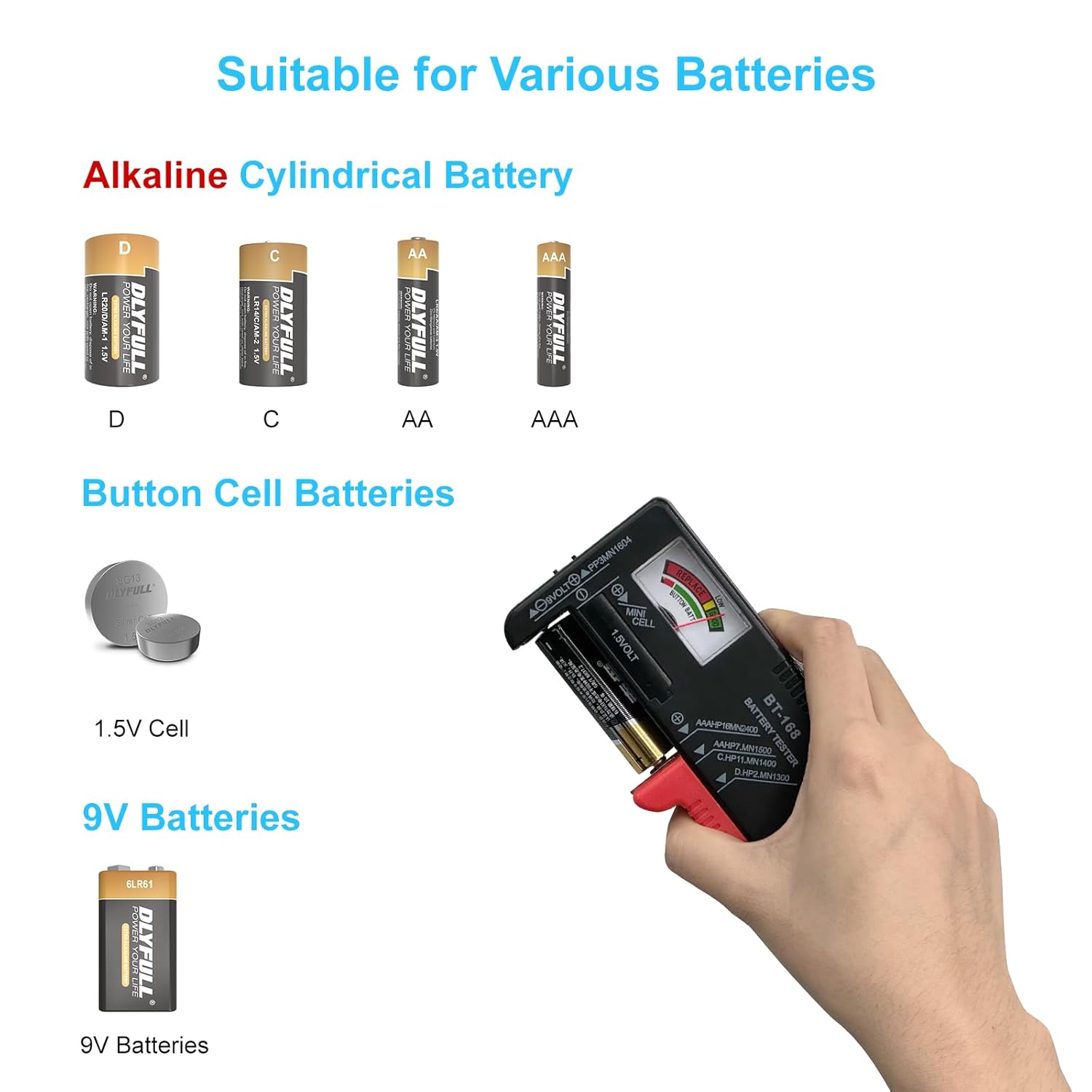
Image: The DLYFULL B1L Small Battery Tester illustrating the types of batteries it can test, including D, C, AA, AAA alkaline batteries, button cells, and 9V batteries.

Image: The DLYFULL B2-Black and B1L Battery Testers displayed together with an AAA battery, showcasing the two products included in the package.
3. Konfiguracja
The DLYFULL B1L Battery Tester operates passively and does not require any internal power source. The DLYFULL B2-Black Battery Tester requires one AAA battery for its LCD display. An AAA battery is included with your purchase.
- For DLYFULL B2-Black: Locate the battery compartment on the back of the B2-Black tester. Insert one 1.5V AAA alkaline battery, ensuring correct polarity (+/-). Close the battery compartment cover securely.
- No further setup is required for either device before use.
4. Instrukcja obsługi
4.1 Using the DLYFULL B2-Black Battery Tester
The B2-Black tester provides a digital readout of battery health.
- Zidentyfikuj typ baterii: Locate the appropriate slot or contact points on the B2-Black tester for your battery type (e.g., cylindrical, 9V, button cell).
- Włóż baterię: Carefully insert the battery into the designated slot or press it against the contact points, ensuring correct polarity.
- Przeczytaj wyświetlacz: The LCD screen will illuminate and display the battery's health status:
- SŁABY: The battery is depleted and should be replaced or recharged.
- SŁABY: The battery has low power and may need replacement soon.
- DOBRZE: The battery has adequate power.
- Wyjmij baterię: Once the reading is stable, remove the battery from the tester.

Image: Close-up of the DLYFULL B2-Black's LCD screen, illustrating the "Poor," "Weak," and "Good" indicators for battery health.

Obraz: Wizualizacjaamples of testing a 9V battery, a button cell battery, and a cylindrical battery using the DLYFULL B2-Black tester.
4.2 Using the DLYFULL B1L Small Battery Tester
The B1L tester uses an analog needle to indicate battery strength.
- Zidentyfikuj typ baterii: The B1L has specific contact points for 1.5V cylindrical batteries (AAA, AA, C, D), 9V batteries, and button cells.
- Włóż baterię:
- For 1.5V cylindrical batteries: Place the battery between the two red adjustable arms, ensuring the positive (+) and negative (-) terminals align with the tester's contacts.
- For 9V batteries: Press the battery terminals against the two small metal contacts at the top of the tester.
- For button cells: Place the button cell in the designated slot or against the contacts.
- Read Analog Meter: The needle on the meter will move to indicate the battery's charge level:
- Red Zone (Replace): Bateria jest rozładowana.
- Yellow Zone (Low Power): The battery has low power.
- Green Zone (Good): The battery has adequate power.
- Wyjmij baterię: Once the reading is stable, remove the battery.

Image: A series of images demonstrating how to test various battery types, including 1.5V cylindrical batteries, 9V batteries, and button cells, using the DLYFULL B1L tester.

Obraz: Tabela szczegółowo przedstawiająca objętośćtage ranges for "Good," "Low Power," and "Replace" statuses for both 1.5V and 9V batteries as indicated by the DLYFULL B1L tester.
| Rozmiar baterii | 1.5 V | 9V |
|---|---|---|
| Dobry | 1.5 V-1.28 V | 9 V-7.8 V |
| Niska moc | 1.27 V-1.15 V | 7.7 V-6 V |
| Zastępować | Poniżej 1.15 V. | Poniżej 6 V. |
5. Konserwacja
To ensure the longevity and accurate performance of your DLYFULL battery testers, follow these maintenance guidelines:
- Czyszczenie: Wipe the testers with a soft, dry cloth. Do not use abrasive cleaners or solvents.
- Składowanie: Store the testers in a cool, dry place away from direct sunlight and extreme temperatures.
- Battery Replacement (B2-Black): If the LCD display on the B2-Black becomes dim or unresponsive, replace the internal AAA battery.
- Unikaj wilgoci: Do not expose the testers to water or high humidity.
- Zachowaj ostrożność: Avoid dropping or subjecting the testers to strong impacts.
6. Rozwiązywanie Problemów
If you encounter issues with your DLYFULL battery testers, refer to the following common problems and solutions:
- No Reading on B2-Black LCD:
- Ensure the AAA battery in the B2-Black is correctly inserted with proper polarity.
- Replace the AAA battery if it is depleted.
- Verify the battery being tested is making proper contact with the tester's terminals.
- No Movement on B1L Analog Meter:
- Ensure the battery being tested is making proper contact with the tester's terminals.
- The battery may be completely dead. Try testing a known good battery to confirm tester functionality.
- Niedokładne odczyty:
- Upewnij się, że zaciski akumulatora są czyste i nie mają śladów korozji.
- Confirm the battery type matches the intended testing method for each tester.
- Avoid testing batteries that are extremely hot or cold, as this can affect readings.
If problems persist, please contact DLYFULL customer support.
7. Specyfikacje
| Funkcja | DLYFULL B2-Black | DLYFULL B1L |
|---|---|---|
| Numer modelu | B2-Black | B1L |
| Marka | DLYFULL | |
| Źródło zasilania | 1x AAA Battery (for LCD) | Passive (no internal battery required) |
| min. Objętość operacyjnatage | 1.5 V (prąd stały) | |
| Typ wyświetlacza | Ekran LCD | Miernik analogowy |
| Kompatybilne typy baterii | AA, AAA, C, CR123A, D, 9V, N, CR2, CRV3, 2CR5, CR-P2, Button Cells | 1.5V AAA, AA, C, D, 9V, Button Cells |
| Dimensions (B1L only) | Brak | Ok. 109 mm x 40 mm x 25 mm (4.3 cala x 1.6 cala x 1.0 cala) |

Image: Detailed dimensions of the DLYFULL B1L Small Battery Tester, showing its compact size of 109mm in length, 40mm in width, and 25mm in thickness.
8. Gwarancja i wsparcie
DLYFULL provides an extensive 18-miesięczna gwarancja for your battery testers, ensuring peace of mind with your purchase. Additionally, lifelong 24/7 premium customer support is available to assist you with any questions or issues.
For support or warranty claims, please visit the official DLYFULL store or contact their customer service directly.


