
Casio GBX-100-8
Casio G-Shock G-Lide GBX-100-8 Digital Surf Watch User Manual
Model: GBX-100-8
1. Wprowadzenie
This manual provides comprehensive instructions for the operation and maintenance of your Casio G-Shock G-Lide GBX-100-8 Digital Surf Watch. Designed for extreme sports enthusiasts, particularly surfers, this timepiece offers advanced features for tracking tide patterns, moon age, and other essential data for water sports.

Rycina 1: Przód view of the Casio G-Shock G-Lide GBX-100-8 watch. The watch features a gray sand-colored resin band and a metallic bezel, with a high-resolution MIP LCD screen showing various data points including time, tide graph, and moon phase.
Please read this manual thoroughly to ensure proper use and to maximize the functionality of your watch.
2. Główne cechy
- Mobile Link (Bluetooth Connectivity): Connects to the G-SHOCK MOVE app for enhanced functionality and data management.
- Tide Graph & Moon Data: Displays tide patterns and moon age for approximately 3,300 surf spots worldwide.
- Godziny wschodu/zachodu słońca: Provides accurate sunrise and sunset times based on selected location.
- High-Resolution MIP LCD: Ensures clear and easy-to-read display of information.
- Funkcja treningowa: Includes distance, speed, pace, and calorie burn measurements.
- Alarm wibracyjny: Configurable vibration alerts for various functions.
- Wodoodporność: 200-meter water resistance, suitable for diving.
- Odporność na wstrząsy: G-SHOCK's renowned shock-resistant structure.
3. Konfiguracja początkowa i parowanie smartfona
3.1. Przed pierwszym użyciem
- Naładuj zegarek: Ensure the watch has sufficient power. While this model is not solar-powered, it has a long-lasting battery.
- Download G-SHOCK MOVE App: Download and install the "G-SHOCK MOVE" app from your smartphone's app store (App Store for iOS, Google Play for Android).
- Włącz Bluetooth: Włącz Bluetooth w swoim smartfonie.
3.2. Pairing with G-SHOCK MOVE App
To unlock the full potential of your GBX-100-8, pairing it with the G-SHOCK MOVE app is essential. This allows for automatic time adjustment, easy configuration of world time, alarm settings, and access to detailed surf spot data.
- On your smartphone, open the RUCH G-SHOCK aplikacja.
- Follow the on-screen instructions in the app to add a new watch. Select your model (GBX-100-8).
- Na zegarku naciśnij i przytrzymaj TRYB button (top left) for approximately two seconds until the watch enters the pairing mode (indicated by a flashing Bluetooth icon or "PAIRING" message).
- Confirm the pairing request on your smartphone. A confirmation message will appear on both the watch and the app once pairing is successful.
- Once paired, the watch will automatically adjust its time and date based on your smartphone's settings.
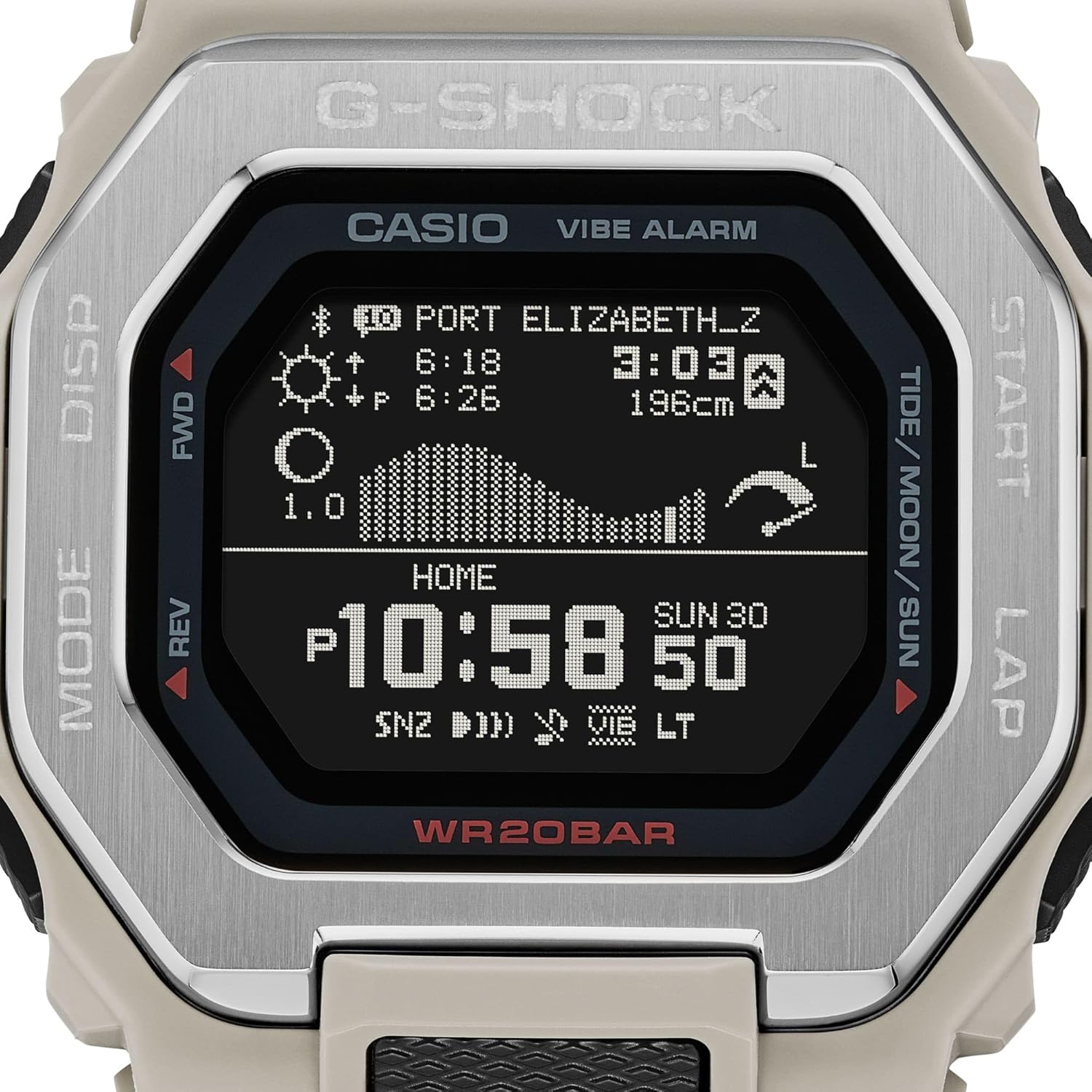
Figure 2: Close-up of the watch face, highlighting the high-resolution MIP LCD. The display shows time, date, tide graph, and other indicators, which are configurable via the G-SHOCK MOVE app after pairing.
Notatka: If pairing fails, ensure the watch is not already paired with another device and that Bluetooth is active on your phone. Refer to the troubleshooting section if issues persist.
4. Instrukcja obsługi
The GBX-100-8 features five buttons for navigation and function control. Familiarize yourself with their locations and primary functions:
- MODE (Top Left): Cycles through watch modes (Timekeeping, Tide/Moon, Training, World Time, Alarm, Timer, Stopwatch). Hold to enter pairing mode.
- DISP (Bottom Left): Zmienia wyświetlane informacje w ramach trybu.
- FWD / REV (Top Right / Bottom Right): Used for navigating menus, adjusting settings, and starting/stopping functions.
- START / LAP (Middle Right): Used for starting/stopping measurements in training mode, or for lap recording.

Rysunek 3: Widok z góry na dół view of the Casio G-Shock G-Lide GBX-100-8 watch. This view clearly shows the placement of the five control buttons around the bezel, essential for navigating the watch's various modes and settings.
4.1. Tryb pomiaru czasu
This is the default mode, displaying the current time, date, and day of the week. Time synchronization occurs automatically when connected to the G-SHOCK MOVE app.
4.2. Tide/Moon Data Mode
Access this mode by pressing the TRYB button. The watch will display tide graphs, moon age, high/low tide times, and sunrise/sunset times for your selected surf spot. You can select and configure surf spots via the G-SHOCK MOVE app.
- Naciskać DISP to cycle through different data displays (e.g., tide graph, high/low tide times, sunrise/sunset).
- To change the surf spot, use the G-SHOCK MOVE app. The watch will update automatically upon connection.
4.3. Tryb treningowy
This mode is designed for tracking your physical activities, particularly running or surfing. It provides real-time data such as distance, speed, pace, and calorie consumption.
- Navigate to Training Mode using the TRYB przycisk.
- Naciskać START/OKRĄŻENIE to begin a training session. The watch will start recording data.
- Naciskać START/OKRĄŻENIE again to pause the session. Press it once more to resume.
- To end a session, press and hold START/OKRĄŻENIE until the session concludes and data is saved.
- Review training logs via the G-SHOCK MOVE app for detailed analysis.
4.4. Other Modes (World Time, Alarm, Timer, Stopwatch)
Cycle through these modes using the TRYB button. Settings for these functions can be adjusted directly on the watch using the FWD/REW buttons, or more conveniently via the G-SHOCK MOVE app.
- Czas światowy: Displays the current time in various major cities around the globe.
- Alarm: Set daily alarms. The watch supports vibration alerts.
- Regulator czasowy: Funkcja odliczania.
- Stoper: A standard stopwatch for measuring elapsed time.
5. Konserwacja i pielęgnacja
5.1. Ogólna opieka
- Czyszczenie: Regularnie przecieraj zegarek miękką, suchą ściereczką. W przypadku uporczywych zabrudzeń użyj miękkiej ściereczki.ampened with water and mild soap, then rinse thoroughly with fresh water and dry.
- Narażenie na działanie wody: While water-resistant, avoid operating buttons underwater. After exposure to saltwater, rinse the watch thoroughly with fresh water and dry it completely.
- Temperatura: Unikaj wystawiania zegarka na działanie ekstremalnych temperatur (wysokiej lub niskiej) przez dłuższy czas.
- Chemikalia: Keep the watch away from gasoline, cleaning solvents, aerosols, adhesives, paints, etc., as they may damage the resin case and band.

Rysunek 4: Tył view of the Casio G-Shock G-Lide GBX-100-8 watch. This image shows the durable stainless steel case back, which is crucial for maintaining the watch's water resistance and protecting its internal components. The resin band and its buckle are also visible.
5.2. Wymiana baterii
The GBX-100-8 uses a CR2032 lithium battery. The battery life is approximately 2 years under normal usage conditions. When the battery power is low, the display may dim or certain functions may become unavailable. It is recommended to have the battery replaced by an authorized Casio service center to ensure proper water resistance and to avoid damaging the watch.
6. Rozwiązywanie Problemów
| Problem | Możliwa przyczyna | Rozwiązanie |
|---|---|---|
| Watch does not connect to smartphone. | Bluetooth is off on phone; watch is out of range; watch is already paired with another device; app not running. | Ensure Bluetooth is on. Bring watch closer to phone. Unpair from other devices. Restart G-SHOCK MOVE app. |
| Czas jest nieprawidłowy. | Not synced with phone; manual time setting error. | Connect to G-SHOCK MOVE app for automatic time adjustment. If manual, re-adjust time. |
| Tide/Moon data is inaccurate. | Incorrect home city or surf spot selected in app. | Verify and correct your home city and selected surf spot within the G-SHOCK MOVE app. Ensure watch is synced. |
| Wyświetlacz jest ciemny lub pusty. | Niski poziom naładowania baterii. | Wymień baterię. Skontaktuj się z autoryzowanym serwisem. |
7. Specyfikacje
- Numer modelu: GBX-100-8
- Materiał obudowy: Żywica / Stal nierdzewna
- Materiał paska: Żywica
- Wodoodporność: 200 metrów (20 BAR)
- Typ wyświetlacza: MIP LCD (Memory in Pixel Liquid Crystal Display)
- Łączność: Bluetooth® o niskim zużyciu energii
- Źródło zasilania: Bateria CR2032
- Czas pracy baterii: Około 2 lat
- Wymiary (wys. x szer. x gł.): Około 50.9 x 46.0 x 14.7 mm
- Waga: Około 66g
- Cechy: Tide Graph, Moon Data, Sunrise/Sunset Time, Training Function (Distance, Speed, Pace, Calories), World Time, Stopwatch, Timer, 4 Daily Alarms, Vibration Alert, Full Auto LED Backlight.
8. Gwarancja i wsparcie
Your Casio G-Shock G-Lide GBX-100-8 watch is covered by a manufacturer's warranty against defects in materials and workmanship. The specific terms and duration of the warranty may vary by region. Please refer to the warranty card included with your purchase for detailed information.
For technical support, service, or warranty claims, please contact Casio customer service or visit the official Casio website. You can find contact information and service center locations on their webmiejscu lub w opakowaniu produktu.
Oficjalny Casio Webstrona: www.casio.pl
Ask a question about this manual
Ask about setup, troubleshooting, compatibility, parts, safety, or missing instructions. Manuals+ will review the question and use this page’s manual context to help answer it.