
COCOCAM ZY-Q6
Instrukcja obsługi kamery bezpieczeństwa COCOCAM AOV 4G LTE
Model: ZY-Q6 | Marka: COCOCAM
1. Wprowadzenie
This user manual provides comprehensive instructions for the installation, operation, and maintenance of your COCOCAM AOV 4G LTE Security Camera. Please read this manual thoroughly before using the product to ensure proper functionality and safety.
1.1 Zawartość opakowania
- 1x COCOCAM AOV 4G LTE Security Camera
- Panel słoneczny 1x
- 1x Screw Package (for mounting)
- Kabel danych 1x
- 1x Instrukcja obsługi (ten dokument)
- 1x Uchwyt na panel słoneczny
- 2x AA Batteries (pre-installed or included for initial setup)

Figure 1.1: COCOCAM AOV 4G LTE Security Camera and Solar Panel. The image displays the main camera unit with two antennas, a lens, and four LED lights, alongside a rectangular solar panel connected by a cable.
2. Informacje dotyczące bezpieczeństwa
- Ensure the camera and solar panel are installed securely to prevent falling.
- Nie wystawiaj aparatu na działanie ekstremalnych temperatur wykraczających poza zakres jego działania.
- Trzymaj urządzenie z dala od silnych pól magnetycznych.
- Do not attempt to disassemble or repair the camera yourself. Contact support for assistance.
- Ensure all cables are properly connected and protected from environmental damage.
- This device is IP66 rated for water and dust resistance, but avoid submerging it in water.
3. Koniec produktuview
3.1 Główne cechy
- 24/7 Recording & Fast Alarm Trigger: Continuous recording with quick alarm activation.
- Intelligent Sound and Light Alarm: Customizable alarm areas with real-time notifications.
- 30 Meters Night Vision: Clear visibility in low-light conditions with white light and infrared options.
- AI Detection/Tracking: Human form detection and movement tracking up to 30 meters.
- Elastyczne opcje przechowywania: Obsługuje karty TF (do 128 GB) i przechowywanie danych w chmurze.
- Dwukierunkowy dźwięk: Wbudowany mikrofon i głośnik umożliwiające komunikację.
- Long-lasting Battery with Solar Panel: 15000mAh rechargeable battery with 8W solar panel for continuous power.
- Odporność na warunki atmosferyczne IP66: Designed for outdoor use, resistant to water and dust.
- 3MP High Definition Video: 2304*1296 resolution for clear footage.
- 355° Pan/90° Tilt: Wide area coverage with remote adjustable viewkąty.
- Remote Monitoring and Mobile Compatibility: Access via COCOCAM app on Android/iOS devices.
- Łączność 4G LTE: Operates without Wi-Fi, includes a built-in SIM card with trial data.
4. Konfiguracja
4.1 Montaż kamery i panelu słonecznego
The camera and solar panel can be mounted on walls or ceilings. Choose a location that provides optimal sunlight exposure for the solar panel and a clear view do kamery.
- Identify a suitable mounting surface.
- Use the provided screw package to secure the camera bracket and solar panel bracket.
- Zamontuj kamerę w uchwycie, a panel słoneczny w uchwycie.
- Podłącz kabel panelu słonecznego do portu ładowania kamery. Upewnij się, że połączenie jest stabilne i wodoodporne.

Figure 4.1: Easy installation of the COCOCAM camera and solar panel. The image shows a person installing the camera and solar panel unit under an eave, demonstrating the ease of setup.

Figure 4.2: Self-sustaining power setup with solar panel and battery. This image illustrates the camera and solar panel mounted on a building, highlighting the 8W solar panel and 15000mAh rechargeable battery for continuous power.
4.2 Instalacja karty SIM i karty pamięci
The camera comes with a built-in SIM card for initial use. You can also install an external SIM card or a TF (microSD) card for local storage.
- Locate the SIM card slot and TF card slot on the camera (refer to the product diagram in the quick start guide).
- Insert the TF card (up to 128GB) into the TF card slot with the contacts facing down.
- If using an external SIM card, insert it into the designated slot. Ensure it is properly seated.
- Close the protective cover to maintain IP66 rating.

Figure 4.3: 3G/4G LTE Connection without Wi-Fi. This image highlights the camera's ability to operate using 3G or 4G LTE networks, making it suitable for locations without Wi-Fi, such as farms, construction sites, or RVs.
4.4 Pobieranie aplikacji i konfiguracja początkowa
Download the COCOCAM app from your device's app store (Android or iOS).
- Szukaj "COCOCAM" in the Google Play Store or Apple App Store.
- Zainstaluj aplikację i utwórz konto.
- Postępuj zgodnie z instrukcjami w aplikacji, aby dodać kamerę. Zazwyczaj polega to na zeskanowaniu kodu QR na kamerze lub ręcznym wpisaniu jej identyfikatora.
- Once connected, you can configure network settings, recording preferences, and alarm settings.

Figure 4.4: COCOCAM app for 24/7 continuous recording. This image shows a smartphone displaying the COCOCAM app interface, with the security camera mounted on a wall in the background, indicating continuous monitoring capabilities.
5. Instrukcja obsługi
5.1 24/7 Recording and Alarm Features
The camera supports continuous recording. When an alarm is triggered, the camera quickly switches to full-frame recording.
- Ciągłe nagrywanie: The camera records 2 seconds per frame during non-alarm periods.
- Fast Alarm Trigger: Upon detection, the camera initiates full-frame recording within 0.2 seconds.
- Customizable Alarm Areas: Zdefiniuj określone strefy w obrębie kamery view do wykrywania ruchu.
- Intelligent Sound and Light Alarm: The camera can emit sound and light warnings upon detecting suspicious activity.
- Powiadomienia w czasie rzeczywistym: Receive instant alerts on your mobile device when an alarm is triggered.
5.2 Sterowanie PTZ (panorama, pochylenie, zoom)
The camera offers extensive pan and tilt capabilities, allowing you to adjust the viewing angle remotely via the COCOCAM app.
- Chleb: Obróć kamerę poziomo o 355°.
- Przechylenie: Możliwość regulacji położenia kamery w pionie do 90°.
- Zoom cyfrowy: Use the app to digitally zoom into the live feed or recorded footage.

Figure 5.1: 355° Pan and 90° Tilt with AI Tracking. This image illustrates the camera's wide range of motion and its ability to track subjects, with icons for two-way audio, AI detection, and AI tracking.
5.3 Wykrywanie i śledzenie sztucznej inteligencji
The camera's advanced AI capabilities allow for precise detection and tracking of human forms and vehicles.
- Wykrywanie człowieka: Identifies human shapes, reducing false alarms from animals or swaying branches.
- Rozpoznawanie pojazdów: Distinguishes vehicles for specific alerts.
- Śledzenie AI: The camera can automatically follow detected subjects within its field of view do 30 metrów.
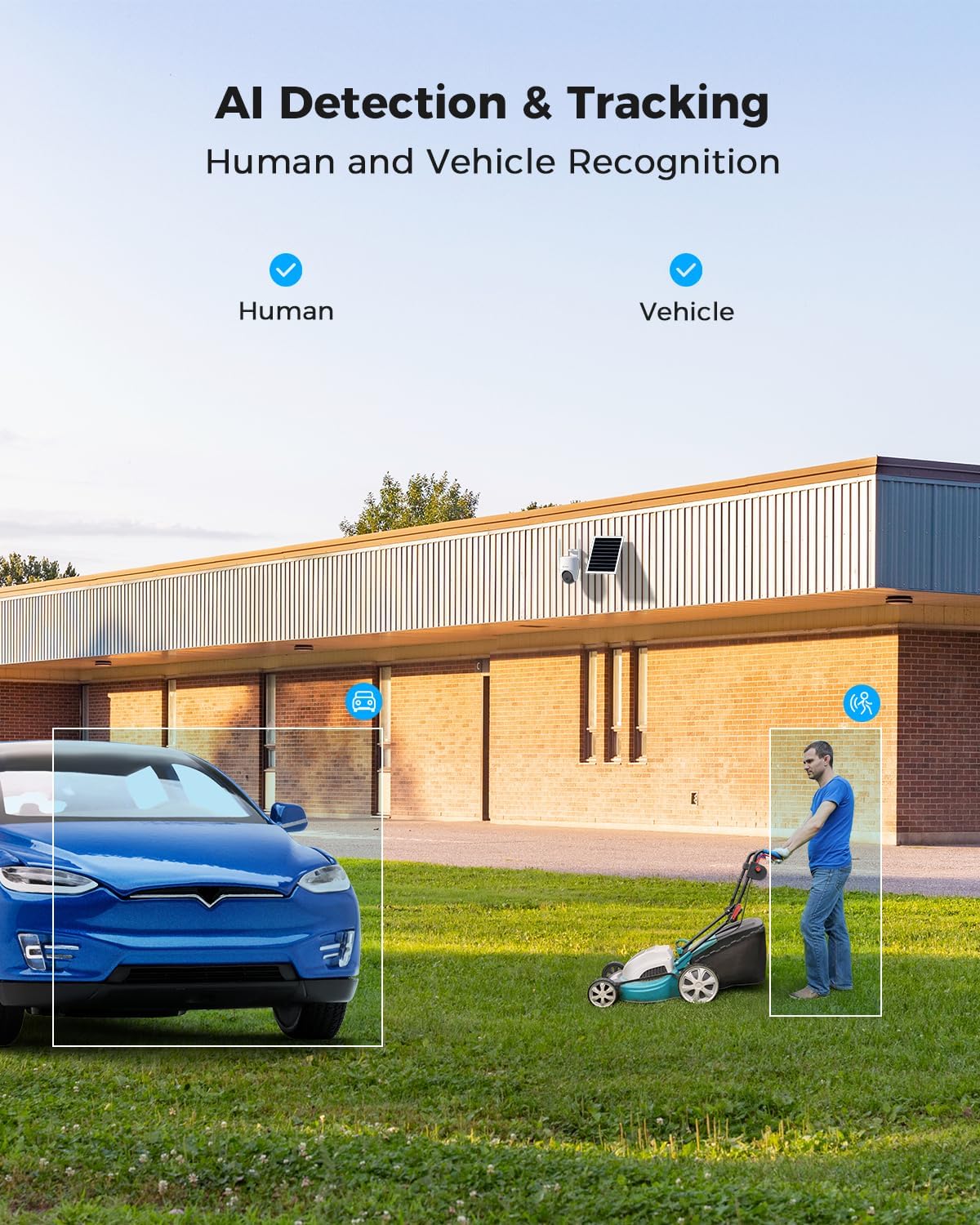
Figure 5.2: AI Detection & Tracking for Human and Vehicle Recognition. The image shows a security camera monitoring an outdoor area, with highlighted boxes indicating detected human and vehicle subjects, demonstrating its AI capabilities.
5.4 Dźwięk dwukierunkowy
Komunikuj się z gośćmi i odstraszaj intruzów, korzystając z wbudowanego mikrofonu i głośnika.
- Access the two-way audio feature through the COCOCAM app.
- Mów do mikrofonu w telefonie, aby przesyłać dźwięk przez głośnik kamery.
- Słuchaj dźwięku z otoczenia kamery za pomocą telefonu.
5.5 Widzenie nocne
The camera provides clear visibility up to 30 meters in complete darkness.
- Nocna Nocna Wizja: Automatically activates in low-light conditions for black and white video.
- Pełnokolorowa wizja nocna: Utilizes white light LEDs to provide color video at night when activated or upon detection.

Figure 5.3: 30m Night Vision and 2K Full Color Night Vision. This image compares standard black and white night vision with the camera's full-color night vision capability, showing enhanced detail and color in low light.
6. Konserwacja
6.1 Pielęgnacja akumulatora i paneli słonecznych
The integrated 15000mAh battery is continuously charged by the 8W solar panel. To ensure optimal performance:
- Upewnij się, że panel słoneczny jest umieszczony w miejscu, w którym będzie otrzymywał maksymalną ilość bezpośredniego światła słonecznego przez cały dzień.
- Regularly clean the surface of the solar panel to remove dust, dirt, or debris that may obstruct sunlight.
- Avoid placing the solar panel in shaded areas.

Figure 6.1: 8W Solar Panel for continuous power. This image focuses on the solar panel, highlighting its 8W power output and the 3-meter cable length for flexible installation.
6.2 Czyszczenie aparatu
- Użyj miękkiego, damp cloth to wipe the camera lens and body.
- Nie używaj żrących chemikaliów ani ściernych środków czyszczących.
- Ensure the camera is dry before prolonged exposure to the elements.
6.3 aktualizacji oprogramowania sprzętowego
Periodically check the COCOCAM app for available firmware updates. Keeping your camera's firmware updated ensures optimal performance, new features, and security enhancements.
7. Rozwiązywanie Problemów
| Problem | Możliwa przyczyna | Rozwiązanie |
|---|---|---|
| Kamera nie łączy się z aplikacją. | Incorrect pairing process, weak 4G signal, camera not powered on. | Ensure camera is powered on. Re-attempt pairing process. Check 4G signal strength at installation location. |
| Słaba jakość wideo. | Dirty lens, low light conditions, weak 4G signal. | Clean the camera lens. Ensure adequate lighting or verify night vision is active. Check 4G signal strength. |
| Akumulator się nie ładuje. | Solar panel obstructed, faulty connection, insufficient sunlight. | Ensure solar panel is clean and receives direct sunlight. Check cable connection between solar panel and camera. |
| AI detection not working or too many false alarms. | Incorrect sensitivity settings, detection area not configured. | Adjust AI detection sensitivity in the app. Configure specific detection zones to exclude irrelevant areas. |
| Problemy z dwukierunkową transmisją dźwięku. | Microphone/speaker obstruction, app permissions, network delay. | Ensure nothing is blocking the camera's microphone or speaker. Check app permissions for microphone access. Verify stable 4G connection. |
8. Specyfikacje
| Funkcja | Szczegół |
|---|---|
| Nazwa modelu | AOV 4G Camera with 7x24 Recording |
| Numer modelu przedmiotu | ZY-Q6 |
| Marka | KOKOKAM |
| Rozdzielczość przechwytywania wideo | 1440p (3MP, 2304*1296) |
| Zakres obrotu/pochylenia | 355° Pan / 90° Tilt |
| Zakres noktowizora | 30 Meters (Infrared & White Light) |
| Technologia łączności | Bezprzewodowa (4G LTE) |
| Źródło zasilania | Battery Powered (15000mAh) with 8W Solar Panel |
| Opcje przechowywania | Karta TF (do 128 GB), przechowywanie w chmurze |
| Odporność na warunki atmosferyczne | IP66 |
| Tworzywo | Akrylonitryl-butadien-styren (ABS) |
| Pozycja Wymiary (dł. x szer. x wys.) | Wymiary 20 x 15 x 12 cm |
| Waga przedmiotu | 620 gramów |
| Baterie | 2 baterie AA (w zestawie) |
9. Gwarancja i wsparcie
COCOCAM provides a dożywotnia gwarancja for this product, ensuring long-term reliability and customer satisfaction.
For technical support, troubleshooting assistance, or warranty claims, please contact COCOCAM customer service:
- Producent: KOKOKAM
- Urzędnik Webstrona: www.cococamtech.com
- E-mail: serwis@cococamtech.com
Please have your model number (ZY-Q6) and purchase information ready when contacting support.
Ask a question about this manual
Ask about setup, troubleshooting, compatibility, parts, safety, or missing instructions. Manuals+ will review the question and use this page’s manual context to help answer it.