
DOOGEE SPUNK-Q2
Instrukcja obsługi wytrzymałego smartfona DOOGEE S Punk
Model: SPUNK-Q2
Wstęp
This manual provides essential information for the safe and efficient operation of your DOOGEE S Punk Rugged Smartphone. Please read it thoroughly before using the device to ensure proper functionality and to prevent damage.
The DOOGEE S Punk is designed for durability and performance, featuring a robust build, powerful battery, and advanced camera capabilities, suitable for various environments and uses.
Zawartość opakowania
Po otwarciu opakowania prosimy sprawdzić, czy znajdują się w nim wszystkie wymienione poniżej elementy:
- 1 x DOOGEE S Punk Cellphone
- 1 x kabel USB typu C
- 1 x ładowarka (33 W)
- 1 x Packing Box / Manual / Warranty Card

Image: The DOOGEE S Punk smartphone shown with its included Type-C USB cable and 33W charger.
Przewodnik po konfiguracji
1. Instalacja karty SIM i karty TF
The DOOGEE S Punk supports dual nano SIM cards or one nano SIM card and one TF (microSD) card for expandable storage up to 1TB.
- Znajdź tackę na kartę SIM znajdującą się z boku telefonu.
- Insert the SIM ejector tool (not included, but typically comes with SIM cards or can be a paperclip) into the small hole next to the tray and push gently until the tray pops out.
- Place your nano SIM card(s) and/or TF card into the designated slots on the tray, ensuring correct orientation.
- Ostrożnie wsuń tackę z powrotem do telefonu, aż będzie przylegać do obudowy urządzenia.

Obraz: Zbliżenie view of the DOOGEE S Punk showing the dual SIM card tray slot.
2. Ładowanie początkowe
Before first use, it is recommended to fully charge your DOOGEE S Punk. The device features a 10800mAh battery with 33W fast charging support.
- Connect the Type-C USB cable to the charging port at the bottom of the phone.
- Podłącz drugi koniec kabla USB do dołączonej ładowarki 33 W.
- Podłącz ładowarkę do gniazdka elektrycznego.
- The charging indicator on the screen will show the charging status. A full charge from 0% takes approximately 180 minutes.

Image: The DOOGEE S Punk connected to its 33W fast charger, illustrating the rapid charging capability.
3. Włączanie/wyłączanie zasilania
- Włączanie: Naciśnij i przytrzymaj przycisk zasilania (znajdujący się po prawej stronie telefonu), aż na ekranie pojawi się logo DOOGEE.
- Aby wyłączyć: Naciśnij i przytrzymaj przycisk zasilania, aż pojawi się menu opcji zasilania. Dotknij „Wyłącz” i potwierdź.
- Zrestartować: W menu opcji zasilania dotknij „Uruchom ponownie” i potwierdź.
Instrukcja obsługi
Wyświetlacz i nawigacja
The DOOGEE S Punk features a 6.58-inch FHD+ IPS display with a resolution of 1080*2408 pixels and 400 nits brightness, ensuring clear visibility even in sunlight. Navigate the Android 14 operating system using touch gestures.

Image: The 6.58-inch FHD+ display of the DOOGEE S Punk, showcasing its vibrant screen quality.
Funkcje aparatu
Capture high-quality photos and videos with the 50MP AI main camera and 16MP front camera. The phone also includes a 2MP macro camera for detailed close-up shots.
- Kamera tylna: 50MP AI Main Camera + 2MP Macro Camera.
- Przednia kamera: 16 MP.
- Tryby fotografowania: Panorama, Portrait, Macro, Beauty, AI Camera, Mono, Pro Mode, Intelligent Scanning, Night View.

Obraz: Ponadview of the DOOGEE S Punk's camera setup, highlighting the 50MP main and 16MP front cameras.
Audio and Intelligent Lights
Experience powerful audio with the 4W super speaker, delivering up to 126 dB volume. The intelligent interaction lights on the back of the phone can be customized to respond to incoming calls, music playback, SMS notifications, and charging status, adding a dynamic visual element.
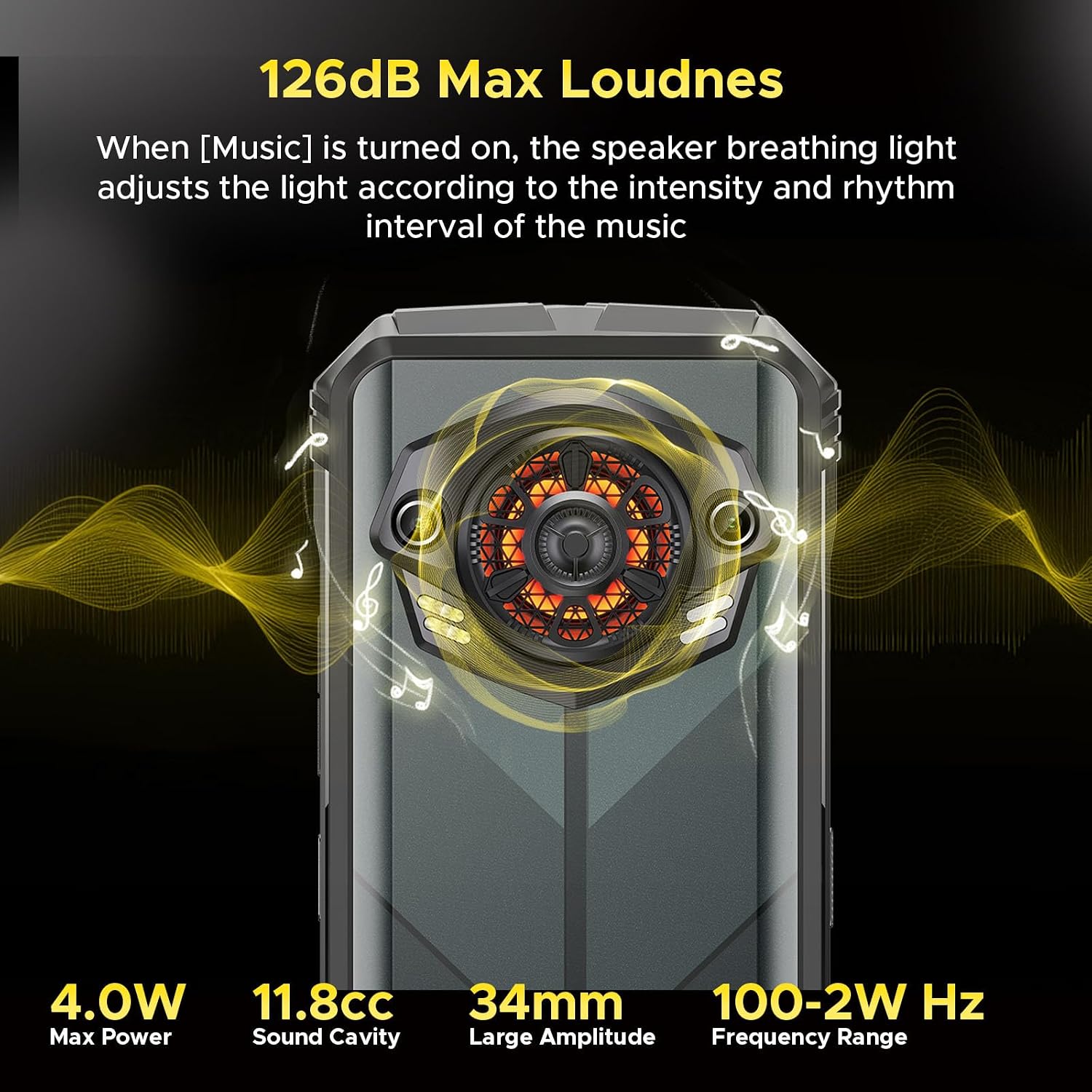
Image: Illustration of the DOOGEE S Punk's 126dB super speaker and the customizable intelligent interaction lights on the rear.

Image: The intelligent interaction lights on the DOOGEE S Punk displaying various color options and their rhythmic response to music.
Łączność i bezpieczeństwo
- Podwójny SIM: Supports two 4G nano SIM cards for flexible network usage.
- NFC: For contactless payments (Google Pay) and quick data transfer.
- OTG: On-The-Go support allows the phone to act as a power bank for other devices (OTG cable not included).
- GPS: Integrated GPS, GLONASS, Galileo, and Beidou for precise location tracking.
- Metody odblokowania: Secure your device with face unlock or the side-mounted fingerprint recognition sensor.

Image: A collage showing various connectivity and security features of the DOOGEE S Punk, such as GPS navigation, side fingerprint recognition, Wi-Fi, Dual 4G SIM, and NFC support.
Konserwacja i trwałość
The DOOGEE S Punk is built to withstand harsh environments, certified with IP68, IP69K, and MIL-STD-810H standards.
- Wodoodporny: IP68 rated, submersible up to 1.5 meters for 30 minutes.
- Pyłoszczelny: IP69K rated, fully protected against dust ingress.
- Odporność na upadek: MIL-STD-810H compliant, withstands drops from up to 1.5 meters.
- Odporność na temperaturę: Działa niezawodnie w temperaturach od -20°C do 55°C.

Image: Visual representation of the DOOGEE S Punk's rugged features, including drop-proof, dust-resistance, and IP68 waterproof capabilities, along with its wide operating temperature range.
Czyszczenie urządzenia
To maintain the device's appearance and functionality, clean it regularly:
- Do przecierania ekranu i obudowy należy używać miękkiej, niepozostawiającej włókien ściereczki.
- W przypadku uporczywych zabrudzeń, delikatnieampPrzetrzyj szmatkę wodą. Unikaj silnych środków chemicznych i materiałów ściernych.
- Przed ładowaniem lub podłączaniem akcesoriów należy upewnić się, że wszystkie porty są suche, zwłaszcza po wystawieniu urządzenia na działanie wody.
Pielęgnacja baterii
Aby zmaksymalizować żywotność baterii:
- Avoid exposing the phone to extreme temperatures (above 55°C or below -20°C) for prolonged periods.
- Należy używać wyłącznie oryginalnej ładowarki i kabla dostarczonych wraz z urządzeniem.
- Do not fully discharge the battery frequently. Charge it before it drops to very low levels.
Rozwiązywanie problemów
If you encounter issues with your DOOGEE S Punk, refer to the following common solutions:
Urządzenie nie włącza się
- Upewnij się, że bateria jest naładowana. Podłącz ładowarkę i odczekaj kilka minut przed próbą włączenia.
- Naciśnij i przytrzymaj przycisk zasilania przez co najmniej 10–15 sekund, aby wymusić ponowne uruchomienie.
Poor Network Connection / No Signal
- Sprawdź, czy karta SIM jest prawidłowo włożona.
- Verify that your carrier supports the phone's network bands (FDD: B1/2/3/4/5/7/8/18/19/20/25/26/28AB/66, TDD: B34/38/39/40/41, WCDMA: B1/2/4/5/8, GSM: B2/B3/B5/B8). Note: AT&T is not supported.
- Przenieś się w miejsce, gdzie jest lepszy zasięg sieci.
- Uruchom ponownie telefon.
Applications Freezing or Crashing
- Zamknij i ponownie otwórz problematyczną aplikację.
- Wyczyść pamięć podręczną i dane aplikacji w Ustawieniach > Aplikacje.
- Ensure all applications and the phone's operating system are updated to the latest version.
- Jeśli problem nadal występuje, rozważ przywrócenie ustawień fabrycznych (najpierw wykonaj kopię zapasową danych).
Problemy z ładowaniem
- Sprawdź, czy kabel ładujący i adapter są solidnie podłączone i nieuszkodzone.
- Spróbuj użyć innego gniazdka elektrycznego.
- Clean the charging port gently with a soft brush to remove any debris.
- If the phone was recently exposed to water, ensure the charging port is completely dry before attempting to charge.
Specyfikacje
| Funkcja | Szczegół |
|---|---|
| Nazwa modelu | SPUNK-Q2 |
| System operacyjny | Android 14 |
| Edytor | Ośmiordzeniowy, 1.6 GHz |
| BARAN | 16 GB (6GB + 10GB virtual memory) |
| Pamięć wewnętrzna | 256 GB |
| Możliwość rozbudowy pamięci masowej | Do 1 TB przez kartę TF |
| Rozmiar wyświetlacza | 6.58 cala FHD+ IPS |
| Rozdzielczość wyświetlacza | 1080 x 2408 pikseli |
| Jasność | 400 nitów |
| Kamera tylna | Główny aparat AI 50 MP + aparat makro 2 MP |
| Przednia kamera | 16MP |
| Pojemność baterii | 10800 mAh |
| Ładowanie | Szybkie ładowanie 33 W |
| Głośnik | 4W Super Speaker, 126 dB Max Loudness |
| Trwałość | IP68, IP69K, MIL-STD-810H |
| Łączność | 4G Dual SIM, Wi-Fi, Bluetooth, NFC, OTG |
| Nawigacja | GPS, GLONASS, Galileo, Beidou |
| Wymiary | 7 x 3.26 x 0.7 cala |
| Waga | 9.2 uncji (262 grama) |
Gwarancja i wsparcie
DOOGEE offers comprehensive support for your S Punk smartphone:
- Gwarancja: Your mobile phone is entitled to a 2-year free warranty.
- Zwroty: 30-dniowa gwarancja zwrotu pieniędzy bez podawania przyczyny.
- Obsługa klienta: Professional team available to solve any issues you may encounter.
Aby uzyskać dalszą pomoc, zapoznaj się z kartą gwarancyjną dołączoną do opakowania lub odwiedź oficjalną stronę pomocy technicznej DOOGEE webstrona.
Powiązane dokumentySPUNK-Q2


Ask a question about this manual
Ask about setup, troubleshooting, compatibility, parts, safety, or missing instructions. Manuals+ will review the question and use this page’s manual context to help answer it.