
Wstęp
The Sandberg Survivor Radio All-in1 5000 (Model 421-03) is a versatile emergency device designed for reliability in various situations. It combines a radio receiver, a powerful flashlight, an SOS alarm, and a power bank function, all powered by multiple charging methods including solar, hand crank, and USB-C. This manual provides detailed instructions for its proper use and care.

Obraz: Przód view of the Sandberg Survivor Radio All-in1 5000, showcasing its flashlight, display, and solar panel.
Informacje dotyczące bezpieczeństwa
- Nie wystawiaj urządzenia na działanie ekstremalnych temperatur, bezpośredniego światła słonecznego przez dłuższy czas (poza czasem ładowania) ani wysokiej wilgotności.
- Trzymaj urządzenie z dala od wody i innych płynów.
- Nie należy podejmować prób demontażu ani modyfikacji urządzenia. Spowoduje to unieważnienie gwarancji i może spowodować uszkodzenia.
- Należy używać wyłącznie dołączonych lub zalecanych kabli ładujących.
- Przechowywać w miejscu niedostępnym dla dzieci.
Zawartość opakowania
Proszę sprawdzić, czy w paczce znajdują się następujące elementy:
- Sandberg Survivor Radio All-in1 5000 (Model 421-03)
- USB-C Charging Cable (Power Cord)
- Instrukcja obsługi (ten dokument)
Produkt ponadview
Familiarize yourself with the various parts and controls of your Sandberg Survivor Radio.
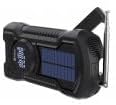
Obraz: Bok view of the Sandberg Survivor Radio All-in1 5000, highlighting the hand crank and telescopic antenna.
- Flesz: Zintegrowane światło LED do oświetlenia.
- Panel słoneczny: Do awaryjnego ładowania energią słoneczną.
- Korba ręczna: Do ręcznego wytwarzania energii.
- Antena teleskopowa: Rozciąga się w celu polepszenia odbioru radiowego.
- Wyświetlacz LCD/LED: Shows frequency, battery status, and other information.
- Przyciski sterujące: Power, Mode, Tuning, Volume, SOS.
- Wejście USB-C: Do ładowania wewnętrznego akumulatora radia.
- Wyjście USB-A: Do ładowania urządzeń zewnętrznych (funkcja power banku).
Organizować coś
Ładowanie baterii wewnętrznej
Before first use, fully charge the radio's internal battery using the USB-C cable.
- Ładowanie przez USB-C: Connect the provided USB-C cable to the radio's USB-C input port and the other end to a USB power adapter (not included) or a computer's USB port. The display will indicate charging status.
- Ładowanie słoneczne: Place the radio with the solar panel facing direct sunlight. This method is primarily for maintaining charge or emergency power and is slower than USB-C charging.
- Ładowanie korbą ręczną: Rotate the hand crank clockwise or counter-clockwise at a steady pace (approximately 120-150 RPM) for 3-5 minutes to generate power for short-term use or to initiate USB-C charging.
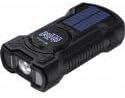
Obraz: Góra view of the Sandberg Survivor Radio All-in1 5000, clearly showing the integrated solar panel.
Pierwsze włączenie zasilania
Press and hold the Power button to turn on the radio. The display will illuminate, showing the current mode and battery level.
Operacyjny
Radio Functions (FM/AM/WB)
- Wybierz tryb: Press the 'Mode' button to cycle through FM, AM, and WB (Weather Band) modes.
- Przedłuż antenę: Aby uzyskać optymalny odbiór, należy całkowicie rozłożyć antenę teleskopową.
- Stacje dostrajające: Use the tuning buttons (usually labeled with arrows or +/-) to scan for stations. Some models may have an auto-scan feature (refer to specific button labels on your device).
- Dostosuj głośność: Use the volume buttons (usually labeled with 'Vol' or +/-) to set the desired audio level.
Obsługa latarki
Press the dedicated flashlight button (often labeled with a light bulb icon) to turn the flashlight on or off. Some models may have multiple brightness settings or a flashing mode; press the button repeatedly to cycle through these options.
Alarm SOS
In an emergency, press and hold the 'SOS' button. The radio will emit a loud siren sound and flash the flashlight to attract attention. Press the 'SOS' button again to deactivate the alarm.
Funkcjonalność Power Banku
The radio can be used to charge external devices such as smartphones or MP3 players.
- Sprawdź, czy wewnętrzny akumulator radia jest odpowiednio naładowany.
- Connect your external device to the radio's USB-A output port using your device's charging cable.
- Ładowanie rozpocznie się automatycznie. Monitoruj stan ładowania swojego urządzenia.
Konserwacja
- Czyszczenie: Przetrzyj urządzenie miękką, suchą ściereczką. Nie używaj środków czyszczących o właściwościach ściernych ani rozpuszczalników.
- Składowanie: Store the radio in a cool, dry place away from direct sunlight when not in use. For long-term storage, ensure the battery is charged to at least 50% and recharge it every 3-6 months to prolong battery life.
- Pielęgnacja anteny: Należy obchodzić się z anteną teleskopową ostrożnie, aby zapobiec jej wygięciu lub złamaniu.
Rozwiązywanie problemów
| Problem | Możliwa przyczyna | Rozwiązanie |
|---|---|---|
| Radio się nie włącza. | Niski poziom naładowania baterii. | Ładuj radio za pomocą portu USB-C, energii słonecznej lub korby ręcznej. |
| Słaby odbiór radia. | Antenna not extended, weak signal. | Całkowicie rozłóż antenę teleskopową. Spróbuj zmienić położenie radia. |
| Urządzenie zewnętrzne nie ładuje się. | Radio battery low, incorrect cable, device not compatible. | Ensure radio has sufficient charge. Use a compatible USB cable. Check if the external device supports USB charging. |
| Korba ręczna jest sztywna lub nie ładuje się. | Mechanism obstruction, incorrect rotation. | Ensure no debris is obstructing the crank. Rotate smoothly and consistently. |
Specyfikacje
- Model: 421-03
- Marka: Sandberg
- Interfejs sprzętowy: USB, USB typu C
- Technologia tunera: SW (Shortwave), also supports FM/AM/WB
- Compatible Devices (for charging): Laptop, MP3 Player, USB Drive
- Typ wyświetlacza: LCD lub LED
- Typ źródła zasilania: Corded Electric (USB-C), Solar, Hand Crank
- Częstotliwość: 180 MHz (internal clock/processing, radio bands vary by mode)
- Typ złącza: USB, USB-C
- Waga przedmiotu: 400 gram
- Zawartość zestawu: Power Cord (USB-C cable)
Gwarancja i wsparcie
Sandberg products are manufactured to high-quality standards. For warranty information and technical support, please refer to the official Sandberg webOdwiedź witrynę lub skontaktuj się ze sprzedawcą. Zachowaj paragon jako dowód zakupu.