
1. Wprowadzenie
This manual provides detailed instructions for the installation, operation, and maintenance of your YOSEC F-153F Waterproof Smart Fingerprint Cabinet Lock. Please read this manual thoroughly before installation and use to ensure proper function and longevity of the product. Keep this manual for future reference.
2. Funkcje produktu
- Bezpieczeństwo biometryczne: Unlock with fingerprint scanner for enhanced security and convenience - no keys required.
- Klawiatura dotykowa: Digital touchscreen keypad allows keyless entry with custom code or temporary access codes.
- Wodoodporna konstrukcja: Weatherproof construction protects internal components from rain, snow, and moisture.
- Dostęp zdalny: Control lock remotely via smartphone app for secure access management.
- Łatwa instalacja: Simple DIY installation with all necessary hardware and instructions included.
3. Składniki produktu
W skład pakietu wchodzą następujące elementy:
- Panel klawiatury
- Zablokuj korpus
- Płyta uderzeniowa
- Śruby mocujące
- Podręcznik
- USB Key (E-key)

Obraz: Ponadview of the lock components and their dimensions.
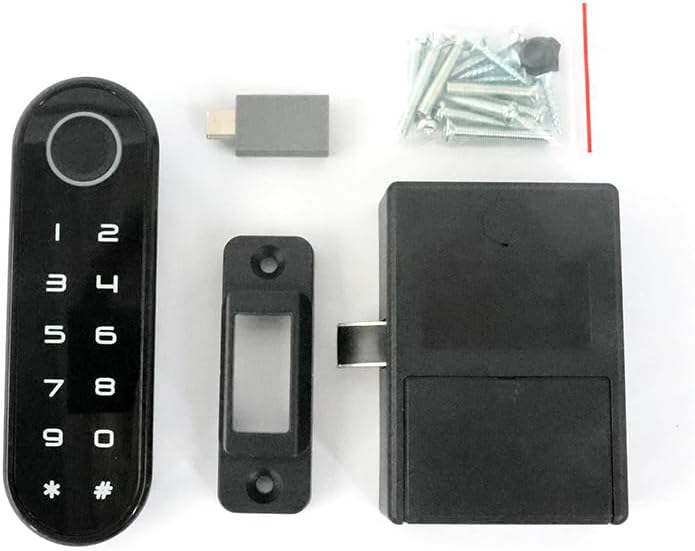
Image: All included components laid out, including the keypad panel, lock body, striking plate, screws, and E-key.
4. Specyfikacje produktu
| Funkcja | Szczegół |
|---|---|
| Marka | YOSEC |
| Numer modelu | F-153F |
| Typ zamka | Biometryczny, klawiatura |
| Tworzywo | Plastikowy |
| Pozycja Wymiary (dł. x szer. x wys.) | 1.5 x 0.6 x 4.7 cala |
| Waga przedmiotu | 0.1 funtów |
| Cechy specjalne | Back-Lit Keypad, Fingerprint, Portable, Touchscreen, Weather Resistant |
| Zalecane zastosowania | Furniture drawer, gym locker, sauna cabinet |
| Protokół łączności | Wi-Fi |
5. Instrukcja instalacji
This section details the steps for installing your smart fingerprint cabinet lock. Ensure you have all components listed in Section 3 before beginning.

Image: Multiple installation methods for drawers, single-door, and double-door cabinets.
5.1 Zagadnienia do rozważenia przed instalacją
- Zlokalizuj otwory montażowe: If the lock panel is installed in one piece with the lock box, first locate the mounting holes.
- Door Inset: For door insets, the latch needs to be flush or slightly indented at the edge of the door panel.
- Door Cover: For door covers, the latch needs to be indented one more side panel thickness.
- Zaznaczanie otworów: Re-mark the mounting hole locations on your furniture.
- Wiercenie otworów: Combine with the provided opening size drawing to drill necessary holes in the door panel.
5.2 Connecting and Securing the Lock
- Podłącz przewody: Pass the wires from the keypad panel through the center hole of the door.
- Connect Lock Box: Connect the lock box to the keypad panel. Ensure the side with 4 metal dots faces out.
- Bezpieczna skrzynka zamykana na klucz: Secure the lock box with the lock panel using the long screws provided.
- Mount Latch: Position the latch mounting height. For door inserts, go in one door panel thickness deeper. For door outer covers, mount the latch directly against the edge of the side panel. Ensure the distance between the latch and the side of the door remains unchanged.
- Screw Latch: Screw the latch into place.
Video: Detailed guide on how to install the fingerprint cabinet lock on a drawer or cabinet door.
6. Instrukcje obsługi
This section covers the various ways to operate your YOSEC F-153F lock, including fingerprint and code management.
Video: Comprehensive guide on how to operate the digital keypad fingerprint cabinet lock, including setup and usage.
6.1 Recording Fingerprints
There are two methods to record fingerprints:
- Method 1 (Direct Recording):
a. Press and hold the sensor area until the green light comes on (approx. 5 seconds).
b. Take your finger away when the green light comes on.
c. When the blue light is on, press your finger on the sensor to record. Repeat 6 times.
d. Two drops of green light indicate entry is complete. The blue light will remain on to continue with other fingerprints. - Method 2 (Using User Code):
a. Press and hold the "*" key for two seconds, release after a beep.
b. Enter the user code (initial code: 1234) followed by "#" to confirm.
c. Then press "4#".
d. The blue light will turn on, indicating it's recording fingerprints. Press your finger and remove it, repeating 6 times.
e. Two drops of green light indicate entry is complete.
6.2 Zmiana kodu użytkownika
The initial user code is 1234.
- Press and hold the "*" key for two seconds, release after a beep.
- Enter the old user code (1234) followed by "#" to confirm.
- Then press "1#".
- Enter the new user code followed by "#" to confirm. End of change.
6.3 Changing the Manager Code
The initial manager code is 543215.
- Press and hold the "*" key for two seconds, release after a beep.
- Enter the old manager code (543215) followed by "#" to confirm.
- Then press "2#".
- Enter the new manager code followed by "#" to confirm. End of change.
6.4 Recovering Factory Settings
To clear all fingerprint codes and restore factory settings:
- Press and hold the "*" key for two seconds, release after a beep.
- Enter the administrator password (initial admin password: 543215) followed by "#" to confirm.
- Then press "5#".
- Four beeps indicate factory reset is complete.
6.5 Using the E-key
The E-key can be used if fingerprint passwords are forgotten or invalid, or if the battery is low.
- Open the side port cover on the keypad panel.
- Insert the E-key into the port. The lock will open once automatically.
- After the latch is extended, enter "11#" to restore factory settings (two ticks).
- The E-key can also be used to change the locking mode.
6.6 Changing the Locking Mode
The lock supports Auto, Manual, and Public modes. Auto mode is the default.
- Press and hold the "*" key for two seconds, release after a beep.
- Enter the manager code (initial: 543215) followed by "#" to confirm.
- Then press "3#".
- Choose your desired mode:
a. Enter "1#" for Auto mode.
b. Enter "2#" for Manual mode.
c. Enter "3#" for Public mode. - Two ticks indicate the mode has changed.
7. Battery Management & Emergency Power
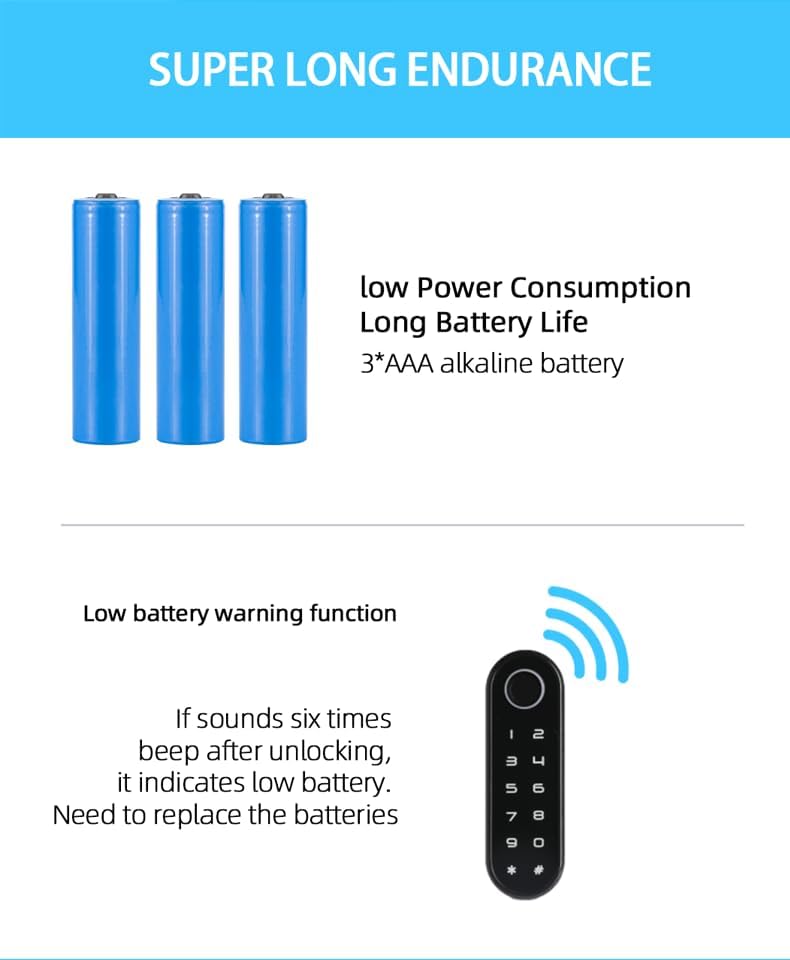
Image: Illustration of low power consumption, long battery life (3*AAA alkaline battery), and low battery warning function.
7.1 Alert o niskim poziomie naładowania baterii
When the battery is low, the lock will emit six beeps after unlocking. This indicates that the batteries need to be replaced soon.
7.2 External Power Supply (Type-C Interface)
If the battery runs out completely and the lock does not respond, you can use an external power source:
- Open the side soft rubber cover on the keypad panel.
- Plug in an external power source, such as a power bank, through the Type-C interface to temporarily power the lock and unlock it.
- After unlocking, please replace the internal batteries with new ones.

Image: The Type-C interface on the lock panel for emergency charging with a power bank.
Video: Demonstrates low battery alert and how to use an external power supply via the Type-C interface.
8. Funkcja wodoodporności
The YOSEC F-153F lock features an IP66 waterproof rating for its keypad panel, protecting it from water splashes and dust. Please note that while the panel is waterproof, the rear lock body is not.

Image: The IP66 waterproof touch screen panel of the lock, showing water resistance.
Video: Demonstration of the waterproof capabilities of the fingerprint cabinet drawer lock.
9. Rozwiązywanie Problemów
- Zamek nie odpowiada: Check battery levels. If completely drained, use an external power source via the Type-C port (refer to Section 7.2).
- Odcisk palca nie został rozpoznany: Ensure your finger is clean and dry. Re-record your fingerprint if issues persist (refer to Section 6.1). Unrecorded fingerprints cannot unlock the device.
- Forgotten code: Use the E-key to restore factory settings, then set a new manager and user code (refer to Section 6.4 and 6.5).
- Locking mode issues: Verify the current locking mode and change it if necessary using the manager code (refer to Section 6.6).
10. Informacje dotyczące bezpieczeństwa
- Do not expose the lock body to water or excessive moisture.
- Use only recommended AAA alkaline batteries.
- Keep the E-key in a safe and accessible location for emergency use.
- Avoid using abrasive cleaners on the touchscreen panel.
- Ensure proper installation to prevent accidental damage or malfunction.
11. Gwarancja i wsparcie
For warranty information or technical support, please refer to the product packaging or contact YOSEC customer service directly. Keep your purchase receipt as proof of purchase.