
1. Wprowadzenie
Thank you for choosing the Andoer 4K/30FPS Sports Camera. This high-performance action camera is designed for capturing stunning 4K videos and 48MP photos, featuring dual screens, 6-axis anti-shake technology, and Wi-Fi connectivity. It is built to withstand various environments, including underwater use with its waterproof housing, making it ideal for surfing, diving, and other outdoor activities.
This manual provides essential information on setting up, operating, maintaining, and troubleshooting your camera to ensure optimal performance and longevity.

Image: The Andoer 4K/30FPS Sports Camera, showcasing its front and rear screens.
2. Informacje dotyczące bezpieczeństwa
Please read the following safety warnings carefully before using the product:
- Ostrzeżenie: Store the product separately from children's toys and other items to avoid accidental ingestion or choking.

Image: A safety warning graphic, emphasizing the importance of keeping the product away from children to prevent choking hazards.
3. Przewodnik konfiguracji
3.1. Zawartość opakowania
Zanim zaczniesz, upewnij się, że w przesyłce znajdują się wszystkie elementy:
- 1 x Sports Camera
- 1 x Waterproof Housing
- 1 x kabel ładujący (typ C)
- 1 x Instrukcja obsługi (angielski)
3.2. Ładowanie akumulatora
The camera is equipped with a built-in 1300mAh polymer lithium battery. For first-time use, fully charge the camera.
- Connect the provided Type-C charging cable to the camera's Type-C interface.
- Connect the other end of the cable to a DC 5V power source (1000-2000mA recommended).
- Zaświeci się kontrolka ładowania. Po pełnym naładowaniu kontrolka zmieni kolor lub zgaśnie.
A full charge provides approximately 3 hours of continuous 4K video recording (without Wi-Fi and screen active).
3.3. Wkładanie karty TF
The camera supports TF cards from 8GB to 512GB. A high-speed card (Class 10 or U3 recommended for 4K recording) is required.
- Locate the TF card holder on the camera.
- Gently insert the TF card with the contacts facing the correct direction until it clicks into place.
- Aby wyjąć kartę, delikatnie naciśnij ją, aż wyskoczy.
3.4. Using the Waterproof Housing
The included waterproof housing allows the camera to be submerged up to 30 meters (98 feet), making it suitable for diving, swimming, and surfing.
- Przed umieszczeniem aparatu w obudowie należy upewnić się, że jest suchy.
- Close the housing securely, ensuring the seal is clean and free of debris.
- Always test the waterproof housing without the camera inside before first use in water.

Image: The Andoer Sports Camera enclosed in its transparent waterproof housing, demonstrating its capability for deep waterproofing up to 30 meters for activities like swimming, surfing, and diving.
4. Instrukcja obsługi
4.1. Elementy i sterowanie kamery
Familiarize yourself with the camera's buttons and interfaces:

Image: A detailed diagram labeling the key functions and components of the Andoer Sports Camera, including lens, screens, buttons, and ports.
- 1. Mi Tou Kong: Port mikrofonu.
- 2. Obiektyw: Obiektyw aparatu.
- 3. Front high-definition screen: Front display for selfies and framing.
- 4. Power on/screen switch button: Powers the camera on/off and switches between screens.
- 5. Front indicator light: Wskazuje status kamery.
- 6. Otwór resetujący: Do resetowania urządzenia.
- 7. TF card holder: Gniazdo na kartę microSD.
- 8. Type-C interface: Do ładowania i przesyłania danych.
- 9. Rear touch screen: Main display for navigation and settings.
- 10. Rear indicator light: Wskazuje status kamery.
- 11. Photo/WiFi key: Toggles between photo mode and Wi-Fi.
- 12. Klawisz w dół: Przycisk nawigacji.
- 13. Horn hole: Głośnik.
- 14. 1/4 copper gong female interface: Standard tripod mount.
4.2. Power On/Off and Screen Switching
- Włączanie: Press and hold the Power on/screen switch button (4) for a few seconds.
- Wyłączone: Press and hold the Power on/screen switch button (4) again until the camera shuts down.
- Przełącz ekrany: Briefly press the Power on/screen switch button (4) to toggle between the front and rear screens. The rear screen supports touch control for easy navigation.
4.3. Nagrywanie wideo
The camera supports various video resolutions, including 4K/30fps.
- Ensure the camera is in video mode (indicated on the screen).
- Press the Shutter/OK button to start recording. The recording indicator light will blink.
- Press the Shutter/OK button again to stop recording. The video file zostanie zapisany na karcie TF.
4.3.1. Video Pre-Recording Function
This feature allows the camera to continuously record footage without saving it until you press the record button, capturing the moments leading up to your action.
- Enable pre-recording in the camera settings.
- When you press the record button, the camera will save the past half-minute of footage along with the new recording.
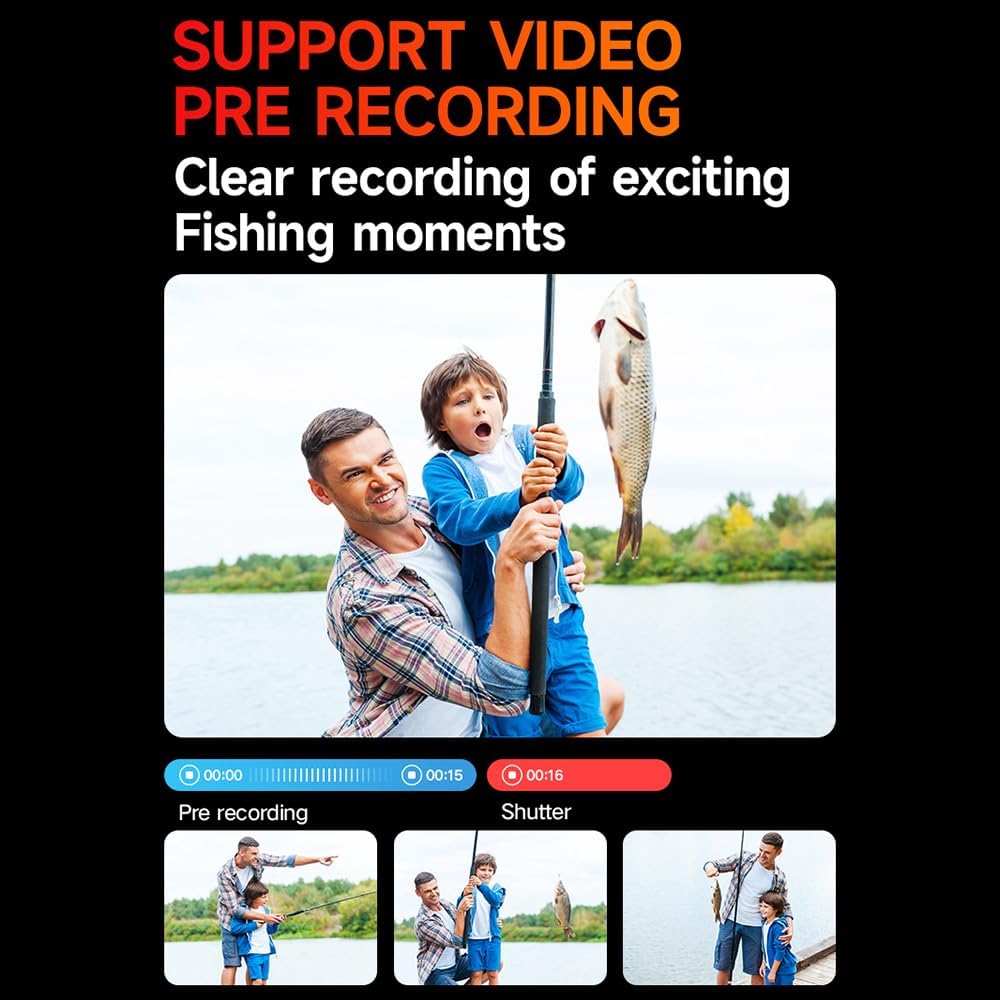
Image: An illustration demonstrating the video pre-recording feature, showing how it captures moments before the record button is pressed, useful for activities like fishing.
4.4. Robienie zdjęć
Rób zdjęcia w wysokiej rozdzielczości do 48 MP.
- Switch to photo mode using the Photo/WiFi key (11) or via the touch screen menu.
- Frame your shot using either the front or rear screen.
- Naciśnij przycisk Migawki/OK, aby zrobić zdjęcie.
4.5. Łączność Wi-Fi i sterowanie aplikacją
Podłącz kamerę do smartfona lub tabletu przez Wi-Fi, aby sterować nią zdalnie i na żywo view, I file przenosić.
- Press the Photo/WiFi key (11) to activate Wi-Fi mode on the camera.
- Download the dedicated Andoer APP from your device's app store.
- On your smartphone/tablet, go to Wi-Fi settings and connect to the camera's Wi-Fi network (SSID usually starts with 'Andoer' or similar).
- Open the Andoer APP to control the camera, view footagi udostępniaj treści.

Image: An illustration depicting the camera's wireless Wi-Fi high-speed transmission capability, showing a smartphone connected to the camera for remote control and live viewing.

Image: A visual guide to the wireless remote control functions, including turning Wi-Fi on/off, remote photography, and starting/saving recordings.
4.6. Zaawansowane funkcje
- 6-Axis Anti-Shake: The advanced stabilization technology ensures smooth and steady footage even during dynamic activities. This feature is automatically active.
- Funkcja fotografowania nocnego: Optimized settings for low-light conditions to capture clearer images and videos at night.
- Korekta rybiego oka: Corrects the distortion often seen with wide-angle lenses, providing a more natural perspective.
- Nagrywanie poklatkowe: Capture changes over time by recording frames at set intervals and compiling them into a video.
- Nagrywanie w zwolnionym tempie: Record high frame rate video to play back in slow motion for dramatic effects.

Obraz: Ponadview of the camera's powerful configuration, highlighting features such as 4K/30FPS, pre-recording support, Wi-Fi, 6-axis gyroscope stabilization, dual color screens, H.265 decoding, high definition photography, night shooting, fisheye correction, time-lapse, slow motion, and 30-meter waterproofing.
4.7. Instalacja i montaż
The camera can be used with various accessories (not included) for multi-purpose and multi-angle recording.
- Bicycle Stand: Mount the camera on your bicycle handlebars.
- Helmet Stand: Securely attach the camera to your helmet for POV shots.
- Triangle Stand (Tripod): Use for stable shots on flat surfaces.
- Handheld Stand: For stable handheld shooting.

Obraz: Byłyamples of how the Andoer Sports Camera can be mounted for various outdoor sports, including on a motorcycle, for parachute sports, on a tripod, on a helmet, worn around the neck, and with a handheld stand.
5. Konserwacja
5.1. Czyszczenie aparatu
- Do czyszczenia korpusu aparatu i ekranu należy używać miękkiej, niepozostawiającej włókien ściereczki.
- For the lens, use a specialized lens cleaning cloth and solution. Avoid touching the lens directly with fingers.
- Ensure the camera is dry before storing or placing it in the waterproof housing.
5.2. Pielęgnacja baterii
- Unikaj wystawiania akumulatora na działanie ekstremalnych temperatur (wysokich lub niskich).
- Aby zachować sprawność akumulatora, należy go regularnie ładować, nawet jeśli nie jest używany.
- If storing for a long period, charge the battery to about 50% before storage.
5.3. Przechowywanie
- Store the camera in a cool, dry place away from direct sunlight and humidity.
- Remove the TF card if storing for extended periods.
6. Rozwiązywanie Problemów
If you encounter issues with your Andoer Sports Camera, refer to the following common problems and solutions:
6.1. Kamera się nie włącza
- Sprawdź baterię: Upewnij się, że bateria jest wystarczająco naładowana. Podłącz kamerę do źródła zasilania i spróbuj ponownie.
- Reset: Use a thin object (like a paperclip) to press the reset hole (6) on the camera.
6.2. Cannot Record/Take Photos
- Karta TF: Ensure a TF card is inserted correctly and has sufficient free space.
- Format karty: If the card is new or causing issues, format it within the camera's settings (this will erase all data).
- Zgodność karty: Ensure the TF card is within the supported capacity (8-512GB) and is a high-speed card.
6.3. Problemy z połączeniem Wi-Fi
- Camera Wi-Fi: Sprawdź, czy w aparacie włączona jest funkcja Wi-Fi.
- Wersja aplikacji: Make sure you are using the latest version of the Andoer APP.
- Uruchom ponownie urządzenia: Try restarting both the camera and your mobile device.
- Ingerencja: Move away from other Wi-Fi devices or sources of interference.
6.4. Słaba jakość obrazu/wideo
- Czystość soczewek: Clean the camera lens and waterproof housing lens.
- Oświetlenie: Zadbaj o odpowiednie oświetlenie miejsca, w którym wykonujesz zdjęcia.
- Ustawienia rozdzielczości: Check that the camera's resolution settings are set to your desired quality (e.g., 4K for video, 48MP for photos).
- Przeciwwstrząsowy: Ensure the 6-axis anti-shake feature is active for smoother video.
7. Specyfikacje
| Funkcja | Specyfikacja |
|---|---|
| Nazwa modelu | 4K/30FPS Sports Camera WiFi Camera Dual Screen |
| Format wideo | MP4, H.264, H.265 protocol |
| Format obrazu | Plik JPG |
| Rozdzielczość wideo | 4K/30fps (3840x2160), 2K 60/30fps (2560x1440), 1080P 120/60/30fps (1920x1080), 720P 120/60/30fps (1280x720), 1080P 30fps (1080x1920P) Vertical, 720P 30fps (720x1280) Vertical |
| Rozdzielczość zdjęcia | 48M (8000x6000), 32M (6560x4920), 20M (5184x3888), 16M (4608x3456), 14M (4320x3240), 12M (4032x3024), 10M (3648x2736), 8M (3264x2448), 5M (2592x1944), 3M (2048x1536), 2M (1600X1200) |
| System wspomagający | Windows; Mac OSX10.4 or above; Linux |
| Pojemność baterii | Bateria litowo-polimerowa 1300mAh |
| Godziny pracy | Approx. 3 hours (without Wi-Fi and screen) |
| Wsparcie magazynowania | Karta TF o pojemności 8-512 GB |
| Objętość ładowaniatage | Prąd stały 5V, 1000-2000mA |
| Interfejs | Typ C |
| Rozmiar aparatu | 7 * 3.8 * 2.8 cm / 2.8 * 1.5 * 1.1 cala |
| Waga aparatu | 70g / 2.5 uncji |
| Cechy specjalne | Anti-Shake, Waterproof (30M with housing), Dual Screens, Touch Control, Wi-Fi, Pre-Recording |
8. Gwarancja i wsparcie
8.1. Informacje o gwarancji
This product comes with a standard limited warranty. Please refer to the warranty card included in your package or visit the official Andoer webSzczegółowe warunki gwarancji można znaleźć na naszej stronie.
8.2. Obsługa klienta
For technical support, service, or inquiries, please contact Andoer customer service through their official channels. You can find more information and contact details on the Sklep Andoer na Amazon lub ich urzędnik webstrona.