
Wstęp
Thank you for choosing the Trueque Wireless Keyboard and Mouse Combo. This manual provides detailed instructions for setting up, operating, maintaining, and troubleshooting your new wireless peripheral set. Please read this manual carefully before use to ensure optimal performance and longevity of your product.
Zawartość opakowania
Sprawdź, czy w przesyłce znajdują się wszystkie elementy:
- 1 x Bezprzewodowa klawiatura
- 1 x mysz bezprzewodowa
- 1 x odbiornik USB (przechowywany wewnątrz myszy)
- 1 x Instrukcja obsługi

Produkt ponadview
The Trueque Wireless Keyboard and Mouse Combo is designed for comfort and efficiency, featuring an ergonomic design, a built-in phone holder, and quiet operation.
Funkcje klawiatury:
- Ergonomiczna konstrukcja: Full-sized keyboard with a generous palm rest and adjustable tilt legs to reduce wrist strain.
- Zintegrowany uchwyt na telefon/tablet: A built-in cradle allows you to prop up your smartphone or tablet for easy viewing.
- Ciche pisanie: Soft membrane keys provide a smooth and quiet typing experience.
- Skróty multimedialne: Includes 6 dedicated hotkeys for quick access to common functions like web browsing and calculator.

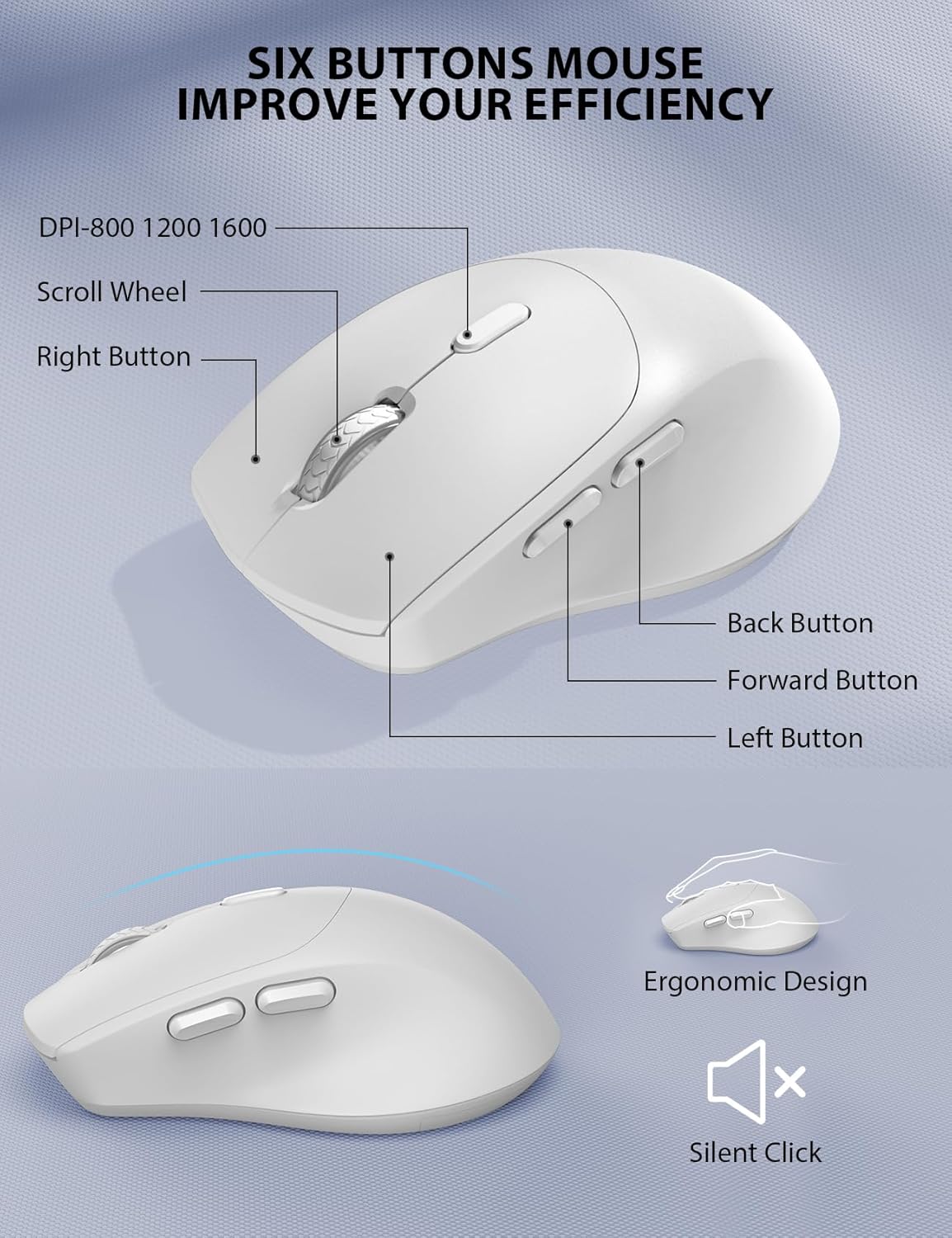
Funkcje myszy:
- Ergonomiczny kształt: Contoured grips and a comfortable handshake angle for prolonged use.
- Regulowane DPI: Three DPI settings (800/1200/1600) for customizable cursor sensitivity.
- Projekt z 6 przyciskami: Includes left, right, scroll wheel, DPI button, and forward/backward buttons for enhanced navigation.
- Ciche kliknięcia: Designed to produce 95% less noise than standard mice.
Połączenie bezprzewodowe:
- Technologia bezprzewodowa 2.4 GHz: Provides a stable and reliable connection up to 33 feet (10 meters).
- Pojedynczy odbiornik USB: One compact USB receiver connects both the keyboard and mouse to your device.

Konfiguracja i instalacja
Follow these steps to set up your Trueque Wireless Keyboard and Mouse Combo:
- Zainstaluj baterie:
- Klawiatura: Open the battery compartment on the underside of the keyboard and insert two (2) AAA batteries (not included), ensuring correct polarity.
- Mysz: Open the battery compartment on the underside of the mouse and insert one (1) AA battery (not included), ensuring correct polarity. The USB receiver is typically stored in this compartment.

Image: The back of the keyboard and mouse, illustrating the battery compartments for 2xAAA (keyboard) and 1xAA (mouse), and the storage slot for the USB receiver. - Podłącz odbiornik USB:
- Wyjmij odbiornik USB z komory baterii myszy.
- Podłącz odbiornik USB do wolnego portu USB w komputerze lub laptopie.
- Włączanie:
- Mysz: Turn on the power switch located on the underside of the mouse.
- Klawiatura: The keyboard will activate automatically when you press any key.
Video: This video demonstrates how to install batteries and pair the mouse, which is helpful for initial setup and troubleshooting connection issues.
Działanie
Użycie klawiatury:
- Pisanie na maszynie: The full-sized layout with a numeric keypad provides a familiar typing experience.
- Skróty klawiszowe: Utilize the dedicated hotkeys (e.g., for web browser, calculator) located above the function keys for quick access to applications.
- Kontrolki: Observe the Num Lock, Caps Lock, and Power indicator lights to monitor keyboard status. The power light will blink when batteries are low.
Użycie myszy:
- Regulacja DPI: Press the DPI button (usually located behind the scroll wheel) to cycle through 800, 1200, and 1600 DPI settings to adjust cursor speed.
- Przyciski nawigacyjne: Use the forward and backward buttons on the side of the mouse for quick web nawigacja strony.
Inteligentne zarządzanie energią
The keyboard and mouse are equipped with a smart sleep mode to conserve battery life:
- Uśpienie klawiatury: Klawiatura przejdzie w tryb uśpienia po 15 minutach bezczynności.
- Mouse Sleep: Mysz przejdzie w tryb uśpienia po 10 minutach bezczynności.
- Obudź się: To wake up either device, simply press any button or key.
With smart power management, you can expect extended battery life, reducing the frequency of battery changes.
Zgodność
This wireless keyboard and mouse combo is widely compatible with various operating systems and devices:
- Systemy operacyjne: Windows, Chrome OS, Mac OS.
- Zgodne urządzenia: PCs, Laptops, Desktops, Tablets (with appropriate USB-A port or adapter).

Rozwiązywanie problemów
If you encounter issues with your wireless keyboard and mouse, please refer to the following common solutions:
- Brak połączenia / opóźnienie:
- Upewnij się, że baterie są prawidłowo zainstalowane i wystarczająco naładowane. W razie potrzeby wymień je.
- Sprawdź, czy odbiornik USB jest prawidłowo podłączony do działającego portu USB. Spróbuj użyć innego portu USB.
- Przesuń klawiaturę i mysz bliżej odbiornika USB, aby wykluczyć problemy z zasięgiem.
- Re-pair the devices: For the mouse, press the scroll wheel and right button simultaneously for 5-8 seconds. For the keyboard, ensure it's powered on and try pressing a key.
- Klawisze nie reagują / mysz się nie porusza:
- Sprawdź poziom naładowania baterii i wymień ją, jeśli jest bliska rozładowania.
- Ensure the mouse power switch is in the 'ON' position.
- Clean any debris around the mouse's optical sensor or under the keyboard keys.
- Ingerencja:
- Other 2.4GHz wireless devices (e.g., Wi-Fi routers, cordless phones) may cause interference. Try to minimize their proximity.
Video: This video provides tips for troubleshooting common issues if your keyboard and mouse are not working properly, including battery installation and pairing.
Specyfikacje
| Funkcja | Szczegół |
|---|---|
| Marka | Frymarczenie |
| Model | B0D4PJYJB8 |
| Kolor | Biały |
| Technologia łączności | Bezprzewodowy 2.4GHz |
| Cechy specjalne | Ergonomic, Wrist Rest, Phone Holder |
| Kompatybilne urządzenia | PC, Laptop, Desktop, Tablet |
| Wykrywanie ruchu | Optyczny |
| Bateria klawiatury | 2 baterie AAA (brak w zestawie) |
| Bateria myszy | 1 x AA battery (Not Included) |
| Źródło zasilania | Zasilany bateryjnie |
| Układ klawiatury | QWERTY |
| Liczba kluczy | 104 |
| Opis klawiatury | Membrana |
| Ustawienia DPI myszy | 800/1200/1600 |
| Kompatybilne systemy operacyjne | Windows, Chrome OS, Mac OS |

Gwarancja i wsparcie
Your Trueque Wireless Keyboard and Mouse Combo comes with a roczna gwarancja wymiany from the date of purchase. If you experience any issues with your product, please contact our customer service team for assistance.
Adres e-mail obsługi klienta: truequeservice@outlook.com
Our professional customer service team is available to help resolve your problems promptly.
