
1. Ważne instrukcje bezpieczeństwa
When using electrical appliances, basic safety precautions should always be followed to reduce the risk of fire, electric shock, and personal injury. Read all instructions carefully before using the Milex Digital Steam Iron.
- Zawsze upewnij się, że objętośćtage na etykiecie znamionowej odpowiada natężeniu prądu w siecitage.
- Nie zanurzaj żelazka, przewodu zasilającego ani wtyczki w wodzie ani innych płynach.
- Odłącz żelazko od gniazdka elektrycznego podczas napełniania go wodą, opróżniania lub gdy nie jest używane.
- Nie używaj urządzenia z uszkodzonym przewodem lub wtyczką, lub gdy urządzenie nie działa prawidłowo lub zostało upuszczone lub uszkodzone w jakikolwiek sposób.
- Trzymaj żelazko i jego przewód poza zasięgiem dzieci i zwierząt domowych, gdy jest włączone lub gdy się stygnie.
- Never leave the iron unattended while it is connected to the power supply or on an ironing board.
- Żelazka należy używać wyłącznie zgodnie z jego przeznaczeniem w gospodarstwie domowym.
- The soleplate of the iron can become extremely hot. Avoid direct contact with the hot soleplate.
- Odstawiając żelazko, zawsze odkładaj je na stabilną, odporną na ciepło powierzchnię.
2. Koniec produktuview
The Milex Digital Steam Iron MSI004 is designed for efficient garment care. Familiarize yourself with its components before use.
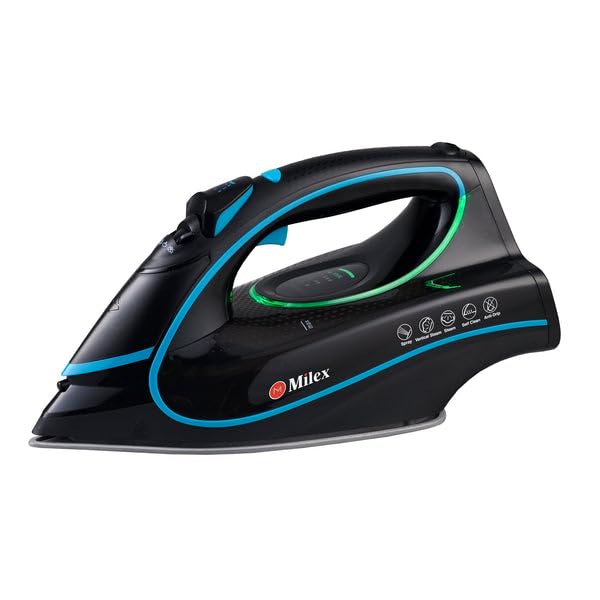
Figure 1: Milex Digital Steam Iron (3/4 view)
This image displays the Milex Digital Steam Iron from a three-quarter angle, highlighting its sleek black design with blue and green accents. Key features visible include the handle, water tank, and the general shape of the soleplate.
Składniki:
- Dysza rozpylająca wodę: For moistening fabrics.
- Wlot do napełniania wodą: Miejsce dodania wody do zbiornika.
- Steam Control Dial/Buttons: To adjust steam output.
- Temperature Control Dial/Buttons: To select desired heat setting.
- Wyświetlacz LED: Pokazuje bieżące ustawienia.
- Uchwyt: For gripping the iron.
- Zbiornik na wodę: Zbiornik na wodę.
- Stopa żelazka: Podgrzana powierzchnia ślizgająca się po materiale.
- Przewód zasilający: Łączy żelazko z gniazdkiem elektrycznym.

Figure 2: Ceramic Soleplate
Na tym zdjęciu widać zbliżenie view of the ceramic soleplate, showing its textured surface and steam vents designed for even heat distribution and smooth gliding.
3. Konfiguracja i pierwsze użycie
3.1 Rozpakowanie
- Remove the iron from its packaging.
- Usuń folię ochronną i naklejki z płyty grzejnej.
- Sprawdź żelazko pod kątem uszkodzeń. W przypadku uszkodzenia nie używaj go i skontaktuj się z obsługą klienta.
3.2 Napełnianie zbiornika na wodę
- Upewnij się, że żelazko jest odłączone od gniazdka elektrycznego.
- Set the steam control to the "Dry Ironing" position (if applicable).
- Otwórz pokrywę wlewu wody.
- Za pomocą miarki ostrożnie wlej czystą wodę z kranu do zbiornika na wodę, aż do linii „MAX”. Nie przepełniaj zbiornika.
- Dokładnie zamknij pokrywę wlotu wody.
Notatka: For areas with hard water, it is recommended to use a mixture of 50% tap water and 50% distilled water to prevent mineral buildup. Never use perfumed water, vinegar, starch, or descaling agents in the water tank.
4. Instrukcja obsługi
4.1 Przygotowanie do prasowania
- Sort garments according to fabric type (e.g., linen, cotton, wool, silk, synthetics).
- Sprawdź etykiety na ubraniach, aby poznać zalecaną temperaturę prasowania.
- Plug the iron into a suitable electrical outlet. The LED display will illuminate.
4.2 Ustawianie temperatury i pary
- Use the temperature control buttons to select the appropriate heat setting for your fabric. The LED display will show the selected temperature.
- Allow the iron to heat up until the indicator light (if present) or LED display confirms it has reached the desired temperature.
- For steam ironing, ensure the water tank is filled. Adjust the steam control to the desired steam level. Steam is typically available at higher temperature settings.
- For dry ironing, ensure the water tank is empty or the steam control is set to "Dry Ironing".
4.3 Korzystanie z funkcji Steam
- Ciągła para: Select a steam setting on the control. Steam will be continuously emitted from the soleplate.
- Uderzenie pary: Press the "Burst" button for an extra shot of steam to remove stubborn wrinkles. Wait a few seconds between bursts.
- Sprej wodny: Press the "Spray" button to lightly moisten fabric before ironing.
4.4 Funkcja automatycznego wyłączania
The iron is equipped with an auto-shutoff safety feature. If left unattended horizontally for a certain period (e.g., 30 seconds) or vertically (e.g., 8 minutes), the heating element will automatically turn off. To reactivate, simply move the iron.
4.5 System zapobiegający kapaniu
The anti-drip system prevents water from dripping from the soleplate when the iron is not hot enough to produce steam. This helps prevent water stains on delicate fabrics.
5. Konserwacja i czyszczenie
Regular maintenance ensures optimal performance and extends the life of your Milex Digital Steam Iron.
5.1 Po każdym użyciu
- Odłącz żelazko od zasilania i pozwól mu całkowicie ostygnąć.
- Usuń pozostałą wodę ze zbiornika na wodę.
5.2 Czyszczenie stopy żelazka
- Gdy stopa żelazka ostygnie, wytrzyj ją wodą.amp szmatkę i, jeśli to konieczne, nieścierny środek czyszczący.
- Nie należy używać szorstkich gąbek ani silnych środków chemicznych, gdyż mogą one uszkodzić powłokę ceramiczną.
5.3 Funkcja samoczyszczenia
The iron features a self-cleaning function to remove mineral deposits from the steam vents.
- Napełnij zbiornik na wodę do linii MAX.
- Podłącz żelazko do prądu i ustaw temperaturę na maksymalną.
- Gdy żelazko osiągnie maksymalną temperaturę, odłącz je od zasilania.
- Trzymaj żelazko poziomo nad zlewem.
- Press and hold the self-clean button (refer to product diagram for location). Hot water and steam will be expelled from the soleplate, flushing out mineral deposits.
- Delikatnie potrząsaj żelazkiem w przód i w tył, aż zbiornik na wodę będzie pusty.
- Plug the iron back in and allow it to heat up again to dry the soleplate.
- Odłącz od zasilania i przechowuj po ostygnięciu.
5.4 Przechowywanie
Always store the iron upright on its heel rest, with the cord neatly wrapped, once it has completely cooled down and the water tank is empty.
6. Rozwiązywanie Problemów
| Problem | Możliwa przyczyna | Rozwiązanie |
|---|---|---|
| Żelazo się nie nagrzewa. | Niepodłączony; zasilanie wyłączonetage; auto-shutoff activated; faulty outlet. | Sprawdź podłączenie zasilania, sprawdź wyłącznik automatyczny, przesuń żelazko, aby je ponownie włączyć, spróbuj użyć innego gniazdka. |
| Brak pary lub niewystarczająca ilość pary. | Water tank empty; temperature too low for steam; steam vents clogged; steam control set to "Dry". | Fill water tank; increase temperature setting; perform self-clean; adjust steam control. |
| Woda kapie z płyty grzewczej. | Temperatura za niska dla pary (działa system zapobiegający kapaniu); zbiornik na wodę przepełniony. | Zwiększ temperaturę, nie przepełniaj zbiornika na wodę. |
| Białe płatki lub pozostałości na ubraniach. | Nagromadzenie minerałów w zbiorniku na wodę/otworach wentylacyjnych pary. | Perform self-clean function; use distilled water or a mix with tap water. |
7. Specyfikacje
| Numer modelu | MSI004 |
| Marka | Milex |
| Moc | 2400 W |
| Tomtage | 220-240 V, 50 Hz |
| Funkcje | Dry, Spray, Steam, Burst |
| Materiał stopy | Ceramiczny |
| Typ wyświetlacza | PROWADZONY |
| Pojemność zbiornika na wodę | 450ml |
| Cechy specjalne | Anti-drip, Auto-shutoff, Lightweight |
| Wymiary produktu (dł. x szer.) | Wymiary 32 dł. x 16 szer. w centymetrach |
8. Gwarancja i obsługa klienta
For information regarding warranty coverage, please refer to the warranty card included with your product or contact the retailer where the product was purchased.
If you experience any issues or have questions about your Milex Digital Steam Iron, please contact Milex customer support. You can find more information and contact details on the official Milex webwitrynę lub za pośrednictwem Milex Store on Amazon.