
1. Wprowadzenie
Thank you for choosing the XIAOVV 4G LTE Solar Outdoor Security Camera. This manual provides essential information for the proper installation, operation, and maintenance of your device. Please read it carefully before use and retain it for future reference. This camera is designed for outdoor surveillance, offering reliable monitoring with 4G LTE connectivity and solar power.
2. Koniec produktuview
The XIAOVV P5plus is a robust outdoor security camera featuring a solar panel for continuous power and 4G LTE connectivity for remote access without relying on Wi-Fi. It offers high-definition imaging, advanced night vision, and intelligent security functions.
Główne cechy:
- Łączność 4G LTE: Supports 4G bands B1/B3/B5/B38/B39/B40/B41 for remote access in areas without Wi-Fi.
- Zasilane energią słoneczną: Integrated solar panel provides continuous power, ensuring 365 days of uninterrupted monitoring.
- 5MP HD Imaging & 1080p Video: Captures clear 5-megapixel still images and records 1080p high-definition video.
- Kolorowe widzenie nocne: Advanced Starlight color night vision ensures clear, detailed footage nawet w warunkach słabego oświetlenia.
- 360° Monitoring: Dual-lens design allows for comprehensive 360-degree coverage without blind spots, with PTZ (Pan-Tilt-Zoom) capabilities.
- Smart Security Functions: AI-based person detection, dual PIR and radar alarms, automatic motion detection, and two-way audio communication.
- Przechowywanie lokalne i w chmurze: Supports up to 128GB Micro SDHC card for local storage and optional cloud storage.
- Kompresja H.265: Efficient video compression for longer storage times and stable recordings.
- Odporna na warunki atmosferyczne konstrukcja: IP66 rated for outdoor use, protecting against dust and powerful water jets.
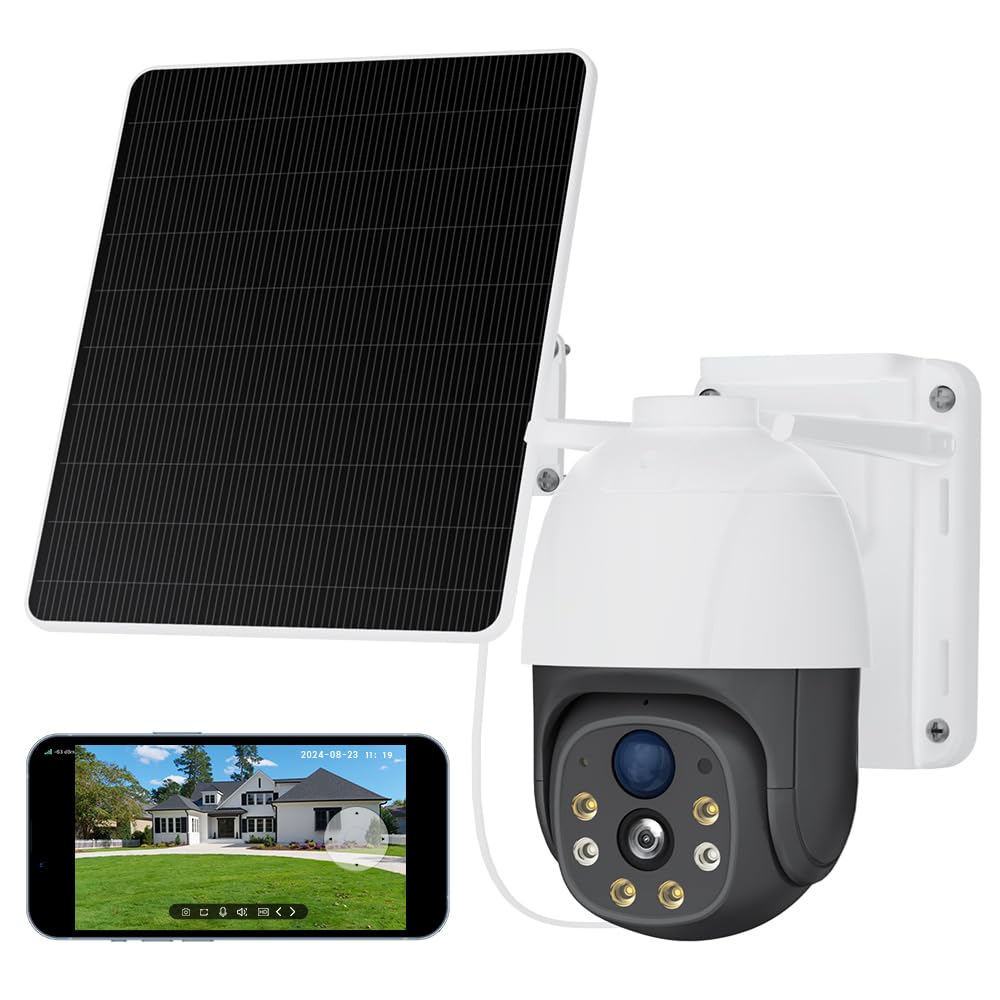
Image 2.1: The XIAOVV 4G LTE Solar Outdoor Security Camera, showcasing its solar panel and various features like 4G LTE signal, full color night vision, AI intelligence, IP65 waterproof rating, device sharing, 2-way audio, HD 1080P, siren, PIR motion detection, and 8000mAh battery capacity.

Image 2.2: A visual representation of the camera's 2K Starlight Color Night Vision, showing a building at night with clear, illuminated details, contrasting with a standard black and white night vision view.
3. Konfiguracja
3.1 Zawartość opakowania
- XIAOVV Solar Camera (1)
- Wspornik montażowy i śruby
- Instrukcja obsługi
3.2 Wkładanie karty SIM i karty Micro SD
- Locate the SIM card and Micro SD card slot on the camera, usually protected by a rubber cover.
- Ostrożnie otwórz pokrywę.
- Insert a valid 4G LTE SIM card (not included) into the SIM card slot with the correct orientation. Ensure it clicks into place.
- Insert a Micro SDHC card (up to 128GB, not included) into the Micro SD card slot with the correct orientation.
- Close the rubber cover firmly to ensure IP66 weatherproofing.
3.3 Montaż kamery
- Choose a suitable outdoor location with good 4G signal reception and direct sunlight exposure for the solar panel.
- Za pomocą dołączonego uchwytu montażowego i śrub można pewnie przymocować kamerę do ściany lub słupa.
- Dostosuj kąt nachylenia panelu słonecznego, aby zmaksymalizować ekspozycję na słońce w ciągu dnia.
- Ensure the camera has a clear line of sight to the area you wish to monitor.

Image 3.1: The XIAOVV camera with its solar panel, shown installed in diverse outdoor settings such as a pasture, fish pond, orchard, construction site, and backyard, illustrating its versatility for different surveillance needs.
3.4 Pobieranie i parowanie aplikacji
- Download the XIAOVV app from your smartphone's app store (iOS or Android).
- Zarejestruj nowe konto lub zaloguj się, jeśli już je posiadasz.
- Postępuj zgodnie z instrukcjami w aplikacji, aby dodać nowy aparat. Zazwyczaj polega to na zeskanowaniu kodu QR na aparacie lub ręcznym wprowadzeniu identyfikatora urządzenia.
- Ensure the camera is powered on and the 4G SIM card is active during the pairing process.
4. Instrukcja obsługi
4.1 Na żywo View
Otwórz aplikację XIAOVV i wybierz kamerę z listy urządzeń, aby uzyskać dostęp do transmisji wideo na żywo. Możesz view foo w czasie rzeczywistymtage from your monitored area.
4.2 Sterowanie PTZ
Utilize the on-screen controls in the live view to pan (rotate horizontally), tilt (rotate vertically), and digitally zoom the camera to adjust your viewing angle and focus on specific areas.
4.3 Dźwięk dwukierunkowy
Tap the microphone icon in the app to speak through the camera's speaker, and listen to audio from the camera's microphone. This allows for real-time communication with visitors or to deter intruders.
4.4 Nagrywanie i odtwarzanie
- Nagrywanie ręczne: Kliknij przycisk nagrywania na żywo view to start or stop manual video recording.
- Rejestrowanie zdarzeń: The camera automatically records when motion is detected, based on your settings.
- Odtwarzanie nagranego dźwięku: Uzyskaj dostęp do nagranego pliku footage via the 'Playback' or 'History' section in the app. You can filter by date and event.
4.5 Detekcja ruchu i alerty
Configure motion detection sensitivity, detection zones, and alert preferences (e.g., push notifications, siren activation) within the app settings. The camera uses AI-based person detection, PIR, and radar for accurate alerts.

Image 4.1: A visual representation of the AI Automatic Tracking feature, showing a father and child playing in a park with a tracking box following their movement, indicating the camera's ability to automatically follow targets.
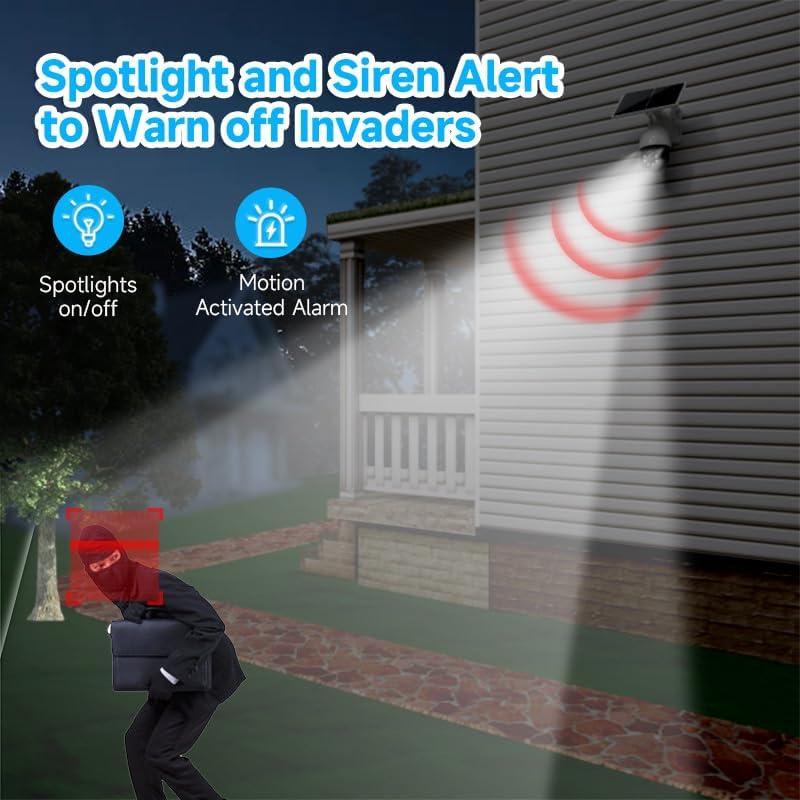
Image 4.2: The camera's spotlight and siren alert system activated at night, illuminating a detected intruder and emitting a warning sound, demonstrating its active deterrence capabilities.
5. Konserwacja
5.1 Czyszczenie
- Regularnie czyść obiektyw aparatu i panel słoneczny miękką, miękką szmatką.amp Aby zapewnić optymalną wydajność, należy czyścić szmatką. Unikać środków czyszczących o działaniu ściernym.
- Ensure the solar panel is free from dirt, dust, leaves, or snow to maintain efficient charging.
5.2 aktualizacji oprogramowania sprzętowego
Check the XIAOVV app periodically for available firmware updates. Keeping your camera's firmware up-to-date ensures optimal performance, security, and access to new features.
5.3 Zarządzanie magazynem
If using a Micro SD card, regularly review i wykonaj kopię zapasową ważnych informacjitage. You can configure the camera to overwrite older footage automatically when the card is full. For cloud storage, manage your subscription and stored data through the app.

Image 5.1: A graph illustrating the benefits of H.265 Video Coding Technology compared to H.264, showing significant savings in storage space and broadband usage, leading to faster loading and smoother playback of videos.
6. Rozwiązywanie Problemów
6.1 Camera Not Connecting to 4G
- Sprawdź, czy karta SIM jest prawidłowo włożona i ma aktywny plan transmisji danych.
- Check 4G signal strength at the camera's location using your smartphone.
- Restart the camera by pressing the reset button or power cycling it.
- Verify that the camera's 4G bands are compatible with your network provider.
6.2 Słaba jakość obrazu
- Wyczyść obiektyw aparatu, aby usunąć wszelkie zabrudzenia i smugi.
- Upewnij się, że przed obiektywem nie ma żadnych przeszkód.
- Sprawdź siłę sygnału 4G. Słaby sygnał może mieć wpływ na jakość przesyłania strumieniowego.
6.3 Bateria nie ładuje się
- Upewnij się, że panel słoneczny jest czysty i wystawiony na bezpośrednie działanie promieni słonecznych przez kilka godzin dziennie.
- Sprawdź połączenie między panelem słonecznym a kamerą.
- Verify that the camera is placed in an area with sufficient sunlight.
6.4 Detekcja ruchu nie działa
- Check motion detection settings in the app; ensure it's enabled and sensitivity is adjusted.
- Verify that the detection zones are correctly configured.
- Upewnij się, że nie ma żadnych przeszkód fizycznych blokujących kamerę. view or PIR sensor.
7. Specyfikacje
| Funkcja | Specyfikacja |
|---|---|
| Nazwa modelu | XIAOVV-P5PLUS-EU4G |
| Łączność | 4G LTE (B1/B3/B5/B38/B39/B40/B41) |
| Zasilacz | Solar Powered (Integrated Solar Panel) |
| Rozdzielczość obrazu | 5 MP (Stills) |
| Rozdzielczość wideo | 1080p (format AVI) |
| Wizja nocna | Starlight Color Night Vision, 15 Meters Range |
| Viewing kąt | 360 stopni (PTZ) |
| Cechy specjalne | Two-way audio, Local recording, AI Person Detection, PIR/Radar Alarms, HD Resolution, PTZ Technology |
| Składowanie | Micro SDHC (up to 128 GB), Optional Cloud Storage |
| Kompresja | H.265 |
| Ocena odporności na warunki atmosferyczne | IP66 |
| Metoda kontroli | Smartphone App (XIAOVV App) |
| Wymiary | Wymiary 20 x 20 x 22 cm |
8. Gwarancja i wsparcie
This XIAOVV product comes with a standard manufacturer's warranty. Please refer to the warranty card included in your package or visit the official XIAOVV webSzczegółowe warunki gwarancji można znaleźć na naszej stronie.
For technical support, troubleshooting assistance, or any product-related inquiries, please contact XIAOVV customer service through the contact information provided on their official webstronie lub w aplikacji XIAOVV.