Wstęp
This manual provides comprehensive instructions for the W26 Pro Max Smart Watch with Bluetooth Earphones. It covers setup, operation, maintenance, and troubleshooting to ensure optimal use of your device. The W26 Pro Max is a versatile 2-in-1 device, combining a smartwatch with integrated wireless Bluetooth earphones, designed to keep you connected and active.
Zawartość opakowania
Po otwarciu opakowania należy sprawdzić, czy znajdują się w nim wszystkie elementy:
- W26 Pro Max Smart Watch
- Integrated Wireless Bluetooth Earphones
- Kabel ładujący
- Instrukcja obsługi (ten dokument)
- Additional Watch Strap (if included as a free gift)

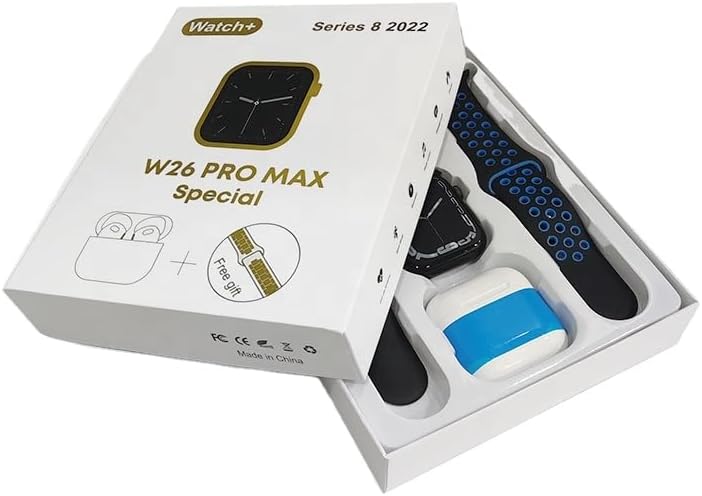
Image: The W26 Pro Max Smart Watch and its accompanying Bluetooth earphones, along with an extra watch strap, are neatly arranged within their retail packaging. The watch face is visible, and the earphones are housed in their charging case.

Obraz: widok z góry view of the W26 Pro Max Smart Watch and Bluetooth Earphones within their packaging. The watch, earphones, and an additional strap are clearly visible, indicating the complete product set.
Przewodnik po konfiguracji
1. Ładowanie początkowe
Before first use, fully charge both the smartwatch and the integrated earphones. Connect the provided charging cable to the watch and a compatible USB power source. The watch display will indicate charging status. Ensure the earphones are properly seated in their charging case within the watch.
2. Włączanie/wyłączanie zasilania
- Włączanie: Press and hold the side button on the smartwatch until the screen illuminates.
- Wyłączone: Press and hold the side button, then select the "Power Off" option on the screen.
3. Parowanie ze smartfonem
To unlock full functionality, pair your W26 Pro Max with your smartphone via Bluetooth.
- Upewnij się, że Bluetooth jest włączony w Twoim smartfonie.
- On the W26 Pro Max, navigate to the Bluetooth settings.
- On your smartphone, search for available Bluetooth devices and select "W26 Pro Max" from the list.
- Jeśli pojawi się monit, potwierdź prośbę o sparowanie na obu urządzeniach.
- For optimal performance, download and install the recommended companion application (e.g., "FitPro app" as mentioned in product description) from your smartphone's app store.
4. Earphone Pairing
The integrated earphones automatically pair with the smartwatch when removed from their charging slots. To pair them with another device (e.g., directly with your phone):
- Remove the earphones from the smartwatch.
- Włącz Bluetooth na urządzeniu, z którym chcesz się sparować.
- Szukaj "W26 Pro Max Earphones" (or similar name) in the Bluetooth device list and select to connect.
Instrukcja obsługi
Nawigacja po smartwatchu
- Ekran dotykowy: Przesuwaj w lewo/prawo, w górę/w dół, aby poruszać się po menu i uzyskiwać dostęp do funkcji. Dotknij, aby wybrać.
- Przycisk boczny: Press to return to the home screen or wake the device. Long press for power options or voice assistant.
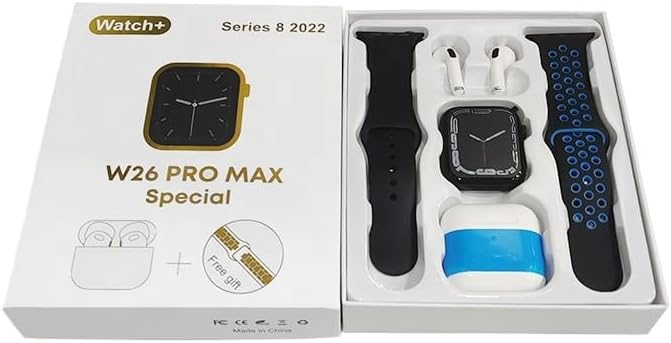
Image: The W26 Pro Max Smart Watch screen shows a voice assistant interface, with text bubbles indicating "Call Linda!" and "What's the weather like today?". This illustrates the voice command functionality.
Główne cechy
Monitorowanie kondycji i zdrowia
The W26 Pro Max is equipped with sensors to monitor various health metrics.
- Monitorowanie częstości akcji serca: The optical heart rate sensor continuously tracks your heart rate. View real-time data on the watch or in the companion app.
- Krokomierz: Monitoruje codzienne kroki, pokonany dystans i spalone kalorie.
- Monitorowanie snu: Monitoruje wzorce snu, w tym sen głęboki, sen płytki i godziny wybudzania.

Image: The W26 Pro Max Smart Watch screen displays heart rate information, showing a graph of heart rate over time, current beats per minute (bpm), and blood pressure readings. This demonstrates the health monitoring capabilities.
Obraz: szczegółowy view of the W26 Pro Max Smart Watch screen showing heart rate and blood pressure monitoring. The text explains that an optical heart rate sensor is used for precise calculation and data can be viewed on the watch or via the FitPro app.
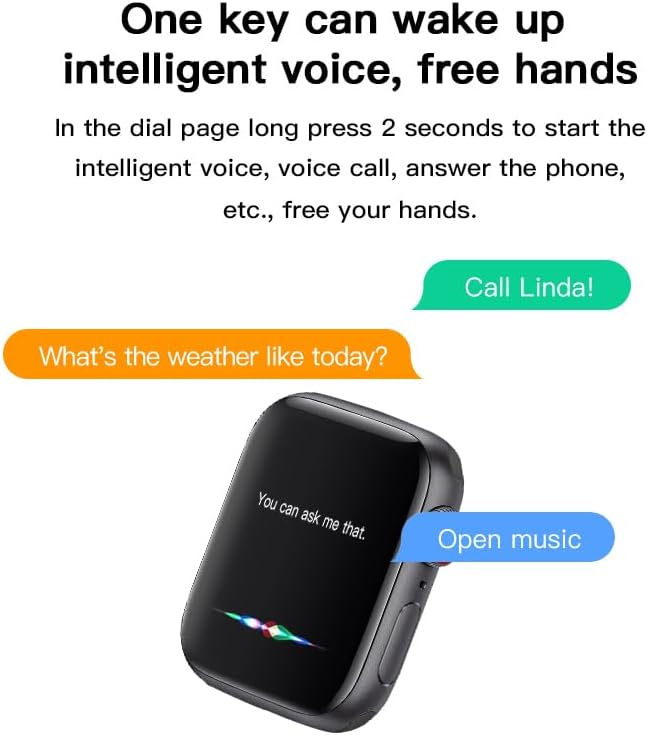
Image: The W26 Pro Max Smart Watch screen displays sleep monitoring data, showing sleep quality (Excellent), percentages of deep sleep, light sleep, and awake time, along with total sleep duration. This highlights the sleep tracking feature.
Komunikacja i media
- Połączenia Bluetooth: Make and receive calls directly from your smartwatch using the integrated microphone and speaker.
- Powiadomienia: Otrzymuj powiadomienia o połączeniach, wiadomościach i aplikacjach ze sparowanego smartfona.
- Odtwarzanie muzyki: Control music playing on your smartphone or listen directly via the integrated earphones.

Image: The W26 Pro Max Smart Watch screen shows music playback controls, including play/pause and skip track buttons, along with a visualizer. This indicates the watch's capability to control audio.
Asystent głosowy
Long press the side button to activate the intelligent voice assistant. Use voice commands for calls, weather inquiries, music control, and more, providing hands-free operation.
Konserwacja i pielęgnacja
- Czyszczenie: Wipe the watch and earphones with a soft, dry, lint-free cloth. For stubborn dirt, slightly dampPrzetrzyj szmatkę wodą. Unikaj silnych środków chemicznych i materiałów ściernych.
- Wodoodporność: The W26 Pro Max has an IP68 rating, meaning it is resistant to dust and can withstand immersion in water up to 1.5 meters for 30 minutes. However, it is not suitable for diving, hot showers, or saunas. Always dry the device thoroughly after exposure to water.
- Pielęgnacja baterii: To prolong battery life, avoid fully discharging the device frequently. Charge it regularly and store it in a cool, dry place when not in use for extended periods.
- Składowanie: Przechowuj urządzenie w chłodnym i suchym miejscu, z dala od bezpośredniego światła słonecznego i ekstremalnych temperatur.
Rozwiązywanie problemów
| Problem | Możliwa przyczyna | Rozwiązanie |
|---|---|---|
| Urządzenie nie włącza się. | Niski poziom naładowania baterii. | Charge the device for at least 30 minutes before attempting to power on again. |
| Nie można sparować ze smartfonem. | Bluetooth is off on phone/watch; device not in pairing mode; interference. | Ensure Bluetooth is enabled on both devices. Restart both devices. Move closer to the phone. Forget previous pairings and try again. |
| Earphones not connecting. | Earphones not properly seated; low earphone battery. | Ensure earphones are fully seated in their charging slots within the watch. Charge the watch to ensure earphones are charging. |
| Niedokładne dane dotyczące zdrowia. | Nieprawidłowe dopasowanie; przesłonięty czujnik. | Upewnij się, że zegarek ściśle przylega do nadgarstka, nie jest za ciasny ani za luźny. Wyczyść czujnik z tyłu zegarka. |
| Krótki czas pracy baterii. | Częste korzystanie z funkcji zużywających dużo energii; stara bateria. | Reduce screen brightness, limit notifications, disable unnecessary features. Ensure full charge cycles. |
Specyfikacje
| Funkcja | Szczegół |
|---|---|
| Numer modelu | W26 Pro Max |
| Wyświetlacz | 1.78-calowy ekran dotykowy AMOLED |
| System operacyjny | Noś system operacyjny |
| Łączność | Bluetooth |
| Pojemność baterii | 280mAh (watch) |
| Żywotność baterii | Do 3 dni (typowe użytkowanie) |
| Odporność na wodę | IP68 |
| Cechy specjalne | Integrated Bluetooth Earphones, Heart Rate Sensor, Pedometer, Sleep Tracker, Microphone, Speaker, Voice Assistant |
| Pojemność pamięci masowej | 16 MB |
| Wymiary opakowania | Wymiary 16.8 x 12.8 x 3 cm |
| Waga | 170 gramów |
Gwarancja i wsparcie
For information regarding warranty coverage and customer support, please refer to the documentation provided with your purchase or contact the retailer where the product was acquired. As this product is manufactured by "Generic", specific warranty details may vary by region and seller.
For technical assistance or further inquiries, please reach out to the customer service channels provided by your point of purchase.


