Wstęp
Welcome to your new Luqeeg 3-Lens Outdoor WiFi Security Camera. This manual provides detailed instructions for installation, operation, and maintenance to ensure optimal performance and security for your property.
This advanced surveillance camera features a unique three-lens system for comprehensive coverage, IP66 weather resistance, intelligent motion detection, and enhanced night vision capabilities. Please read this manual thoroughly before use and retain it for future reference.
Zawartość opakowania
Sprawdź, czy w przesyłce znajdują się wszystkie elementy:

Image description: The Luqeeg 3-Lens Outdoor WiFi Security Camera, power adapter, mounting screws, and waterproof connector.
- Luqeeg 3-Lens Outdoor WiFi Security Camera
- Power Adapter (US Plug, 110-240V)
- Śruby montażowe i kołki ścienne
- Zestaw złączy wodoodpornych
- Instrukcja obsługi (ten dokument)
Przewodnik po konfiguracji
1. Instalacja fizyczna
Choose a suitable outdoor location for mounting the camera, ensuring a clear view of the area you wish to monitor and within range of your WiFi network. Use the provided mounting screws and wall plugs to securely attach the camera to a wall or ceiling.
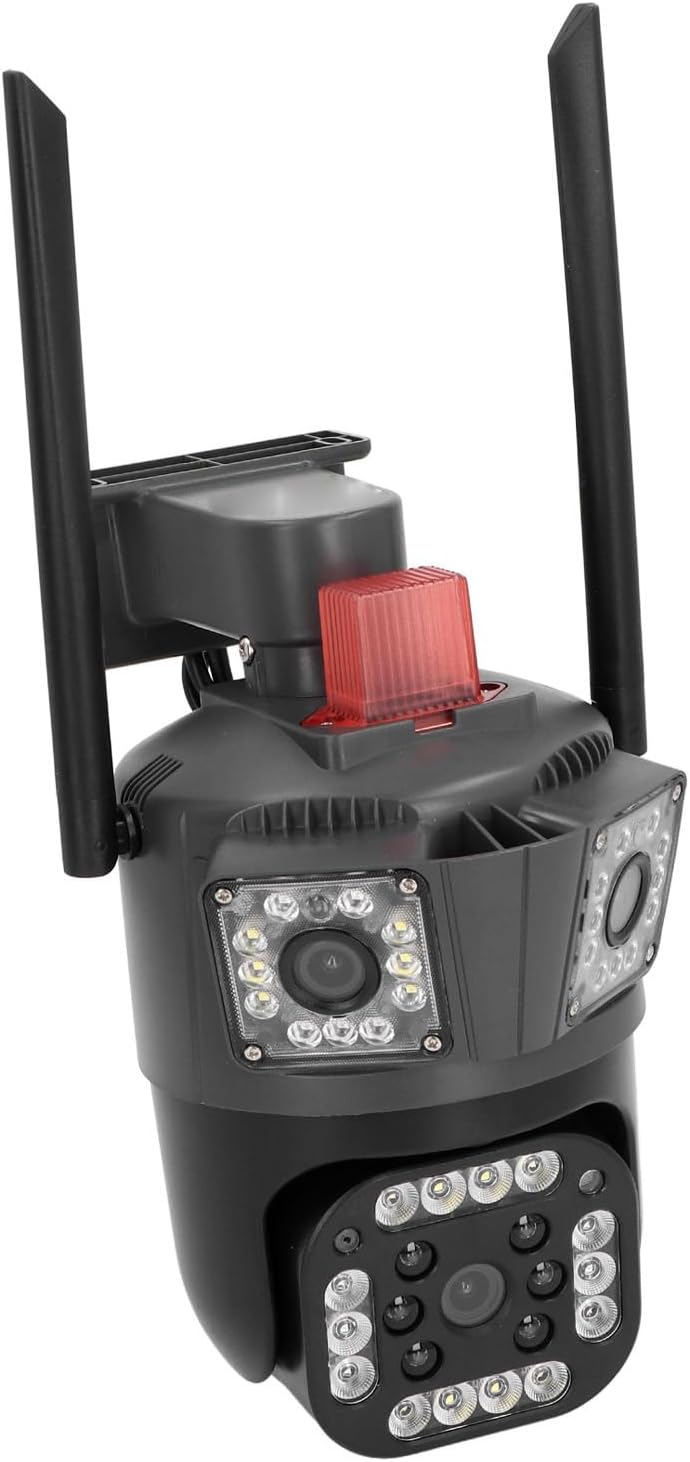
Image description: An example of the Luqeeg 3-Lens Outdoor WiFi Security Camera mounted on an exterior wall, providing a wide view nieruchomości.
2. Podłączenie zasilania
Connect the provided power adapter to the camera's power input port. Ensure the connection is secure and protected from moisture using the waterproof connector kit if necessary. Plug the power adapter into a standard 110-240V electrical outlet. The camera will power on automatically.
3. Instalacja karty pamięci (opcjonalnie)
For local video storage, insert a Micro SD card (up to 128GB, not included) into the designated card slot on the camera. Ensure the camera is powered off before inserting or removing the card. The card slot is typically located under a protective cover. Refer to the diagram below for location.

Opis obrazu: Zbliżenie view of the camera's lower lens and surrounding LED lights, indicating the general area where a Micro SD card slot might be located under a protective cover.
4. Network Connection (WiFi/Wired)
Your camera supports both WiFi and wired network connections.
Połączenie WiFi:
Download the dedicated mobile application (e.g., search for 'iCSee' or similar on your smartphone's app store). Follow the in-app instructions to add your camera. This typically involves scanning a QR code on the camera or connecting to a temporary WiFi hotspot created by the camera.
Połączenie przewodowe:
Connect an Ethernet cable from your router to the camera's Ethernet port. The camera will automatically establish a wired network connection.
Instrukcja obsługi
1. Na żywo View and Multi-Lens Display
Open the mobile application to access the live feed from your camera. The unique 3-lens system allows you to view three different angles simultaneously on a single screen, providing comprehensive surveillance.

Image description: A graphical representation showing the three distinct fields of view from the camera's lenses displayed on a single screen, covering a wide area around a house.
2. Sterowanie obrotem i pochyleniem
The lower lens of the camera supports remote pan (horizontal) and tilt (vertical) adjustments. Use the controls within the mobile app to rotate the camera 355 degrees horizontally and 90 degrees vertically to adjust your viewing angle. The upper lenses have a fixed viewkąt.
3. Dźwięk dwukierunkowy
The camera features a built-in microphone and speaker for two-way audio communication. Use the intercom function in the app to speak to visitors or deter intruders.
4. Wizja nocna
The camera automatically switches to night vision mode in low-light conditions. Equipped with high-brightness LED lights, it provides clear full-color night vision for enhanced visibility after dark.
5. Detekcja ruchu i alerty
The camera's intelligent motion detection system identifies movement within its field of view. When motion is detected, the camera can trigger a light and sound alarm and send instant alerts to your mobile phone. You can customize motion detection zones and sensitivity settings within the app.

Image description: A visual representation of the camera detecting and tracking a person, highlighting the motion detection zone and automatic rotation tracking feature.
6. Udostępnianie wielu użytkownikom
Share access to your camera's live feed and recordings with up to 5 authorized users through the mobile application, allowing multiple family members or trusted individuals to monitor the property.
Konserwacja
- Czyszczenie: Regularnie czyść obiektywy i obudowę aparatu miękką, miękką szmatką.amp cloth to remove dust and dirt. Do not use harsh chemicals or abrasive materials, as they may damage the camera's finish or lenses.
- Aktualizacje oprogramowania układowego: Check the mobile application periodically for available firmware updates. Installing updates ensures optimal performance, security, and access to new features.
- Zarządzanie pamięcią masową: If using a Micro SD card, regularly review and back up important recordings to another device. Format the card periodically (e.g., monthly) through the app to maintain recording performance and prevent data corruption.
Rozwiązywanie problemów
| Problem | Możliwa przyczyna | Rozwiązanie |
|---|---|---|
| Kamera nie włącza się | Brak zasilania | Check power adapter connection and electrical outlet. Ensure voltage wynosi 110-240V. |
| Nie można połączyć się z WiFi | Incorrect WiFi password, camera too far from router, or network interference | Verify WiFi password. Move camera closer to router or use a WiFi extender. Ensure 2.4GHz WiFi is used. |
| Niska jakość obrazu | Dirty lens, low light, or network bandwidth | Clean the camera lenses. Ensure adequate lighting for optimal image. Check internet connection speed. |
| Wykrywanie ruchu nie działa | Incorrect settings, detection zone not configured | Review motion detection settings in the app. Adjust sensitivity and detection zones. |
| Problemy z dwukierunkową transmisją dźwięku | Microphone/speaker blocked, app volume low | Ensure nothing is obstructing the microphone or speaker. Check volume settings in the app and on your phone. |
Aby uzyskać dalszą pomoc, zapoznaj się z sekcją pomocy w aplikacji lub skontaktuj się z obsługą klienta.
Specyfikacje
- Model: Luqeeggz872qrpme-11
- Tworzywo: Plastik inżynieryjny ABS
- Tomtage: 110-240 V
- Łączność sieciowa: WiFi / Wired Ethernet
- Piksele: 5 MP
- Rezolucja: 2960*1655
- Czujnik obrazu: CMOS
- Horizontal Clarity: 3K
- Obiektyw: 3.6 mm (3 lenses)
- Panoramowanie/pochylanie: Lower lens: 355° Horizontal, 90° Vertical (Upper lenses fixed)
- Widzenie nocne: Dual-light Full Color (High-brightness LED)
- Stopień wodoodporności: IP66
- Składowanie: Cloud Storage, Local Micro SD Card (up to 128GB, not included)
- Audio: Dwukierunkowy interkom
- Typ montażu: Montaż ścienny
- Wymiary opakowania: 25 x 19 x 16 cm; 830 g
Informacje dotyczące bezpieczeństwa
- Upewnij się, że kamera jest solidnie zamontowana, aby zapobiec jej upadkowi.
- Używaj wyłącznie dołączonego zasilacza.
- Nie wystawiaj aparatu na działanie ekstremalnych temperatur wykraczających poza zakres jego działania.
- Przechowywać w miejscu niedostępnym dla dzieci.
- Nie próbuj samodzielnie demontować ani naprawiać aparatu. W celu uzyskania pomocy skontaktuj się z wykwalifikowanym personelem.
Gwarancja i wsparcie
For warranty information and technical support, please refer to the contact details provided with your purchase or visit the official Luqeeg website. Please have your model number (Luqeeggz872qrpme-11) ready when contacting support.