
1. Wprowadzenie
This manual provides detailed instructions for the proper use and maintenance of your BOBLOV KJ25 Body Camera. Please read this manual thoroughly before operating the device to ensure optimal performance and longevity.
Package Contents: What's in the Box
- 1 x kamera nasobna BOBLOV KJ25
- 1 x krótki klips 360° z tyłu
- 1 x długi klips na ramię 180°
- 1 x wtyczka ładująca
- 1 x kabel USB
- 1 x Instrukcja obsługi (ten dokument)
- 1 x karta Micro SD o pojemności 128 GB (wstępnie zainstalowana lub dołączona osobno)

Image: The BOBLOV KJ25 Body Camera and its included accessories.
2. Koniec produktuview
The BOBLOV KJ25 is a compact and versatile body camera designed for various recording needs. It features a durable casing, a clear display, and intuitive controls.
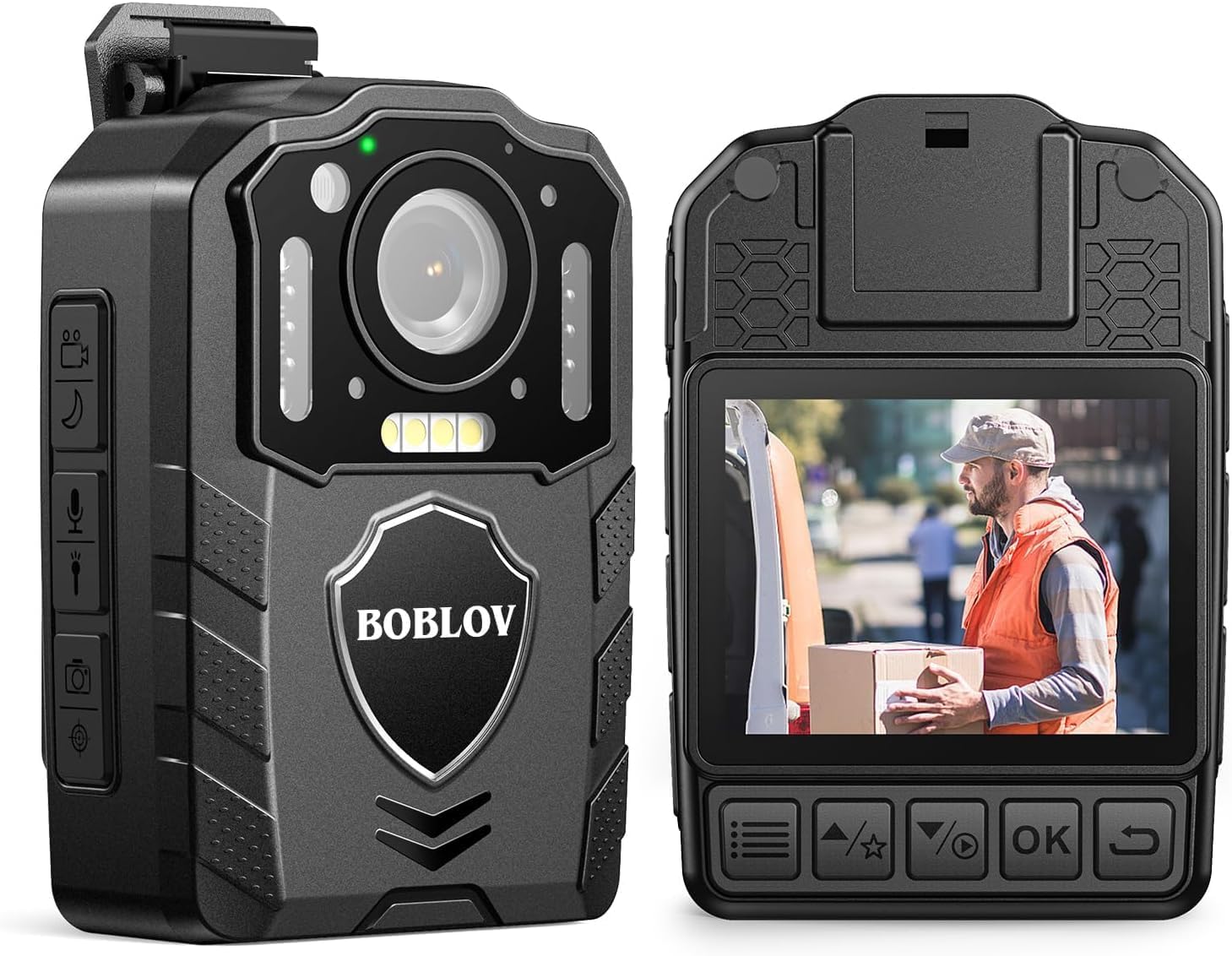
Obraz: przód i tył views of the BOBLOV KJ25 Body Camera, highlighting its design and interface.
Główne cechy:
- Rozdzielczość wideo: 1080P at 30fps for clear footage.
- Rozdzielczość zdjęcia: Up to 48 Megapixels.
- Czas pracy baterii: Built-in 3000mAh battery provides up to 13 hours of continuous recording.
- Widzenie nocne: Equipped with 10 IR lights for clear recording in low-light conditions.
- Pamięć zewnętrzna: Supports Micro SD cards from 64GB to 512GB (128GB card included).
- Nagrywanie w pętli: Automatycznie nadpisuje najstarsze filegdy pamięć masowa jest pełna.
- Pre/Post-recording: Captures events before and after the main recording trigger.
- Czerwony laser: For quick aiming and location identification.
- Białe światła wypełniające: Provides additional illumination when needed.
- Konstrukcja do noszenia: Easily attaches to clothing using included clips.
3. Konfiguracja
3.1 Ładowanie akumulatora
Before first use, fully charge the camera's internal 3000mAh battery. Connect the camera to the charging plug using the provided USB cable. The charging indicator light will show the charging status. A full charge typically takes approximately 5 hours.

Image: The BOBLOV KJ25 Body Camera being charged, illustrating its size and battery specifications.
3.2 Wkładanie karty Micro SD
The BOBLOV KJ25 supports Micro SD cards from 64GB to 512GB. A 128GB card is included. Locate the Micro SD card slot on the side of the camera. Gently insert the card with the gold contacts facing down until it clicks into place. To remove, push the card in slightly until it springs out.

Image: Inserting a Micro SD card into the camera's dedicated slot.
3.3 Mocowanie klipsów
The camera comes with a short 360° back clip and a long 180° shoulder clip. Choose the appropriate clip for your intended use. Attach the clip to the camera's mounting point and secure it. The clips allow for hands-free operation by attaching the camera to your uniform, belt, or backpack strap.

Image: The BOBLOV KJ25 Body Camera worn on a uniform, illustrating its hands-free application.
4. Instrukcja obsługi
4.1 Włączanie/wyłączanie zasilania
- Włączanie: Naciśnij i przytrzymaj przycisk zasilania, aż ekran się podświetli.
- Aby wyłączyć: Naciśnij i przytrzymaj przycisk zasilania, aż urządzenie się wyłączy.
4.2 Nagrywanie wideo
The camera records video in 1080P resolution at 30 frames per second, ensuring clear and detailed footage.
- Rozpocznij nagrywanie: In standby mode, press the Video Record button once to begin recording.
- Zatrzymaj nagrywanie: Press the Video Record button again to stop and save the current video file.

Image: Visual comparison highlighting the clear 1080P video quality of the camera.
Video: An official product video demonstrating the BOBLOV KJ25 Body Camera's 1080P video recording capabilities and features.
4.3 Robienie zdjęć
Capture high-resolution still images up to 48MP.
- Zrób zdjęcie: In standby mode, press the Photo button once to capture an image.

Image: The camera's 48MP photo and 1080P video resolution in a practical setting.
4.4 Widzenie nocne
The KJ25 features automatic and manual night vision capabilities, utilizing 10 IR lights to ensure clear recordings in dark environments.
- Activate Night Vision: Refer to the camera's on-screen menu or dedicated button for night vision activation. It can be set to automatic or manual mode.

Image: Demonstration of the camera's auto/manual night vision feature in a dark setting.
4.5 Nagrywanie w pętli
Po włączeniu funkcja nagrywania w pętli umożliwia kamerze ciągłe nagrywanie poprzez nadpisywanie najstarszych nagrań. files, gdy karta pamięci jest pełna. Dzięki temu masz pewność, że zawsze masz najnowszą wersję foo.tage.
- Setting Loop Recording: Access the camera's settings menu to adjust loop recording duration (e.g., 3, 5, 10, 15, 20, 30 minutes) or to enable/disable the feature. The default setting is typically 10 minutes.

Image: Explanation of loop recording functionality and customizable video segment lengths.
4.6 Red Laser Quick Locate
The integrated red laser assists in quickly identifying the camera's aiming point, useful for precise recording.
- Aktywuj laser: Refer to the camera's controls for the dedicated laser activation button.

Image: The red laser quick locate feature in use by an officer.
4.7 White Filling Lights
For additional illumination in dark areas, the camera includes white filling lights.
- Activate White Lights: Refer to the camera's controls for the dedicated white light activation button.

Image: The white filling lights feature providing illumination for a delivery person.
4.8 Odtwarzanie
Review recorded videos and photos directly on the camera's screen or by connecting it to a computer.
- Odtwarzanie na kamerze: Use the navigation buttons to access the playback menu and select files.
- Odtwarzanie na komputerze: Connect the camera to a computer using the USB cable. The camera will appear as a removable disk, allowing you to access and transfer files.
5. Konserwacja
5.1 Czyszczenie
- Do czyszczenia korpusu aparatu należy używać miękkiej, suchej ściereczki.
- Do czyszczenia soczewek należy używać specjalnej ściereczki i płynu do czyszczenia soczewek, aby uniknąć zarysowań.
- Nie używaj żrących chemikaliów ani ściernych środków czyszczących.
5.2 Przechowywanie
- Przechowuj kamerę w chłodnym, suchym miejscu, z dala od bezpośredniego światła słonecznego i ekstremalnych temperatur.
- Aby zachować sprawność akumulatora przed długotrwałym przechowywaniem, należy upewnić się, że jest on częściowo naładowany (około 50%).
6. Rozwiązywanie Problemów
Typowe problemy i rozwiązania:
- Kamera nie włącza się: Upewnij się, że bateria jest naładowana. Podłącz ją do źródła zasilania i spróbuj ponownie.
- Problemy z nagrywaniem (np. zawieszanie się, błędy): Check if the Micro SD card is properly inserted and has sufficient free space. Format the SD card if issues persist (this will erase all data).
- Słaba jakość wideo/zdjęć: Ensure the lens is clean and free from smudges. Check lighting conditions; use night vision or white lights if necessary.
- Komputer nie rozpoznaje kamery: Spróbuj użyć innego portu USB lub kabla. Upewnij się, że kamera jest włączona po podłączeniu.
7. Specyfikacje
| Funkcja | Szczegół |
|---|---|
| Marka | BOBLOV |
| Numer modelu | KJ25 |
| Rozdzielczość przechwytywania wideo | 1080p |
| Efektywna rozdzielczość obrazu nieruchomego | 48 MP |
| Technologia czujnika fotograficznego | CMOS |
| Typ pamięci flash | Micro SD (Supports 64GB to 512GB) |
| Rozmiar zainstalowanej pamięci Flash | 128 GB (w zestawie) |
| Format przechwytywania wideo | Ruch |
| Obsługiwany format audio | MP3 |
| Rozmiar ekranu | 2 cali |
| Technologia łączności | USB |
| Kolor | Czarny |
| Cechy | Night Vision, Red Laser, White Filling Lights, Loop Recording |
| Poziom wodoodporności | Nie jest wodoodporny |
| Stabilizacja obrazu | NIE |
| Współczynnik kształtu | Kompaktowy |
| Zgodność z systemem operacyjnym | Okna |
| Wymiary przedmiotu (gł. x szer. x wys.) | 2.1" gł. x 1.1" szer. x 2.9" wys. |
| Liczba baterii | 1 litowo-polimerowy (w zestawie) |
| Typ soczewki | Szeroki kąt |
| Typ fokusu | Ręczne ustawianie ostrości |
| Maksymalna rozdzielczość wyświetlacza | 240×320 pikseli |
| Tryby fotografowania | Noc |
| Proporcje obrazu | 16:9 |
| Obsługiwany format obrazu | Plik JPG |
| Typ kontroli ekspozycji | Podręcznik |
| Kompatybilne urządzenia | Smartphone (for data transfer) |
8. Gwarancja i pomoc techniczna
8.1 Informacje o gwarancji
Kamera noszona na ciele BOBLOV KJ25 jest wyposażona w: 2-letnia gwarancja od daty zakupu. Niniejsza gwarancja obejmuje wady produkcyjne i zapewnia niezawodne działanie przy normalnym użytkowaniu. Prosimy zachować dowód zakupu na wypadek roszczeń gwarancyjnych.
8.2 Obsługa klienta
For further assistance, technical support, or warranty inquiries, please refer to the official BOBLOV weblub skontaktuj się bezpośrednio z działem obsługi klienta. Więcej informacji i zasobów pomocy znajdziesz na stronie Sklep BOBLOV na Amazonie.