
COCOCAM ZY-C5
Instrukcja obsługi zewnętrznej kamery bezpieczeństwa zasilanej energią słoneczną COCOCAM 4G LTE
Model: ZY-C5
Wstęp
Thank you for choosing the COCOCAM 4G LTE Outdoor Solar Security Camera. This manual provides detailed instructions for the installation, operation, and maintenance of your camera. Please read this manual thoroughly before use to ensure proper functionality and to maximize the benefits of your device. This camera is designed for outdoor surveillance in areas without Wi-Fi access, utilizing 4G LTE connectivity and solar power for continuous operation.
Informacje dotyczące bezpieczeństwa
Aby zapobiec uszkodzeniu produktu lub obrażeniom ciała użytkownika i innych osób, należy przestrzegać następujących środków ostrożności:
- Upewnij się, że kamera jest solidnie zamontowana, aby zapobiec jej upadkowi.
- Nie należy wystawiać aparatu na działanie ekstremalnych temperatur wykraczających poza zakres jego działania (od -20°C do 50°C).
- Keep the camera and solar panel away from open flames or heat sources.
- Nie próbuj demontować ani modyfikować kamery. Spowoduje to unieważnienie gwarancji.
- Use only the provided accessories and power sources.
- Ensure all cables are properly connected and secured to prevent tripping hazards or damage.
- Zutylizuj baterie zgodnie z lokalnymi przepisami.
Zawartość opakowania
Sprawdź, czy w przesyłce znajdują się wszystkie elementy:
- 1x 4G Camera
- Panel słoneczny 1x
- Kabel ładowania USB 1x
- 1x Uchwyt na panel słoneczny
- 1x Screw Bag for Camera
- 1x Screw Bag for Solar Panel
- 1x Instrukcja obsługi
Produkt ponadview
The COCOCAM 4G LTE Outdoor Solar Security Camera (Model ZY-C5) is a wireless surveillance solution designed for remote locations without Wi-Fi. It features 2K resolution, pan-tilt-zoom (PTZ) capabilities, and is powered by a 10000mAh battery and a 6W solar panel. The camera supports 4G LTE connectivity via a SIM card for real-time monitoring and alerts.

Image: The COCOCAM 4G LTE Outdoor Solar Security Camera, featuring its main unit, solar panel, and a smartphone displaying the live camera feed.
Organizować coś
1. Instalacja karty SIM
The camera operates using a 4G LTE SIM card, making it ideal for areas without Wi-Fi. A SIM card is pre-installed for convenience.

Image: The COCOCAM 4G LTE camera installed outdoors, connected to its solar panel, highlighting its independence from Wi-Fi.
- Locate the SIM card slot on the camera, usually protected by a rubber cover.
- If replacing, gently press the existing SIM card to eject it.
- Insert the Nano-SIM (4FF) card into the slot, ensuring correct orientation.
- Close the rubber cover firmly to maintain IP66 water resistance.
2. Charging and Solar Panel Setup
The camera is powered by a 10000mAh rechargeable battery, continuously charged by the included 6W solar panel.

Image: The COCOCAM 4G LTE camera and its solar panel mounted on an exterior wall, illustrating the solar power connection for uninterrupted power.
- Connect the solar panel cable to the charging port on the camera.
- Position the solar panel in a location that receives maximum direct sunlight throughout the day for optimal charging efficiency.
- For initial setup or if the battery is low, you can also charge the camera using the provided USB cable.
3. Montaż kamery
The camera is designed for easy wall mounting.
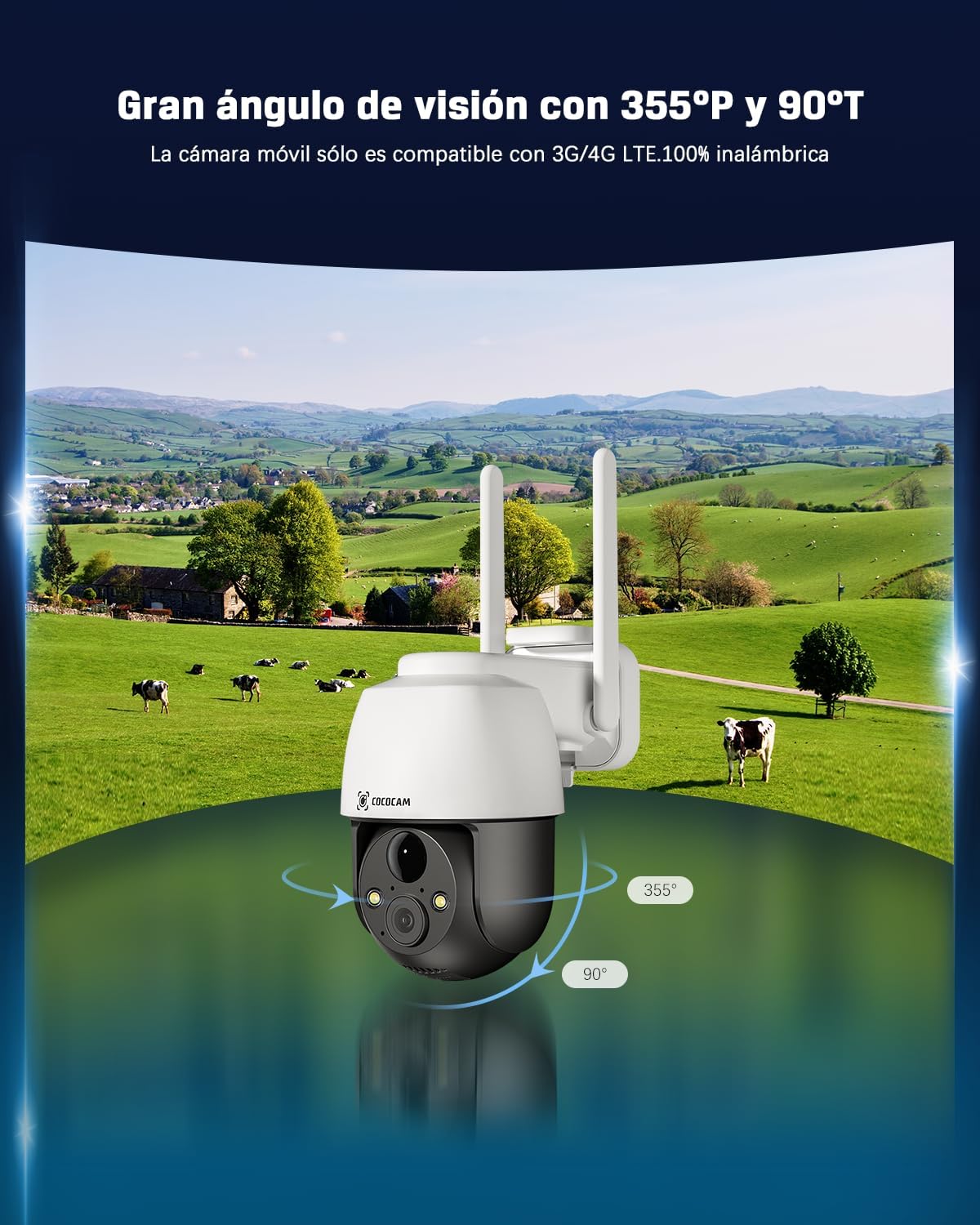
Image: The COCOCAM 4G LTE camera demonstrating its wide field of view with 355-degree horizontal pan and 90-degree vertical tilt.
- Choose a suitable mounting location that provides the desired viewing angle and is within reach of the solar panel cable.
- Use the provided screw bag to securely attach the camera bracket to the wall.
- Zamontuj kamerę w uchwycie montażowym.
- Dostosuj kąt kamery tak, aby objąć cały obszar nadzoru.
4. Instalacja aplikacji i początkowe połączenie
Control and monitor your camera remotely via the dedicated mobile application.
- Download the CloudEdge app from your smartphone's app store (Android/iOS).
- Zarejestruj konto i zaloguj się.
- Follow the in-app instructions to add your COCOCAM camera. This typically involves scanning a QR code on the camera or entering its device ID.
- Po nawiązaniu połączenia będziesz mieć dostęp do transmisji na żywo i możliwość konfiguracji ustawień.
Obsługa aparatu
1. Na żywo View i sterowanie PTZ
Access real-time video and control the camera's movement.
- Otwórz aplikację CloudEdge i wybierz kamerę, którą chcesz view kanał na żywo.
- Use the on-screen controls to pan (355° horizontal) and tilt (90° vertical) the camera, providing comprehensive coverage of your area.
2. Dźwięk dwukierunkowy
Komunikuj się z gośćmi i odstraszaj intruzów, korzystając z wbudowanego mikrofonu i głośnika.
- Kliknij ikonę mikrofonu na żywo view mówić przez kamerę.
- Głośnik kamery przekaże Twój głos, a Ty będziesz mógł słyszeć dźwięk z kamery.
3. Wizja nocna
The camera provides clear visibility even in low-light conditions.

Image: Comparison of day and 2K full-color night vision captured by the COCOCAM camera, demonstrating its clarity in various lighting conditions.
- Kamera automatycznie przełącza się na tryb noktowizyjny przy słabym oświetleniu.
- Enjoy full-color night vision up to 25 meters with white light, and up to 30 meters with infrared.
4. Smart Detection and AI Analysis
Receive accurate alerts with advanced detection features.

Image: The COCOCAM 4G LTE camera demonstrating its AI-powered human detection, distinguishing people from other movements and sending precise alerts.
- The PIR human detection technology reduces false alarms by focusing on human shapes.
- Customize alarm areas and utilize the smart light and sound alarm system for enhanced security.
5. Opcje przechowywania
Nagrane footage can be stored locally or in the cloud.
- Przechowywanie kart TF: The camera supports local storage on a TF (microSD) card up to 128GB (card not included). Ensure the card is formatted before use.
- Przechowywanie w chmurze: Recorded 6-second fragments can be stored for 7 days of loop coverage (compatible when using the camera's built-in SIM card). COCOCAM offers unlimited data packages and a 7-day free trial for cloud storage.
6. Integracja z asystentem głosowym
Control your camera with voice commands.
- The COCOCAM 4G security camera works with Alexa and Google Assistant.
- Link your camera to your smart home system for convenient voice control and access to live streams.
Konserwacja
- Czyszczenie: Regularnie czyść obiektyw aparatu i panel słoneczny miękką, miękką szmatką.amp ściereczką, aby zapewnić wyraźne obrazy i wydajne ładowanie. Nie używaj silnych środków chemicznych.
- Pielęgnacja baterii: While the solar panel provides continuous charging, ensure the camera receives adequate sunlight. If the camera is stored for extended periods, fully charge the battery before storage and recharge every few months to maintain battery health.
- Aktualizacje oprogramowania: Check the CloudEdge app periodically for firmware updates to ensure optimal performance and access to new features.
Rozwiązywanie problemów
| Problem | Możliwa przyczyna | Rozwiązanie |
|---|---|---|
| Kamera nie łączy się z siecią 4G. | No SIM card, incorrect SIM installation, no 4G coverage, SIM PIN active. | Ensure SIM card is correctly inserted and activated. Check 4G signal strength in the area. Disable SIM PIN on another device before inserting. |
| Akumulator się nie ładuje. | Solar panel not receiving enough sunlight, panel dirty, cable disconnected. | Relocate solar panel to a sunnier spot. Clean the solar panel surface. Check cable connection between panel and camera. |
| Niska jakość obrazu. | Lens dirty, low light conditions, network issues. | Clean the camera lens. Ensure adequate lighting for optimal image quality. Check 4G signal strength. |
| Częste fałszywe alarmy. | Motion detection sensitivity too high, non-human triggers. | Adjust motion detection sensitivity in the app. Utilize human detection and customize alarm zones. |
| Dwukierunkowa transmisja dźwięku nie działa. | Zablokowany mikrofon/głośnik, uprawnienia aplikacji, ustawienia głośności. | Ensure nothing is obstructing the microphone or speaker. Check app permissions for audio access. Adjust volume settings in the app. |
Dane techniczne
| Funkcja | Specyfikacja |
|---|---|
| Model | ZY-C5 |
| Rozdzielczość przechwytywania wideo | 2K (2304*1296) |
| Technologia łączności | Bezprzewodowa (4G LTE) |
| Zakres obrotu/pochylenia | Poziomo 355°, Pionowo 90° |
| Zakres noktowizora | Up to 25 meters (color), 30 meters (infrared) |
| Źródło zasilania | Solar powered, Battery powered (10000mAh) |
| Panel słoneczny Wattage | 6W |
| Poziom wodoodporności | IP66 |
| Temperatura pracy | -20°C do 50°C |
| Pojemność magazynowa | TF card up to 128GB (not included) |
| Kompatybilne urządzenia | Smartphone, Tablet (Android/iOS) |
| Typ kontrolera | Amazon Alexa, Android, Google Assistant, CloudEdge, iPhone |
| Tworzywo | Akrylonitryl-butadien-styren (ABS) |
| Wymiary produktu | 0.4 x 0.4 x 4 cm; 490 g |
Gwarancja i obsługa klienta
COCOCAM is committed to providing high-quality products and excellent customer service. Your product is covered by a standard warranty. For specific warranty details, please refer to the documentation included with your purchase or contact COCOCAM customer support.
If you encounter any issues or have questions regarding your COCOCAM 4G LTE Outdoor Solar Security Camera, please do not hesitate to contact our support team. We offer professional technical support to assist you.
Visit the official COCOCAM store for more information and support: COCOCAM Store
Ask a question about this manual
Ask about setup, troubleshooting, compatibility, parts, safety, or missing instructions. Manuals+ will review the question and use this page’s manual context to help answer it.