
1. Wprowadzenie
This manual provides detailed instructions for the installation, operation, and maintenance of your GESKS ICSEE WiFi Camera Security 6MP Dual Lens Wireless PTZ Camera. This advanced security camera is designed for outdoor use, offering comprehensive surveillance with its dual-lens system, pan-tilt-zoom capabilities, and intelligent features.
Przed użyciem produktu należy dokładnie przeczytać tę instrukcję, aby zapewnić jego prawidłową konfigurację i optymalną wydajność. Zachowaj instrukcję do wykorzystania w przyszłości.
2. Funkcje produktu
- Upgraded Dual Lens & Dual Screen & 360° View: Features one fixed lens and one Pan-Tilt lens, providing a 360-degree field of view with two integrated screens for comprehensive monitoring.
- 6MP HD Image & Full-Color Night Vision: Delivers 6MP (3MP+3MP) full HD clearer images and video. Equipped with white and infrared lamps, offering three night vision modes: Full-color, Infrared, and Smart Vision, with a night vision distance up to 65ft.
- Human Detection & Real-time Alarm: Incorporates human detection with automatic tracking of movement trajectories. Triggers real-time alarms and sends notifications to the iCSee app upon detection of potential threats.
- Two-Way Audio & Multi-User Sharing: Built-in microphone and speaker enable two-way communication. Allows sharing access with multiple users for collaborative monitoring.
- SD Card/Cloud Storage & Alexa Compatibility: Supports 24/7 recording with local storage via micro SD card (up to 128GB) or cloud server. Compatible with Amazon Alexa for voice control.
- Elastyczna łączność: Supports both wireless WiFi (2.4GHz) and wired Ethernet connections for enhanced network stability.
3. Co znajduje się w pudełku
Po otwarciu opakowania należy sprawdzić, czy wszystkie poniższe elementy znajdują się w opakowaniu i są w dobrym stanie:
- CCTV Camera (Dual Lens White 6MP)
- Zasilacz
- Instrukcja obsługi
- Śruby montażowe
- Uchwyt montażowy

Rysunek 3.1: Dołączone akcesoria produktu
This image displays the contents of the product packaging, including the camera unit, power adapter, mounting screws, and the user manual.
4. Przewodnik konfiguracji
4.1 Komponenty kameryview
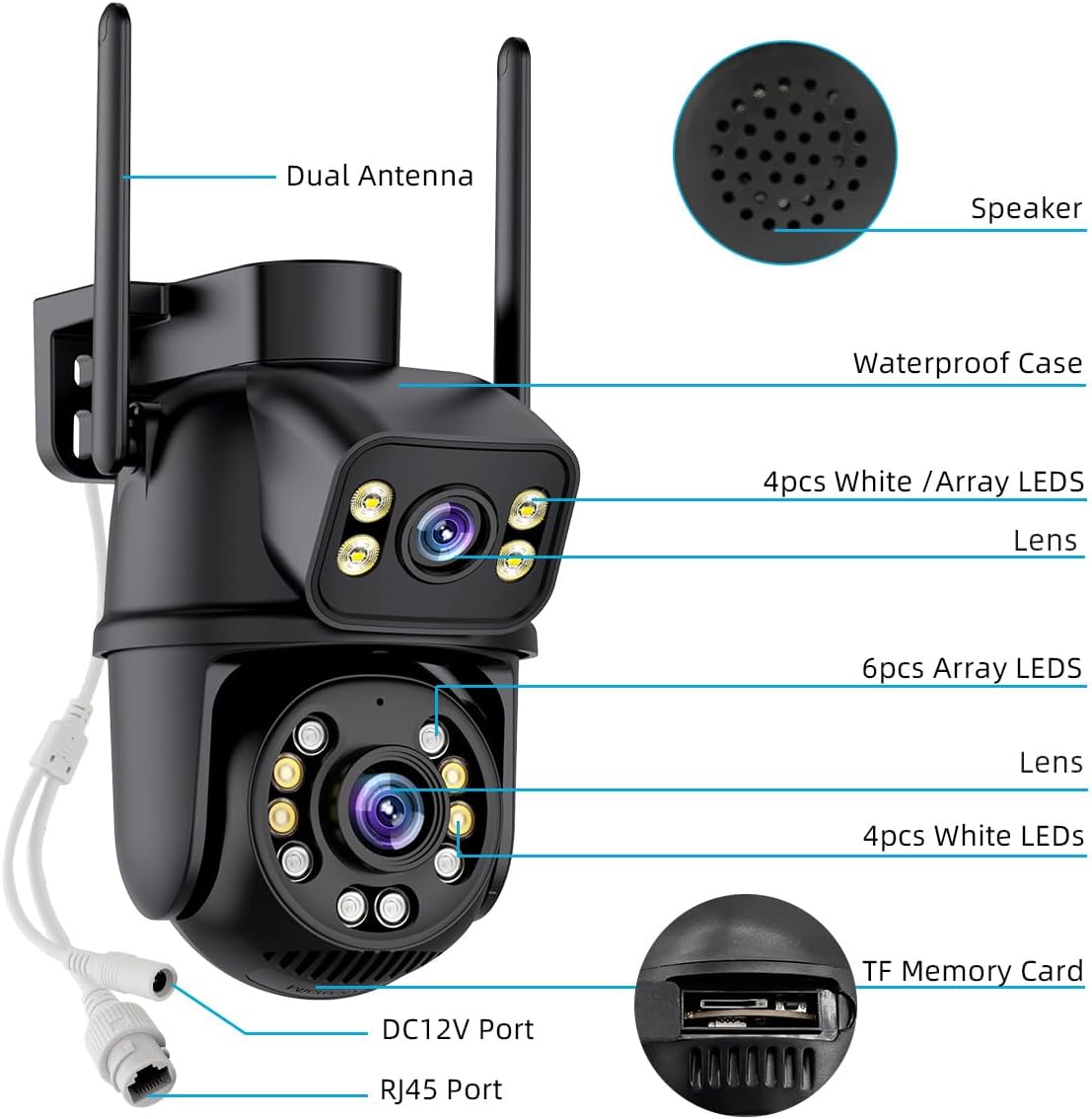
Rysunek 4.1: Schemat komponentów kamery
This diagram labels key components of the camera, such as the dual antennas for wireless connectivity, the speaker for two-way audio, the waterproof casing, the dual lenses, various LED lights for night vision, the DC12V power port, the RJ45 Ethernet port, and the TF (Micro SD) memory card slot.
4.2 Włączanie kamery
- Connect the provided power adaptor to the DC12V port on the camera.
- Plug the power adaptor into a standard electrical outlet.
- Wait for the camera to power on and initiate its self-test sequence.
4.3 Połączenie sieciowe
Kamera obsługuje połączenia Wi-Fi i przewodowe Ethernet.
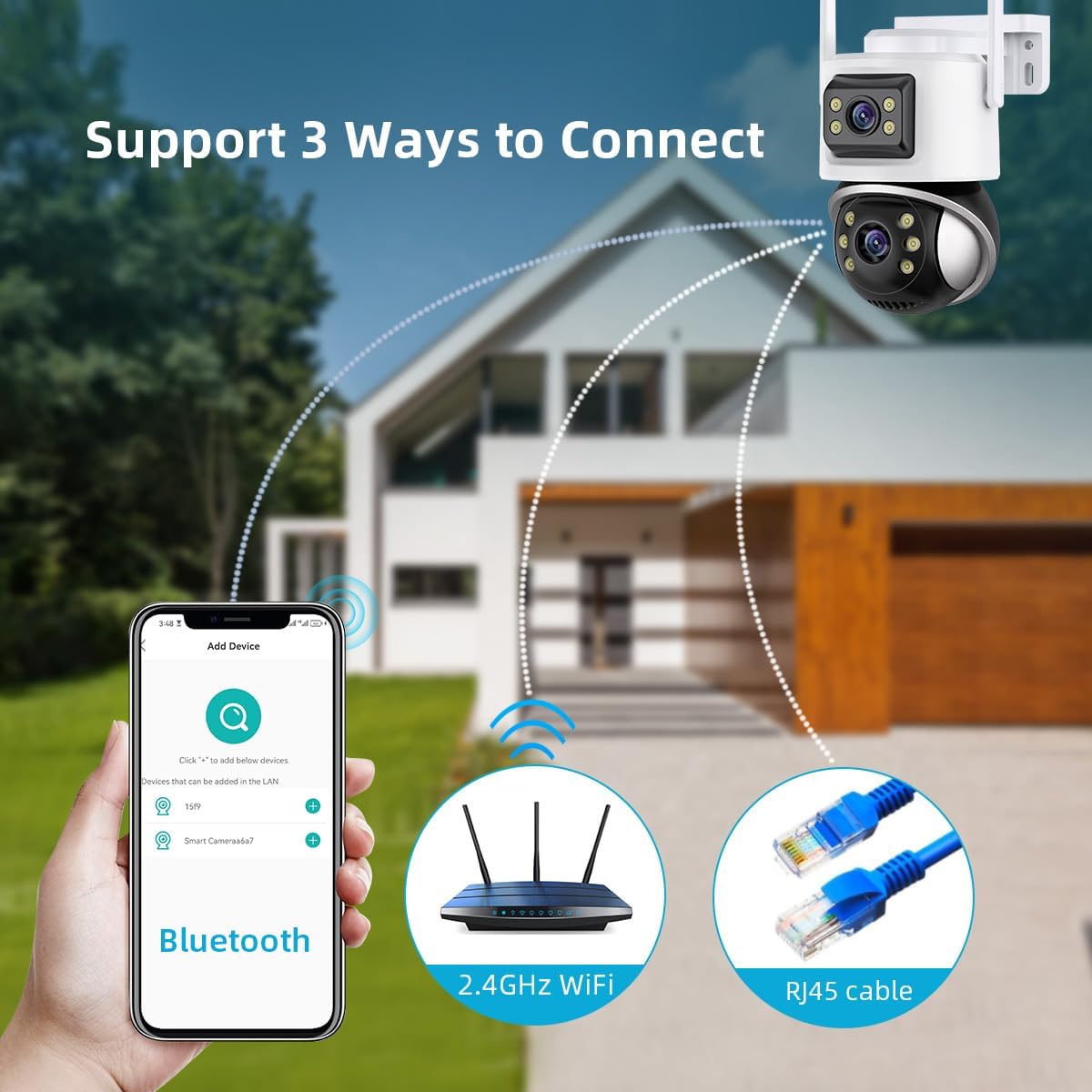
Rysunek 4.2: Metody połączenia
This image illustrates the three primary methods for connecting the camera to your network: initial setup via Bluetooth, wireless connection using 2.4GHz WiFi, and a stable wired connection via an RJ45 Ethernet cable.
Wi-Fi Connection (Recommended)
- Pobierz iCSee aplikację ze sklepu z aplikacjami na Twoim smartfonie (iOS App Store lub Google Play Store).
- Zarejestruj konto i zaloguj się.
- Kliknij ikonę „+” w aplikacji, aby dodać nowe urządzenie.
- Select 'WiFi Camera' and follow the on-screen prompts to connect the camera to your 2.4GHz Wi-Fi network. Ensure your phone is connected to the same 2.4GHz Wi-Fi network during setup.
- The app may use Bluetooth for initial device discovery.
Przewodowe połączenie Ethernet
- Connect an Ethernet cable from your router to the RJ45 port on the camera.
- The camera will automatically attempt to obtain an IP address and connect to the network.
- Open the iCSee app, tap the '+' icon, and select 'Add device in LAN' to discover the camera.
4.4 Montaż kamery
The camera is designed for ceiling mount installation.
- Wybierz odpowiednią lokalizację na zewnątrz, aby zapewnić optymalny zasięg nadzoru.
- Use the mounting bracket as a template to mark the drill holes on the desired surface.
- W razie potrzeby wywierć otwory montażowe i włóż załączone kołki rozporowe.
- Przymocuj uchwyt montażowy do powierzchni za pomocą dołączonych śrub.
- Zamontuj kamerę stabilnie w uchwycie montażowym.
5. Instrukcja obsługi
5.1 Na żywo View i sterowanie PTZ
Once connected, open the iCSee app to access the live view. You can control the camera's pan (horizontal rotation), tilt (vertical movement), and digital zoom directly from the app interface.
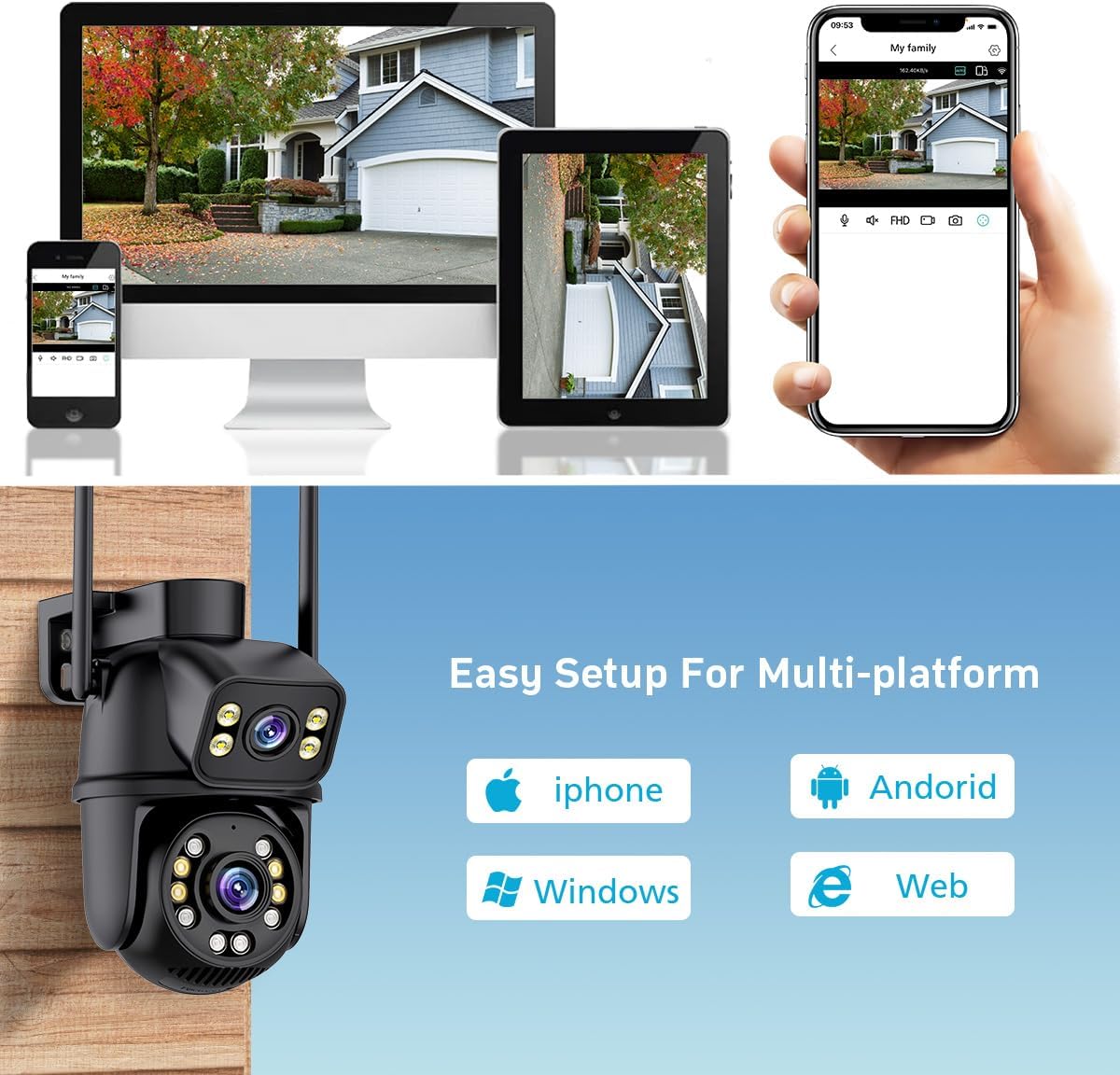
Figure 5.1: Multi-platform Live View
This image demonstrates the camera's compatibility with multiple platforms, including iPhone, Android, Windows, and web browsers, allowing users to view the live feed from various devices.

Rysunek 5.2: Funkcjonalność zoomu cyfrowego
This image illustrates the camera's 5.0X digital zoom capability, highlighting how users can zoom in on specific details within the camera's field of view by pinching the screen on their mobile device.
5.2 Tryby widzenia nocnego
Kamera oferuje trzy tryby widzenia nocnego:
- Pełnokolorowa wizja nocna: Utilizes white lamps to provide full-color images in low-light conditions.
- Nocna Nocna Wizja: Wykorzystuje diody LED podczerwone, pozwalające uzyskać wyraźne czarno-białe obrazy w całkowitej ciemności.
- Smart Vision: Automatycznie przełącza się między podczerwienią a pełnym kolorem na podstawie wykrycia ruchu lub światła otoczenia.
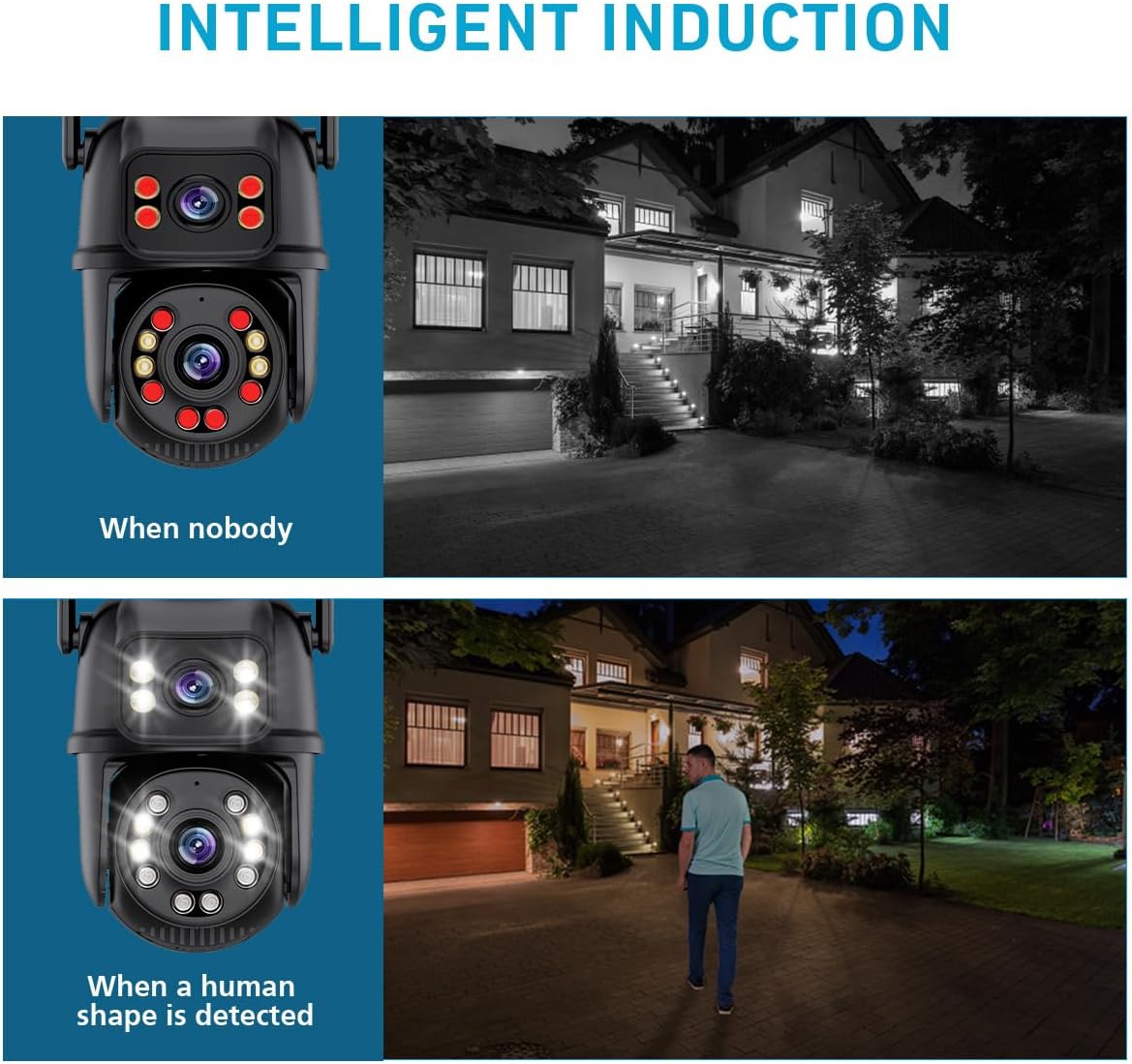
Figure 5.3: Intelligent Induction Night Vision
This image demonstrates the intelligent night vision feature, showing how the camera operates in infrared mode when no one is present and automatically switches to full-color mode with activated white lights upon human detection.

Rysunek 5.4: Inteligentna, pełnokolorowa wizja nocna
This image visually compares traditional infrared night vision (monochrome) with the camera's intelligent full-color night vision, showcasing the enhanced detail and color provided by the latter.
5.3 Dźwięk dwukierunkowy
Use the two-way audio feature to communicate with visitors or deter intruders. Tap the microphone icon in the app to speak, and the speaker icon to listen.

Figure 5.5: Smoother Two-Way Audio
This image demonstrates the two-way audio functionality, showing how a user can communicate with someone at their doorstep through the camera's built-in microphone and speaker.
5.4 Human Detection and Tracking
Enable human detection in the app settings. When a person is detected, the camera will automatically track their movement within its field of view and send real-time alerts to your smartphone.

Rysunek 5.6: Automatyczne śledzenie
This image illustrates the camera's automatic tracking feature, showing how it follows the movement of individuals within its surveillance area.

Figure 5.7: Floodlight & Alarm Siren
This image demonstrates the camera's floodlight and alarm siren capabilities, which can be triggered upon detection of moving objects in darkness, providing both visual deterrence and audible alerts.
5.5 Rejestrowanie i przechowywanie
Kamera obsługuje dwie metody zapisu umożliwiające ciągłe nagrywanie 24 godziny na dobę, 7 dni w tygodniu:
- Karta micro sd: Insert a micro SD card (up to 128GB, not included) into the camera's TF memory card slot. Recordings will be stored locally.
- Przechowywanie w chmurze: Subscribe to the cloud storage service via the iCSee app for secure, remote storage of your recordings.

Figure 5.8: Two Storage Methods
This image visually represents the two available storage options for recorded footage: secure cloud storage and local storage using a micro SD card.
5.6 Sterowanie głosowe Alexa
Integrate your camera with Amazon Alexa for convenient voice control. Follow the instructions in the iCSee app to link your camera to your Alexa account. You can then use voice commands to view obraz z kamery na kompatybilnych urządzeniach obsługujących Alexę.
6. Konserwacja
- Czyszczenie: Regularnie czyść obiektyw i obudowę aparatu miękką, miękką szmatką.amp Do usuwania kurzu i brudu należy używać ściereczki. Nie należy używać silnych środków chemicznych ani materiałów ściernych.
- Aktualizacje oprogramowania układowego: Regularnie sprawdzaj aplikację iCSee pod kątem aktualizacji oprogramowania sprzętowego. Aktualizowanie oprogramowania sprzętowego aparatu zapewnia optymalną wydajność, bezpieczeństwo i dostęp do nowych funkcji.
- Zarządzanie kartami SD: W przypadku korzystania z karty SD należy okresowo ją aktualizować.view i wykonaj kopię zapasową ważnych informacjitage. Rozważ sformatowanie karty SD co kilka miesięcy, aby zachować wydajność.
- Wodoodporność: Ensure all cable connections and covers are securely fastened to maintain the camera's waterproof rating, especially after installation or maintenance.
7. Rozwiązywanie Problemów
| Problem | Możliwa przyczyna | Rozwiązanie |
|---|---|---|
| Camera is offline/cannot connect to Wi-Fi. | Incorrect Wi-Fi password; Camera too far from router; Router is 5GHz only; Network interference. | Verify Wi-Fi password. Move camera closer to router or use a Wi-Fi extender. Ensure router supports 2.4GHz Wi-Fi. Reduce interference from other devices. Try wired Ethernet connection. |
| Poor image quality/blurry video. | Protective film on lens; Dirty lens; Insufficient lighting; Network bandwidth issues. | Remove any protective film. Clean the lens gently. Ensure adequate lighting or enable appropriate night vision mode. Check network speed. |
| Alerty o wykryciu ruchu nie są odbierane. | Detection sensitivity too low; App notifications disabled; Camera not connected to internet. | Adjust detection sensitivity in app settings. Enable notifications for the iCSee app on your smartphone. Verify camera's internet connection. |
| Dwukierunkowa transmisja dźwięku nie działa. | Mikrofon/głośnik wyciszony w aplikacji; Głośność zbyt niska; Opóźnienie sieci. | Check audio settings in the iCSee app. Increase volume. Ensure stable network connection. |
| Karta SD nie nagrywa. | Karta SD jest pełna lub uszkodzona; Nieprawidłowy format; Karta SD nie została prawidłowo włożona. | Check SD card status in app. Format the SD card via the app. Reinsert the SD card. Ensure it is a compatible type (up to 128GB). |
8. Specyfikacje
| Funkcja | Specyfikacja |
|---|---|
| Numer modelu | IK-P11-Q6 |
| Zastosowanie wewnątrz/na zewnątrz | Plenerowy |
| Rozdzielczość przechwytywania wideo | 6MP (3MP+3MP), 1440p |
| Efektywna rozdzielczość obrazu nieruchomego | 8 MP, 6 MP |
| Technologia łączności | Bezprzewodowy (Wi-Fi), przewodowy (Ethernet) |
| Protokół łączności | Wi-Fi, Ethernet, ONVIF |
| Źródło zasilania | Przewodowy elektryczny (prąd stały 12 V) |
| Typ kontrolera | APP (iCSee), Amazon Alexa |
| Typ montażu | Montaż sufitowy |
| Zakres noktowizora | 65 stóp |
| Poziom wodoodporności | Wodoodporny (IP66) |
| Typ pamięci flash | Mikro SD |
| Maksymalny obsługiwany rozmiar pamięci Flash | 128 GB |
| Kodowanie wideo | H.265 |
| Tryb pracy | Tylko ruch (wykrywanie ludzi) |
| Cechy specjalne | Local Recording, 2-Way Audio, Night Vision, Built-In Light, Motion Sensor |
| Wymiary produktu | 4.87 x 4.87 x 7.8 cala |
| Waga przedmiotu | 1.3 funta |
| Tworzywo | Akrylonitryl-butadien-styren (ABS) |
9. Gwarancja i wsparcie
For warranty information and technical support, please refer to the contact details provided on the product packaging or the official GESKS webZachowaj paragon jako dowód zakupu na wypadek reklamacji.
Jeśli napotkasz jakiekolwiek problemy, które nie zostały omówione w tym podręczniku, skontaktuj się z obsługą klienta, aby uzyskać pomoc.