
Jebao EP6500
Jebao Jecob EP6500 DC Aquarium Return Pump Instruction Manual
Modele: EP-6500
Wstęp
The Jebao Jecob EP6500 DC Aquarium Return Pump is designed for efficient and quiet water circulation in various aquatic environments. Featuring an LCD controller for adjustable speed and multiple operational modes, this pump is suitable for aquariums, ponds, fountains, sumps, and hydroponic systems. Its robust construction with a wear-resistant ceramic shaft ensures long-lasting performance in both fresh and saltwater applications.
This manual provides essential information for the safe and effective installation, operation, and maintenance of your EP6500 pump.
Główne cechy
- Manual Control System: Intuitive LCD display for easy operation.
- Wszechstronne zastosowanie: Supports bottom blowing, side draught, and dry use configurations.
- Technologia fali sinusoidalnej: Ensures ultra-quiet operation for minimal disturbance.
- Ochrona zaawansowana: IC electronic detection for dry run and locked rotor protection, with automatic power-off upon no water detection.
- Trwała konstrukcja: Wyposażony w odporny na zużycie ceramiczny wał zapewniający dłuższą żywotność.
- Szerokie zastosowanie: Suitable for both salt water and fresh water environments.
Specyfikacje
| Atrybut | Szczegół |
|---|---|
| Marka | Jebao |
| Numer modelu | EP6500 |
| Kolor | Czarny |
| Tworzywo | Plastik, Stal nierdzewna |
| Wymiary produktu (dł. x szer. x wys.) | 20 dł. x 13.4 szer. x 12.7 wys. centymetrów |
| Źródło zasilania | Prąd stały (24 V) |
| Maksymalna szybkość przepływu | 1717 Gallons Per Minute (6500 LPH) |
| Maksymalna wysokość podnoszenia | 14.7 stóp |
Zawartość opakowania
Sprawdź, czy wszystkie komponenty są obecne i w dobrym stanie:
- Jebao Jecob EP6500 DC Aquarium Return Pump
- Kontroler LCD
- Zasilacz
- Various Hose Adapters (for different hose diameters)
- Intake Screens (for debris filtration)
- Instrukcja obsługi

Image: All components of the Jebao Jecob EP6500 DC Aquarium Return Pump package, including the pump, controller, power supply, various hose adapters, and intake screens.
Konfiguracja i instalacja
1. Podłączanie adapterów węża
- Select the appropriate hose adapter for your tubing diameter.
- Thread the chosen adapter onto the pump's outlet. Ensure a secure, watertight connection.
- Connect your water tubing to the adapter. Use a hose clamp (not included) for extra security if needed.

Image: Close-up of the pump's water outlet, showing the threaded connection for hose adapters.

Obraz: Bok view of the pump's water outlet, illustrating the secure attachment of a hose adapter.
2. Attaching Intake Screens
The pump comes with different intake screens to prevent debris from entering the impeller. Choose the screen suitable for your application (e.g., fine mesh for small debris, wider slots for larger debris).
- Attach the desired intake screen to the pump's inlet. Ensure it clicks securely into place.

Image: The Jebao Jecob EP6500 pump with a standard intake screen, designed for general debris filtration.
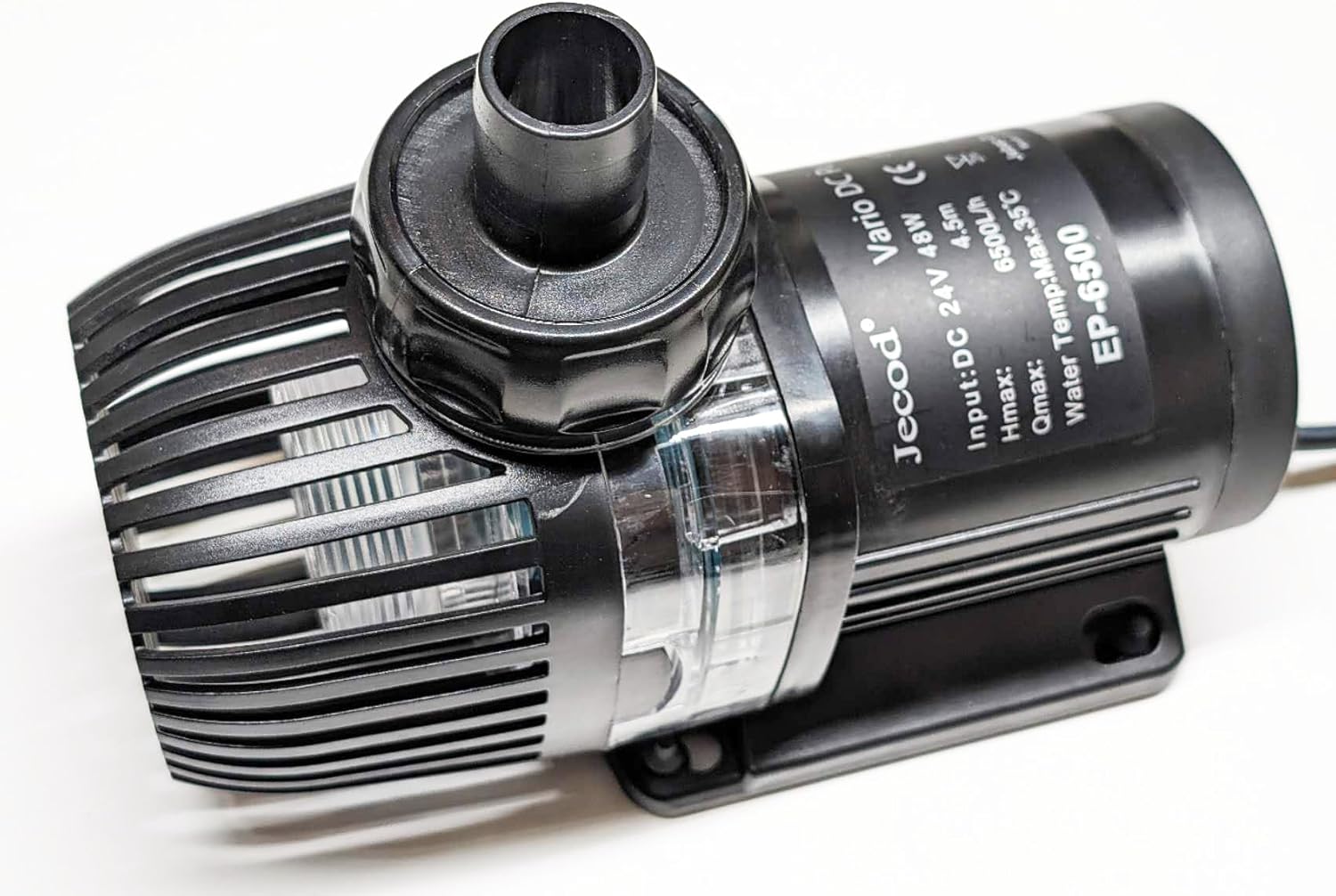
Image: The Jebao Jecob EP6500 pump featuring a side draught intake screen, suitable for low water level applications.
3 Podłączanie kontrolera i zasilania
- Connect the pump cable to the LCD controller.
- Podłącz zasilacz do kontrolera LCD.
- Plug the power adapter into a properly grounded electrical outlet.
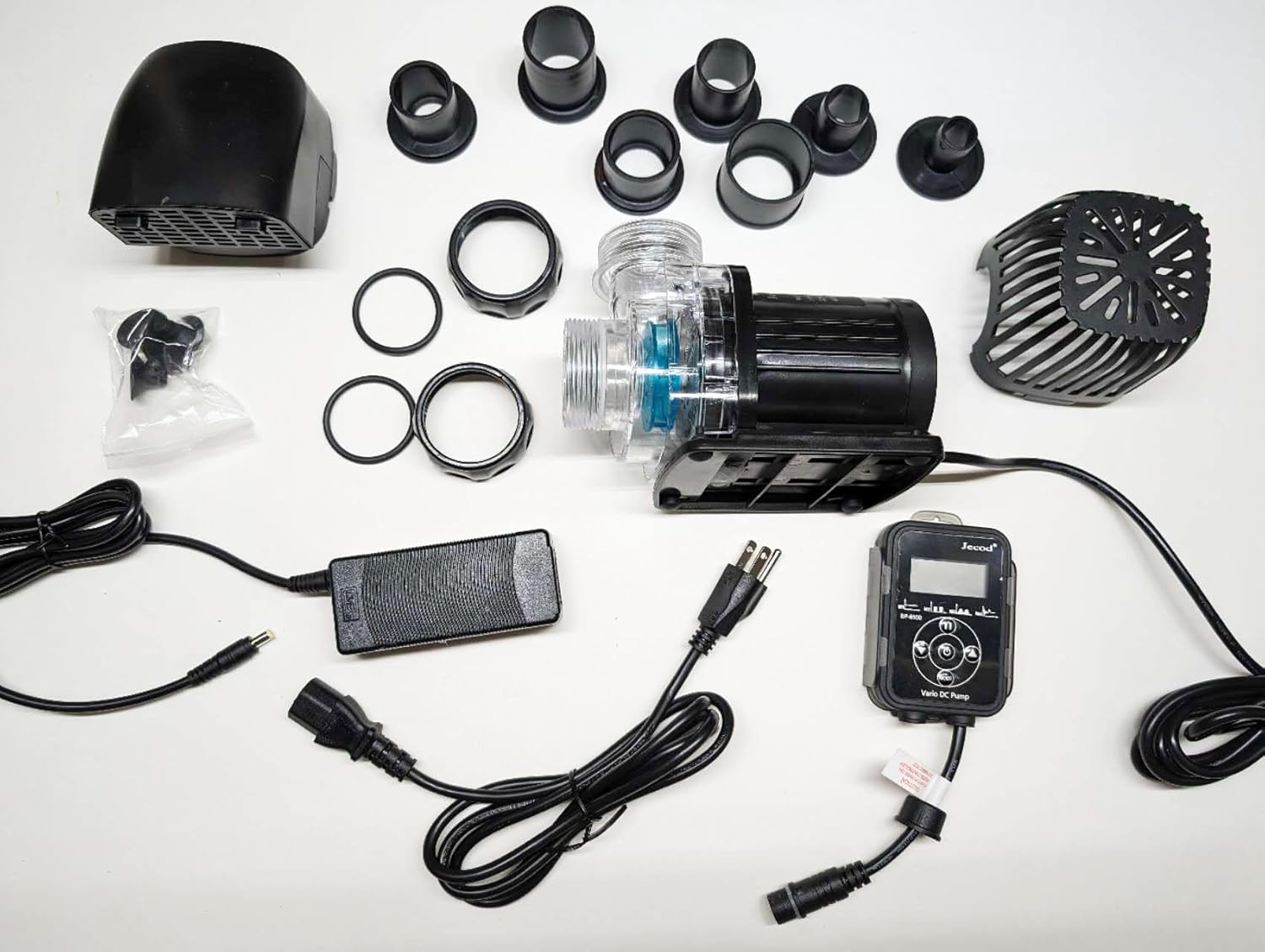
Image: The Jebao Jecob EP6500 pump and its LCD controller, showing the connection points.
4. Umieszczenie
- For submersible use, ensure the pump is fully submerged in water before plugging it in to prevent dry running.
- For dry use (external installation), ensure the pump is primed with water before starting.
- Position the pump on a stable, flat surface.
Video: Demonstrates the installation and operation of a similar DC aquarium pump, including speed adjustment, feed mode, and wave maker mode. This video is from JEREPOND, a seller of similar products.
Video: Illustrates the quiet operation, low water level use, flow rate adjustment, feed mode, memory function, and installation of a similar DC return pump. This video is from hygger, a seller of similar products.
Video: Shows the components, connections, and operation of a similar AQQA return pump, including assembly steps.
Instrukcja obsługi
LCD Controller Functions
The LCD controller allows for precise control over the pump's operation:
- Przycisk zasilania: Włącza/wyłącza pompę.
- Przycisk TRYB: Cycles through different operating modes (Constant Flow, Feed Mode, Wave Maker Mode).
- Przyciski +/-: Adjust the flow rate or duration depending on the selected mode.
- Wyświetlacz LCD: Shows current mode, flow rate, or timer settings.
Tryby pracy
- Tryb stałego przepływu: Adjust the flow rate from minimum to maximum using the +/- buttons. The display will show the current power level.
- Tryb karmienia: Activates a temporary pause in pump operation for feeding fish or other aquatic life. Press the MODE button to enter Feed Mode, and use +/- to set the duration of the pause (e.g., 10, 20, or 30 minutes). The pump will resume normal operation automatically after the set time.
- Wave Maker Mode: Creates oscillating water flow to simulate natural wave patterns. Use the +/- buttons to adjust the intensity or frequency of the waves.
Video: Demonstrates the constant flow, wave maker, feed mode, dry run protection, and memory function of a similar AQQA multifunctional return pump.
Video: Shows the connections, constant flow, wave maker, feed mode, dry run protection, and memory function of a similar AQQA aquarium water pump with controller.
Konserwacja
Regularna konserwacja zapewnia optymalną wydajność i długą żywotność pompy.
1. Cleaning the Impeller and Intake Screens
- Odłącz pompę od źródła zasilania.
- Remove the intake screen by gently twisting or unclipping it.
- Carefully remove the impeller cover and then the impeller itself.
- Clean the impeller and its housing with a soft brush and fresh water to remove any debris or mineral buildup.
- Clean the intake screen.
- Reassemble all parts in reverse order, ensuring they are securely fitted.
2. Preventing Dry Running
The pump features IC electronic detection to prevent dry running. However, always ensure the pump is fully submerged or properly primed before operation to avoid unnecessary wear and tear.
Rozwiązywanie problemów
| Problem | Możliwa przyczyna | Rozwiązanie |
|---|---|---|
| Pompa nie działa | No power, clogged impeller, dry run protection activated. | Check power connection, clean impeller, ensure pump is submerged/primed. |
| Zmniejszone natężenie przepływu | Clogged intake screen/impeller, kinked tubing, incorrect flow setting. | Clean intake/impeller, check tubing for obstructions, adjust flow rate on controller. |
| Niezwykły hałas | Debris in impeller, worn impeller, pump not stable. | Clean impeller, inspect for damage, ensure stable placement. |
| Komunikat o błędzie na wyświetlaczu LCD | Specific error code (e.g., dry run, locked rotor). | Refer to the controller's specific error code guide in the full manual for detailed solutions. Generally, check for obstructions or water levels. |
Gwarancja i wsparcie
For warranty information, technical support, or replacement parts, please refer to the contact information provided with your purchase or visit the official Jebao webZachowaj dowód zakupu na wypadek roszczeń gwarancyjnych.