
1. Wprowadzenie
The Fuers WLAN Water Leak Detector (Model WFSJ01) is designed to provide real-time monitoring for water leaks and drips in your home or office. This device connects to your 2.4 GHz Wi-Fi network and sends instant notifications to your smartphone via the Tuya app, allowing for prompt action to prevent potential water damage. Its robust design and dual detection capabilities make it an essential tool for safeguarding your property.
2. Informacje dotyczące bezpieczeństwa
- Nie wystawiaj urządzenia na działanie ekstremalnych temperatur ani bezpośredniego światła słonecznego.
- Trzymaj urządzenie z dala od dzieci i zwierząt domowych.
- Use only the specified battery type (2 x AAA batteries).
- Podczas instalacji należy zwrócić uwagę na prawidłową polaryzację baterii.
- Zużyte baterie należy utylizować zgodnie z lokalnymi przepisami.
- Nie próbuj samodzielnie demontować ani naprawiać urządzenia. W razie potrzeby skontaktuj się z pomocą techniczną.
3. Zawartość opakowania
- 1 x Fuers WLAN Water Leak Detector (Model WFSJ01)
- 2 baterie AAA
- 1 x Instrukcja obsługi
4. Koniec produktuview
The Fuers WLAN Water Leak Detector features a compact design with advanced sensors for reliable water detection. It operates wirelessly and integrates with the Tuya Smart Life app for remote monitoring and alerts.
Główne cechy:
- Smart Monitoring & Remote Notifications: Connects via 2.4 GHz Wi-Fi to send real-time alerts to your smartphone.
- Dual Detection Modes: Equipped with rear sensors for leak detection and a front probe for small drip detection.
- 100dB Local Alarm: Emits a loud audible alarm upon water detection.
- Stopień wodoodporności IP67: Designed for long-term use in humid environments.
- Trwały materiał ABS: High-quality construction ensures longevity and resistance to breakage.
- Zasilany bateryjnie: Operates on 2 AAA batteries (included) for flexible placement and continuous protection during power outagt.j.
- Ostrzeżenie o niskim poziomie naładowania baterii: Sends app notifications when batteries need replacement.
Składniki:
The device consists of a main body housing the electronics, battery compartment, and an audible alarm. It features two types of sensitive probes:
- Tylne czujniki: For detecting widespread water leaks.
- Front Probe: Specifically designed for detecting small drips.

Image: The Fuers Water Leak Detector with its battery compartment open, revealing two AAA batteries and illustrating the front and rear sensitive probes.
5. Konfiguracja
5.1 Instalacja baterii
- Gently twist the cover of the device counter-clockwise to open it.
- Confirm the positive (+) and negative (-) poles inside the battery compartment.
- Insert the two AAA batteries, ensuring correct polarity.
- Align the cover and twist clockwise to tighten and secure it.

Image: A four-step visual guide demonstrating how to open the device cover, confirm battery polarity, insert AAA batteries, and securely close the cover.
5.2 Parowanie aplikacji (Tuya Smart Life)
- Pobierz aplikację „Tuya Smart” lub „Smart Life” ze sklepu z aplikacjami na swoim smartfonie (iOS lub Android).
- Zarejestruj się lub zaloguj na swoje konto.
- Upewnij się, że Twój smartfon jest połączony z siecią Wi-Fi 2.4 GHz. Urządzenie nie obsługuje Wi-Fi 5 GHz.
- Otwórz aplikację i dotknij ikony „+”, aby dodać nowe urządzenie.
- Select "Security & Video Surveillance" > "Water Leak Sensor (Wi-Fi)" or search for "Water Leak Sensor".
- Follow the on-screen instructions to put the device into pairing mode (usually involves pressing and holding a button on the device until an indicator light flashes).
- Enter your Wi-Fi network password in the app.
- Wait for the device to connect. Once connected, you can rename the device and assign it to a specific room.
6. Instrukcja obsługi
Once set up, the Fuers WLAN Water Leak Detector continuously monitors for water presence. It features two primary detection methods:
- Wykrywanie wycieków: The rear sensors detect larger water leaks, triggering a 100dB alarm and sending an immediate app notification.
- Drip Detection: The front probe is designed to detect small drips, ideal for placement under faucets or pipes. This also triggers the alarm and app notification.
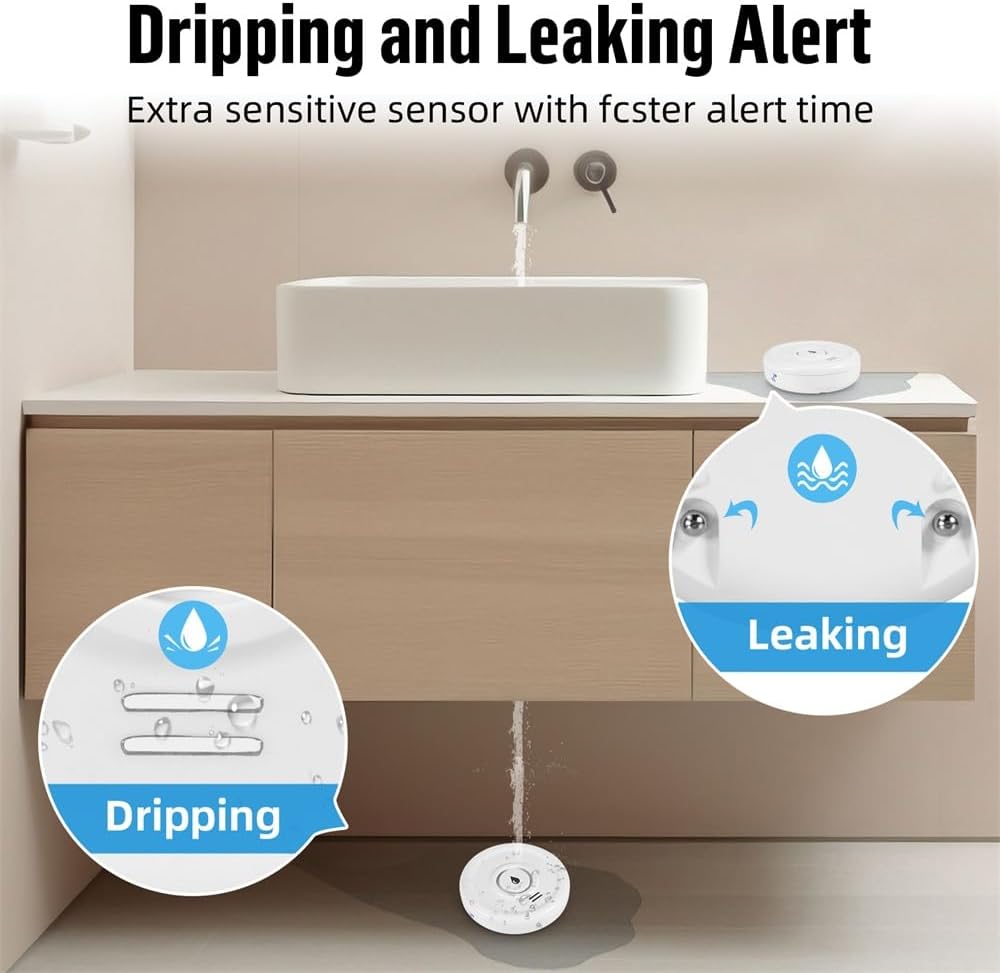
Image: A visual representation of the device's ability to detect both small drips and larger leaks, highlighting its versatile sensing capabilities.
Otrzymywanie alertów:
When water is detected, the device will:
- Emit a loud 100dB audible alarm.
- Send a real-time push notification to your smartphone via the Tuya Smart Life app.

Image: The water leak detector placed on a wet surface, indicating a leak, while a smartphone displays a 'Water Leakage Alarm' notification from the app.
You can customize notification settings within the Tuya Smart Life app. The app also allows you to view the device's status and battery level.
7. Konserwacja
7.1 Wymiana baterii
The device operates on 2 AAA batteries with a standby time of up to two years. The app will send a low battery warning notification to your smartphone when the batteries need replacement. To replace batteries, follow the steps in Section 5.1.

Image: The Fuers Water Leak Detector with its battery compartment open, showing two AAA batteries and a graphical representation of battery life, indicating up to 2 years of standby time.
7.2 Czyszczenie
Wipe the device with a soft, dry cloth. Do not use abrasive cleaners or immerse the device in water (beyond its intended IP67 rating for detection) as this may damage internal components.
8. Rozwiązywanie Problemów
| Problem | Możliwa przyczyna | Rozwiązanie |
|---|---|---|
| Urządzenie nie łączy się z siecią Wi-Fi | Incorrect Wi-Fi password; Not a 2.4 GHz network; Device too far from router; Pairing mode not activated. | Verify Wi-Fi password. Ensure router is 2.4 GHz. Move device closer to router. Re-enter pairing mode as per app instructions. |
| Brak powiadomień aplikacji | App notifications disabled; Device offline; Low battery. | Check app notification settings. Verify device is online in the app. Replace batteries if low battery warning is present. |
| Alarm nie włącza się | Niski poziom naładowania baterii; Awaria urządzenia. | Wymień baterie. Jeśli problem będzie się powtarzał, skontaktuj się z obsługą klienta. |
| Fałszywe alarmy | Condensation or high humidity; Device placed on a damp powierzchnia. | Ensure placement is on a dry surface. Avoid areas with excessive condensation. |
9. Specyfikacje
- Numer modelu: WFSJ01
- Wymiary: 20 mm (dł.) x 50 mm (szer.) x 65 mm (wys.)
- Źródło zasilania: 2 x baterie AAA (w zestawie)
- Połączenie bezprzewodowe: Wi-Fi 2.4 GHz (IEEE 802.11b/g/n)
- Zgodna aplikacja: Tuya Inteligentne / Inteligentne życie
- Głośność alarmu: 100dB
- Stopień wodoodporności: IP67
- Tworzywo: Wysokiej jakości tworzywo sztuczne ABS
- Max Range (Wireless): 20 metrów (bez przeszkód)
- Technologia czujników: Czujnik kontaktu
- Typ instalacji: Floor/Surface Mount

Image: The Fuers Water Leak Detector partially submerged in water, demonstrating its IP67 waterproof and durable construction.
10. Gwarancja i wsparcie
This product comes with a standard manufacturer's warranty. For detailed warranty information, please refer to the documentation included with your purchase or contact the retailer. For technical support, troubleshooting assistance, or any inquiries regarding your Fuers WLAN Water Leak Detector, please visit the official Fuers webstronie lub skontaktuj się z działem obsługi klienta.
Zasoby internetowe:
- Aplikacja Tuya Smart: www.tuya.com/app
- Aplikacja inteligentnego życia: www.smartlife.com/app