
1. Wprowadzenie i koniecview
This manual provides essential information for setting up, operating, and maintaining your Xiaomi POCO F6 Pro smartphone. Please read it carefully to ensure optimal performance and longevity of your device.
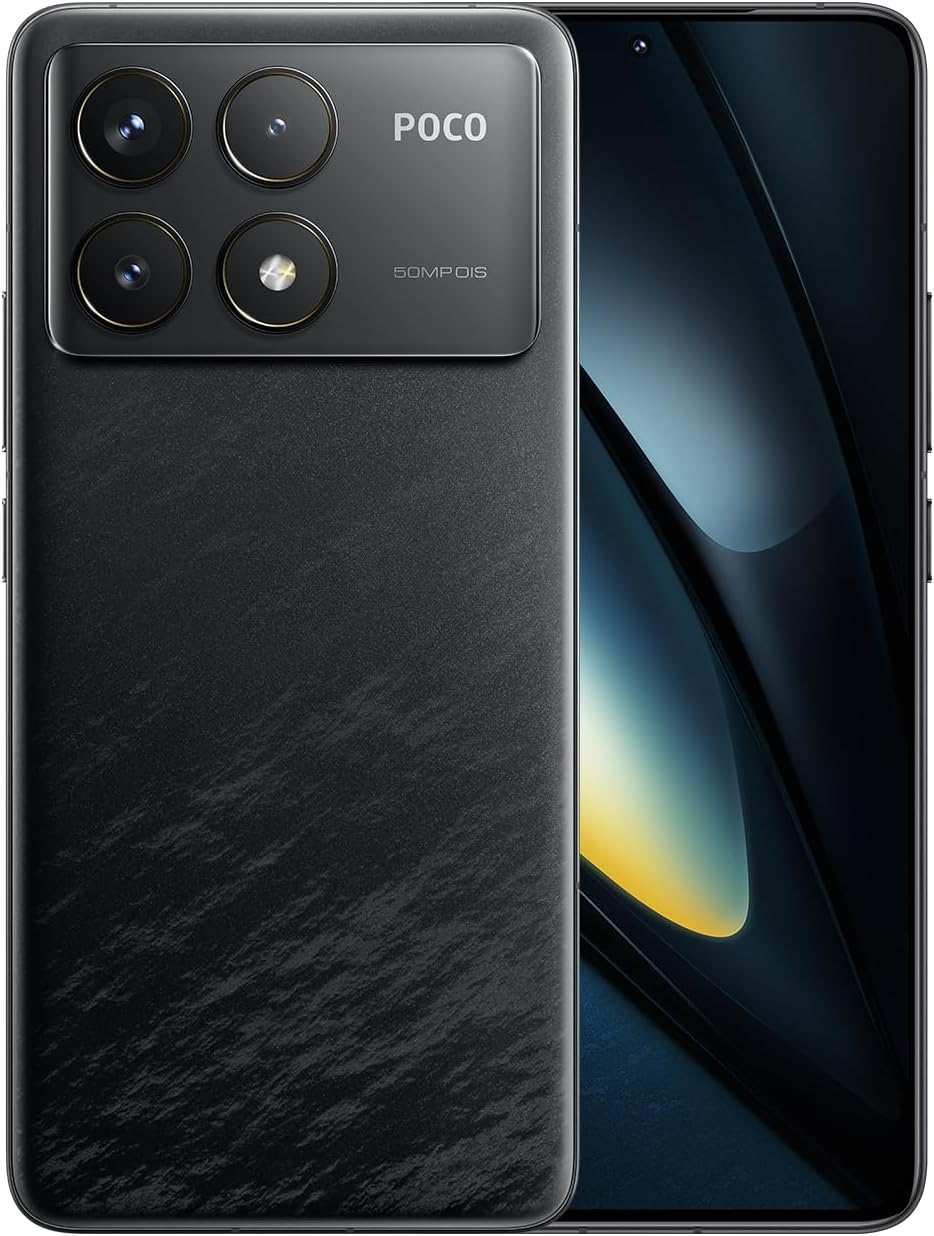
Figure 1.1: Xiaomi POCO F6 Pro device overview.
Główne cechy:
- Procesor o wysokiej wydajności: Equipped with the Qualcomm Snapdragon 8 Gen 2, a 4nm flagship processor offering approximately 20% improvement in CPU and GPU performance for a superior user experience.
- Zaawansowany system chłodzenia: Features LiquidCool Technology 4.0 with a large stainless steel IceLoop system (approx. 5000mm²) for efficient heat dissipation, maintaining peak performance during intensive tasks.
- Szybkie ładowanie i długa żywotność baterii: A 5000mAh battery combined with 120W Xiaomi HyperCharge technology allows for a 100% charge in approximately 19 minutes.
- Oszałamiający wyświetlacz: A WQHD+ (3200x1440) 1-120Hz LTPO C8 OLED display with a peak brightness of 4000 nits, offering high light efficiency, low power consumption, and hardware-level low blue light protection.
- Zaawansowany system kamer: A triple camera setup with a 50MP main sensor, Optical Image Stabilization (OIS), and Light Fusion 800 image sensor for professional-quality photos in various lighting conditions.
2. Przewodnik konfiguracji
2.1 Zawartość opakowania
Before starting, verify that all items are present in the package:
- Smartfon Xiaomi POCO F6 Pro
- AC Adapter (120W HyperCharge)
- Kabel USB typu C.
- Narzędzie do wyjmowania karty SIM
- Miękkie etui
- Szybki przewodnik
2.2 Wkładanie karty SIM
- Znajdź tackę na kartę SIM znajdującą się z boku urządzenia.
- Włóż narzędzie do wyjmowania karty SIM w mały otwór obok tacki i delikatnie naciśnij, aż tacka wyskoczy.
- Włóż kartę(y) Nano-SIM do tacki złotymi stykami do dołu. Upewnij się, że są prawidłowo osadzone.
- Ostrożnie wsuń tackę z powrotem do gniazda, aż będzie równo z urządzeniem.
2.3 Pierwsze włączenie i konfiguracja
- Naciśnij i przytrzymaj przycisk zasilania, aż pojawi się logo Xiaomi.
- Postępuj zgodnie z instrukcjami wyświetlanymi na ekranie, aby wybrać język i region, a następnie nawiązać połączenie z siecią Wi-Fi.
- Zaloguj się za pomocą konta Google lub utwórz nowe.
- Ustaw metodę blokowania ekranu (PIN, wzór, hasło, odcisk palca lub odblokowanie twarzą).
- Review i zaakceptuj regulamin.
- Twoje urządzenie jest teraz gotowe do użycia.
3. Instrukcja obsługi
3.1 Wyświetlacz i nawigacja
The POCO F6 Pro features a WQHD+ 120Hz LTPO OLED display. Navigate the interface using gestures or traditional navigation buttons, configurable in the settings.

Rysunek 3.1: Specyfikacje i funkcje wyświetlacza.
- Częstotliwość odświeżania: The adaptive refresh rate (1-120Hz) optimizes smoothness and power consumption.
- Jasność: Adjust brightness manually or enable adaptive brightness for automatic adjustment based on ambient light.
- Komfort oczu: The hardware-level low blue light design helps reduce eye strain. Enable Reading Mode in settings for a more comfortable viewzdobywania doświadczenia.
- Czujnik odcisków palców: The in-display fingerprint sensor provides quick and secure unlocking. Ensure your finger is clean and dry for optimal performance.
3.2 Wydajność i gry
The Snapdragon 8 Gen 2 processor and LiquidCool Technology 4.0 ensure high performance, especially for gaming.

Figure 3.2: WildBoost Optimization 3.0 for enhanced gaming.
- Game Turbo: Access Game Turbo by swiping from the left edge during gameplay to optimize performance, manage notifications, and record screen.
- Optymalizacja WildBoost 3.0: This feature enhances performance scheduling and game control for an improved overall gaming experience.
3.3 Funkcje aparatu
The POCO F6 Pro features a versatile triple camera system for high-quality photography.

Figure 3.3: POCO F6 Pro triple camera system.
- Główna kamera: 50MP with OIS for stable, high-resolution photos.
- Aparat ultraszerokokątny: 8 MP do rejestrowania szerszych scen.
- Kamera makro: 2 MP do szczegółowych zdjęć zbliżeniowych.
- Funkcje AI: Utilize AI for image enhancement, object removal, and smart search within your gallery.
3.4 Bateria i ładowanie
The device is equipped with a 5000mAh battery and supports 120W Xiaomi HyperCharge.

Figure 3.4: 120W HyperCharge technology.
- Szybkie ładowanie: Use the provided 120W charger and cable for optimal charging speeds.
- Optymalizacja baterii: The POCO battery management system, featuring Surge P2 charging chipset and Surge G1 battery chipset, provides smart and safe management.
- Tryb hibernacji: The device can enter hibernation mode to conserve battery when not in use for extended periods.
3.5 Łączność
The POCO F6 Pro offers various connectivity options.

Rysunek 3.5: Łączność i funkcje audio.
- Wi-Fi 7: Supports the latest Wi-Fi standard for faster and more reliable wireless connections.
- Bluetooth 5.3: Do podłączania bezprzewodowych akcesoriów, np. słuchawek i głośników.
- NFC: Multifunctional NFC for contactless payments and data transfer.
- Miotacz podczerwieni: Use your phone as a universal remote control for compatible devices.
- GNSS: High-precision Global Navigation Satellite System for accurate location services.
4. Konserwacja
Proper maintenance ensures the longevity and optimal performance of your POCO F6 Pro.
- Czyszczenie: Do czyszczenia ekranu i obudowy używaj miękkiej, niepozostawiającej włókien ściereczki. Unikaj materiałów ściernych i silnych środków chemicznych.
- Aktualizacje oprogramowania: Regularnie sprawdzaj dostępność aktualizacji systemu i instaluj je, aby mieć pewność, że na Twoim urządzeniu znajdują się najnowsze funkcje i poprawki zabezpieczeń.
- Zarządzanie pamięcią masową: Okresowo usuwaj niepotrzebne filei aplikacje, aby zwolnić miejsce na dysku i utrzymać wydajność.
- Pielęgnacja baterii: Avoid exposing the device to extreme temperatures. While fast charging is convenient, occasional slower charging can help prolong battery health.
- Ochrona: Use a screen protector and the provided soft case to guard against scratches and minor impacts.
5. Rozwiązywanie Problemów
Jeśli napotkasz problemy z urządzeniem, zapoznaj się z poniższymi typowymi procedurami rozwiązywania problemów:
- Urządzenie nie odpowiada: Naciśnij i przytrzymaj przycisk zasilania przez około 10–15 sekund, aby wymusić ponowne uruchomienie.
- Szybkie rozładowywanie baterii: Check background app usage in battery settings. Reduce screen brightness or disable unnecessary features like GPS, Bluetooth, or Wi-Fi when not in use.
- Problemy z łącznością sieciową: Toggle Airplane Mode on and off. Restart your device. Check if your SIM card is properly inserted. Contact your network provider if the issue persists.
- Aplikacje ulegają awarii/zawieszają się: Clear the cache and data for the problematic app in App Info settings. If the issue continues, uninstall and reinstall the app.
- Przegrzanie: Close background applications, reduce screen brightness, and avoid using the device while charging for extended periods. If gaming, ensure the device has adequate ventilation.
- Problemy z czujnikiem linii papilarnych: Ensure your finger and the sensor area are clean and dry. Re-register your fingerprints if recognition is inconsistent.
For more complex issues, consult the official Xiaomi support webodwiedź witrynę lub skontaktuj się z obsługą klienta.
6. Specyfikacje
| Funkcja | Specyfikacja |
|---|---|
| System operacyjny | Android 14 |
| Edytor | Qualcomm Snapdragon 8 Gen 2 |
| Prędkość procesora | 3.2 GHz |
| Rozmiar zainstalowanej pamięci RAM | 12 GB |
| Pojemność pamięci masowej | 256 GB |
| Technologia wyświetlania | OLED |
| Rozdzielczość odczytu | 3200 x 1440 (WQHD+) |
| Moc znamionowa akumulatora | 5000 mAh |
| Technologia komunikacji bezprzewodowej | Cellular, Wi-Fi 7, Bluetooth 5.3 |
| Technologia łączności | USB, NFC, IR Blaster |
| GPS | Tak |
| Współczynnik kształtu | Łupek |
| Kolor | Czarny |
| Numer modelu produktu | MZB0HEJJP |
| Waga przedmiotu | 580 gramów |
| Wymiary opakowania | Wymiary 18.7 x 9.4 x 6.1 cm |
7. Gwarancja i wsparcie
Your Xiaomi POCO F6 Pro is covered by a standard manufacturer's warranty. For detailed warranty terms and conditions, please refer to the warranty card included in your product packaging or visit the official Xiaomi support webstrona.
For technical support, service, or inquiries, please contact Xiaomi customer service through their official channels. Keep your proof of purchase handy when seeking support.
Oficjalne wsparcie Xiaomi: https://www.mi.com/global/support