
1. Wprowadzenie
This manual provides detailed instructions for the installation, operation, and maintenance of your Dosilkc UltraHD 4K POE Outdoor Bullet Security Camera (Model DS-T461). This 8MP IP network camera offers advanced surveillance features including human/vehicle detection, color night vision, and two-way audio. Please read this manual thoroughly before use to ensure proper setup and optimal performance.

Figure 1: Application Scenarios for the Dosilkc 4K POE Bullet Camera. The camera is suitable for various indoor and outdoor environments such as garages, warehouses, corridors, and courtyards.
2. Informacje dotyczące bezpieczeństwa
Aby zapobiec uszkodzeniu produktu i zapewnić bezpieczeństwo użytkownika, należy przestrzegać następujących środków ostrożności:
- Ensure the power supply meets the camera's requirements (PoE).
- Nie próbuj demontować ani modyfikować kamery. Spowoduje to unieważnienie gwarancji.
- Install the camera in a secure location to prevent unauthorized removal.
- Unikaj kierowania aparatu bezpośrednio na silne źródła światła przez dłuższy czas.
- Keep the camera away from strong electromagnetic interference.
- Używaj wyłącznie akcesoriów zatwierdzonych przez producenta.
3. Zawartość opakowania
Sprawdź, czy w opakowaniu znajdują się wszystkie elementy:
- Dosilkc UltraHD 4K POE Outdoor Bullet Security Camera
- Instrukcja obsługi (ten dokument)
- Install Screw Bag
- Waterproof Cable Cover
4. Koniec produktuview
Familiarize yourself with the components of your security camera.

Figure 2: Camera Components and Dimensions. This diagram labels the lens, microphone, IR LEDs, speaker, SD card slot, and mounting bracket, along with the camera's physical dimensions.
- Obiektyw: Przechwytuje wideo footage.
- Mic: Wbudowany mikrofon do wejścia audio.
- Diody IR: Infrared LEDs for night vision in low-light conditions.
- Głośnik: Wbudowany głośnik umożliwiający dwukierunkową transmisję dźwięku.
- Gniazdo karty SD: Supports Micro SD cards up to 512GB for local storage.
- Nawias: Adjustable mounting bracket for installation.
5. Konfiguracja i instalacja
5.1 Fizyczna instalacja
The camera is designed for both indoor and outdoor use with an IP66 weatherproof housing.

Figure 3: IP66 Weatherproof Housing. The camera's robust design ensures protection against various weather conditions including rain, snow, and high temperatures.
- Wybierz lokalizację: Select a suitable location for optimal surveillance coverage. Consider the camera's 105° diagonal field of view.
- Zamontuj kamerę: Za pomocą dołączonego woreczka ze śrubami zamontuj kamerę bezpiecznie na ścianie lub suficie.
- Connect POE Cable: Connect a single Ethernet cable to the camera's POE port. This cable will provide both power and data transmission. Use the waterproof cable cover for outdoor installations to protect the connection.
5.2 Konfiguracja początkowa
The camera supports Plug & Play with Hikvision NVRs and is compatible with other NVRs (e.g., Da-hua) via Open Network Video Interface protocol. It also works with third-party software like Blue Iris and iSpy.

Figure 4: Multiple Storage and Compatibility Options. The camera offers flexible storage solutions including NVRs, FTP, NAS, and local SD card, and integrates with various surveillance software.
- Połączenie NVR:
- For Hikvision NVRs: Connect the camera directly to the NVR's POE port. The camera should be automatically detected.
- For other NVRs: Refer to your NVR's manual for adding ONVIF-compatible IP cameras.
- Integracja oprogramowania: If using third-party software (e.g., Blue Iris, iSpy), follow their respective guides for adding an ONVIF IP camera.
- Konfiguracja aplikacji mobilnej: Download the recommended mobile application (refer to packaging or quick start guide for app name). Follow the in-app instructions to add your camera and access live view i ustawienia.
Video 1: Camera Setup Guide
This video demonstrates the basic setup process for the Dosilkc 4K POE Bullet Security Camera, including physical installation and initial connection steps.
6. Działanie
6.1 Na żywo View i nagrywanie
Wejdź na żywo view through your NVR or mobile application. Recordings can be stored on an NVR, FTP server, NAS server, or a local Micro SD card (up to 512GB, not included).

Figure 5: Superior 4K UHD Image Quality. This image illustrates the enhanced detail provided by the 8MP (3840x2160) resolution compared to lower resolutions.
6.2 Tryby widzenia nocnego
The camera features dual-light full-color technology with three smart night vision modes, selectable via the mobile app:
- IR Night Vision Mode: Standard black-and-white infrared vision.
- Full Color Night Vision Mode: Utilizes white light to provide full-color images in darkness.
- Inteligentne widzenie w nocy: Automatically switches between IR and full-color based on detected motion or alarm settings.
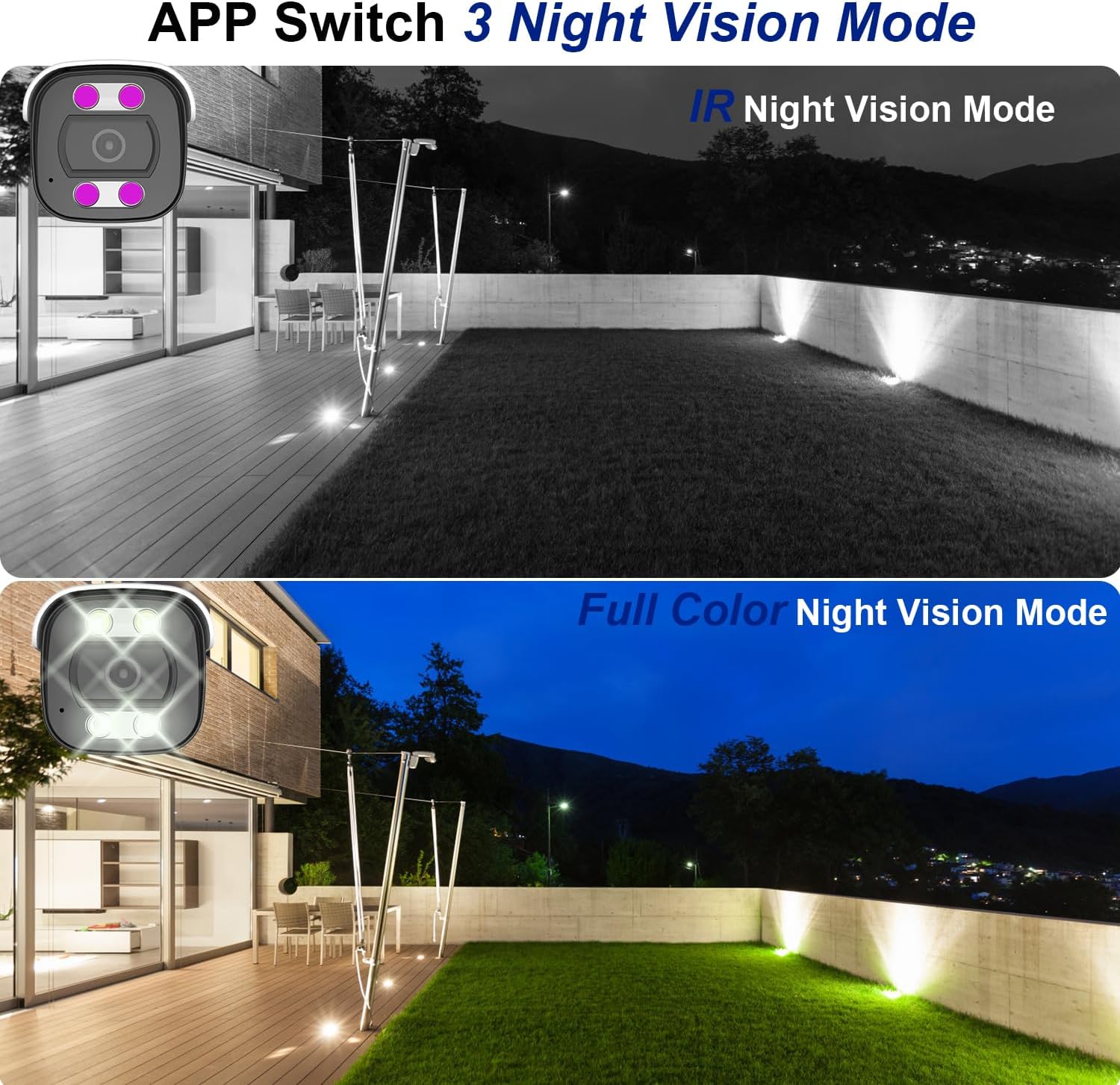
Figure 6: Night Vision Modes. This image demonstrates the difference between traditional IR (black and white) and full-color night vision capabilities.
6.3 Person/Vehicle Detection
The camera is equipped with professional human/vehicle detection functions to reduce false alarms. When a person or vehicle enters the configured detection area, the camera will automatically send real-time video or snapshots to your mobile phone.
- Obszar wykrywania: Skonfiguruj określone strefy w obrębie kamery view w celu wykrycia.
- Wrażliwość: Adjust the detection sensitivity to optimize performance and minimize unwanted alerts.

Figure 7: Smart Human/Vehicle Detection. The camera identifies human presence and sends an immediate alert to a connected mobile device.
Video 2: Smart Detection Features
This video demonstrates the human and vehicle detection capabilities of the camera, showing how it identifies subjects and triggers alerts.
6.4 Dźwięk dwukierunkowy
The built-in microphone and speaker allow for two-way communication. You can listen to audio from the camera's location and speak through the camera using the mobile app or NVR interface.

Figure 8: Two-Way Audio Functionality. The camera enables real-time communication, allowing users to speak and listen remotely.
Video 3: Two-Way Audio Demonstration
This video illustrates the two-way audio feature, demonstrating how users can communicate through the camera.
7. Konserwacja
Regularna konserwacja zapewnia długowieczność i optymalną wydajność Twojego aparatu:
- Czyszczenie: Delikatnie przetrzyj obiektyw i obudowę aparatu miękką ściereczką.amp płótno. Nie używaj ostrych środków chemicznych ani ściernych środków czyszczących.
- Aktualizacje oprogramowania układowego: Okresowo sprawdzaj dostępność aktualizacji oprogramowania sprzętowego za pomocą aplikacji mobilnej lub strony producenta webwitryna, aby zapewnić najnowsze funkcje i poprawki zabezpieczeń.
- Kontrola kabla: Regularly inspect the Ethernet cable and waterproof cover for any signs of wear or damage, especially in outdoor installations.
- Zarządzanie pamięcią masową: W przypadku korzystania z karty SD należy okresowo ją aktualizować.view i zarządzaj nagranymi footagaby zapobiec zapełnieniu karty.
8. Rozwiązywanie Problemów
Oto rozwiązania typowych problemów, z którymi możesz się spotkać:
| Problem | Możliwa przyczyna | Rozwiązanie |
|---|---|---|
| Kamera się nie włącza. | No power from PoE switch/NVR; faulty Ethernet cable. | Ensure PoE switch/NVR is powered on. Check Ethernet cable connection and integrity. Try a different PoE port or cable. |
| Brak sygnału wideo. | Network connectivity issue; incorrect NVR/app settings. | Verify network connection. Ensure camera is properly added to NVR/app. Check IP address settings. |
| Słabe widzenie w nocy. | IR LEDs obstructed; incorrect night vision mode. | Clear any obstructions from the camera's view. Switch night vision mode in the app (IR, Full Color, Smart). |
| False alarms from detection. | Detection sensitivity too high; detection area too broad. | Adjust detection sensitivity and refine the detection area in the camera settings via the app or NVR. |
| Dwukierunkowa transmisja dźwięku nie działa. | Microphone/speaker disabled; volume too low; network latency. | Check audio settings in the app/NVR. Ensure volume is up. Verify stable network connection. |
Video 4: Advanced Troubleshooting Tips
This video provides additional tips and solutions for common operational issues with the Dosilkc security camera.
9. Specyfikacje
| Funkcja | Szczegół |
|---|---|
| Numer modelu | DS-T461 |
| Rozdzielczość przechwytywania wideo | 4K (3840*2160@20fps) |
| Czujnik obrazu | 1/3" CMOS ze skanowaniem progresywnym |
| Obiektyw | 2.8mm |
| Viewing Angle (FoV) | 105 Degrees (diagonal) |
| Zakres noktowizora | 88 stóp (dostępna kolorowa wizja nocna) |
| Audio | Built-in 2-way audio (microphone & speaker) |
| Wykrywanie | Wykrywanie ludzi/pojazdów |
| Składowanie | Micro SD Card Slot (up to 512GB), NVR, FTP, NAS |
| Kompresja | H.265/H.264 |
| Łączność | Wired (PoE - Power over Ethernet) |
| Odporność na warunki atmosferyczne | Wodoodporność IP66 |
| Wymiary (dł. x szer. x wys.) | 17.98 x 6.99 x 6.99 cm (ok. 7.08 x 2.75 x 2.75 cala) |
| Waga | 481 gramów |
| Typ montażu | Ceiling Mount, Screw In |
| Kompatybilne urządzenia | Digital Video Recorder (NVR), Blue Iris, iSpy |
10. Gwarancja i wsparcie
Aby uzyskać informacje dotyczące gwarancji i pomocy technicznej, zapoznaj się z oficjalną stroną Dosilkc webOdwiedź stronę internetową lub skontaktuj się bezpośrednio z działem obsługi klienta. Zachowaj paragon jako dowód zakupu na wypadek reklamacji.
Wsparcie online: Visit the Dosilkc official webwitryna z odpowiedziami na często zadawane pytania, możliwością pobrania oprogramowania i zasobami pomocy technicznej.
Skontaktuj się z pomocą techniczną: Zapoznaj się z opakowaniem produktu lub oficjalnym webstrona zawierająca dane kontaktowe działu obsługi klienta.