
Vtopek T309S
Vtopek T309S 10.26-inch Wireless Carplay Android Auto Display User Manual
Model: T309S
Wstęp
This manual provides detailed instructions for the installation, operation, and maintenance of your Vtopek T309S 10.26-inch Wireless Carplay Android Auto Display. This device integrates wireless Carplay and Android Auto, a 2.5K front dash camera, and a 1080P rear camera, offering enhanced connectivity and safety features for your vehicle.
Konfiguracja i instalacja
Follow these steps to properly install your Vtopek T309S display.
1. Montaż wyświetlacza
The display comes with two adjustable monitor brackets for flexible installation. Choose the bracket suitable for your vehicle's dashboard or windshield.
- Mocowanie samoprzylepne: For dashboard installation, ensure the surface is clean and dry before applying the adhesive base.
- Mocowanie przyssawki: For windshield installation, press the suction cup firmly against the glass and engage the locking mechanism.
- Adjust the display angle using the 360° rotatable support for optimal viewnie zasłaniając pola widzenia.

Figure 1: Adjustable Monitor Brackets for flexible installation.
2. Podłączenie zasilania
The device is powered via a Type-C port and connects to your vehicle's cigarette lighter (7-32V compatible).
- Ważny: Always use the original power adapter provided. Using other brands or phone data cables may cause the device to restart repeatedly or malfunction.
- Plug the power supply into the car charger. The Type-C port ensures stable and fast power delivery.
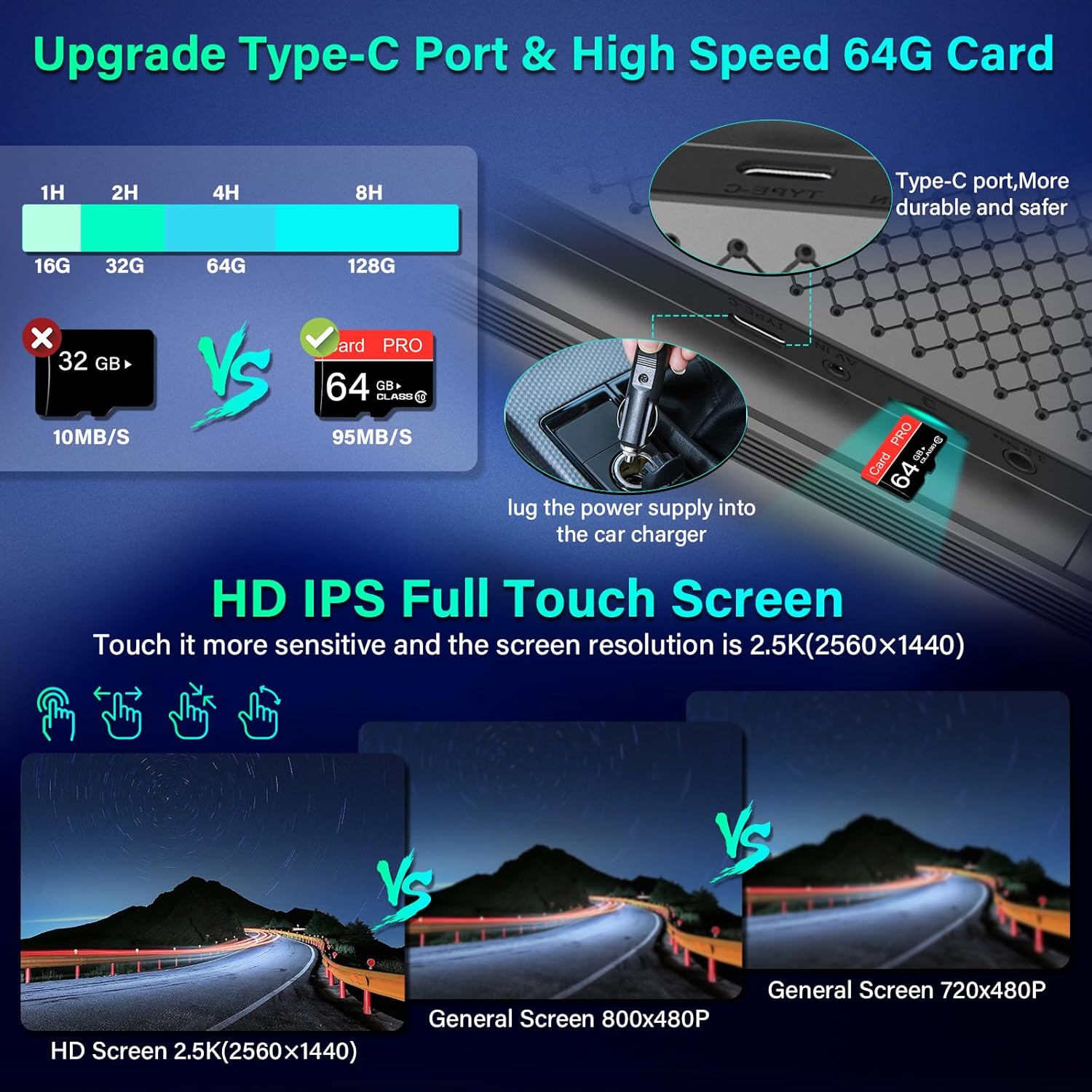
Figure 2: Type-C Port and 64GB SD Card Slot.
3. Instalacja kamery
The system includes a 2.5K front dash camera and a 1080P rear camera.
- Przednia kamera: Integrated into the main display unit. It supports rotation and can be used as an interior camera.
- Kamera tylna: Install the 1080P rear camera at the back of your vehicle. It is IP69 waterproof.
- Reversing Light Connection: To enable the automatic display of the rear view podczas cofania podłącz czerwony przewód kamery tylnej do świateł cofania pojazdu.
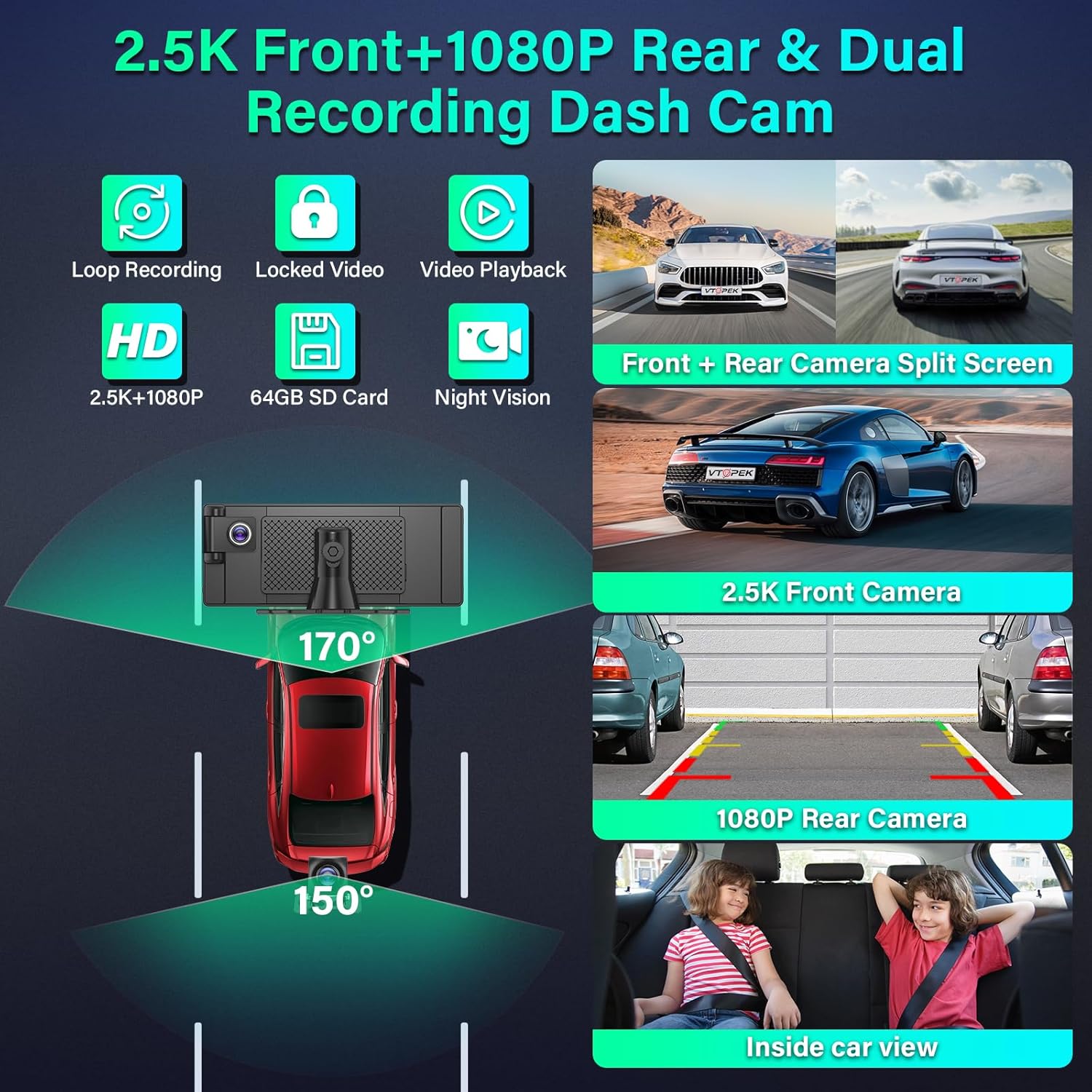
Figure 3: Dual Recording Dash Cam System Overview.

Figure 4: Adjustable Reversing Line and Waterproof Rear Camera.
Instrukcja obsługi
Learn how to use the various features of your Vtopek T309S display.
1. Bezprzewodowy CarPlay i Android Auto
Podłącz swój smartfon bezprzewodowo, aby bezproblemowo korzystać z nawigacji, muzyki, połączeń i wiadomości.
- Włącz Wi-Fi i Bluetooth w swoim smartfonie.
- The 10.26-inch display will automatically connect to Carplay (for iPhone) or Android Auto (for Android phones).
- Access map navigation, make calls, play music, and send text messages directly from the display.

Figure 5: Wireless Carplay, Android Auto, and Mirror Link Interfaces.
2. Mirror Link (AirPlay / Android Cast)
Project your smartphone screen onto the display.
- Connect your smartphone to the Carplay display via AirPlay (for iPhone) or Android Cast (for Android phones).
- To pozwala Ci view videos from apps like YouTube or TikTok on the display.
- Notatka: Compatibility may vary with certain phone models.
3. Voice Assistant (Siri & Google Assistant)
Control the device hands-free using voice commands.
- Activate Siri or Google Assistant to navigate, make calls, play music, and more.
- This feature enhances driving safety by allowing you to keep your hands on the wheel.

Figure 6: Voice Assistant and Hands-free Calling.
4. Dual Bluetooth 5.0
The display features dual Bluetooth technology for enhanced audio and connectivity.
- Connect your phone's Bluetooth to the Carplay screen.
- Simultaneously connect the Carplay screen to your car's original speakers for high-quality audio output.

Figure 7: Dual Bluetooth Mode for Audio Streaming.
5. Opcje wyjścia audio
The Vtopek T309S offers multiple ways to output audio to your car's sound system:
- Głośnik samochodowy Bluetooth: Connect the display to your car's Bluetooth for wireless audio.
- Nadajnik FM: Tune the display and your car radio to the same FM frequency to transmit audio.
- Połączenie AUX: Za pomocą kabla AUX podłącz wyświetlacz do wejścia AUX w samochodzie.
- Wbudowany głośnik: The display has integrated stereo speakers for direct audio output.

Figure 8: Multiple Audio Output Options.
6. Funkcje kamery samochodowej
The integrated dash cam provides comprehensive recording capabilities.
- Nagrywanie w pętli: Rejestruje w sposób ciągły, nadpisując najstarsze filegdy karta SD 64 GB jest pełna.
- Zablokowane wideo: Critical events (e.g., collisions detected by G-sensor) are automatically locked and protected from being overwritten.
- Odtwarzanie wideo: Review nagrano footage directly on the display.
- Widzenie nocne: Equipped with F1.6 aperture and WDR technology for clear recordings in low-light conditions.
- Podzielony ekran: The Android Carplay screen supports split-screen mode, allowing you to view front camera footage alongside navigation or music.
7. Wspomaganie cofania
The rear camera provides assistance for safe parking.
- When reversing, the system automatically displays the rear camera view na pełnym ekranie.
- Adjustable Reversing Lines: Parking guidelines are displayed and can be adjusted to suit various vehicle types.
- The 170° front and 150° rear wide-angle lenses reduce blind spots.
Konserwacja
Właściwa konserwacja gwarantuje długowieczność i optymalną wydajność urządzenia.
- Zarządzanie kartami SD: The device supports loop recording. When the included 64GB SD card is full, the oldest recordings will be automatically overwritten. Regularly back up important footage.
- Czyszczenie: Do czyszczenia ekranu wyświetlacza używaj miękkiej, suchej ściereczki. Unikaj środków czyszczących o właściwościach ściernych i rozpuszczalników.
- Kamera tylna: The IP69 waterproof rating protects the rear camera from water and dust. Periodically check for any obstructions or dirt on the lens and clean gently if necessary.
- Zasilacz: Always use the original power adapter to prevent damage and ensure stable operation.
Rozwiązywanie problemów
Jeśli napotkasz problemy, zapoznaj się z poniższymi, często występującymi problemami i rozwiązaniami.
| Problem | Możliwa przyczyna | Rozwiązanie |
|---|---|---|
| Device repeatedly restarts or does not power on. | Incorrect power adapter used. Insufficient power supply. | Ensure you are using the original power adapter provided with the device. Verify the car's cigarette lighter socket is functioning correctly. |
| Wireless Carplay/Android Auto fails to connect. | Bluetooth/Wi-Fi off on phone. Phone not paired. | Ensure your phone's Bluetooth and Wi-Fi are enabled. Go to the device's settings to initiate pairing. Restart both the display and your phone. |
| Brak dźwięku lub słaba jakość dźwięku. | Incorrect audio output setting. Volume too low. | Check the audio output settings on the display (Bluetooth, FM, AUX, Built-in Speaker). Adjust the volume on both the display and your car stereo. Ensure FM frequency matches if using FM transmitter. |
| Rear camera image not displayed when reversing. | Red wire not connected to reversing lights. Camera cable loose. | Verify that the red wire from the rear camera is correctly connected to your vehicle's reversing light power supply. Check all camera cable connections. |
| Screen shows abnormal colors (e.g., pink/green screen). | Wewnętrzny problem sprzętowy. | Attempt a factory reset if available in settings. If the problem persists, contact customer support. |
Specyfikacje
| Funkcja | Szczegół |
|---|---|
| Marka | Vtopek |
| Numer modelu | T309S |
| Rozmiar ekranu | 10.26 cali |
| Typ wyświetlacza | HD IPS Full Touch Screen, LED |
| Maksymalna rozdzielczość wyświetlacza | 1600 x 900 Pixels (QHD wide 1440p) |
| Rozdzielczość przedniej kamery | 2.5 tys. |
| Rozdzielczość tylnej kamery | 1080P |
| Technologia łączności | Bluetooth 5.0, Wi-Fi |
| Cechy specjalne | Wireless Android Auto, Built-in Bluetooth, Wireless Carplay, FM Tuner, Touch Screen, Loop Recording, 24H Parking Monitor, Night Vision, IP69 Waterproof Rear Camera |
| Kompatybilne urządzenia | Smartfon |
| Moc wejściowa | 7-32 V (zapalniczka samochodowa) |
| Składowanie | Karta SD 64 GB (w zestawie) |
| Proporcje obrazu | 16:9 |
| Współczynnik kontrastu obrazu | 1000:1 |
Gwarancja i wsparcie
Your Vtopek T309S display comes with comprehensive support and warranty.
- Gwarancja: The product is covered by a 1-year manufacturer's warranty from the date of purchase.
- Wsparcie techniczne: Vtopek offers lifetime technical support.
- Obsługa klienta: For any issues or inquiries, please contact our professional customer service team.

Rysunek 9: Informacje o gwarancji i wsparciu.
Adres e-mail kontaktowy: jenny@jansite.cn