
Wstęp
Welcome to the user manual for your Timex Activity Tracker Watch, model TW5M60800. This digital quartz watch features a durable brass case, a comfortable khaki silicone strap, and a green dial. Designed for daily wear, it includes activity tracking functions and is water-resistant up to 30 meters. This manual provides essential information for setting up, operating, maintaining, and troubleshooting your watch to ensure optimal performance.

Rysunek 1: Przód view of the Timex Activity Tracker Watch TW5M60800. This image displays the digital green dial, the brass case, and the khaki silicone strap.
Organizować coś
1. Aktywacja początkowa
Your watch may come with a plastic battery saver tab. Gently pull and remove this tab from the side of the watch to activate the battery and power on the device.
2. Ustawianie czasu i daty
The Timex Activity Tracker Watch typically features multiple buttons for setting.
- Zlokalizuj TRYB button (usually on the bottom left). Press it repeatedly to cycle through display modes until you reach the time setting mode (often indicated by flashing digits).
- Użyj USTAWIĆ or REGULOWAĆ button (usually top left or right) to select the digit you wish to change (hours, minutes, year, month, day).
- Użyj START/STOP or OKRĄŻENIE/RESET button (usually on the right side) to increase the value of the selected digit.
- Po wprowadzeniu wszystkich prawidłowych ustawień naciśnij przycisk TRYB ponownie, aby wyjść z trybu ustawień.
Rysunek 2: Strona view of the watch, illustrating the placement of control buttons on the brass case. These buttons are used for navigating menus and adjusting settings.
3. Regulacja paska
The watch features a silicone strap with a traditional buckle clasp. Adjust the strap to a comfortable fit on your wrist, ensuring it is snug but not too tight to allow for accurate activity tracking.
Instrukcja obsługi
1. Podstawowy wyświetlacz czasu
In the default mode, the watch displays the current time (hours, minutes, seconds) and often the day of the week.
2. Accessing Activity Tracker Functions
Naciśnij TRYB button to cycle through various functions. Look for modes labeled "Activity," "Steps," "Distance," or "Calories."
- Kroki: Wyświetla całkowitą liczbę wykonanych kroków.
- Dystans: Pokazuje szacowany pokonany dystans.
- Kalorie: Indicates the estimated calories burned.
- Cel dzienny: Some models allow setting a daily step goal. Refer to the on-screen prompts for setting and tracking.
To reset daily activity data, typically hold down a specific button (e.g., NASTAWIĆ or PODOŁEK) while in an activity tracking mode. Consult the watch's on-screen prompts for exact instructions.
3. Wodoodporność
This watch is water-resistant to 30 meters (3 ATM). This means it is suitable for everyday use and can withstand splashes or brief immersion in water. It is nie suitable for swimming, showering, or diving. Avoid pressing buttons while the watch is wet or submerged.
Konserwacja
1. Czyszczenie zegarka
To clean the watch case and strap, use a soft, damp cloth. For the silicone strap, a mild soap solution can be used, then rinse thoroughly with clean water and dry completely. Avoid using harsh chemicals or abrasive materials, as these can damage the watch's finish.
2. Wymiana baterii
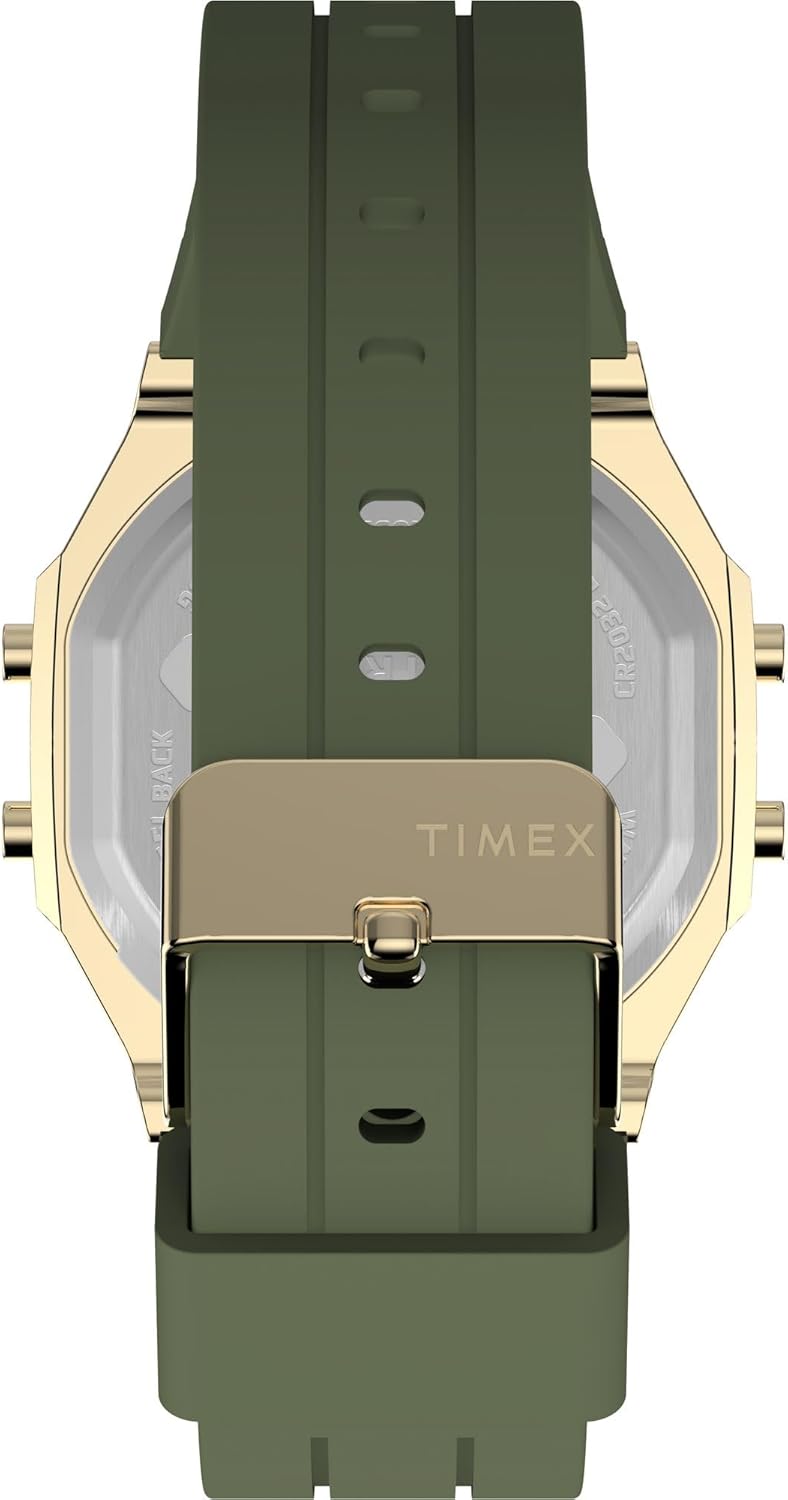
The watch is powered by a CR2032 battery. When the display dims or stops functioning, it's time to replace the battery.
- Carefully remove the back cover of the watch using a small screwdriver or a specialized watch tool.
- Note the orientation of the old battery before removing it.
- Włóż nową baterię CR2032 biegunem dodatnim (+) skierowanym do góry.
- Replace the back cover, ensuring it is securely fastened to maintain water resistance.
It is recommended to have battery replacement performed by a qualified watch technician to ensure proper sealing and water resistance.

Rysunek 3: Tył view of the watch, displaying the stainless steel back with "TIMEX ACTIVITY TRACKER" engraving, battery type (CR2032), and water resistance rating.
3. Przechowywanie
Gdy nie używasz zegarka, przechowuj go w chłodnym, suchym miejscu, z dala od bezpośredniego światła słonecznego i ekstremalnych temperatur.
Rozwiązywanie problemów
| Problem | Możliwa przyczyna | Rozwiązanie |
|---|---|---|
| Wyświetlacz jest pusty lub przyciemniony. | Niski poziom naładowania akumulatora lub jego rozładowanie. | Replace the CR2032 battery. Ensure the battery saver tab is removed. |
| Nieprawidłowa godzina lub data. | Data/godzina nie zostały ustawione prawidłowo lub zostały zresetowane. | Postępuj zgodnie z instrukcjami „Ustawianie czasu i daty” w sekcji Konfiguracja. |
| Activity tracking data is inaccurate. | Watch not worn properly, or sensor obstruction. | Ensure the watch is worn snugly on the wrist. Clean the back sensor area. |
| Przyciski nie reagują. | Zegarek może być zablokowany lub może mieć problem z baterią. | Try a soft reset (if applicable, by holding all buttons for a few seconds). Check battery. |
Specyfikacje
| Funkcja | Szczegół |
|---|---|
| Numer modelu | TW5M60800 |
| Typ wyświetlacza | Cyfrowy |
| Typ ruchu | Kwarc |
| Źródło zasilania | Bateria (CR2032) |
| Materiał obudowy | Mosiądz |
| Średnica koperty | 40 milimetrów |
| Grubość obudowy | 10 milimetrów |
| Materiał kryształu | Akryl |
| Materiał paska | Silikon |
| Kolor paska | Khaki |
| Kolor tarczy | Zielony |
| Odporność na wodę | 30 metrów (3 ATM) |
| Rodzaj zapięcia | Klamra |
| Dział | Dorosły unisex |
Gwarancja i wsparcie
For detailed warranty information, please refer to the warranty card included with your product packaging or visit the official Timex website. For further assistance or technical support, please contact Timex customer service through their official channels.