
Wstęp
The M-VAVE SMK-25 MINI is a compact and portable 25-key USB MIDI keyboard controller designed for music production on Mac and PC. It features velocity-sensitive keys, assignable controls, pitch and modulation functions, and versatile connectivity options including USB and Bluetooth. This manual provides detailed instructions for setting up, operating, maintaining, and troubleshooting your device.

Image: The M-VAVE SMK-25 MINI MIDI Keyboard Controller, showcasing its compact design and 25 velocity-sensitive keys.
Organizować coś
1. Włączanie
The SMK-25 MINI features a built-in rechargeable battery. To power on the device, press and hold the power button located on the side or top panel until the indicator light illuminates.
2. Połączenie USB
For a wired connection to your computer (Mac or PC), use the provided USB-C cable. Connect one end to the USB-C port on the SMK-25 MINI and the other end to an available USB port on your computer. The device is plug-and-play, requiring no additional drivers for basic functionality.

Image: Illustration of the plug-and-play USB connection process for the MIDI keyboard controller to a computer.
3. Połączenie Bluetooth
Aby połączyć się bezprzewodowo przez Bluetooth:
- Ensure the SMK-25 MINI is powered on.
- Naciśnij BT button on the controller to activate Bluetooth pairing mode. The Bluetooth indicator light will flash.
- On your computer or mobile device, navigate to Bluetooth settings and select "SMK-25 MINI" from the list of available devices.
- Po nawiązaniu połączenia kontrolka Bluetooth zacznie świecić światłem ciągłym.
4. Software Setup (DAW Compatibility)
The SMK-25 MINI is compatible with various Digital Audio Workstations (DAWs) such as Ableton Live, GarageBand, Logic Pro, Studio One, Cubase, Pro Tools, and Reason Studios. After connecting the controller, open your preferred DAW and ensure the SMK-25 MINI is recognized as a MIDI input device in the software's preferences or settings.

Image: The M-VAVE SMK-25 MINI shown with various DAW logos, indicating broad software compatibility.
Instrukcja obsługi
1. Podstawowe sterowanie
- Klawisze wrażliwe na prędkość: The 25 keys respond to how hard you press them, allowing for dynamic expression in your playing.
- Pitch Bend Buttons: Użyj PODGRYWAJ I UPADŹ buttons to momentarily raise or lower the pitch of notes.
- Modulation Button: Ten MOD button can be assigned to control various parameters within your DAW or instrument, such as vibrato or filter cutoff.
- Sustain Button: Naciśnij SUS button to sustain notes, similar to a piano sustain pedal. An external sustain pedal can also be connected via the 3.5mm port.
- Przesunięcie oktawowe: Użyj OC+ I OC- buttons to shift the keyboard's octave range up or down.
- Customization Knob: The rotary knob typically controls volume or can be assigned to other MIDI CC parameters for real-time control.

Obraz: Zbliżenie view of the M-VAVE SMK-25 MINI's control panel, highlighting the pitch, mod, sustain, arpeggiator, and octave shift buttons.
2. Zaawansowane funkcje
- Arpeggiator: Naciśnij ARP button to activate the arpeggiator. You can then use the keys and other controls to adjust arpeggio patterns, tempo, gate length, and octave range. Refer to your DAW's manual for specific arpeggiator synchronization settings.
- Smart Chord & Scale Modes: Ten SC/CH button enables Smart Chord and Smart Scale modes. These modes assist in playing harmonically correct notes and chords within a selected scale, simplifying music creation.
Konserwacja
To ensure the longevity and optimal performance of your M-VAVE SMK-25 MINI, follow these maintenance guidelines:
- Czyszczenie: Do czyszczenia powierzchni kontrolera należy używać miękkiej, suchej ściereczki. Unikać środków czyszczących o właściwościach ściernych, rozpuszczalników i wosków.
- Składowanie: Przechowywać urządzenie w chłodnym i suchym miejscu, z dala od bezpośredniego światła słonecznego, ekstremalnych temperatur i wysokiej wilgotności.
- Obsługiwanie: Handle the controller with care. Avoid dropping it or subjecting it to strong impacts.
- Pielęgnacja baterii: Aby zapewnić optymalną żywotność baterii, unikaj częstego całkowitego rozładowywania baterii. Regularnie ładuj urządzenie, zwłaszcza jeśli będzie przechowywane przez dłuższy czas.
Rozwiązywanie problemów
| Problem | Możliwa przyczyna | Rozwiązanie |
|---|---|---|
| Urządzenie nie włącza się. | Niski poziom baterii lub problem z zasilaniem. | Charge the device using the USB-C cable. Ensure the power button is pressed correctly. |
| Brak dźwięku lub sygnału MIDI w DAW. | Incorrect connection or software settings. | Verify USB or Bluetooth connection. Check your DAW's MIDI input settings to ensure the SMK-25 MINI is selected and enabled. |
| Połączenie Bluetooth nie powiodło się. | Pairing mode not active or interference. | Zapewnij BT button is pressed and flashing. Move closer to the host device. Try restarting both devices. |
| Keys are unresponsive or inconsistent. | Problem z oprogramowaniem lub przeszkoda fizyczna. | Restart your DAW and the controller. Ensure no debris is lodged under the keys. |
Specyfikacje
| Funkcja | Szczegół |
|---|---|
| Model | SMK-25 MINI |
| Liczba kluczy | 25, Velocity-Sensitive |
| Łączność | USB-C, Bluetooth |
| Porty MIDI | 3.5mm MIDI Out (TRS Type A compatible) |
| Wejście pedału podtrzymania | 3.5mm (shared with MIDI Out) |
| Sterownica | Pitch Up/Down, Mod, Sustain, Arpeggiator, Smart Chord/Scale, Octave Up/Down, Customization Knob |
| Bateria | Built-in, 780 mAh Lithium |
| Czas ładowania | Około 5 godzin |
| Czas pracy | Około 30 godzin |
| Czas czuwania | Około 40 godzin |
| Kompatybilne urządzenia | PC, Mac, tablet, smartfon |
| Wymiary | 15.12 x 5.63 x 2.64 cala (w przybliżeniu) |
| Waga | 1.2 funta (w przybliżeniu) |
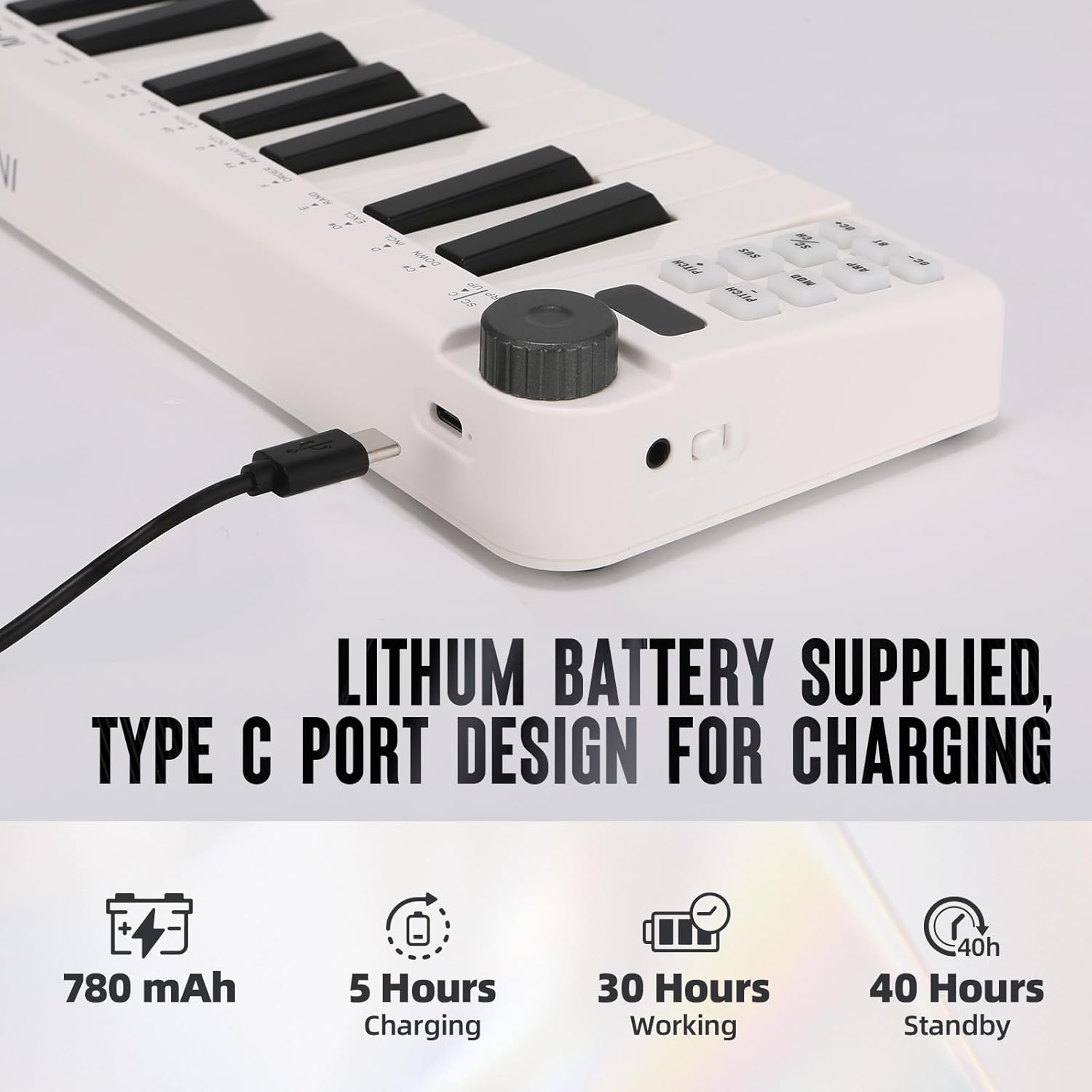
Image: Visual representation of the M-VAVE SMK-25 MINI's battery capacity, charging time, working time, and standby time.
Gwarancja i wsparcie
M-VAVE products are designed for reliability and performance. For warranty information, technical support, or service inquiries, please refer to the official M-VAVE webOdwiedź stronę internetową lub skontaktuj się bezpośrednio z działem obsługi klienta. Zachowaj paragon jako dowód zakupu na wypadek reklamacji.
M-VAVE aims to provide high-quality audio equipment and instruments. For assistance, their professional sales support team can address questions within 24 hours.
Odwiedź Sklep M-VAVE na Amazon Aby uzyskać więcej informacji.