
Wstęp
The Yesido YAU41 is a versatile 2-in-1 Bluetooth 5.0 audio adapter designed to function as both a transmitter (TX) and a receiver (RX). It enables wireless audio streaming for a wide range of devices, converting traditional audio systems into Bluetooth-enabled ones. Additionally, it features a built-in TF card reader for direct music playback. This manual provides essential information for proper setup, operation, and maintenance of your YAU41 device.
Produkt ponadview
Główne cechy:
- Bluetooth 5.0 zapewniający stabilne i wydajne połączenie bezprzewodowe.
- 2-in-1 functionality: Transmitter (TX) and Receiver (RX) modes.
- Integrated TF card reader for direct audio playback.
- 3.5mm AUX audio input/output.
- Rechargeable battery with approximately 10 hours of music playback.
- Kompaktowa i przenośna konstrukcja.
- Intuitive TX/RX mode switch button.
Elementy urządzenia:
Familiarize yourself with the various parts of your YAU41 audio adapter:
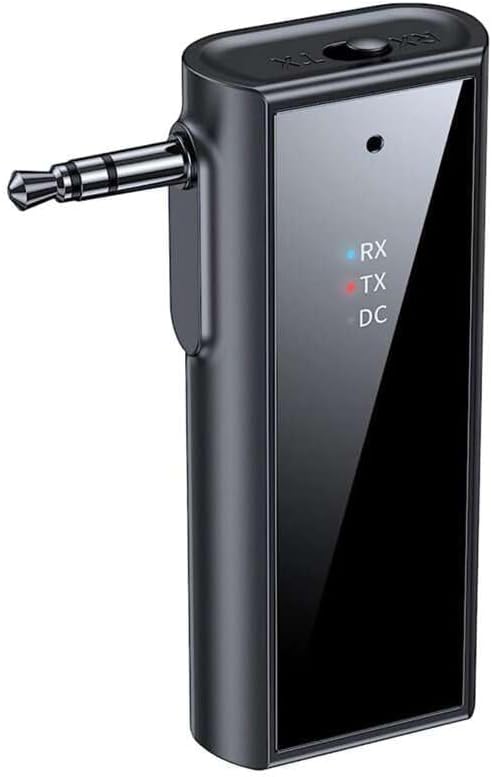
Obraz: Przód view of the Yesido YAU41 Audio Adapter, highlighting the 3.5mm audio jack, mode indicator lights (RX, TX, DC), and the Yesido logo.
- Gniazdo audio 3.5 mm: For connecting to audio sources (TX mode) or speakers (RX mode).
- TX/RX Switch Button: Przełącza pomiędzy trybem nadajnika i odbiornika.
- Przycisk zasilania/przycisk wielofunkcyjny: Powers the device on/off, plays/pauses music, answers/ends calls.
- Przycisk zwiększania głośności/następnego utworu: Zwiększa głośność lub przechodzi do następnego utworu.
- Przycisk zmniejszania głośności/poprzedniego utworu: Zmniejsza głośność lub przechodzi do poprzedniego utworu.
- Gniazdo karty TF: For inserting a TF (MicroSD) card for direct music playback.
- Port ładowania USB-C: Do ładowania urządzenia.
- Indicator Lights (RX, TX, DC):
- RX (Blue): Indicates Receiver mode is active.
- TX (Red): Indicates Transmitter mode is active.
- DC (Green): Wskazuje stan ładowania.
Organizować coś
1. Ładowanie początkowe:
Before first use, fully charge the YAU41 adapter. Connect the provided USB-C charging cable to the device's USB-C port and the other end to a standard USB power adapter (not included) or a computer USB port. The DC indicator light will illuminate during charging and turn off when fully charged.
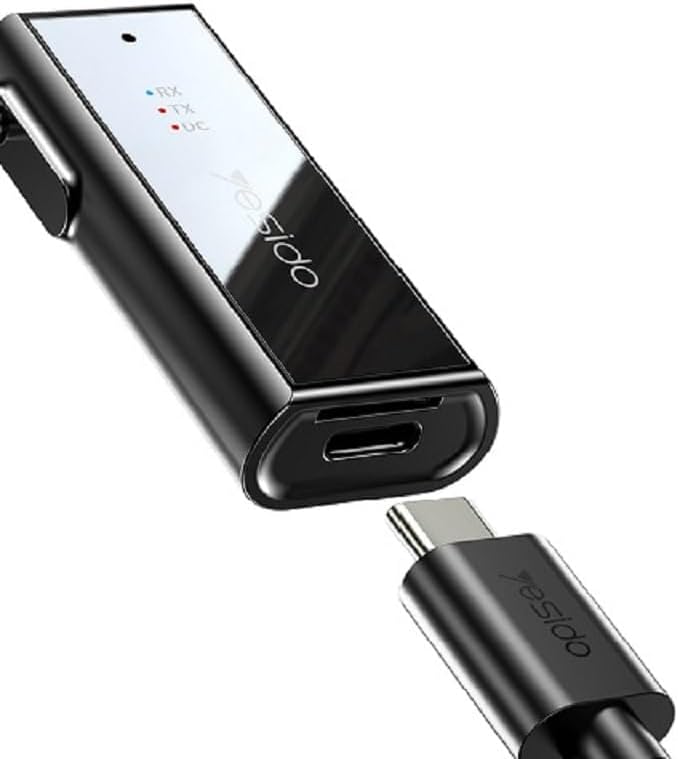
Image: The Yesido YAU41 Audio Adapter being charged via its USB-C port.
2. Włączanie/wyłączanie:
- Włączanie: Press and hold the Power button for approximately 3 seconds until the indicator lights flash.
- Aby wyłączyć: Press and hold the Power button for approximately 3 seconds until the indicator lights turn off.
Tryby pracy
Tryb nadajnika (TX):
In TX mode, the YAU41 transmits audio from a non-Bluetooth device (e.g., TV, computer, MP3 player) to a Bluetooth-enabled receiving device (e.g., Bluetooth headphones, Bluetooth speaker).
- Ensure the YAU41 is powered on.
- Przesuń przełącznik TX/RX w pozycję TX position. The red TX indicator light will illuminate.
- Connect the YAU41's 3.5mm audio jack to the audio output port of your non-Bluetooth device using the provided 3.5mm audio cable.
- Place your Bluetooth receiving device (headphones/speaker) into pairing mode.
- The YAU41 will automatically search for and connect to nearby Bluetooth receiving devices. Once connected, the TX indicator light may change its blinking pattern or remain solid.
- Play audio on your non-Bluetooth device. The sound should now be transmitted to your Bluetooth headphones/speaker.
Tryb odbiornika (RX):
In RX mode, the YAU41 receives audio from a Bluetooth-enabled device (e.g., smartphone, tablet) and outputs it to a non-Bluetooth audio system (e.g., car stereo, home stereo, wired headphones).
- Ensure the YAU41 is powered on.
- Przesuń przełącznik TX/RX w pozycję RX position. The blue RX indicator light will illuminate and flash, indicating it's in pairing mode.
- Connect the YAU41's 3.5mm audio jack to the audio input port (e.g., AUX-in) of your non-Bluetooth audio system using the provided 3.5mm audio cable.
- On your Bluetooth-enabled device (e.g., smartphone), enable Bluetooth and search for available devices. Select "YAU41" from the list to pair.
- Once successfully paired, the blue RX indicator light will remain solid.
- Play audio on your Bluetooth-enabled device. The sound will now be output through your connected audio system.

Image: The Yesido YAU41 Audio Adapter in a car, demonstrating its use with a TF card for direct music playback.
Odtwarzanie kart TF:
The YAU41 supports direct audio playback from a TF (MicroSD) card.
- Włóż kartę TF z dźwiękiem files (e.g., MP3) into the TF card slot on the YAU41.
- Urządzenie automatycznie przełączy się w tryb odtwarzania z karty TF.
- Use the Volume Up/Next Track and Volume Down/Previous Track buttons to control playback.
- The Power/Multi-function button can be used to play/pause.
- Ensure the YAU41 is connected to an audio output device (e.g., speaker in RX mode) to hear the audio.
Ładowanie
When the battery is low, the indicator light may flash or a voice prompt may be heard. To charge the device:
- Connect the YAU41 to a USB power source using the provided USB-C cable.
- The DC indicator light will turn on during charging.
- Once fully charged, the DC indicator light will turn off.
- A full charge typically takes approximately 1-2 hours and provides up to 10 hours of music playback.
Konserwacja
- Przechowuj urządzenie w suchym miejscu. Nie wystawiaj go na działanie wilgoci ani płynów.
- Czyść urządzenie miękką, suchą ściereczką. Unikaj stosowania silnych środków chemicznych i ściernych środków czyszczących.
- Przechowywać urządzenie w chłodnym i suchym miejscu, z dala od bezpośredniego światła słonecznego i ekstremalnych temperatur.
- Unikaj upuszczania i narażania urządzenia na silne uderzenia.
- Nie należy podejmować prób demontażu lub modyfikacji urządzenia, gdyż spowoduje to utratę gwarancji i może spowodować uszkodzenia.
Rozwiązywanie problemów
| Problem | Możliwe rozwiązanie |
|---|---|
| Urządzenie nie włącza się. | Ensure the device is fully charged. Press and hold the Power button for 3-5 seconds. |
| Cannot pair in TX/RX mode. |
|
| Brak wyjścia/wejścia audio. |
|
| Opóźnienie dźwięku. | Bluetooth audio transmission can sometimes introduce minor latency. This device uses Bluetooth 5.0, which minimizes this, but some applications (e.g., live music performance) may still experience noticeable delay. Ensure no obstacles are between devices. |
Specyfikacje
| Funkcja | Szczegół |
|---|---|
| Model | YAU41 |
| Wersja Bluetooth | 5.0 |
| Tryby pracy | Nadajnik (TX), odbiornik (RX) |
| Łączność | Bluetooth, 3.5 mm AUX |
| Obsługa kart TF | Tak (MicroSD) |
| Odległość transmisji | Do 10 metrów (33 stóp) |
| Typ baterii | Rechargeable Lithium Ion/Polymer |
| Czas odtwarzania muzyki | Około 10 godzin |
| Port ładowania | USB-C |
| Metoda kontroli | Pikolak |
| Tworzywo | PC (poliwęglan) |
| Waga | 300 gramów |
| Kolor | Czarny |
| Kompatybilne urządzenia | TV, Radio, Speaker, Smartphone, Car Audio Systems |
Informacje dotyczące bezpieczeństwa
- Nie wystawiaj urządzenia na działanie ekstremalnych temperatur, bezpośredniego światła słonecznego ani otwartego ognia.
- Avoid using the device in dusty or dirty environments.
- Trzymaj urządzenie z dala od silnych pól magnetycznych.
- Do not use unauthorized chargers or cables, as this may damage the device or pose a safety risk.
- Urządzenie i baterię należy utylizować zgodnie z lokalnymi przepisami.
Gwarancja i wsparcie
Aby uzyskać informacje o gwarancji i pomocy technicznej, zapoznaj się z dokumentacją dołączoną do zakupu lub skontaktuj się bezpośrednio z producentem. Zachowaj dowód zakupu na wypadek roszczeń gwarancyjnych.