
1. Wprowadzenie
Thank you for choosing the Reobiux 2K PTZ IP 6MP Dual Lens Outdoor Security Camera. This manual provides essential information for the proper installation, operation, and maintenance of your security camera system. Please read this manual thoroughly before use and retain it for future reference.
Zawartość opakowania:
- 2 x Reobiux 2K PTZ IP 6MP Dual Lens Outdoor Security Camera
- 1 x Instrukcja obsługi
- 1 x Zestaw wkrętów instalacyjnych
- 1 x 3-metrowy kabel zasilający
2. Informacje dotyczące bezpieczeństwa
Aby zapewnić bezpieczną obsługę i zapobiec uszkodzeniom, należy przestrzegać następujących środków ostrożności:
- Upewnij się, że napięcie zasilaniatage odpowiada wymaganiom kamery (12 V DC).
- Nie wystawiaj aparatu na działanie ekstremalnych temperatur i wilgoci wykraczających poza zakres jego działania.
- Unikaj umieszczania kamery w pobliżu silnych pól elektromagnetycznych.
- Przed przystąpieniem do prac konserwacyjnych lub instalacyjnych należy odłączyć zasilanie.
- Only use authorized accessories and power adapters.
- This camera is designed for outdoor use and is IP66 waterproof. However, avoid submerging it in water.
3. Koniec produktuview
The Reobiux A33H-2P camera features a dual-lens system for comprehensive surveillance. It includes a fixed lens and a rotating lens, providing a wide field of view and PTZ (Pan-Tilt-Zoom) capabilities.

Image 3.1: Camera Components and PTZ Control. This image illustrates the Reobiux A33H-2P camera mounted on a wall, highlighting its fixed upper lens and rotating lower lens. Arrows indicate a 355-degree pan capability and a 90-degree tilt capability. Below the camera, a smartphone screen displays a dual-view interface, showing simultaneous feeds from both lenses, demonstrating the camera's comprehensive monitoring features.
Główne cechy:
- Podwójny obiektyw i podwójny ekran: One fixed lens and one rotatable lens for 360° coverage.
- Rozdzielczość 2.5K: High-definition video recording for clear images.
- Kolorowe widzenie nocne: Lepsza widoczność w warunkach słabego oświetlenia.
- Automatyczne śledzenie: Follows detected human movement.
- Dwukierunkowy dźwięk: Wbudowany mikrofon i głośnik umożliwiające komunikację.
- Wodoodporność IP66: Durable for various outdoor weather conditions.
- Łączność Wi-Fi i Bluetooth: Easy setup and remote access.
4. Konfiguracja
4.1 Fizyczna instalacja
- Wybierz lokalizację: Select an outdoor location that provides the desired surveillance coverage and has access to a power outlet. Ensure the mounting surface is sturdy.
- Zamontuj kamerę: Use the provided installation screws to securely mount the camera to the wall. The camera supports wall mounting.
- Podłącz zasilanie: Connect the 3m power cable to the camera and then to a 12V DC power source.
4.2 Instalacja i połączenie aplikacji
The Reobiux camera uses the 'icsee' application for setup and remote control.
- Pobierz aplikację: Szukaj 'icsee' in your smartphone's app store (App Store for iOS or Google Play for Android) and download it.
- Utwórz konto: Open the icsee app and follow the on-screen instructions to create a new user account.
- Dodaj kamerę:
- Sprawdź, czy Bluetooth i Wi-Fi w Twoim telefonie są włączone.
- In the icsee app, tap the '+' icon to add a new device.
- The app will use Bluetooth to quickly discover and pair with the camera.
- Follow the prompts to connect the camera to your 2.4 GHz Wi-Fi network. Notatka: The camera only supports 2.4 GHz Wi-Fi; 5 GHz networks are not supported.
- Pełna konfiguracja: Po nawiązaniu połączenia możesz nadać nazwę kamerze i dostosować ustawienia początkowe.

Image 4.1: App Download. This image displays the logos for the Apple App Store and Google Play Store, indicating where users can download the 'icsee' application for their Reobiux camera.

Image 4.2: Multi-Device Monitoring. This image shows a smartphone, tablet, and desktop computer all displaying live video feeds from the Reobiux camera, illustrating the multi-platform accessibility of the icsee application.
5. Obsługa
5.1 Na żywo View i nagrywanie
Access the icsee app to view żyćtage from your camera. The dual-lens design allows for simultaneous monitoring of different angles on a split screen.

Image 5.1: 2.5K FHD Resolution. This image depicts a child and a dog playing outdoors, with an inset magnifying the dog's face to showcase the camera's 2.5K Full HD resolution, which provides significantly clearer images than standard 1080p cameras.
The camera records video in 2.5K resolution, providing detailed and clear images. Recordings can be stored locally on a microSD card (not included) or via cloud storage (subscription may be required).
5.2 Sterowanie PTZ
Use the icsee app to remotely control the pan and tilt functions of the rotating lens. The camera offers a 355-degree pan and a 90-degree tilt, allowing you to adjust the vieww razie potrzeby.
5.3 Tryby widzenia nocnego
Kamera posiada trzy tryby widzenia nocnego:
- Tryb podczerwieni: Zapewnia czarno-biały obraz wideo w całkowitej ciemności.
- Tryb koloru: Wykorzystuje białe światło, aby zapewnić pełnokolorowy obraz wideo w nocy.
- Tryb alarmu: Automatically switches to color night vision and activates lights upon detection of motion.

Image 5.2: Two Night Vision Modes. This image is split to demonstrate the difference between Infrared Night Vision (left, monochrome) and Color Night Vision (right, full color) when viewing a house at night, highlighting the camera's versatility in low-light conditions.
5.4 Detekcja ruchu i alarmy
The camera is equipped with advanced motion detection and automatic tracking capabilities:
- Automatyczne śledzenie: When human movement is detected, the camera will automatically pan and tilt to follow the subject, keeping it centered in the frame.
- Konfigurowalne alarmy: You can set specific detection times, zones, and alarm intervals within the app.
- Regulowana czułość: Choose from low, medium, or high sensitivity levels to minimize false alarms.
- Alerty: Receive real-time push notifications on your smartphone. The camera can also trigger sound and light alarms.

Image 5.3: Real-time Push & Sound Alarm. This image shows a Reobiux camera mounted on a house at night, illuminating a person with a flashlight. A smartphone screen in the foreground displays a push notification from the 'icsee' app, indicating a 'Human Detection' alert, demonstrating the camera's real-time alarm capabilities.
5.5 Dźwięk dwukierunkowy
The integrated microphone and speaker enable clear two-way communication through the camera. You can speak to visitors or deter intruders directly from your smartphone.

Image 5.4: Two-Way Audio Functionality. This image illustrates the two-way audio feature, showing a delivery person at a front door and a smartphone displaying the camera's live feed with an audio interface, allowing the user to communicate remotely.
The camera is also compatible with Amazon Alexa, allowing you to view transmisje na żywo za pomocą komend głosowych.
5.6 Dostęp wieloużytkownikowy
The icsee app allows you to create multiple family accounts and share access to the camera feed with trusted family members or friends.
6. Konserwacja
6.1 Czyszczenie
Regularnie czyść obiektyw aparatu miękką, suchą ściereczką, aby zapewnić wysoką jakość obrazu. Nie używaj silnych środków chemicznych ani materiałów ściernych.
6.2 aktualizacji oprogramowania sprzętowego
Check the icsee app periodically for available firmware updates. Keeping your camera's firmware up-to-date ensures optimal performance and security.
6.3 Odporność na warunki atmosferyczne
The camera has an IP66 waterproof rating, meaning it is protected against dust and powerful water jets. It is designed to operate reliably in various weather conditions, including sunshine, rain, and snow.
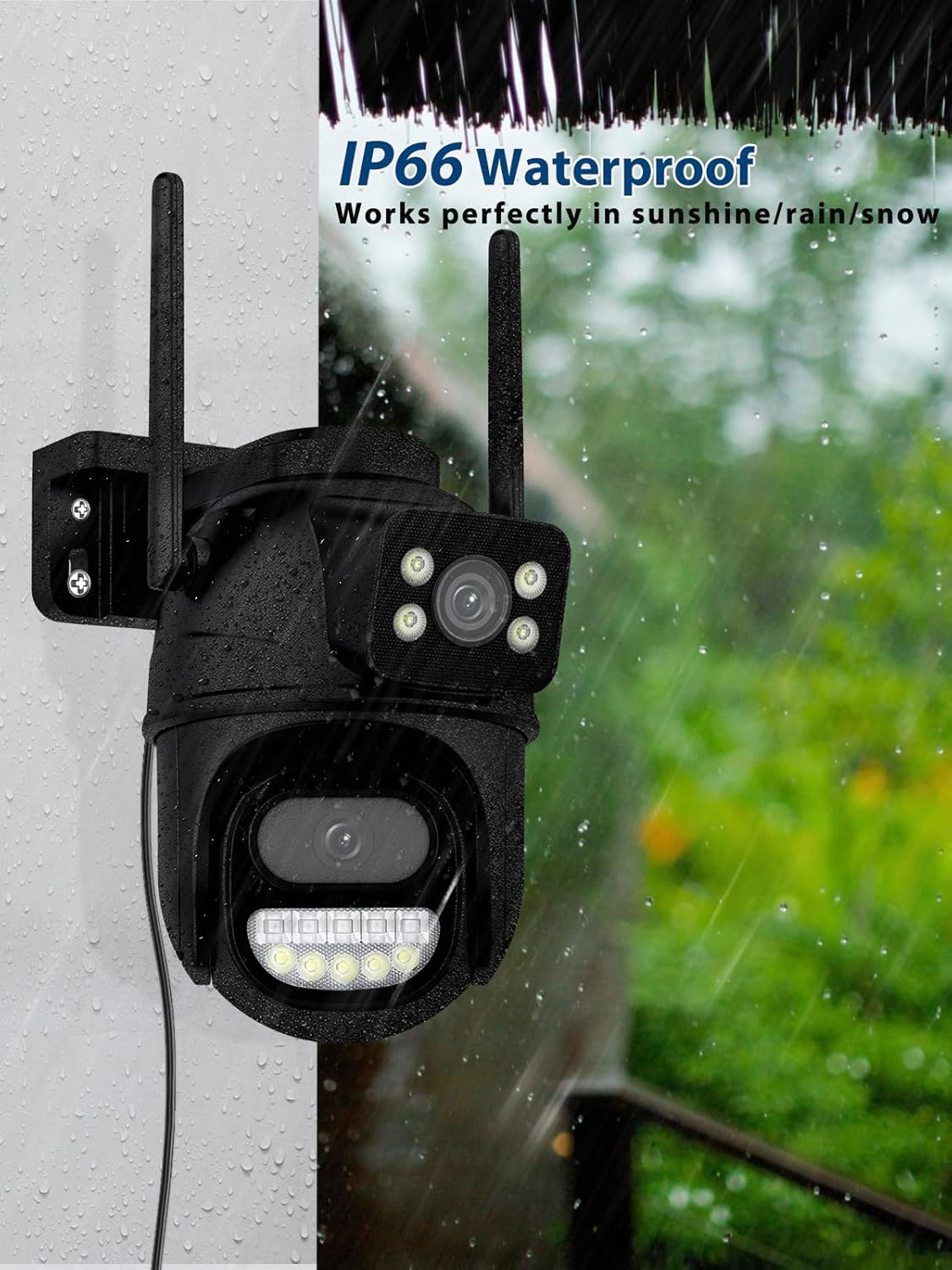
Image 6.1: IP66 Waterproof. This image shows the Reobiux A33H-2P camera mounted on an exterior wall during a rain shower, with water droplets visible. This visually confirms its IP66 waterproof rating, indicating its ability to function effectively in various weather conditions.
7. Rozwiązywanie Problemów
- Kamera nie łączy się z siecią Wi-Fi:
- Upewnij się, że Twoja sieć Wi-Fi obsługuje częstotliwość 2.4 GHz. Kamera nie obsługuje Wi-Fi 5 GHz.
- Check that the Wi-Fi signal strength is adequate at the camera's location.
- Uruchom ponownie router i kamerę.
- Sprawdź, czy hasło Wi-Fi wprowadzone w aplikacji jest prawidłowe.
- Częste fałszywe alarmy:
- Adjust the motion detection sensitivity to a lower level (low/medium).
- Define specific detection zones to exclude areas with irrelevant motion (e.g., moving trees, street traffic).
- Upewnij się, że obiektyw aparatu jest czysty i nie ma w nim żadnych przeszkód.
- Słaba jakość obrazu:
- Wyczyść obiektyw aparatu.
- Sprawdź prędkość swojego połączenia internetowego. Stabilne i szybkie połączenie jest kluczowe dla streamingu w wysokiej rozdzielczości.
- Ensure the camera is receiving sufficient power.
- Dwukierunkowa transmisja dźwięku nie działa:
- Check the volume settings on your smartphone and in the icsee app.
- Upewnij się, że nie ma żadnych przeszkód blokujących mikrofon lub głośnik kamery.
- Verify that the app has microphone permissions on your smartphone.
8. Specyfikacje
| Funkcja | Specyfikacja |
|---|---|
| Marka | Reobiux |
| Numer modelu | REO-A33H-2P |
| Rozdzielczość nagrywania wideo | 2.5 tys. |
| Technologia komunikacji bezprzewodowej | Bluetooth, Wi-Fi (tylko 2.4 GHz) |
| Liczba kanałów | 2 |
| Współczynnik kształtu | Bullet / Dome |
| Viewing kąt | 355 stopni (obrót), 90 stopni (pochylenie) |
| Typ instalacji | Wkręcane / Montaż ścienny |
| Zakres noktowizora | Do 30 metrów |
| Tworzywo | Plastikowy |
| Tomtage | 12 V (prąd stały) |
| Pobór mocy | 5 watów |
| Poziom wodoodporności | Wodoodporność IP66 |
| Cechy specjalne | Two-Way Audio, Local Recording, HD Resolution, Night Vision |
| Kompatybilne urządzenia | Smartphone, Tablet, Computer, Digital Video Recorder |
| Typ kontrolera | Amazon Alexa |
9. Gwarancja i wsparcie
Reobiux products are designed for reliability and performance. For warranty information, please refer to the specific terms and conditions provided at the time of purchase or contact Reobiux customer support.
Obsługa klienta:
If you encounter any issues or have questions regarding your Reobiux camera, please visit the official Reobiux website or contact their customer service team for assistance. Please have your model number (A33H-2P) and purchase details ready when contacting support.