
1. Wprowadzenie i koniecview
The Hoestr Body Camera A32 is a compact and versatile recording device designed for various applications, including personal security, law enforcement, cycling, and home monitoring. It features 1296P video resolution, infrared night vision, a 180-degree rotatable lens, and a long-lasting 3000mAh battery for extended recording times.
This manual provides essential information on how to set up, operate, and maintain your body camera to ensure optimal performance and longevity.
2. Funkcje produktu
- Wideo w wysokiej rozdzielczości: Records in 1296P resolution for clear and detailed footage.
- Nocna Nocna Wizja: Umożliwia nagrywanie w warunkach słabego oświetlenia.
- Obiektyw obrotowy o 180°: Umożliwia elastyczne kąty nagrywania.
- One-Slide Quick Recording: Instant start/save video recording with a single slide switch.
- One-Touch Image Rotation: Corrects inverted images with a simple button press.
- Długa żywotność baterii: 3000mAh battery provides up to 10 hours of 1080P video recording or 18 hours of audio recording.
- Detekcja ruchu: Nagrywanie rozpoczyna się automatycznie po wykryciu ruchu.
- Wbudowana pamięć masowa: Includes 55GB of flash memory, expandable up to 256GB via TF card.
3. Zawartość opakowania
Proszę sprawdzić, czy w paczce znajdują się następujące elementy:
- 1 x Hoestr Body Camera A32
- Kabel ładujący 1 x USB-C
- 2 x Sturdy Clips (for bicycle and clothing attachment)
- 1 x Instrukcja obsługi

Image: Contents of the Hoestr Body Camera A32 package, showing the camera, clips, and charging cable.
4. Układ urządzenia
Familiarize yourself with the various parts and controls of your Hoestr Body Camera A32.
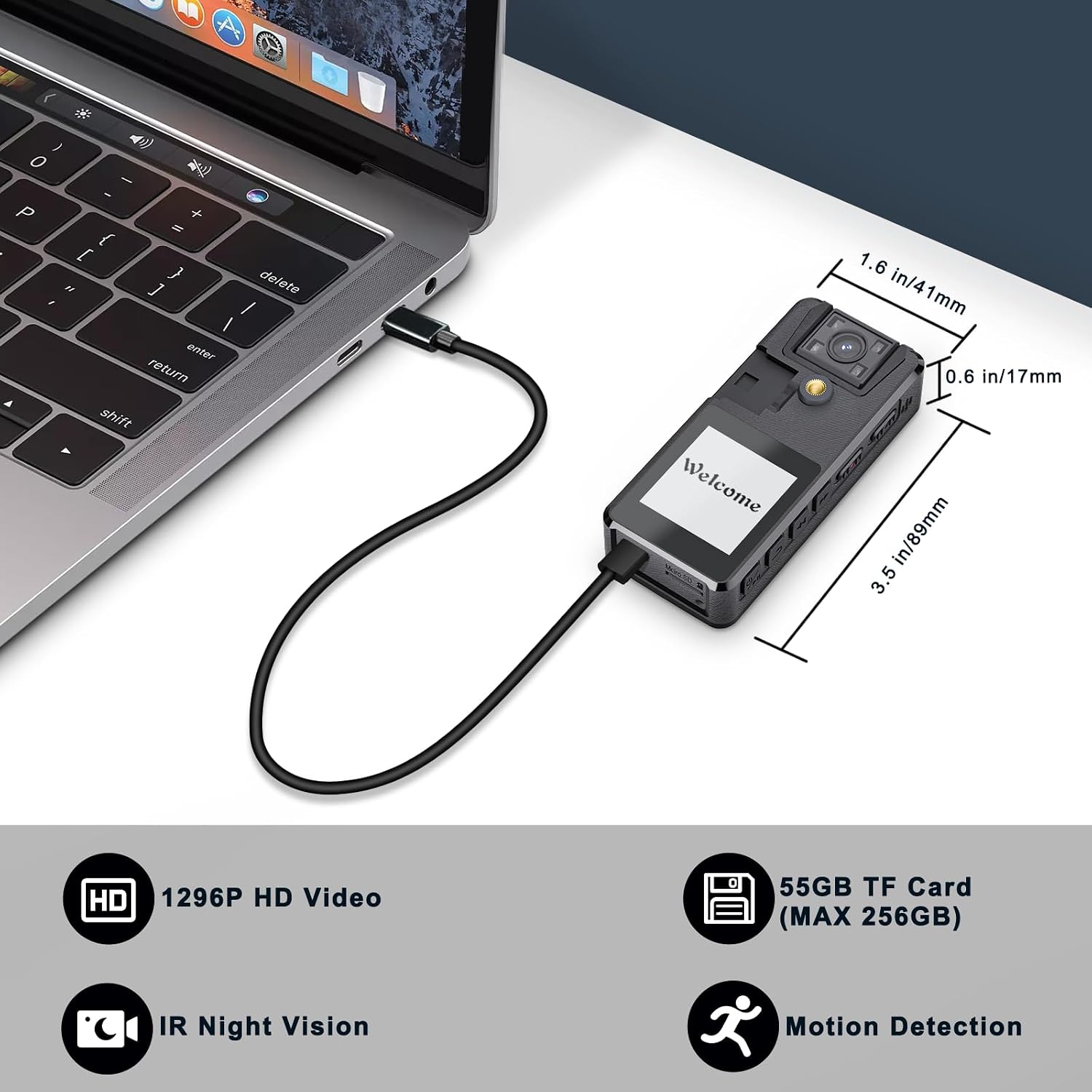
Obraz: Przód view of the Hoestr Body Camera A32 connected to a laptop via USB-C, showing its dimensions (3.5 in/89mm length, 1.6 in/41mm width, 0.6 in/17mm thickness).

Image: The Hoestr Body Camera A32 demonstrating its 180-degree rotatable lens, showing positions rotated to the top and to the back.
- Obrotowy obiektyw: The camera lens can be manually rotated 180 degrees.
- Ekran wyświetlacza: Pokazy na żywo view, menu, and playback.
- Przełącznik nagrywania: Przesuń w górę, aby rozpocząć nagrywanie, lub w dół, aby zapisać.
- Przyciski głośności (+/-): Used for menu navigation, activating night vision (Volume +), and image rotation (Volume -).
- Port USB-C: Do ładowania i przesyłania danych.
- Przycisk resetowania: Aby przywrócić ustawienia fabryczne lub ponownie uruchomić urządzenie.
- Gniazdo kart Micro SD: For external memory expansion (up to 256GB).
5. Konfiguracja
5.1 Ładowanie akumulatora
Before first use, fully charge the camera. Connect the camera to a power source using the provided USB-C cable. The 3000mAh battery typically takes about 4 hours to fully charge.

Image: The Hoestr Body Camera A32 highlighting its 3000mAh battery capacity, indicating up to 10 hours of 1080P video recording time after a 4-hour charge.
5.2 Inserting and Formatting the Memory Card
The camera has 55GB of built-in flash memory. If you wish to expand storage, insert a TF (Micro SD) card into the designated slot. The camera supports cards up to 256GB.
Ważny: The body camera only supports FAT32 formatted TF cards. After inserting a new memory card for the first time, you must format it directly on the camera. Formatting on a computer may change the format to exFAT or others, which can cause the camera to malfunction or lead to data loss. Refer to the camera's on-screen menu for formatting options.
6. Instrukcja obsługi
6.1 Włączanie/wyłączanie zasilania
Press and hold the Power button for a few seconds to turn the camera on or off.
6.2 Nagrywanie wideo
To start video recording, simply slide the dedicated record button up. The camera will begin recording immediately, regardless of whether it was previously powered on or off. To stop and save the recording, slide the button down.
6.3 Nagrywanie dźwięku
The camera supports audio recording. Specific instructions for audio-only recording modes can be found in the on-screen menu settings.
6.4 Widzenie nocne IR
To activate infrared night vision, press the "Volume +" button. This feature allows the camera to capture visual images in dimly lit environments.

Image: The Hoestr Body Camera A32 showing a split view of a room, illustrating the difference between normal lighting and IR Night Vision, which captures clear images in darkness.
6.5 One-Touch Image Rotation
If your image appears inverted, press the "Volume -" button before recording to rotate the image 180 degrees. This eliminates the need for complex settings adjustments.

Image: A split image showing two people, one side with the image correctly oriented and the other side with the image inverted, demonstrating the one-touch image rotation feature.
6.6 Wykrywanie ruchu
The camera can be set to record automatically when motion is detected within its field of view. This feature helps conserve battery life and storage space. Enable or disable motion detection through the camera's menu settings.

Image: A person jumping in the air, with a target reticle overlay, illustrating the motion detection feature of the Hoestr Body Camera A32.
7. Konserwacja
- Czyszczenie: Do czyszczenia korpusu i obiektywu aparatu używaj miękkiej, suchej ściereczki. Unikaj materiałów ściernych i silnych środków chemicznych.
- Składowanie: Przechowuj kamerę w chłodnym, suchym miejscu, z dala od bezpośredniego światła słonecznego i ekstremalnych temperatur.
- Pielęgnacja baterii: Aby zapewnić optymalną żywotność baterii, unikaj częstego całkowitego rozładowywania. Ładuj ją regularnie, nawet jeśli nie jest używana przez dłuższy czas.
- Aktualizacje oprogramowania układowego: Sprawdź producenta webokresowo odwiedzaj tę witrynę w celu sprawdzenia dostępności aktualizacji oprogramowania sprzętowego, które poprawią wydajność i dodadzą nowe funkcje.
8. Rozwiązywanie Problemów
Q1: Why can't I format the memory card on my computer? Why is it necessary to format the memory card after inserting it into the camera for the first time?
A: The body camera only supports FAT32 format TF cards. You can only format the memory card on the police body camera itself. If you format the memory card on your computer, it will change its format from FAT32 to exFAT or another format, which will cause the camera to not work correctly or result in data loss.
Q2: Why does it only show approximately 55GB of memory when I view to na moim komputerze?
A: Memory manufacturers typically define 1GB as 1000MB, while computers recognize 1GB as 1024MB. This difference in calculation leads to a slight discrepancy in reported storage capacity. The actual usable capacity is as advertised.
Ogólne wskazówki dotyczące rozwiązywania problemów:
- If the camera is unresponsive, try pressing the reset button with a thin object.
- Upewnij się, że akumulator jest wystarczająco naładowany.
- Verify that the memory card is properly inserted and formatted.
9. Specyfikacje
| Funkcja | Specyfikacja |
|---|---|
| Marka | Hoestr |
| Numer modelu | A32 |
| Efektywna rozdzielczość wideo | 1296 pikseli |
| Typ soczewki | Wide Angle, 180° Rotatable |
| Rozmiar ekranu | 1.54 cali |
| Rozmiar zainstalowanej pamięci Flash | 55 GB (wewnętrzna) |
| Maksymalna pamięć zewnętrzna | 256 GB (karta TF) |
| Pojemność baterii | 3000 mAh litowo-jonowy |
| Recording Time (1080P Video) | Do 10 godzin |
| Recording Time (Audio) | Do 18 godzin |
| Czas ładowania | Około 4 godziny (USB-C) |
| Waga przedmiotu | 80 gram |
| Poziom wodoodporności | Nie jest wodoodporny |
| Stabilizacja obrazu | Tak |
| File Format | Ruch |
10. Gwarancja i wsparcie
Informacje o gwarancji
The Hoestr Body Camera A32 comes with a 2-letnia gwarancja od daty zakupu. Niniejsza gwarancja obejmuje wady produkcyjne i usterki powstałe w wyniku normalnego użytkowania. Prosimy zachować dowód zakupu na wypadek roszczeń gwarancyjnych.
Obsługa klienta
For technical assistance, troubleshooting, or warranty inquiries, please contact Hoestr customer support through the retailer where you purchased the product or visit the official Hoestr webwitryna do informacji kontaktowych.