
Wstęp
This manual provides detailed instructions for the GAMFAMI TERIOS Wireless Controller. Please read this manual carefully before using the product to ensure proper operation and to maximize your gaming experience. This controller is designed for use with PlayStation 4, PS4 Pro, and PS4 Slim consoles.
Cechy produktu
- Joysticki z efektem Halla: Equipped with Hall joysticks to prevent drift and ensure a longer lifespan with smooth, precise control.
- Programowanie makr: Two programmable back buttons (M1, M2) allow mapping of various inputs (X, O, Triangle, Square, Up, Down, Left, Right, L3, R3, L1, R1, L2, R2) for enhanced gameplay.
- Połączenie bezprzewodowe: Enjoy a seamless wireless gaming experience with Bluetooth technology.
- Podwójne wibracje Shock: Enhanced dual shock motors provide immersive haptic feedback for a realistic gaming experience.
- Funkcja turbo: Activate the Turbo feature for rapid, repeated button presses, offering a competitive advantage.
- Długotrwała bateria: Features a 1000mAh rechargeable battery for extended play sessions.
- Ergonomiczna konstrukcja: Lightweight and durable ABS construction with textured grips for comfortable handling.
- Built-in Speaker & 3.5mm Audio Jack: Provides high-quality audio directly from the controller and supports headset connection.
Zawartość opakowania
Proszę sprawdzić zawartość opakowania po rozpakowaniu:
- GAMFAMI TERIOS Wireless Controller
- Kabel ładujący USB
- Instrukcja obsługi
Układ kontrolera
Familiarize yourself with the buttons and features of your GAMFAMI TERIOS Wireless Controller.
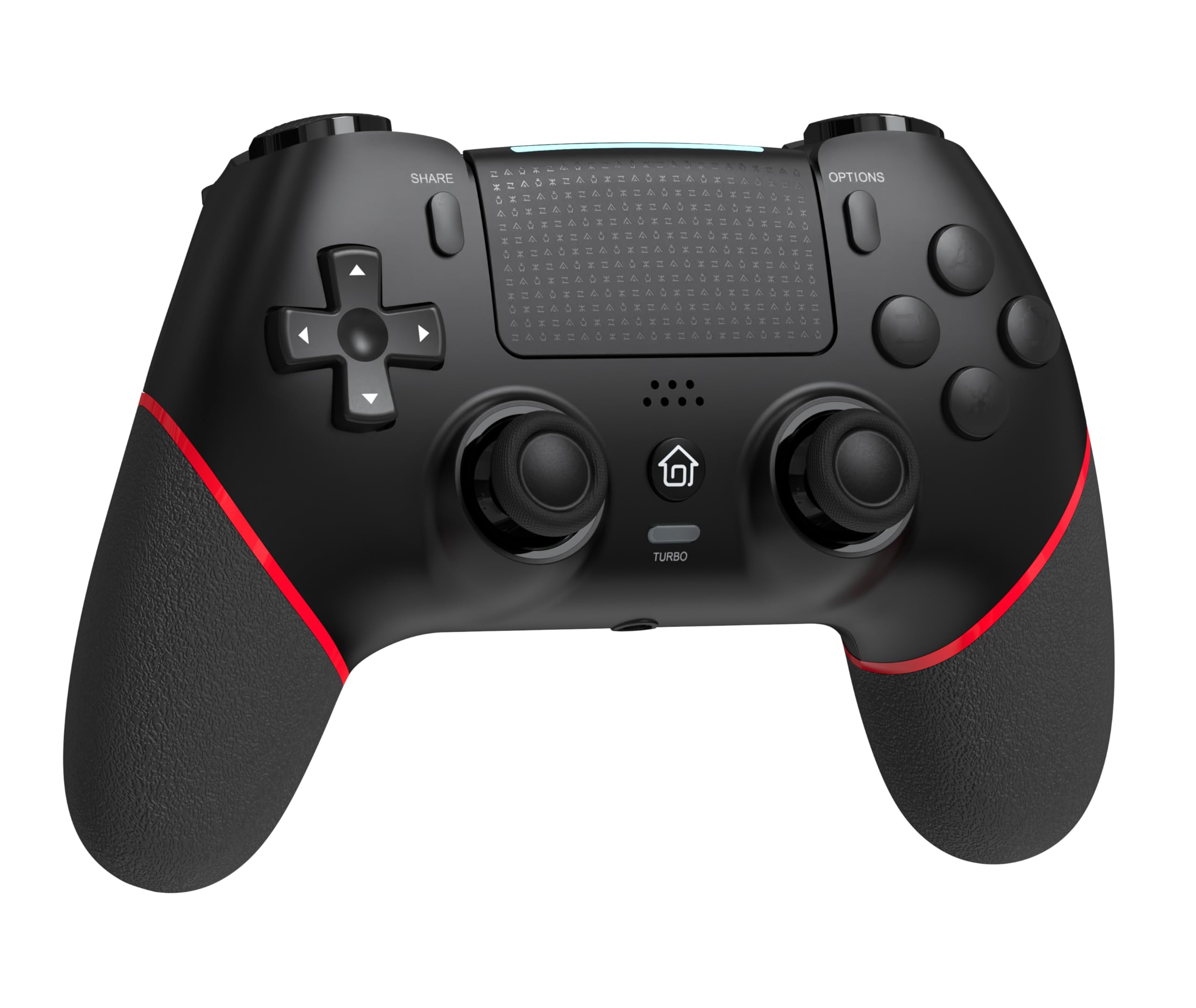
Przód view of the GAMFAMI TERIOS Wireless Controller, showing the joysticks, D-pad, action buttons, Share, Options, Home, and Turbo buttons, and the touchpad.
- Klawisz kierunkowy (D-Pad): Do wprowadzania danych kierunkowych.
- Przyciski akcji (trójkąt, kółko, krzyżyk, kwadrat): Standardowe przyciski akcji PlayStation.
- Lewy/prawy drążek analogowy: For precise movement and camera control. Features Hall Effect technology.
- Przycisk UDOSTĘPNIJ: Do udostępniania treści rozgrywki.
- Przycisk OPCJE: Do menu i opcji w grze.
- Przycisk PS (przycisk Home): To access the PS4 system menu.
- Przyciski L1/R1: Guziki na ramionach.
- Wyzwalacze L2/R2: Wyzwalacze analogowe.
- Panel dotykowy: Multi-touch input area.
- Przyciski M1/M2: Programowalne przyciski wstecz.
- Przycisk TURBO: Włącza/wyłącza funkcję turbo.
- Gniazdo słuchawkowe 3.5 mm: Do podłączenia kompatybilnego zestawu słuchawkowego.
- Port USB-C: Do ładowania i przewodowego połączenia.

Z powrotem view of the controller, highlighting the M1 and M2 programmable buttons and product information.
Konfiguracja i połączenie
Pairing with PS4/PS4 Pro/PS4 Slim
- Sprawdź, czy konsola PS4 jest włączona.
- Connect the controller to your PS4 console using the included USB charging cable.
- Press the PS button on the controller. The light bar will flash, indicating it is pairing.
- Once the light bar turns solid, the controller is successfully paired and ready for use.
- You can now disconnect the USB cable for wireless play.
Reconnecting to PS4
After initial pairing, simply press the PS button on the controller to reconnect wirelessly to your PS4 console.
Instrukcja obsługi
Korzystanie z funkcji Turbo
- Naciśnij i przytrzymaj TURBINA przycisk.
- Podczas trzymania TURBINA, press the action button (e.g., Cross, Circle, Square, Triangle, L1, R1, L2, R2) you wish to apply the turbo function to.
- Release both buttons. The selected action button will now rapidly repeat its input when held down.
- To disable turbo for a specific button, repeat the process: hold TURBINA and press the turbo-enabled action button.
- To disable turbo for all buttons, press and hold the TURBINA przycisk przez 5 sekundy.
Macro Programming (M1/M2 Buttons)
The M1 and M2 buttons on the back of the controller can be programmed to replicate other button inputs.
- Naciśnij i przytrzymaj UDZIAŁ przycisk i M1 or M2 button simultaneously for 3 seconds until the light bar flashes rapidly. This indicates macro programming mode.
- Press the button(s) you wish to map to M1 or M2 (e.g., X, O, Triangle, Square, Up, Down, Left, Right, L3, R3, L1, R1, L2, R2). You can map a single button or a sequence of buttons.
- Naciśnij M1 or M2 button again to save the macro. The light bar will stop flashing rapidly and return to its normal state.
- To clear a macro, repeat step 1, then press the M1 or M2 button twice without pressing any other buttons.

Illustration of the advanced buttons and their programming capabilities.
Ładowanie i zarządzanie baterią
The controller is equipped with a 1000mAh rechargeable battery.
Ładowanie kontrolera
- Connect the included USB charging cable to the USB-C port on the controller.
- Connect the other end of the cable to a USB port on your PS4 console (when powered on or in rest mode) or a compatible USB wall adapter (5V/1A recommended).
- The light bar on the controller will slowly pulse orange while charging.
- Once fully charged, the light bar will turn off.
Wskaźnik poziomu naładowania baterii
The controller's light bar will indicate battery status. A low battery will cause the light bar to flash red. It is recommended to charge the controller when this occurs.
Konserwacja
- Czyszczenie: Do czyszczenia kontrolera używaj miękkiej, suchej ściereczki. Nie używaj silnych środków chemicznych ani materiałów ściernych.
- Składowanie: Przechowuj kontroler w chłodnym, suchym miejscu, z dala od bezpośredniego światła słonecznego i ekstremalnych temperatur.
- Unikaj kropli: Chroń kontroler przed upadkami i uderzeniami, które mogą uszkodzić jego podzespoły wewnętrzne.
Rozwiązywanie problemów
| Problem | Rozwiązanie |
|---|---|
| Kontroler nie łączy się/nie paruje. |
|
| Controller experiences input lag or disconnection. |
|
| Joysticks exhibit drift. |

Illustration of Hall Effect joystick technology, designed to prevent drift. |
| Kontroler nie ładuje się. |
|
Specyfikacje
| Nazwa modelu | TERIOSY |
| Marka | GAMFAMI |
| Kompatybilne urządzenia | PS4, PS4 Pro, PS4 Slim |
| Typ kontrolera | Gamepad |
| Technologia łączności | Bluetooth (bezprzewodowy) |
| Źródło zasilania | Zasilany bateryjnie |
| Pojemność baterii | 1000mAh |
| Waga przedmiotu | 0.37 kilograma |
| Kolor | Czarny Czerwony |
Gwarancja i wsparcie
For warranty information and technical support, please refer to the documentation included with your purchase or visit the official GAMFAMI webZachowaj paragon jako dowód zakupu na wypadek ewentualnych roszczeń gwarancyjnych.
For further assistance, please contact GAMFAMI customer service through their official channels.