
1. Wprowadzenie
This manual provides detailed instructions for setting up, operating, and maintaining your BoyKeep 2K Wi-Fi Indoor Camera. Designed for indoor surveillance, this camera offers high-resolution video, two-way audio, motion detection, and versatile storage options, making it ideal for monitoring pets, babies, or general home security.

Figure 1: BoyKeep 2K Wi-Fi Indoor Camera (White model).
2. Zawartość opakowania
- BoyKeep 2K Wi-Fi Indoor Camera (Model K30)
- Zasilacz
- Kabel zasilający USB
- Akcesoria montażowe
- Instrukcja obsługi (ten dokument)
3. Przewodnik konfiguracji
3.1 Początkowe włączenie zasilania
- Rozpakuj kamerę i wszystkie akcesoria.
- Connect the USB power cable to the camera's power port and the power adapter.
- Plug the power adapter into a standard electrical outlet. The camera will power on and initiate its self-test.
- Wait for the camera's indicator light to flash, indicating it is ready for connection.
3.2 Instalacja aplikacji i tworzenie konta
- Download the "BoyKeep" app from your smartphone's app store (available for Android and iOS).
- Otwórz aplikację i postępuj zgodnie z instrukcjami wyświetlanymi na ekranie, aby utworzyć nowe konto lub zaloguj się, jeśli już je posiadasz.
3.3 Łączenie z Wi-Fi
- In the BoyKeep app, tap the "+" icon to add a new device.
- Wybierz model aparatu z listy.
- Follow the app's instructions to connect the camera to your Wi-Fi network. The camera supports both 2.4 GHz and 5 GHz Wi-Fi bands.
- Ensure your smartphone is connected to the same Wi-Fi network you intend to connect the camera to.
- Scan the QR code displayed on your phone screen with the camera lens when prompted. Hold the phone approximately 15-20 cm (6-8 inches) from the camera.
- Once connected, the camera's indicator light will turn solid, and you will hear a confirmation sound.

Figure 2: Illustrates the camera's 355° horizontal pan and 95° vertical tilt capabilities, along with key features like motion tracking, two-way audio, 2K video, and night vision.
4. Instrukcja obsługi
4.1 Na żywo View i sterowanie obrotem/pochyleniem
- Open the BoyKeep app and select your camera from the device list to access the live view.
- Use the directional controls within the app to pan the camera horizontally (355°) and tilt it vertically (95°) to adjust the viewkąt.

Figure 3: The camera offers a wide 360-degree coverage, allowing comprehensive monitoring of your space.
4.2 Dźwięk dwukierunkowy
- Z koncertu view, dotknij ikony mikrofonu, aby mówić przez głośnik kamery.
- Kliknij ikonę głośnika, aby słuchać dźwięku z otoczenia kamery.

Figure 4: The camera supports two-way audio, enabling communication with individuals near the camera.
4.3 Detekcja ruchu i alerty
- Enable motion detection in the app settings to receive real-time alerts on your smartphone when motion is detected.
- Adjust sensitivity levels and set specific monitoring zones to minimize false alarms.
- The camera can automatically track detected motion and record video clips.
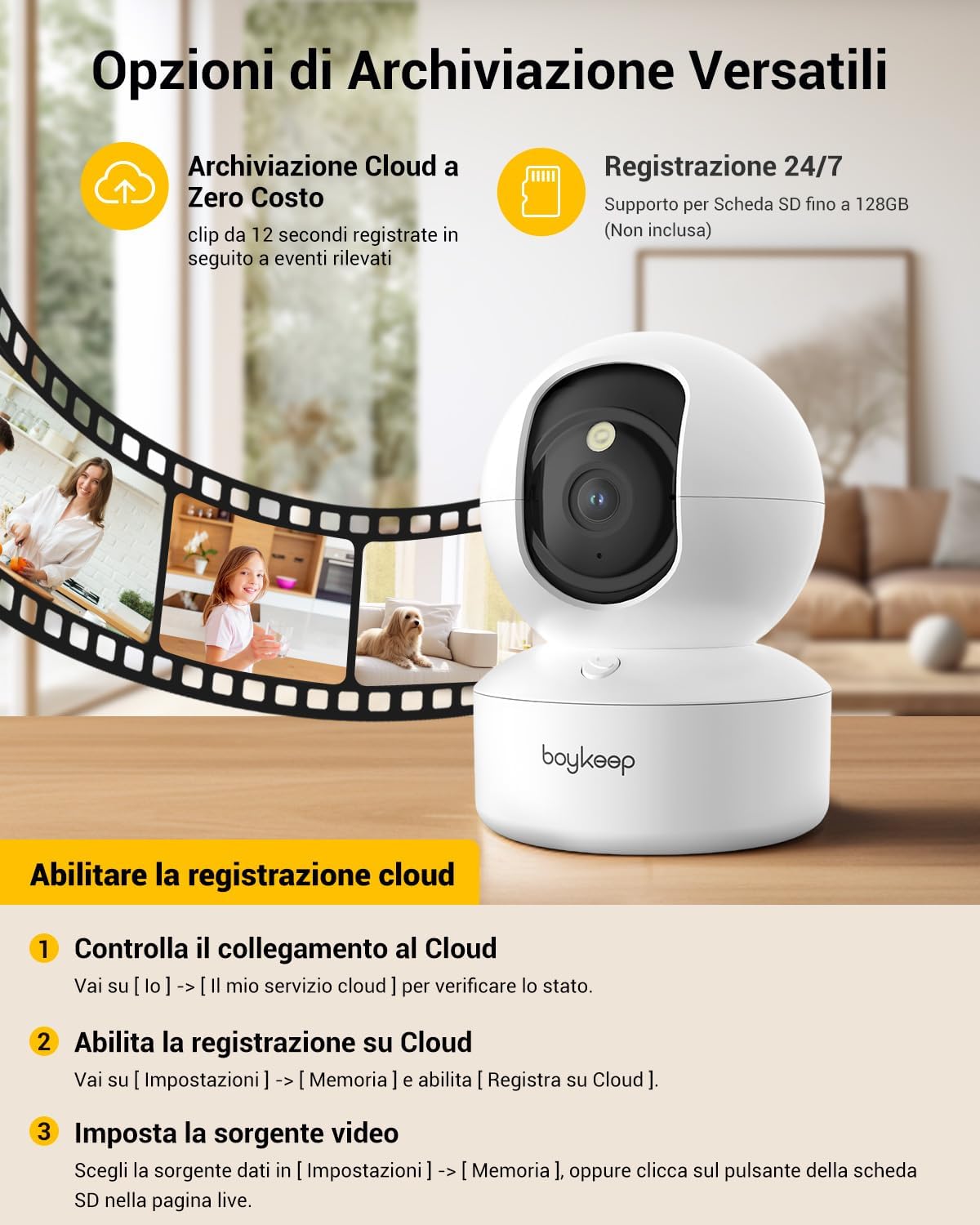
Figure 5: The camera features intelligent AI detection and tracking for people and pets, capturing key moments.
4.4 Widzenie nocne
- The camera automatically switches to night vision mode in low-light conditions using its infrared LEDs.
- This provides clear black-and-white video footagdo 10 metrów w całkowitej ciemności.

Figure 6: The camera provides clear 24-hour crystal-clear vision, including effective night vision.
4.5 Opcje nagrywania i przechowywania
- Przechowywanie w chmurze: The camera offers free cloud storage for 12-second event clips over the last 24 hours (requires activation in the app). This provides a secure backup.
- Przechowywanie kart Micro SD: Insert a Micro SD card (up to 128 GB, not included) into the camera's slot for continuous recording or event-triggered recording.

Rysunek 7: Koniecview of versatile storage options, including free cloud storage for 12-second event clips and 24/7 recording support via Micro SD card (up to 128GB, not included).
4.6 Enabling Cloud Recording (App Instructions)
- Open the BoyKeep app and select your camera.
- Idź do [I] → [My Cloud Service] aby sprawdzić stan.
- Przejdź do [Ustawienia] → [Pamięć] i włącz [Record to Cloud].
- Choose your video source from [Ustawienia] → [Pamięć], or click the SD card button on the live page.
Video 1: Demonstrates the process of enabling cloud recording within the BoyKeep app settings.
Video 2: Shows the BoyKeep indoor camera in action, highlighting its features and functionality.
5. Konserwacja
- Czyszczenie: Delikatnie przetrzyj obiektyw i korpus aparatu miękką, suchą ściereczką. Nie używaj płynnych środków czyszczących ani materiałów ściernych.
- Aktualizacje oprogramowania: Regularly check the BoyKeep app for firmware updates to ensure optimal performance and security.
- Umieszczenie: Ensure the camera is placed on a stable surface or securely mounted to prevent accidental falls. Avoid placing it in direct sunlight or near heat sources.
6. Rozwiązywanie Problemów
| Wydanie | Możliwa przyczyna / rozwiązanie |
|---|---|
| Kamera nieaktywna | Sprawdź połączenie Wi-Fi, upewnij się, że kamera jest włączona, uruchom ponownie kamerę i router. |
| Nie można połączyć się z siecią Wi-Fi | Ensure correct Wi-Fi password, camera is within router range, and you are connecting to a supported 2.4GHz or 5GHz network. Try resetting the camera. |
| Słaba jakość wideo | Check network speed, ensure lens is clean, adjust camera placement for better lighting. |
| Nie otrzymano alertów ruchu | Verify motion detection is enabled in app settings, check notification settings on your phone, ensure app is running in the background. |
| Dwukierunkowe audio nie działa | Check microphone and speaker settings in the app, ensure volume is up on your phone and camera. |
7. Specyfikacje
| Funkcja | Szczegół |
|---|---|
| Numer modelu | K30 |
| Rezolucja | 2K (1296p) |
| Pan Angle | 355° |
| Kąt nachylenia | 95° |
| Łączność | Wi-Fi (2.4 GHz i 5 GHz) |
| Zakres noktowizora | Do 10 metrów |
| Opcje przechowywania | Przechowywanie w chmurze, karta Micro SD (do 128 GB) |
| Źródło zasilania | Wired Electric (5V, 3W) |
| Wymiary (dł. x szer. x wys.) | Wymiary 8.38 x 8.38 x 16.26 cm |
| Waga | 310 gramów |
| Stosowanie | Wnętrz |
8. Gwarancja i wsparcie
BoyKeep provides a 24-month warranty for this product. For any issues, questions, or suggestions, please contact BoyKeep customer support. They aim to provide 100% satisfactory solutions within 3 working days.
You can typically find support contact information within the BoyKeep app or on the official BoyKeep webstrona.