
1. Wprowadzenie
Welcome to the SUUNY X1 Pro Max Smartwatch user manual. This document provides comprehensive instructions to help you set up, operate, and maintain your new smartwatch. The X1 Pro Max is designed to enhance your daily life with features such as Bluetooth calling, health monitoring (heart rate, blood pressure, blood oxygen), sports tracking, and smart notifications. Please read this manual carefully before using the device to ensure optimal performance and longevity.
2. Zawartość opakowania
Po otwarciu opakowania należy sprawdzić, czy zawiera ono wszystkie poniższe elementy:
- SUUNY X1 Pro Max Smartwatch
- Kabel do ładowania bezprzewodowego
- Instrukcja obsługi
- Silicone Strap (Black or Grey, depending on model)
- Steel Bamboo Strap (Black or Silver, depending on model)
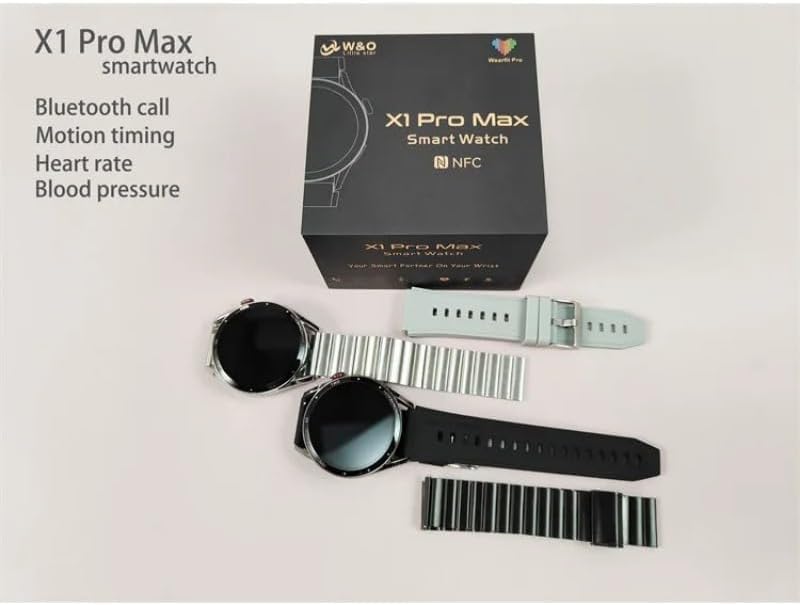
Image: The SUUNY X1 Pro Max Smartwatch packaging, showing two watches (one black, one silver) along with various silicone and steel straps, and the user manual.
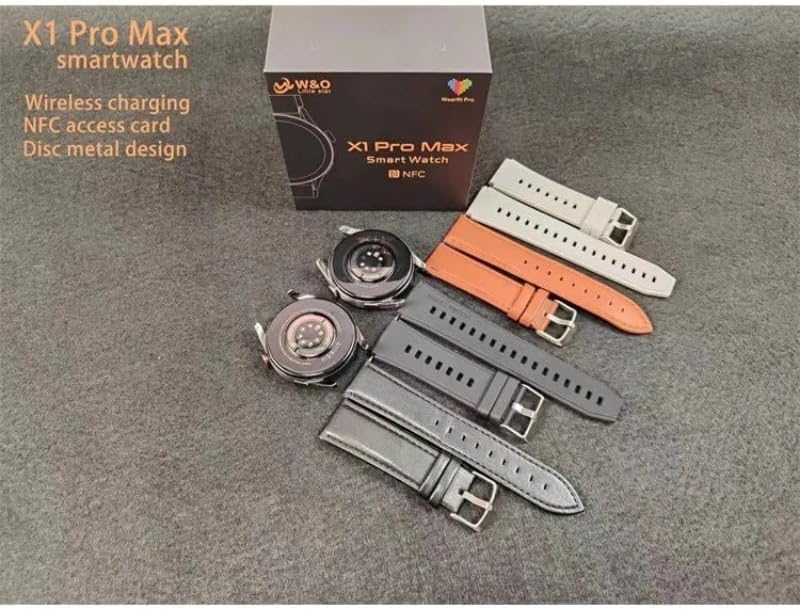
Image: A SUUNY X1 Pro Max Smartwatch box with the watch body and several interchangeable straps in different colors (grey, orange, black, silver).
3. Koniec produktuview
The SUUNY X1 Pro Max features a round 1.45-inch AMOLED display with a resolution of 412x412 pixels. It is equipped with a main chip 551 and Bluetooth version 5.2 for stable connectivity.
Kluczowe komponenty:
- Wyświetlacz: 1.45-inch Round AMOLED Touchscreen
- Przycisk boczny/korona: For navigation and function control.
- Czujniki: Heart rate, blood pressure, blood oxygen sensors on the rear.
- Ładowanie styków: On the rear for wireless charging.
- Głośnik/Mikrofon: Do połączeń Bluetooth.

Obraz: Zbliżenie view of the SUUNY X1 Pro Max Smartwatch in silver with a grey silicone strap, displaying a watch face with time, date, weather, steps, and heart rate.
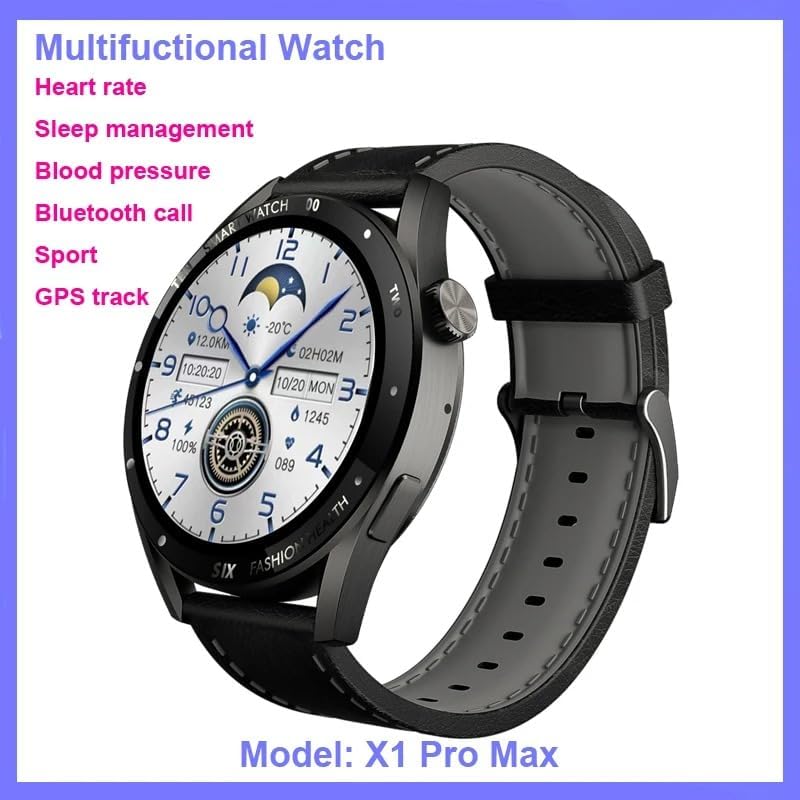
Image: The SUUNY X1 Pro Max Smartwatch in black with a black silicone strap, shown at an angle, highlighting its design and the 'Multifunctional Watch' capabilities.

Obraz: Szczegółowy views of the SUUNY X1 Pro Max Smartwatch, showing the alloy watch case, the sweat-proof breathable silicone strap with its buckle, and the stainless steel rear cover with brand logo.
4. Konfiguracja
4.1 Ładowanie smartwatcha
Before initial use, fully charge your smartwatch. The X1 Pro Max supports wireless charging.
- Connect the wireless charging cable to a USB power adapter (not included) and plug it into a power source.
- Place the back of the smartwatch onto the charging pad of the wireless charger. Ensure the charging contacts align.
- Wyświetlacz zegarka pokaże stan ładowania. Pełne naładowanie trwa zazwyczaj około 2 godzin.
4.2 Włączanie/wyłączanie
- Włączanie: Press and hold the side button until the SUUNY logo appears.
- Wyłączone: Naciśnij i przytrzymaj przycisk boczny, a następnie wybierz na ekranie opcję „Wyłącz”.
4.3 Instalacja aplikacji i parowanie Bluetooth
To unlock the full potential of your smartwatch, download and install the "WearFit Pro" application on your smartphone. The app is compatible with Android 5.0+ and iOS 10.0+ devices.
- Scan the QR code provided in the manual or on the watch screen, or search for "WearFit Pro" in your smartphone's app store.
- Install and open the "WearFit Pro" app.
- Włącz Bluetooth w swoim smartfonie.
- In the "WearFit Pro" app, navigate to the device section and select "Add Device".
- The app will search for available devices. Select "X1 Pro Max" from the list to pair.
- Potwierdź prośbę o sparowanie na smartfonie i smartwatchu.
4.4 NFC Access Control Setup
The X1 Pro Max supports NFC access control unlocking.
- Open the "WearFit Pro" app and navigate to the NFC settings.
- Follow the in-app instructions to add and configure your NFC access card information.
- Once set up, you can use your smartwatch to unlock compatible NFC access points.
5. Instrukcja obsługi
5.1 Podstawowa nawigacja
- Przesuń w dół: Uzyskaj dostęp do szybkich ustawień (np. jasność, tryb DND).
- Przesuń palcem w górę: View powiadomienia.
- Przesuń w lewo/w prawo: Scroll through widgets and main functions (e.g., activity, heart rate, weather).
- Naciśnij przycisk boczny: Wróć do tarczy zegarka lub uzyskaj dostęp do menu aplikacji.
- Double-click Screen: Wake up the function (if enabled).
- Obróć koronę: Scroll through menus or adjust settings.
Połączenia Bluetooth 5.2
Once paired via Bluetooth, you can make and receive calls directly from your smartwatch.
- Nawiązywanie połączenia: Aby nawiązać połączenie, uzyskaj dostęp do dialera lub listy kontaktów na zegarku.
- Odbieranie połączenia: Gdy ktoś do Ciebie zadzwoni, możesz odebrać lub odrzucić połączenie bezpośrednio na ekranie zegarka.
5.3 Powiadomienia
Enable app notifications in the "WearFit Pro" app to receive alerts for messages, calls, and other applications directly on your watch.
5.4 trybów sportowych
The smartwatch supports various sports modes to track your workouts.
- Przejdź do sekcji „Sport” lub „Trening” na zegarku.
- Select your desired activity (e.g., running, walking, cycling).
- Start the activity. The watch will record data such as duration, distance, calories burned, and heart rate.
- End the activity to save the data, which will sync with the "WearFit Pro" app.
6. Funkcje monitorowania stanu zdrowia
The SUUNY X1 Pro Max provides various health monitoring functions. For accurate readings, ensure the watch is worn snugly on your wrist.
6.1 Monitorowanie tętna
The watch can continuously monitor your heart rate or take on-demand measurements.
- Navigate to the "Heart Rate" function on the watch.
- The watch will begin measuring your heart rate.
- View your heart rate data and trends in the "WearFit Pro" app.
6.2 Monitorowanie ciśnienia krwi
The watch can estimate your blood pressure.
- Navigate to the "Blood Pressure" function on the watch.
- Podczas pomiaru należy pozostać nieruchomo.
- Results will be displayed on the watch and synced to the app.
6.3 Monitorowanie tlenu we krwi
Zmierz poziom saturacji krwi tlenem (SpO2).
- Navigate to the "Blood Oxygen" function.
- Keep your arm still and flat during the measurement.
6.4 Monitorowanie snu
Wear the watch to bed, and it will automatically track your sleep patterns, including deep sleep, light sleep, and wake times. View detailed analysis in the "WearFit Pro" app.
Notatka: The health monitoring features are for reference only and should not be used for medical diagnosis or treatment. Consult a medical professional for health-related concerns.
7. Inteligentne funkcje
- Weather Reminders: Otrzymuj aktualne informacje o pogodzie na swoim zegarku.
- Przypomnienia o siedzącym trybie życia: The watch will remind you to move after periods of inactivity.
- Budzik: Set alarms through the app or directly on the watch.
- Stoper: Użyj wbudowanego stopera do pomiaru czasu swoich czynności.
- Znajdź zegarek: Use the "WearFit Pro" app to locate your watch if it's within Bluetooth range.
- Zdalne sterowanie kamerą: Shake the watch to take photos on your paired smartphone.
- Short Video Remote Control: Control short video playback on your smartphone.
- Business Card Function: Store and display digital business cards.
8. Konserwacja
8.1 Czyszczenie
Regularly clean your smartwatch and strap to prevent skin irritation and maintain device functionality.
- Przetrzyj ekran i obudowę zegarka miękką, niepozostawiającą włókien ściereczką.
- W przypadku uporczywych plam lekko dampPrzetrzyj szmatkę wodą. Unikaj stosowania silnych środków chemicznych i materiałów ściernych.
- Aby zapewnić efektywne ładowanie, należy okresowo czyścić styki ładowania.
8.2 Wodoodporność (IP67)
The SUUNY X1 Pro Max is rated IP67, meaning it is protected from dust and can withstand immersion in water up to 1 meter for 30 minutes.
- Nadaje się do codziennego użytku, np. do mycia rąk lub podczas lekkiego deszczu.
- Avoid wearing the watch during swimming, showering with hot water, or diving, as steam and high water pressure can compromise the seal.
- Jeśli zegarek ulegnie zamoczeniu, należy go dokładnie wysuszyć przed ładowaniem.
8.3 Pielęgnacja baterii
- Unikaj częstego całkowitego rozładowywania akumulatora.
- Nie wystawiaj zegarka na działanie ekstremalnych temperatur.
- If storing the watch for an extended period, charge it to about 50% and power it off.
9. Rozwiązywanie Problemów
9.1 Zegarek się nie włącza
- Upewnij się, że zegarek jest w pełni naładowany. Podłącz go do ładowarki bezprzewodowej na co najmniej 30 minut.
- Aby wymusić ponowne uruchomienie, spróbuj nacisnąć i przytrzymać przycisk boczny przez 10–15 sekund.
9.2 Nie można sparować ze smartfonem
- Upewnij się, że Bluetooth jest włączony w Twoim smartfonie.
- Ensure the "WearFit Pro" app is installed and running.
- Uruchom ponownie smartfon i smartwatch.
- Forget the device in your smartphone's Bluetooth settings and try pairing again through the "WearFit Pro" app.
- Sprawdź, czy zegarek nie jest już sparowany z innym urządzeniem.
9.3 Nieprawidłowe odczyty stanu zdrowia
- Upewnij się, że zegarek ściśle przylega do nadgarstka — nie jest za ciasny, ani za luźny.
- Podczas pomiaru trzymaj ramię nieruchomo.
- Wyczyść czujniki z tyłu zegarka.
- Note that these readings are for general wellness and fitness purposes and are not medical-grade.
9.4 Brak powiadomień
- Check if notifications are enabled in the "WearFit Pro" app.
- Ensure your smartphone's notification settings allow the "WearFit Pro" app to send notifications.
- Sprawdź, czy zegarek jest połączony ze smartfonem przez Bluetooth.
10. Specyfikacje
| Funkcja | Specyfikacja |
|---|---|
| Numer modelu | X1 Pro Max |
| Rozmiar wyświetlacza | 1.45 inches (Round) |
| Rozdzielczość wyświetlacza | 412 x 412 pikseli |
| Typ wyświetlacza | AMOLED |
| Główny Chip | 551 |
| Pamięć | 128 MB |
| Wersja Bluetooth | 5.2 (AB5376A3) |
| Pojemność baterii | 260 mAh (litowo-jonowy) |
| Metoda ładowania | Ładowanie bezprzewodowe |
| Odporność na wodę | IP67 |
| Zgodność | Android 5.0+ / iOS 10.0+ |
| Aplikacja towarzysząca | WearFit Pro |
| GPS | Brak GPS-u |
11. Gwarancja i wsparcie
For warranty information and customer support, please refer to the documentation provided with your purchase or contact the retailer where you purchased the SUUNY X1 Pro Max Smartwatch. Specific warranty terms may vary by region and seller.
For technical assistance or further inquiries, please reach out to the SUUNY customer service channels as indicated on their official webwitryny lub opakowania produktu.