
Wstęp
This manual provides comprehensive instructions for the Ticwatch Pro 5 Enduro Smartwatch. It covers device setup, operational procedures, health and fitness monitoring features, battery management, and technical specifications. Please read this manual thoroughly to ensure proper use and maintenance of your device.
Zawartość opakowania
Sprawdź, czy w opakowaniu znajdują się wszystkie elementy:
- 1 x TicWatch Pro 5 Enduro Smartwatch
- 1 x kabel ładujący USB
- 1 x Krótki przewodnik
- 1 x Informacje o bezpieczeństwie produktu

Image: Contents of the TicWatch Pro 5 Enduro retail box, showing the smartwatch, USB charging cable, quick guide, and product safety information leaflet.
Produkt ponadview
The Ticwatch Pro 5 Enduro features a 1.43-inch OLED display with Sapphire Crystal Glass and a reinforced bezel. It includes a newly designed rotating crown and a customizable side button for navigation and interaction.

Obraz: Przód view of the TicWatch Pro 5 Enduro Smartwatch, showcasing its round display with a digital watch face indicating time, date, battery level, heart rate, distance, and steps.

Image: An internal diagram of the TicWatch Pro 5 Enduro, illustrating the integration of the Snapdragon W5+ Gen 1 Wearable Platform and Wear OS by Google.
Rotating Crown and Side Button
The newly designed rotating crown allows for effortless navigation through menus and notifications. The customizable side button can be configured for quick access to frequently used functions.

Obraz: szczegółowy view of the TicWatch Pro 5 Enduro's right side, highlighting the larger, newly designed rotating crown and the customizable side button.
Organizować coś
Początkowe parowanie
- Ensure your smartphone is running Android 8.0 or later.
- Power on your TicWatch Pro 5 Enduro.
- Download and install the Mobvoi Health app on your smartphone.
- Follow the on-screen instructions in the Mobvoi Health app to pair your smartwatch.
Aktualizacje oprogramowania
Regularly check for and install software updates through the Mobvoi Health app to ensure optimal performance and access to the latest features.
Instrukcja obsługi
Nawigacja
- Ekran dotykowy: Przesuwaj w górę, w dół, w lewo lub w prawo, aby poruszać się po menu i powiadomieniach. Dotknij, aby wybrać elementy.
- Obrotowa korona: Rotate to scroll through lists, adjust volume, or zoom in/out on maps. Press to return to the watch face or open the app drawer.
- Przycisk boczny: Press for its customized function (e.g., quick access to a workout mode).
Inteligentne powiadomienia
Receive notifications for calls, texts, and social media messages directly on your watch. Manage notification settings via the Mobvoi Health app on your smartphone.

Image: The TicWatch Pro 5 Enduro screen showing incoming notifications from various communication applications, including Gmail, Messages, WhatsApp, and Telegram.
NFC Payments (Google Pay)
The watch supports NFC payments via Google Pay. Set up your payment methods in the Google Wallet app on your paired smartphone and access them directly from your watch for contactless transactions.
Wear OS by Google Integration
The TicWatch Pro 5 Enduro runs on Wear OS by Google, providing access to Google Maps, Google Wallet, YouTube Music, and a wide range of other applications available for download.

Image: A visual representation of the Wear OS by Google ecosystem on the TicWatch Pro 5 Enduro, showing icons for various Google applications and other popular apps.
Śledzenie zdrowia i sprawności
The TicWatch Pro 5 Enduro offers comprehensive health and fitness monitoring features.
TicHealth App
The TicHealth app consolidates all your health data, including daily and weekly goals, sleep patterns, workouts, heart rate, blood oxygen levels, stress levels, and calorie intake. Access comprehensive insights with a single tap.

Image: The TicHealth application interface displayed on the TicWatch Pro 5 Enduro, showing a summary of daily health metrics such as steps, stairs climbed, calories burned, distance, heart rate, blood oxygen, and stress levels.
One-Tap Measurement
Quickly track five essential health metrics in approximately 90 seconds: heart rate, blood oxygen, respiratory rate, stress level, and heart health.

Image: A user's wrist wearing the TicWatch Pro 5 Enduro, which is displaying the results of a one-tap measurement showing heart rate, blood oxygen, respiratory rate, stress, and heart health.
Ciągły monitoring
- Monitorowanie tętna 24/7: Tracks heart rate continuously, providing daily and weekly reports on heart rate zones and alerts for abnormal heart activity.
- 24H Blood Oxygen Monitoring: Measures blood oxygen saturation levels to offer insights into oxygen absorption and overall health.

Image: The TicWatch Pro 5 Enduro screen showing a graph of 24/7 heart rate monitoring, indicating different heart rate zones and current beats per minute.

Image: The TicWatch Pro 5 Enduro screen displaying 24-hour blood oxygen saturation levels, showing a graph of percentages over time and the current reading.
Sleep Tracking & Snoring Detection
The watch automatically detects sleep sessions, including naps. The Mobvoi Health app includes snoring detection, providing information to help improve sleep quality.

Image: The TicWatch Pro 5 Enduro displaying detailed sleep tracking data, including sleep stages, total sleep duration, and information related to snoring detection within the Mobvoi Health app.
Workout Modes and Smart Training
Over 110 professional sports modes are available. Features include:
- Wbudowany GPS: For tracking outdoor activities.
- Czas regeneracji: Provides insights into optimal exercise timing based on individual health data.
- Maks. VO2: Measures the maximum amount of oxygen your body can utilize during intense exercise, indicating cardiovascular fitness.
- Third-Party Fitness App Data Sync: Seamlessly integrates with apps like Strava, Adidas Running, and Nike Run Club for real-time data synchronization.

Image: A runner wearing the TicWatch Pro 5 Enduro, with the watch screen showing VO2 Max data, distance, and calories burned during an activity.

Image: An athlete resting after a workout, with the TicWatch Pro 5 Enduro on their wrist displaying recovery time, calories, and lap information.

Image: The TicWatch Pro 5 Enduro screen demonstrating data synchronization with third-party fitness applications, featuring logos for Strava, Adidas Running, Nike Run Club, and C25K.
Cechy zewnętrzne
- Wiele GNSS: Supports GPS, GLONASS, Galileo, QZSS, and Beidou for accurate positioning.
- Kompas: Zapewnia wskazówki dotyczące kierunku.
- Barometr i wysokościomierz: Measures atmospheric pressure and altitude.

Image: A cyclist wearing the TicWatch Pro 5 Enduro, with the watch screen showing a map interface indicating Multi-GNSS tracking (GPS, GLONASS, Galileo, QZSS, Beidou) of their route.

Image: Two outdoor enthusiasts, one hiking and one rock climbing, with their TicWatch Pro 5 Enduro watches displaying compass direction and barometer/altimeter readings respectively.
Zarządzanie baterią
The TicWatch Pro 5 Enduro features dual-layer display technology for extended battery life.
- Tryb inteligentny: Do 90 XNUMX godzin pracy baterii.
- Tryb podstawowy: Do 45 dni pracy na baterii.
Szybkie ładowanie
The watch supports fast charging technology, providing approximately two days of usage with a 30-minute charge.

Image: A graphic illustrating the TicWatch Pro 5 Enduro's battery performance, showing up to 90 hours in Smart Mode and 45 days in Essential Mode, alongside its fast charging capability of 30 minutes for 2 days of usage.
Trwałość i design
- Szkło szafirowe: High-quality, scratch-resistant display glass.
- Reinforced Bezel Carvings: Enhanced durability for severe environments.
- US Military Standard 810H (MIL-STD-810H): Certified to withstand various environmental stresses including rain, sand, ice, shock, and vibration.
- 5ATM Water Resistant Rating: Suitable for swimming in shallow fresh water, handwashing, and sweating. Not suitable for hot water, soap, detergents, bathing, showers, scuba diving, water skiing, or high-speed water activities.
Image: A graphic detailing the durability features of the TicWatch Pro 5 Enduro, including Sapphire Crystal Glass, reinforced bezel carvings, and US-MIL-STD 810H certification.

Image: A swimmer wearing the TicWatch Pro 5 Enduro, illustrating its 5ATM water resistance rating suitable for open water swimming, handwashing, and sweat exposure.
Personalizacja
Tarcze zegarka
Choose from over 10,000 watch face designs through the TimeShow app or Google Play. Customize with shortcuts to apps like AllTrails, Spotify, and Google Calendar.

Image: A collage of different customizable watch faces available for the TicWatch Pro 5 Enduro, showcasing różne style i sposoby wyświetlania danych.
Ultra Low Power Display
The ultra-low-power display provides essential information like step count, calories, blood oxygen, heart rate, battery life, and compass. It offers 18 different backlight colors for enhanced readability in low-light conditions.
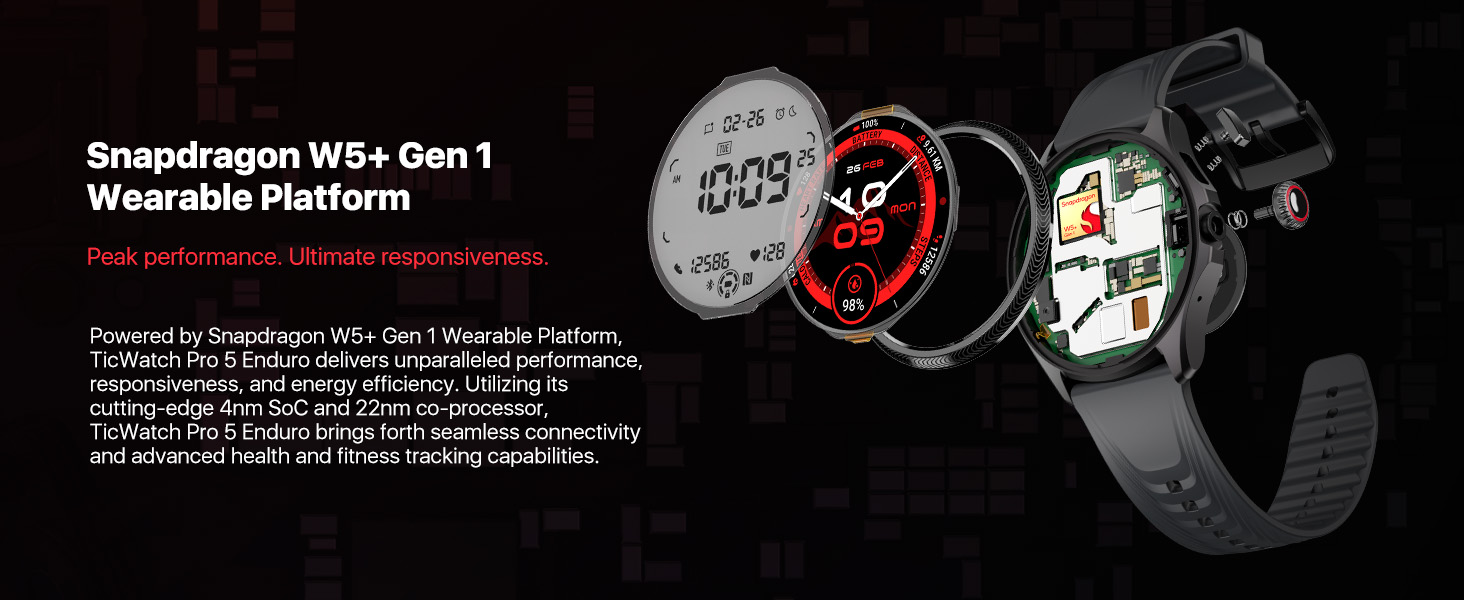
Image: A graphic demonstrating the TicWatch Pro 5 Enduro's ultra-low-power display, showing various data points and a palette of 18 backlight color options.
Heart Rate Zone Backlights
During TicExercise, the display backlight color can change to indicate your current heart rate zone (Resting, Warm up, Fat burn, Cardio, Anaerobic, Dangerous), allowing for quick assessment of training intensity.

Image: The TicWatch Pro 5 Enduro screen displaying heart rate zone backlights, with different colors corresponding to various heart rate intensity levels during exercise.
Specyfikacje
| Funkcja | Szczegół |
|---|---|
| Numer modelu | TicWatch Pro 5 Enduro |
| System operacyjny | Wear OS by Google (platforma do noszenia Snapdragon W5+ Gen 1) |
| Wyświetlacz | 1.43 Inches OLED (466*466 resolution) with Sapphire Crystal Glass |
| Pamięć | 2GB RAM, ROM 32GB |
| Pojemność baterii | 628 mAh |
| Czas pracy baterii (tryb inteligentny) | Do 90 godzin |
| Czas pracy baterii (tryb podstawowy) | Do 45 dni |
| Odporność na wodę | 5ATM |
| Standard trwałości | US Military Standard 810H (MIL-STD-810H) |
| GPS | Built-in Multi-GNSS (GPS, GLONASS, Galileo, QZSS, Beidou) |
| Łączność | Bluetooth, Wi-Fi, NFC (Google Pay) |
| Czujniki | Heart Rate Monitor, Blood Oxygen Sensor, Barometer, Compass |
| Wymiary | 1.97 x 1.89 x 0.47 cala (50 x 48 x 12 mm) |
| Waga | 1.58 uncji (44.7 grama) |
Rozwiązywanie problemów
- Zegarek się nie włącza: Ensure the watch is fully charged using the provided USB charging cable. If the issue persists, try a different charging port or adapter.
- Problemy z parowaniem:
- Verify your smartphone meets the Android 8.0 or later requirement.
- Upewnij się, że Bluetooth jest włączony zarówno w zegarku, jak i smartfonie.
- Restart both devices and attempt pairing again through the Mobvoi Health app.
- Niedokładne dane dotyczące zdrowia:
- Upewnij się, że zegarek ściśle przylega do nadgarstka, ale nie jest zbyt ciasny.
- Regularnie czyść czujniki z tyłu zegarka.
- Note that environmental factors and individual physiology can affect sensor readings.
- Krótka żywotność baterii:
- Zmniejsz jasność ekranu.
- Ogranicz odświeżanie aplikacji w tle.
- Wyłącz niepotrzebne powiadomienia.
- Utilize Essential Mode when extended battery life is critical.
- Problemy z synchronizacją aplikacji:
- Ensure your watch and smartphone are connected via Bluetooth.
- Check for updates for both the Mobvoi Health app and the watch's operating system.
- Restart the Mobvoi Health app on your phone.
Konserwacja
- Czyszczenie: Regularnie czyść obudowę i pasek zegarka miękką,amp płótno. Unikaj stosowania ostrych chemikaliów lub materiałów ściernych.
- Ładowanie: Use only the official Ticwatch charging cable. Ensure the charging contacts on the watch and cable are clean and dry before charging.
- Składowanie: Przechowuj zegarek w chłodnym i suchym miejscu, gdy go nie używasz. Unikaj ekstremalnych temperatur.
- Oprogramowanie: Keep the watch's software and the Mobvoi Health app updated to the latest versions.
Gwarancja i wsparcie
For warranty information and customer support, please refer to the official Ticwatch website or the documentation included in your product package. You can also contact Mobvoi customer service directly for assistance with your TicWatch Pro 5 Enduro.
Online resources and FAQs may be available on the Ticwatch Brand Store.