
1. Wprowadzenie
This manual provides instructions for the Varmilo Koi 73 JIS Keyboard with Sakura Switches (Model: VMMA73A039SAKURA). This keyboard features a unique design inspired by traditional Chinese Koi fish and water elements, combined with a modern aesthetic. It is a compact 65% size keyboard with a Japanese Industrial Standard (JIS) layout, designed for both functionality and portability. The keyboard is equipped with Cherry-style stabilizers for a stable typing experience.
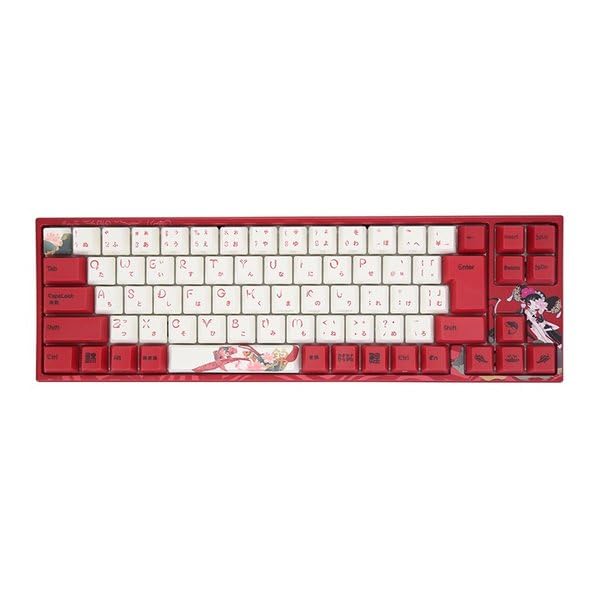
Image: Varmilo Koi 73 JIS Keyboard overview.
2. Główne cechy
- Unique Koi Design: Features vibrant koi fish illustrations and a red aesthetic, developed in collaboration with illustrator Li Huan.
- JIS Layout: 73-key Japanese Industrial Standard layout for specific regional input needs.
- Compact 65% Size: Optimizes desk space while retaining essential function and arrow keys.
- Przełączniki konfigurowalne: Offers a choice of Varmilo mechanical electrostatic capacity switches to suit individual typing preferences.
- Cherry-Style Stabilizers: Ensures consistent and stable key presses, especially for larger keys.
- Łączność USB: Reliable wired connection for stable performance.
3. Przewodnik konfiguracji
3.1 Zawartość opakowania
Przed rozpoczęciem upewnij się, że w przesyłce znajdują się wszystkie elementy:
- Varmilo Koi 73 JIS Keyboard
- Kabel USB
- Instrukcja obsługi (ten dokument)
3.2 Podłączanie klawiatury
To connect your Varmilo Koi 73 keyboard to your computer, follow these steps:
- Znajdź port USB-C z tyłu klawiatury.
- Podłącz jeden koniec dołączonego kabla USB do portu USB-C klawiatury.
- Podłącz drugi koniec kabla USB do wolnego portu USB w komputerze.
- Klawiatura powinna zostać automatycznie rozpoznana przez system operacyjny.
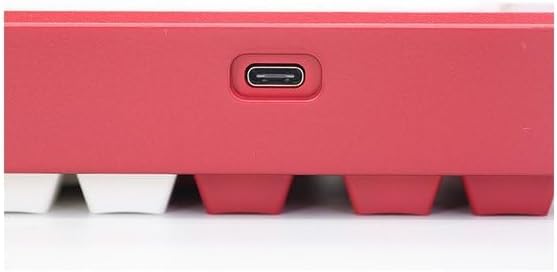
Image: USB-C port for keyboard connection.
3.3 Instalacja sterownika (opcjonalnie)
For advanced customization and optimal performance, it is recommended to install the Varmilo driver software. This software allows you to remap keys, adjust performance settings, and customize lighting effects.
Video: This video demonstrates the driver installation process and software usage for Varmilo keyboards. While it features the Muse65 model, the steps for driver installation and basic software navigation are generally applicable to other Varmilo keyboards like the Koi 73.
Please visit the official Varmilo website for the latest driver downloads specific to your keyboard model. Follow the on-screen instructions during installation.
4. Instrukcja obsługi
4.1 Podstawowe funkcje klawiszy
The Varmilo Koi 73 keyboard features a standard JIS layout. Most keys function as labeled. For special functions, refer to the combination keys below.
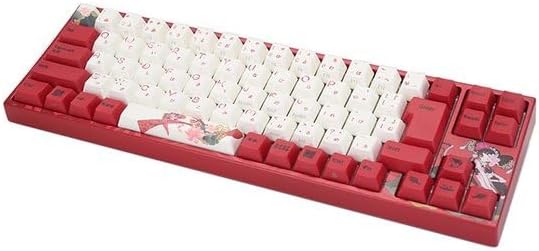
Obraz: Ponadview of the Varmilo Koi 73 JIS Keyboard layout.
4.2 Kombinacje klawiszy funkcyjnych (Fn)
Since this is a 73-key layout, some functions are accessed via the Fn key. Hold down the Fn key and press the corresponding key to activate its secondary function. Common Fn combinations include:
- Fn + F1-F12: Multimedia controls (e.g., volume, play/pause).
- Fn + klawisze strzałek: Page Up/Down, Home/End (specific to model, refer to keycap legends).
- Klawisz Fn + Win: Blokuje/odblokowuje klawisz Windows.

Image: Left side keys, often used with Fn for additional functions.
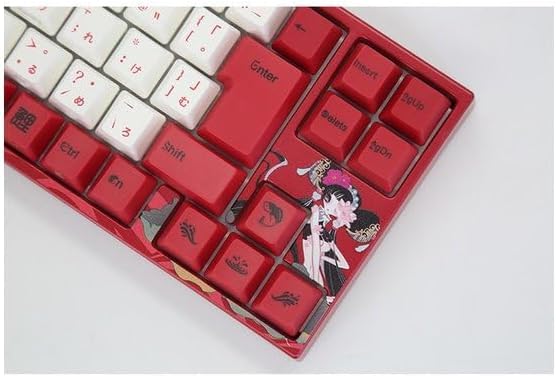
Image: Right side keys, including navigation and utility keys.
4.3 efektów świetlnych
The Varmilo Koi 73 keyboard supports various RGB lighting effects. You can cycle through different modes and adjust brightness using specific key combinations. Refer to your keyboard's specific keycap legends or the driver software for detailed lighting controls.
Video: This video showcases various RGB lighting effects on a Varmilo keyboard. While the model shown is Muse65, it provides a general idea of the dynamic lighting capabilities available on Varmilo keyboards, including the Koi 73.
5. Konserwacja i pielęgnacja
Proper maintenance ensures the longevity and optimal performance of your Varmilo Koi 73 keyboard.
- Czyszczenie nakładek klawiszy: Gently remove keycaps using a keycap puller. Clean the keycaps with a soft cloth dampUmyj je łagodnym mydłem i wodą. Przed ponownym założeniem upewnij się, że są całkowicie suche.
- Czyszczenie korpusu klawiatury: Do przecierania klawiatury użyj miękkiej, suchej ściereczki. W przypadku uporczywych zabrudzeń użyj delikatnego detergentu.amp cloth with a small amount of isopropyl alcohol can be used. Avoid excessive moisture.
- Usuwanie kurzu: Za pomocą sprężonego powietrza usuń kurz i zanieczyszczenia spomiędzy klawiszy.
- Unikaj płynów: Aby zapobiec uszkodzeniu klawiatury, należy trzymać ją z dala od płynów.
- Pielęgnacja kabli: Nie należy nadmiernie zginać ani ściskać kabla USB.
6. Rozwiązywanie Problemów
If you encounter issues with your Varmilo Koi 73 keyboard, try the following solutions:
- Klawiatura nie odpowiada:
- Sprawdź, czy kabel USB jest prawidłowo podłączony do klawiatury i komputera.
- Spróbuj podłączyć klawiaturę do innego portu USB w komputerze.
- Uruchom ponownie komputer.
- Jeśli używasz koncentratora USB, spróbuj podłączyć go bezpośrednio do komputera.
- Klucze nie są rejestrowane:
- Sprawdź, czy pod klawiszami nie znajdują się żadne zanieczyszczenia lub obce przedmioty.
- If specific keys are not working, consider reinstalling the keyboard driver.
- Problemy z oświetleniem:
- Ensure the keyboard driver is installed and up to date.
- Use the Fn key combinations or driver software to adjust lighting modes and brightness.
- Klawisz Windows zablokowany:
- Naciskać Fn + Win Key aby przełączyć blokadę klawisza Windows.
If the problem persists, please contact Varmilo customer support for further assistance.
7. Specyfikacje
| Marka | Warmilo |
| Numer modelu | VMMA73A039SAKURA |
| Układ klawiatury | 73-key JIS (Japanese Industrial Standard) |
| Łączność | Przewodowy USB |
| Typ przełącznika | Mechanical (Linear) |
| Kompatybilne urządzenia | Laptop |
| Wymiary produktu | 34.2 cm (dł.) x 34.2 cm (szer.) x 5.1 cm (wys.) |
| Zawarte komponenty | Kabel USB |
8. Gwarancja i wsparcie
Varmilo products typically come with a manufacturer's warranty. Please refer to the warranty card included with your product or visit the official Varmilo webSzczegółowe warunki gwarancji można znaleźć na naszej stronie.
For technical support, driver downloads, or further inquiries, please visit the official Varmilo support page or contact their customer service.
Official Varmilo Webstrona: www.varmilo.com