
1. Wprowadzenie
Thank you for choosing the Vortex Powerhub30 Black 30000 mAh External Battery. This device is designed to provide reliable portable power for your electronic devices. Please read this manual carefully before use to ensure proper operation and to maximize the lifespan of your power bank.
2. Informacje dotyczące bezpieczeństwa
- Do not expose the power bank to extreme temperatures (above 60°C / 140°F or below 0°C / 32°F), direct sunlight, or fire.
- Unikaj upuszczania, demontażu i prób samodzielnej naprawy urządzenia. Może to spowodować uszkodzenie i unieważnienie gwarancji.
- Trzymaj powerbank z dala od wody, wilgoci i materiałów żrących.
- Nie używaj powerbanku, jeśli jest widocznie uszkodzony, spuchnięty lub przecieka.
- Przechowywać w miejscu niedostępnym dla dzieci.
- Używaj wyłącznie certyfikowanych kabli ładujących i adapterów.
- Powerbank należy utylizować zgodnie z lokalnymi przepisami.
3. Zawartość opakowania
- Vortex Powerhub30 Black 30000 mAh External Battery
- USB Charging Cable (Micro-USB/Type-C compatible)
- Instrukcja obsługi
4. Koniec produktuview
The Vortex Powerhub30 is equipped with multiple ports and an LED display for convenient charging and monitoring.

Obraz 1: Przód view of the Vortex Powerhub30 Black external battery, showing its compact design and the Vortex logo. The image also highlights its 30000 mAh capacity and illustrates its use with various devices like smartphones, tablets, and headphones.
Składniki:
- Porty wyjściowe USB-A (x2): Do ładowania urządzeń zewnętrznych.
- Port USB typu C: Bidirectional, used for both charging the power bank and charging external devices.
- Port wejściowy Micro-USB: Do ładowania power banku.
- Wyświetlacz LED: Pokazuje pozostały procent bateriitage.
- Przycisk zasilania: Aktywuje wyświetlacz LED i rozpoczyna ładowanie.
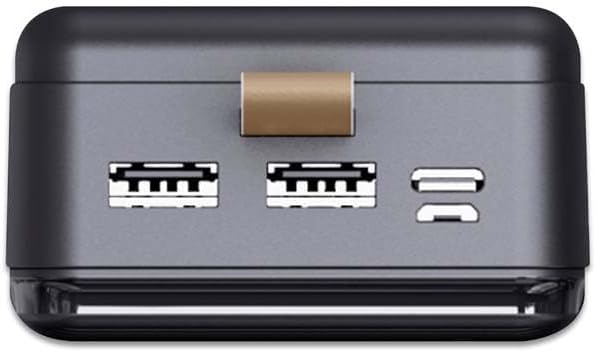
Obraz 2: Góra view of the Vortex Powerhub30, clearly displaying the two USB-A output ports and the single bidirectional USB Type-C port. This view illustrates the multiple connectivity options available.

Image 3: Close-up top view of the Vortex Powerhub30, highlighting the integrated LED indicator which displays the current battery charge level. The power button is also visible next to the indicator.
5. Konfiguracja
Pierwsze ładowanie powerbanku:
- Before first use, fully charge your Powerhub30.
- Connect the provided USB charging cable to either the Micro-USB input port or the USB Type-C port on the power bank.
- Podłącz drugi koniec kabla do ładowarki sieciowej USB (brak w zestawie) lub do portu USB komputera.
- The LED display will show the charging progress. Once 100% is displayed, the power bank is fully charged.
6. Instrukcja obsługi
Ładowanie urządzeń zewnętrznych:
- Connect your device's charging cable to one of the USB-A output ports or the USB Type-C port on the Powerhub30.
- Podłącz drugi koniec kabla do smartfona, tabletu lub innego kompatybilnego urządzenia.
- Press the power button on the Powerhub30 to initiate charging. The LED display will show the power bank's remaining charge.
- The Powerhub30 can charge up to three devices simultaneously.
- Once your device is fully charged, disconnect it from the power bank. The power bank will automatically turn off after a period of inactivity.
7. Konserwacja
- Czyść powerbank miękką, suchą ściereczką. Nie używaj silnych środków chemicznych ani ściernych środków czyszczących.
- Przechowuj power bank w chłodnym, suchym miejscu, gdy nie jest używany.
- To maintain battery health, fully charge the power bank at least once every three months, even if not in regular use.
- Unikaj częstego przeładowywania i całkowitego rozładowywania akumulatora.
8. Rozwiązywanie Problemów
Power bank nie ładuje:
- Upewnij się, że kabel ładujący jest bezpiecznie podłączony zarówno do powerbanku, jak i do źródła zasilania.
- Wypróbuj inny kabel ładujący lub zasilacz sieciowy.
- Sprawdź, czy źródło zasilania jest aktywne.
Urządzenie nie ładuje się z powerbanku:
- Upewnij się, że powerbank jest odpowiednio naładowany (sprawdź wyświetlacz LED).
- Naciśnij przycisk zasilania na powerbanku, aby aktywować wyjście.
- Wypróbuj inny kabel ładujący do swojego urządzenia.
- Upewnij się, że Twoje urządzenie jest kompatybilne ze specyfikacją wyjściową power banku.
Powolne ładowanie:
- Upewnij się, że używasz kabla ładującego wysokiej jakości.
- Some devices may charge slower if multiple devices are connected simultaneously.
- Check if your device supports fast charging and if the cable/port used supports it.
9. Specyfikacje
| Model | Powerhub30 |
| Pojemność baterii | 30000 mAh |
| Porty wejściowe | Micro USB, USB typu C |
| Porty wyjściowe | 2x USB-A, 1x USB Type-C (bidirectional) |
| Funkcja specjalna | Compact design, LED battery display |
| Zalecane zastosowanie | Smartphones, Tablets, other USB-powered devices |
| Wymiary | 14.8 × 7 × 2.8 cm (w przybliżeniu) |
| Tworzywo | ABS Casing |
10. Gwarancja i wsparcie
For warranty information and customer support, please refer to the official Vortex webodwiedź witrynę lub skontaktuj się ze sprzedawcą. Możesz również odwiedzić Vortex Brand Store po więcej szczegółów.