
1. Wprowadzenie
Welcome to the DITONG HY300 Plus HD Projector user manual. This guide will help you set up, operate, and maintain your new projector. The HY300 Plus is a portable projector equipped with Android 11 and dual-band WiFi 6, offering a seamless and high-quality viewing experience for movies, presentations, and more, both indoors and outdoors.
2. Koniec produktuview
2.1 Składniki
The DITONG HY300 Plus projector package typically includes the following items:
- DITONG HY300 Plus Projector
- Zasilacz
- Zdalne sterowanie

Image: The DITONG HY300 Plus projector in white, accompanied by its black remote control and a protective cover for the lens.
2.2 Główne cechy
- System operacyjny Android 11: Built-in smart operating system for direct access to streaming apps without external devices.
- Dual-band WiFi 6 (5G + 2.4G): Ensures faster and more reliable wireless connectivity for smooth streaming and screen mirroring.
- Skupienie elektroniczne: Easily adjust image clarity using the remote control.
- 4K Decoding & 720P Native Resolution: Supports 4K video input with a native resolution of 1280x720P for clear images.
- Automatyczna korekcja trapezu: Automatically adjusts image distortion for a perfectly rectangular picture.
- 180° Flexible Projection Angle: Umożliwia projekcję na ścianach, sufitach i podłogach.
- Praca o niskim poziomie hałasu: Pracuje przy głośności poniżej 25 dB, co zapewnia cichą pracę viewzdobywania doświadczenia.
- Wysoka jasność: 8000 Lux (250 ANSI lumens) for vivid and bright images.
- Multiple Aspect Ratios: Supports 16:9, 4:3, and 16:10.
- Łączność Bluetooth: Do podłączania zewnętrznych urządzeń audio.

Obraz: Ponadview of the DITONG HY300 Plus features, including electronic focus, Bluetooth 5.0, 4K decoding, 720P native resolution, WiFi 5G/2.4G, and auto keystone correction.

Image: A demonstration of the electronic focus feature, showing a clear image projected onto a screen with the projector and remote control in the foreground.

Image: Illustrates the 180-degree flexible projection angle, showing the projector casting an image onto a wall and a ceiling in a bedroom setting.

Image: Depicts the dual-band WiFi 5G/2.4G capability, showing a fast connection for screen mirroring with a projected image of a car chase.

Image: Illustrates the low noise level of the projector, comparing its sound output to common ambient noises like whispering and a motorcycle passing.
3. Konfiguracja
3.1 Rozpakowanie i kontrola
Carefully remove all components from the packaging. Inspect for any signs of damage. If any items are missing or damaged, contact customer support immediately.
3.2 Połączenie zasilania
- Podłącz zasilacz do portu wejściowego zasilania projektora.
- Podłącz zasilacz do odpowiedniego gniazdka elektrycznego.
3.3 Pierwsze włączenie zasilania
Naciśnij przycisk zasilania na projektorze lub pilocie, aby włączyć urządzenie. Projektor uruchomi się, wyświetlając interfejs Androida 11.
3.4 Umiejscowienie i odległość projekcji
Ustaw projektor na stabilnej, płaskiej powierzchni. Aby uzyskać optymalną viewing, consider the projection distance:
- For a 130-inch display, an optimal projection distance is approximately 1.68 meters.
- The projector supports various screen sizes from 40 inches to 130 inches depending on distance.

Image: A diagram illustrating optimal projection distances for different screen sizes, showing that 1.68 meters is ideal for a 130-inch display.
3.5 Opcje montażu
The HY300 Plus is designed for versatile placement:
- Przenośne zastosowanie: Place it on a table or flat surface.
- Montaż sufitowy: The bottom of the projector features a 1/4-inch screw hole, compatible with standard ceiling mounts or camera tripods.
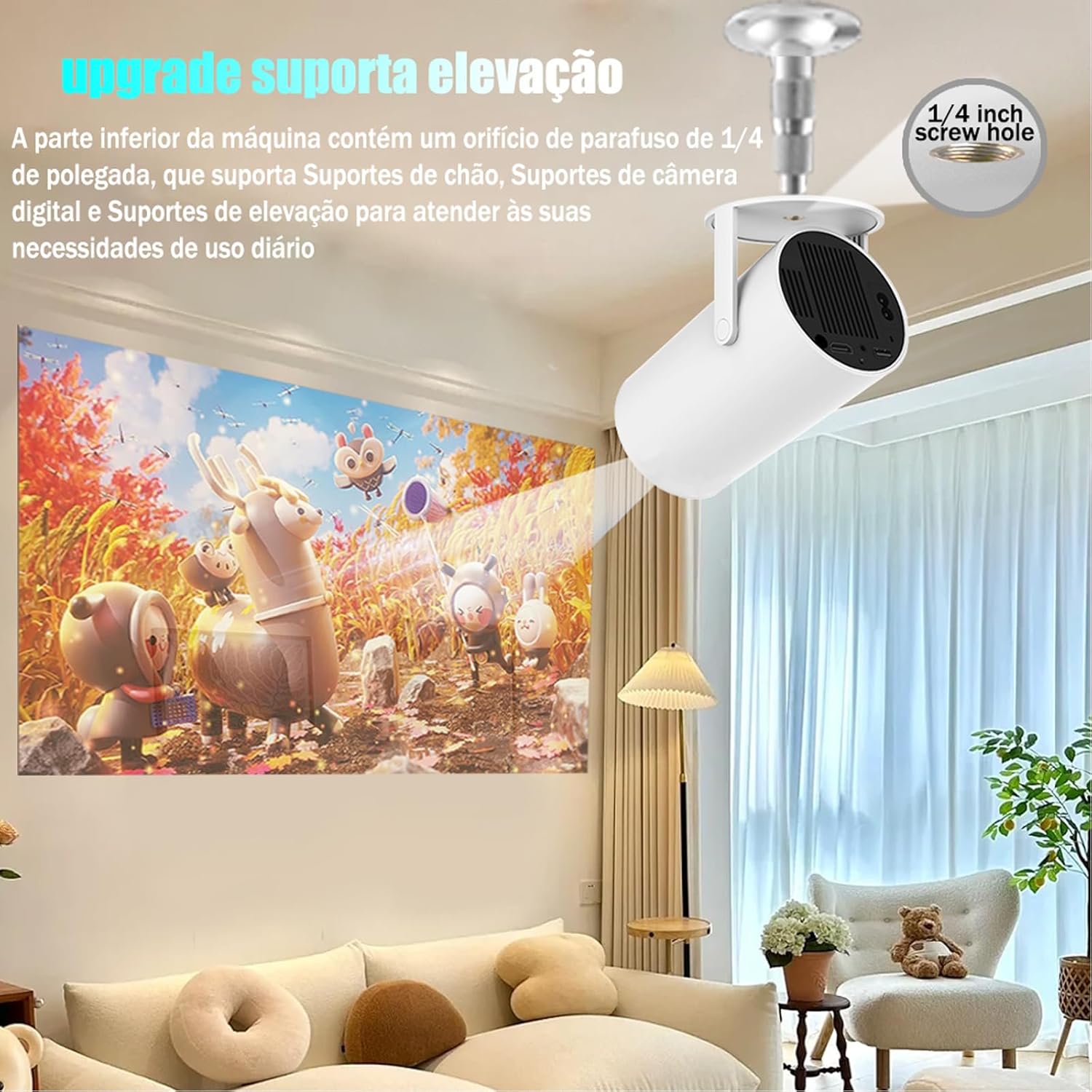
Image: The projector shown mounted to a ceiling, highlighting the 1/4-inch screw hole for various mounting solutions.
4. Instrukcja obsługi
4.1 Funkcje zdalnego sterowania
Use the included remote control to navigate the projector's interface. Key functions include:
- Włączanie/wyłączanie zasilania
- Nawigacja (góra, dół, lewo, prawo, OK)
- Back/Home buttons
- Kontrola głośności
- Regulacja ostrości

Image: The DITONG HY300 Plus projector with its remote control, demonstrating the electronic focus feature.
4.2 Electronic Focus Adjustment
Aby dostosować klarowność obrazu:
- Point the remote control at the projector.
- Press the dedicated focus buttons (usually marked with a circle or 'F' icon) on the remote to sharpen the image.
4.3 Automatic Keystone Correction
The HY300 Plus features automatic keystone correction. When the projector is moved or angled, it will automatically adjust the image to maintain a rectangular shape. Manual adjustments are typically not required.
4.4 Podłączanie urządzeń zewnętrznych
- HDMI: Connect laptops, gaming consoles, or other HDMI-enabled devices using an HDMI cable.
- Screen Mirroring (WiFi): Connect your smartphone or tablet wirelessly via WiFi for screen mirroring. Ensure both devices are connected to the same WiFi network.
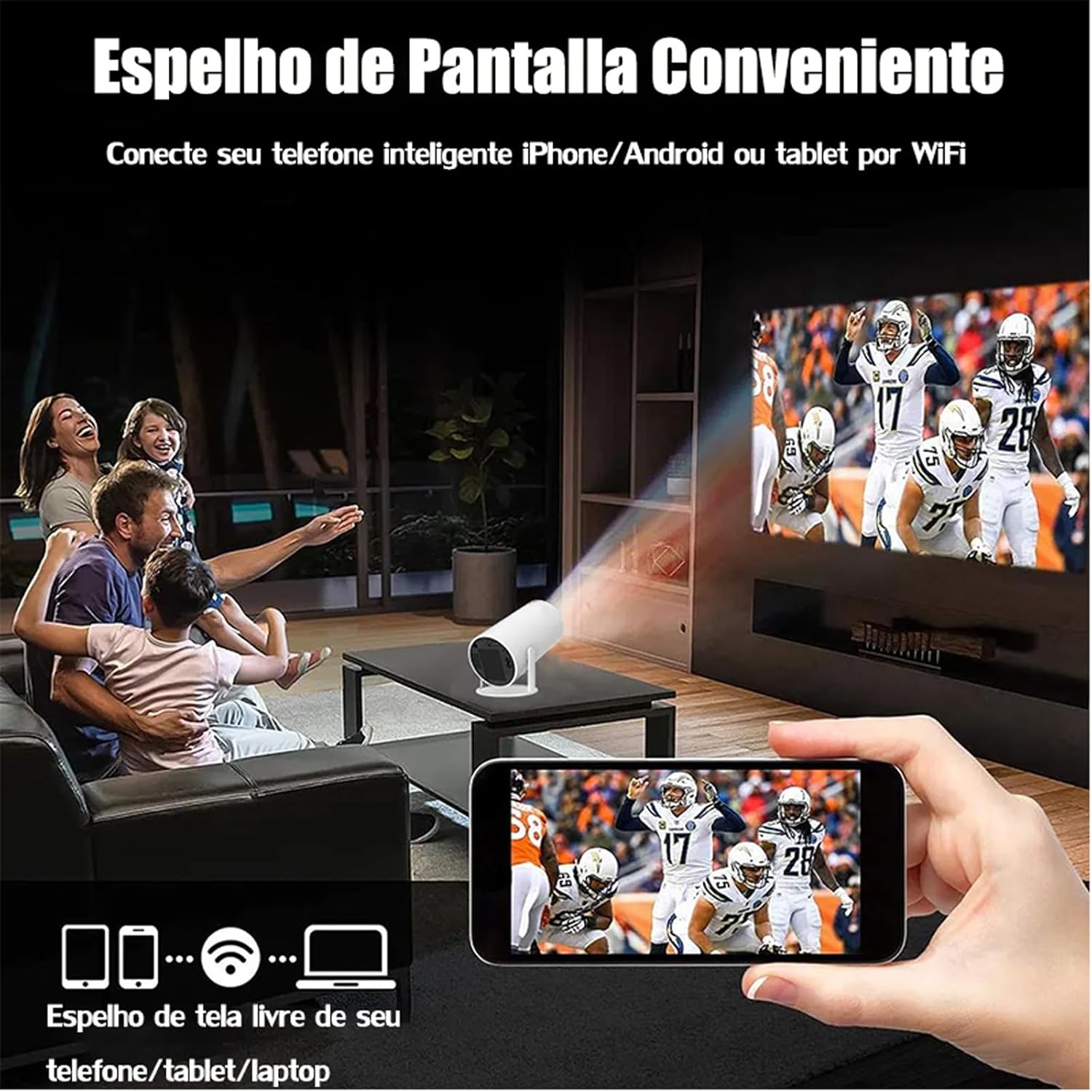
Image: A family watching a football game projected onto a screen, with a smartphone in the foreground demonstrating wireless screen mirroring.
4.5 Nawigacja w systemie Android 11
The projector's smart interface allows you to download and use various applications. Use the remote control to navigate through menus, select apps, and adjust settings. Connect to your home WiFi network to access online content.
4.6 Wyjście audio
The projector has built-in speakers. For enhanced audio, you can connect external Bluetooth speakers or headphones via the Bluetooth interface.
5. Konserwacja
Właściwa konserwacja gwarantuje długowieczność i optymalną wydajność projektora.
- Czyszczenie soczewek: Gently wipe the projector lens with a soft, lint-free cloth or a lens cleaning brush. Avoid abrasive materials that could scratch the lens.
- Wentylacja: Upewnij się, że otwory wentylacyjne projektora są czyste i wolne od kurzu i innych przeszkód, aby zapobiec przegrzaniu. Nie blokuj otworów wentylacyjnych podczas pracy.
- Składowanie: When not in use, store the projector in a cool, dry place, away from direct sunlight and extreme temperatures. Use the protective cover if provided.
6. Rozwiązywanie Problemów
If you encounter issues with your DITONG HY300 Plus projector, refer to the following common problems and solutions:
- Brak obrazka:
- Ensure the power adapter is securely connected and the projector is powered on.
- Check the input source. Make sure the correct HDMI or mirroring input is selected.
- Rozmazany obraz:
- Use the remote control to adjust the electronic focus.
- Upewnij się, że powierzchnia projekcyjna jest płaska i projektor stoi stabilnie.
- Brak dźwięku:
- Sprawdź poziom głośności projektora i podłączonego urządzenia.
- If using external speakers, ensure they are properly connected via Bluetooth.
- Problemy z łącznością Wi-Fi:
- Upewnij się, że projektor znajduje się w zasięgu routera WiFi.
- Restart the projector and your WiFi router.
- Sprawdź, czy hasło sieci WiFi zostało wprowadzone poprawnie.
If the problem persists, please contact DITONG customer support for further assistance.
7. Specyfikacje
Below are the detailed specifications for the DITONG HY300 Plus HD Projector:
| Funkcja | Specyfikacja |
|---|---|
| Marka | DITONG |
| Model | HY300 PLUS |
| System operacyjny | Android 11 |
| Łączność bezprzewodowa | Dual-band WiFi 6 (5G + 2.4G) |
| Bluetooth | Tak |
| Technologia wyświetlania | LCD |
| Jasność | 8000 Lux (250 ANSI lumens) |
| Rozdzielczość natywna | 1280x720P |
| Obsługiwana rozdzielczość | Do 4 tys. |
| Proporcje obrazu | 16:9, 4:3, 16:10 |
| Częstotliwość odświeżania | 60 Hz |
| Centrum | Elektroniczny fokus |
| Korekcja trapezowa | Automatyczny |
| Kompatybilne urządzenia | Smartphones, devices with HDMI output |
| Typ złącza | Bluetooth, HDMI, Wifi |
| Współczynnik kształtu | Przenośny |
| Typ montażu | Montaż sufitowy |
| Waga produktu | 2.27 gramów |
| Tomtage | 1.2E+2 wolty |
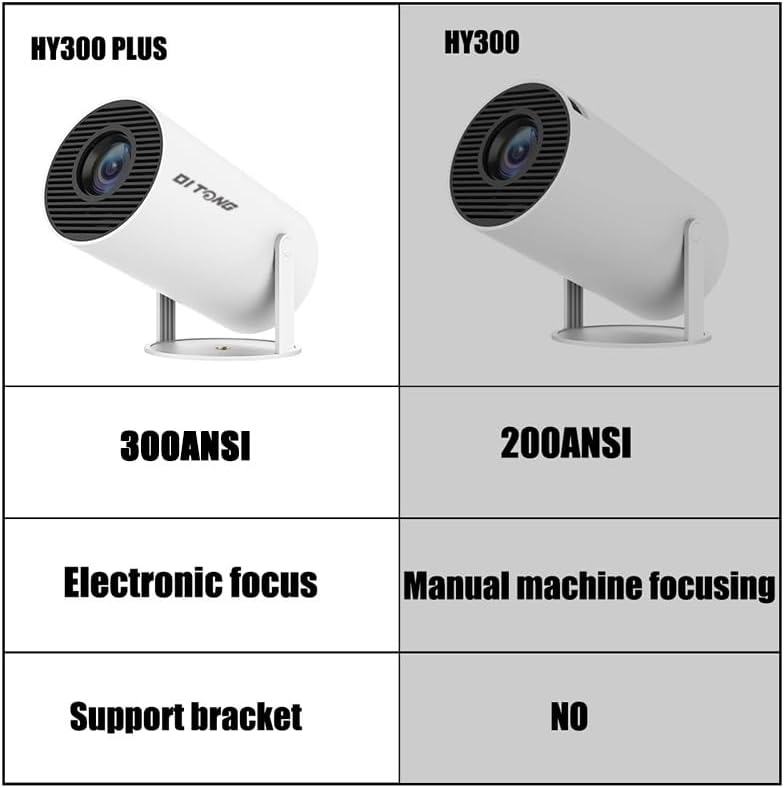
Image: A comparison table highlighting the differences between the HY300 Plus and the original HY300, showing the Plus model has 300 ANSI lumens, electronic focus, and a support bracket.
8. Gwarancja i wsparcie
The DITONG HY300 Plus Projector comes with a manufacturer's warranty. Please refer to the product packaging or the official DITONG webSzczegółowe warunki gwarancji można znaleźć na naszej stronie.
For technical support, troubleshooting assistance, or warranty claims, please contact DITONG customer service through the contact information provided with your purchase or on the official DITONG support channels.


