
BOXPUT Q96
Instrukcja obsługi BOXPUT Q96 Android TV Stick
Model: Q96
Wstęp
This manual provides comprehensive instructions for setting up, operating, and maintaining your BOXPUT Q96 Android TV Stick. The Q96 is a compact streaming device designed to transform your television into a smart TV, offering access to a wide range of applications and media content in up to 4K resolution.

Image: The BOXPUT Q96 Android TV Stick, a compact device for streaming media.
Co jest w pudełku
Sprawdź, czy w przesyłce znajdują się wszystkie elementy:
- 1x Q96 TV Stick
- Pilot zdalnego sterowania 1x IR
- 1x odbiornik podczerwieni
- Kabel ładowania USB 1x
- 1x HD Extension Cable
- 1x Instrukcja obsługi (ten dokument)
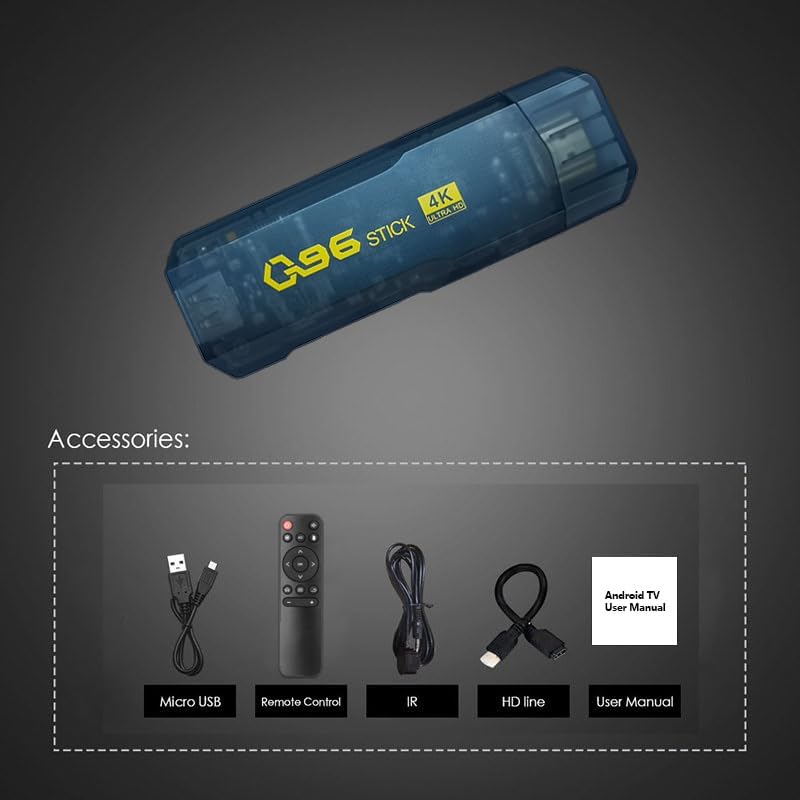
Image: All components included in the BOXPUT Q96 package: the TV stick, remote control, IR receiver, USB cable, HD extension cable, and user manual.
Produkt ponadview
The BOXPUT Q96 TV Stick is powered by Android 10.0, offering a stable and responsive user experience. Its compact design allows for discreet placement behind your television.
Główne cechy:
- System operacyjny: Android 10.0
- Edytor: Quad-core Allwinner H313 CPU
- Wyjście wideo: Supports 4K Ultra HD (4K*2K UHD) and 3D video playback
- Rozszyfrowanie: H.265 up to 4K@60fps and VP9 decoding technology
- Pamięć: 1GB RAM, ROM 8GB
- Łączność: 2.4G Wi-Fi, HDMI, IR
- Obsługiwane usługi: Google TV, Netflix, Prime Video, Skype, Vudu, YouTube, and more.
- Cechy szczególne: Wireless mouse/keyboard compatibility, DLNA/Mirocast Function.

Obraz: Ponadview of the BOXPUT Q96 TV Stick highlighting its key features including H.265, Android 10, 2.4G WiFi, 4K Ultra HD, and Allwinner H313 processor.
Device Ports and Interfaces:

Image: Diagram illustrating the various ports on the BOXPUT Q96 TV Stick, including USB, HD (HDMI), IR Cable port, Android interface, and SD card slot.
Przewodnik po konfiguracji
Podłącz TV Stick: Insert the BOXPUT Q96 TV Stick directly into an available HDMI port on your television. If space is limited, use the provided HD Extension Cable.

Image: The BOXPUT Q96 TV Stick being connected to an HDMI port on the back of a television.
Connect the IR Receiver: Plug the IR Receiver cable into the designated IR port on the TV Stick. Position the IR receiver in a location where it has a clear line of sight to your remote control.
Włącz urządzenie: Connect the Micro USB Charging Cable to the TV Stick's power input and then to a USB power source (e.g., a TV USB port or a USB power adapter, not included). The device will power on automatically.
Wybierz wejście HDMI: Use your TV's remote control to select the correct HDMI input source to which the Q96 TV Stick is connected.
Początkowe ustawienia: Postępuj zgodnie z instrukcjami wyświetlanymi na ekranie, aby dokończyć konfigurację początkową, obejmującą wybór języka, nawiązanie połączenia z siecią Wi-Fi i zalogowanie się na konto Google.
Instrukcja obsługi
Poruszanie się po interfejsie:
The BOXPUT Q96 runs on Android 10.0, providing a user-friendly interface. Use the included IR Remote Control to navigate through menus, select applications, and control playback.

Image: The main home screen of the Android TV Stick interface, displaying various application icons.
Instalowanie aplikacji:
Access the Google Play Store from the home screen to download and install your favorite streaming apps, games, and utilities. The 8GB ROM provides ample space for essential applications.

Image: A selection of popular applications supported by the BOXPUT Q96, including YouTube, Netflix, Google Play, Hulu, and Skype.
4K and 3D Playback:
The Q96 supports 4K Ultra HD and 3D video output. Ensure your television and content are 4K/3D compatible for the best viewing experience. The device utilizes H.265 and VP9 decoding for clear image processing.
Łączność Wi-Fi:
The device features built-in 2.4G Wi-Fi for internet access. Connect to your home network during the initial setup or via the settings menu. A stable Wi-Fi connection is crucial for smooth streaming.
Konserwacja
- Czyszczenie: Do czyszczenia urządzenia używaj miękkiej, suchej ściereczki. Unikaj płynnych środków czyszczących i materiałów ściernych.
- Wentylacja: Ensure the TV Stick is not covered or placed in an enclosed space to allow for proper ventilation and prevent overheating.
- Aktualizacje oprogramowania: Periodically check for system updates in the settings menu to ensure optimal performance and access to the latest features.
- Składowanie: Jeśli urządzenie nie będzie używane przez dłuższy czas, należy odłączyć je od zasilania i przechowywać w chłodnym, suchym miejscu.
Rozwiązywanie problemów
| Problem | Możliwa przyczyna | Rozwiązanie |
|---|---|---|
| Brak zasilania/urządzenie się nie włącza | Power cable not connected properly; insufficient power supply. | Ensure the Micro USB cable is securely connected. Use a reliable USB power adapter (5V/2A recommended, not included). Try a different USB port or power adapter. |
| Brak sygnału na ekranie telewizora | Wybrano niewłaściwe wejście HDMI; luźne połączenie HDMI. | Verify your TV is set to the correct HDMI input. Re-seat the TV Stick in the HDMI port or try a different HDMI port. Ensure the HD Extension Cable (if used) is securely connected. |
| Pilot nie odpowiada | IR receiver blocked; low battery in remote; remote not paired. | Ensure the IR receiver has a clear line of sight to the remote. Replace remote batteries. If it's a new remote or after battery change, follow pairing instructions (refer to remote's specific manual if provided separately). |
| Niska wydajność/zawieszanie się aplikacji | Too many apps running; low storage; poor Wi-Fi signal. | Close unused applications. Clear cache for problematic apps (Settings > Apps). Uninstall unnecessary apps to free up storage. Ensure a strong Wi-Fi signal. Restart the device. |
| Problemy z połączeniem Wi-Fi | Incorrect password; router issues; device too far from router. | Double-check Wi-Fi password. Restart your Wi-Fi router. Move the TV Stick closer to the router or consider a Wi-Fi extender. |
Specyfikacje
| Funkcja | Szczegół |
|---|---|
| Marka | BOXPUT |
| Nazwa modelu | Pytanie 96 |
| System operacyjny | Android 10.0 |
| Edytor | Quad-core Allwinner H313 CPU (Cortex™-A53) |
| Procesor graficzny | G31 (0 OpenGL ES3.2/2.0/1.0, Vulkan 1.1, OpenCL 2.0) |
| Dekodowanie wideo | H.265 decoder up to 4K@60fps, VP9 |
| Wyświetl wyjście | HDMI 2.1 do 4K@60fps |
| Pamięć (RAM) | 1 GB pamięci LPDDR3 |
| Pamięć masowa (ROM) | 8 GB pamięci EMMC |
| Łączność | Wi-Fi (2.4G), HDMI, IR |
| Obsługiwane usługi internetowe | Google TV, Netflix, Prime Video, Skype, Vudu, YouTube |
| Cechy specjalne | Android 10.0, 4K support, Quad-core processor, Wireless mouse/keyboard compatibility, DLNA/Mirocast Function |
| Wymiary produktu | 5.66 x 4.1 x 1.83 cala |
| Waga przedmiotu | 7.4 uncji |
Gwarancja i wsparcie
For warranty information and technical support, please refer to the official BOXPUT website or contact their customer service directly. Details may be provided on the product packaging or a separate warranty card.
You can visit the BOXPUT store on Amazon for additional product information and support: BOXPUT Amazon Store
Ask a question about this manual
Ask about setup, troubleshooting, compatibility, parts, safety, or missing instructions. Manuals+ will review the question and use this page’s manual context to help answer it.