BRAZE-6 Portable Bluetooth Speaker User Manual
Model: BRAZE-6-BK | Brand: TOPTECH
1. Wprowadzenie
The TOPTECH BRAZE-6 is a portable wireless Bluetooth speaker system designed to deliver powerful sound with an integrated LED light show. Featuring dual 3-inch woofers, this rechargeable speaker is suitable for various indoor and outdoor settings, including parties, gatherings, and personal listening.
It supports multiple audio input sources, including Bluetooth, USB, TF card, FM radio, and AUX, and offers True Wireless Stereo (TWS) functionality for enhanced audio experience. The built-in rechargeable battery provides extended standby time, ensuring your music accompanies you for longer durations.

Obraz 1.1: Przód view of the BRAZE-6 Portable Bluetooth Speaker, showcasing its dual woofers and multi-color LED lighting.
2. Zawartość opakowania
Sprawdź, czy w przesyłce znajdują się wszystkie elementy wymienione poniżej:
- BRAZE-6 Portable Bluetooth Speaker
- Zdalne sterowanie
- Mikrofon przewodowy
- Zasilacz
- Instrukcja obsługi (ten dokument)
- Karta gwarancyjna
3. Koniec produktuview
Familiarize yourself with the main components and controls of your BRAZE-6 speaker.

Obraz 3.1: Bok view of the BRAZE-6 speaker, highlighting the top-mounted control buttons.
Panel sterowania (góra)
- Przycisk zasilania: Włącza/wyłącza głośnik.
- Przycisk trybu: Switches between Bluetooth, FM Radio, AUX, USB, and TF card modes.
- Przycisk Odtwórz/Pauza: Odtwarza lub wstrzymuje odtwarzanie dźwięku.
- Przyciski poprzedniego/następnego utworu: Navigates through tracks or FM radio stations.
- Regulacja głośności: Reguluje główną głośność.
- Przycisk światła LED: Activates or changes the LED light patterns.
Input Ports (Rear/Side)
- Port USB: Do dysków flash USB.
- Gniazdo karty TF: Do kart TF (MicroSD).
- Wejście AUX: Do podłączania zewnętrznych urządzeń audio za pomocą kabla audio 3.5 mm.
- Wejście mikrofonowe: Do podłączenia przewodowego mikrofonu.
- Wejście prądu stałego 5 V: Do ładowania głośnika.
4. Rozpoczęcie pracy
4.1 Ładowanie głośnika
Before first use, fully charge the speaker for optimal battery life.
- Podłącz dołączony zasilacz do portu wejściowego DC 5 V w głośniku.
- Podłącz adapter do standardowego gniazdka ściennego.
- Zaświeci się kontrolka ładowania (kolor może się różnić), co oznacza, że ładowanie jest w toku.
- Once fully charged, the indicator light will change or turn off. Disconnect the adapter.
Note: The speaker can be used while charging, but it is recommended to fully charge it before initial use.
4.2 Włączanie/wyłączanie
- Aby włączyć, naciśnij i przytrzymaj Przycisk zasilania until the speaker activates and you hear an audible prompt.
- Aby wyłączyć, naciśnij i przytrzymaj Przycisk zasilania aż do momentu wyłączenia głośnika.
5. Instrukcja obsługi
5.1 Łączność Bluetooth
Pair your BRAZE-6 speaker with a Bluetooth-enabled device (e.g., smartphone, tablet, computer).
- Upewnij się, że głośnik jest włączony i pracuje w trybie Bluetooth. Jeśli nie, naciśnij przycisk Przycisk trybu until you hear the "Bluetooth mode" prompt. The LED lights may flash to indicate pairing mode.
- Włącz na swoim urządzeniu Bluetooth i wyszukaj dostępne urządzenia.
- Select "BRAZE-6" from the list of found devices.
- Once paired, you will hear a confirmation sound, and the LED lights may change their pattern.
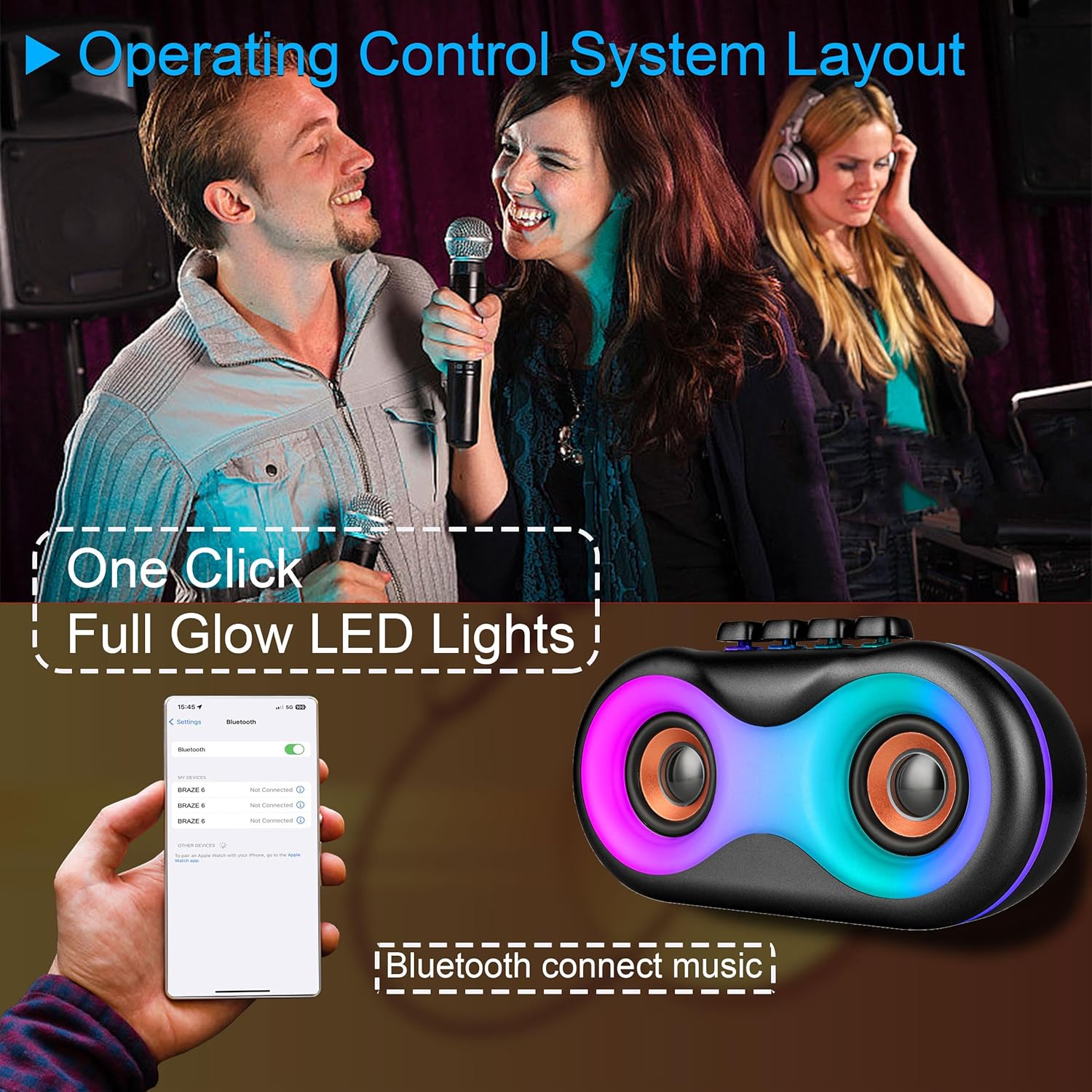
Image 5.1: Illustration of Bluetooth pairing process with a smartphone, showing the speaker's LED lights active.
Note: The speaker supports BLE agreements for stable wireless audio streaming up to 10 meters (33 feet).
5.2 Playing Audio from Various Sources
The BRAZE-6 speaker supports multiple input methods:

Image 5.2: Visual representation of supported input types: USB, Bluetooth, FM Radio, TWS, AUX, and TF Card.
- Karta USB/TF: Insert a USB flash drive or TF card into the respective port. The speaker will automatically switch to the correct mode and begin playing audio files.
- Wejście AUX: Connect an external audio device (e.g., MP3 player, laptop) to the AUX port using a 3.5mm audio cable. Press the Przycisk trybu aby wybrać tryb AUX.
- Radio FM: Naciśnij Przycisk trybu to switch to FM Radio mode. Use the Previous/Next Track buttons to scan for stations.
5.3 Pokaz świetlny LED
The BRAZE-6 features dynamic multi-color LED lights that enhance your listening experience.
- Naciśnij Przycisk światła LED on the control panel to activate the light show.
- Press the button again to cycle through different light patterns or turn the lights off.

Image 5.3: The BRAZE-6 speaker with its powerful stereo sound output and integrated lighting effects.
5.4 Wired Microphone Usage
Connect the included wired microphone for karaoke or public address functions.
- Plug the microphone cable into the dedicated Microphone Input port on the speaker.
- Adjust the microphone volume using the speaker's controls or the microphone's built-in controls if available.
5.5 Prawdziwa funkcja bezprzewodowego stereo (TWS)
The TWS function allows you to pair two BRAZE-6 speakers together for a true stereo sound experience.
- Ensure both BRAZE-6 speakers are powered on and in Bluetooth pairing mode (not connected to any device).
- Na jednym z głośników (będzie to głośnik główny) naciśnij i przytrzymaj Przycisk TWS (if available, or a combination of buttons as per specific model instructions, typically the Play/Pause button).
- The speakers will attempt to connect to each other. Once connected, you will hear a confirmation sound.
- Now, connect your Bluetooth device to the primary speaker. Audio will play through both speakers in stereo.
6. Pielęgnacja i konserwacja
6.1 Czyszczenie
- Wipe the speaker's exterior with a soft, dry, or slightly damp płótno.
- Do not use abrasive cleaners, alcohol, benzene, or other volatile solvents, as they may damage the surface.
- Ensure no liquid enters the speaker's ports or openings.
6.2 Przechowywanie
- Przechowuj głośnik w chłodnym, suchym miejscu, z dala od bezpośredniego światła słonecznego i ekstremalnych temperatur.
- Unikać przechowywania w środowisku zapylonym lub wilgotnym.
6.3 Pielęgnacja baterii
- Aby przedłużyć żywotność baterii, należy unikać częstego całkowitego rozładowywania baterii.
- If the speaker will not be used for an extended period, charge it to approximately 50% every 3-6 months.
- Nie wystawiaj akumulatora na działanie nadmiernego ciepła, np. bezpośredniego światła słonecznego lub ognia.
7. Rozwiązywanie Problemów
If you encounter issues with your BRAZE-6 speaker, refer to the following common problems and solutions:
| Problem | Możliwa przyczyna | Rozwiązanie |
|---|---|---|
| Głośnik nie włącza się. | Niski poziom naładowania baterii; przycisk zasilania nie został wciśnięty prawidłowo. | Naładuj głośnik; naciśnij i przytrzymaj przycisk zasilania przez kilka sekund. |
| Brak dźwięku. | Zbyt niski poziom głośności; Wybrano niewłaściwy tryb; Urządzenie nie jest prawidłowo podłączone. | Increase volume; Press Mode button to select correct input; Reconnect device. |
| Parowanie Bluetooth nie powiodło się. | Głośnik nie jest w trybie parowania; Bluetooth urządzenia jest wyłączony; Zbyt duża odległość od głośnika. | Ensure speaker is in Bluetooth mode; Turn on device Bluetooth; Move device closer (within 10m). |
| Oświetlenie LED nie działa. | LED light feature turned off. | Press the LED Light Button to activate. |
| Słaby odbiór radia FM. | Słaby sygnał; zakłócenia. | Adjust speaker position; Extend antenna if available. |
8. Specyfikacje techniczne
Detailed specifications for the BRAZE-6 Portable Bluetooth Speaker:

Image 8.1: Product dimensions of the BRAZE-6 speaker.
| Funkcja | Specyfikacja |
|---|---|
| Nazwa modelu | BRAZE-6-BK |
| Marka | TOPTECH |
| Typ głośnika | Woofer (Dual 3-inch) |
| Technologia łączności | Bluetooth, pomocniczy, USB, bezprzewodowy |
| Protokół łączności | Bluetooth |
| Funkcja specjalna | Światło LED |
| Źródło zasilania | Zasilany bateryjnie |
| Wymiary produktu (Gł. x Szer. x Wys.) | 18.9" x 13.2" x 22.83" |
| Kolor | Czarny |
| Typ kontrolera | Przycisk |
| Zalecane zastosowania | Na smartfony lub tablety |
| Kompatybilne urządzenia | Smartfon |
| jest wodoodporny | PRAWDA |
| Liczba elementów | 1 |
| UPC | 755824425996 |
| Producent | Najlepsza technologia audio |
9. Gwarancja i wsparcie
Your BRAZE-6 Portable Bluetooth Speaker comes with a warranty. Please refer to the included warranty card for specific terms and conditions, including coverage period and claim procedures.
For technical support, troubleshooting assistance beyond this manual, or warranty inquiries, please contact TOPTECH customer service through the following channels:
- Wsparcie online: Visit the official TOPTECH webInformacje kontaktowe znajdziesz na stronie internetowej lub stronie sklepu Amazon.
- Wsparcie e-mailowe: Refer to your warranty card or product packaging for the customer service email address.
For more information about TOPTECH products, you can visit the Sklep TOPTECH na Amazon.