
Xblitz S9 Duo (Model XBL-CAR-DR074)
Instrukcja obsługi kamery samochodowej przedniej i tylnej Xblitz S9 Duo
Model: S9 Duo (XBL-CAR-DR074)
1. Wprowadzenie
Thank you for choosing the Xblitz S9 Duo Dash Cam. This device is designed to provide reliable front and rear vehicle surveillance, capturing high-quality video footage of your journeys and while parked. Equipped with advanced features such as 2K resolution, Wi-Fi connectivity, Wide Dynamic Range (WDR), and a dedicated parking mode, the S9 Duo ensures comprehensive coverage and peace of mind. Please read this manual carefully to understand the proper installation, operation, and maintenance of your dash cam.
2. Zawartość opakowania
Przed przystąpieniem do instalacji sprawdź, czy w opakowaniu znajdują się wszystkie elementy wymienione poniżej:
- Xblitz S9 Duo Front Dash Cam
- Kamera tylna
- Mocowanie przyssawki
- Charging Cable (Car Charger)
- Narzędzie instalacyjne
- Karta gwarancyjna
If any components are missing or damaged, please contact Xblitz customer support.
3. Koniec produktuview
Familiarize yourself with the main components of your Xblitz S9 Duo Dash Cam.
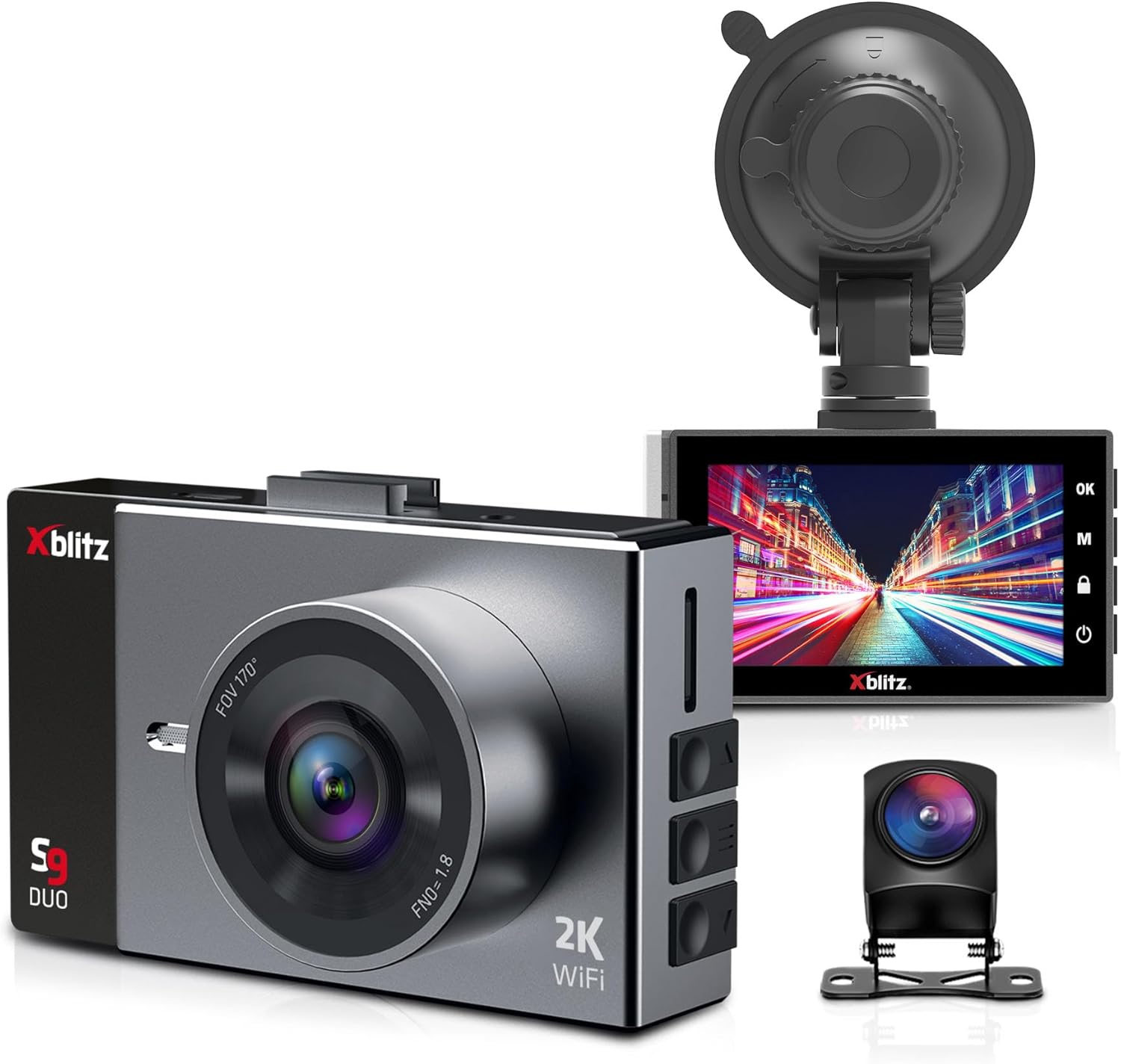
Rysunek 3.1: The Xblitz S9 Duo dash cam kit, showing the front camera with its wide-angle lens, the rear camera, and the suction cup mount. The front camera features a 2K resolution and Wi-Fi capability.

Rysunek 3.2: Z bliska view of the Xblitz S9 Duo dash cam's 3-inch display, showing the user interface with control buttons on the side. The screen provides clear visibility for settings and video playback.

Rysunek 3.3: The Xblitz S9 Duo dash cam, its rear camera, and the product packaging. This image illustrates the complete product set as it would appear out of the box.
4. Konfiguracja i instalacja
Follow these steps for proper installation of your Xblitz S9 Duo Dash Cam.
4.1. Wkładanie karty pamięci
- Sprawdź, czy kamera samochodowa jest wyłączona.
- Znajdź gniazdo karty microSD z boku jednostki głównej.
- Insert a high-speed microSD card (Class 10 or higher, up to 128GB recommended) into the slot until it clicks into place.
- Aby wyjąć kartę, delikatnie wciśnij ją, aż wysunie się.
4.2. Montaż przedniej kamery
- Wyczyść obszar szyby przedniej w miejscu, w którym zamierzasz zamontować kamerę.
- Przymocuj uchwyt z przyssawką do kamery samochodowej.
- Mocno dociśnij przyssawkę do przedniej szyby, najlepiej za tylną szybą.view mirror, and secure the lever.
- Dostosuj kąt kamery, aby zapewnić wyraźny obraz view drogi przed pojazdem, unikając przeszkód z tyłuview lusterko lub wycieraczki.
4.3. Montaż tylnej kamery
- Connect the rear camera cable to the main front camera unit.
- Route the cable neatly along the vehicle's headliner and pillar trim to the rear of the vehicle.
- Zamontuj tylną kamerę na tylnej szybie, aby zapewnić wyraźny obraz. view of the road behind. Use the provided adhesive or screws if applicable.
- Adjust the angle of the rear camera for optimal coverage.
4.4. Podłączenie zasilania
- Podłącz ładowarkę samochodową do portu zasilania kamery samochodowej.
- Podłącz drugi koniec ładowarki samochodowej do gniazda zasilania 12 V w pojeździe (gniazdo zapalniczki).
- Route the power cable discreetly to avoid interference with driving.
- The dash cam will typically power on automatically when the vehicle starts and power off when the engine is turned off.
5. Instrukcja obsługi
Understand the various functions and modes of your Xblitz S9 Duo Dash Cam.
5.1. Podstawowa obsługa
- Włączanie/wyłączanie: The device powers on automatically with vehicle ignition. To manually power on/off, press and hold the power button.
- Nagranie: Once powered on, the dash cam automatically begins loop recording. A red indicator light or icon on the screen confirms recording is active.
- Wyświetlacz ekranowy: The 3-inch screen offers various display configurations: split-screen for front and rear views, rear camera view within the front camera view, or quick switching between front and rear camera views.
5.2. Wi-Fi Module and Mobile Application
The S9 Duo features a built-in Wi-Fi module, allowing you to connect the camera to your smartphone for remote control and file kierownictwo.
- Download the dedicated mobile application (check the user manual or product packaging for the app name).
- Enable Wi-Fi on your dash cam through the settings menu.
- Connect your smartphone to the dash cam's Wi-Fi network (SSID and password will be displayed on the dash cam screen or in the manual).
- Use the mobile application to view żyćtage, przeglądaj nagrane filmy, pobieraj filedo telefonu i dostosuj ustawienia aparatu.
5.3. Nagrywanie w pętli
This function ensures continuous recording by automatically overwriting the oldest unlocked files when the memory card is full. This eliminates the need for manual file usunięcie.
5.4. Czujnik G (czujnik grawitacji)
The G-Sensor detects sudden acceleration, braking, or impacts (e.g., collisions). When triggered, the S9 Duo automatically locks the current video file, protecting it from being overwritten by loop recording. These protected files can serve as evidence for police or insurance claims.
5.5. Detekcja ruchu
When activated, motion detection allows the S9 Duo to record automatically when it senses movement around the vehicle. This provides surveillance when the vehicle is parked, capturing events in front of and behind the car.
5.6. Tryb parkowania
In parking mode, the camera remains active (until its integrated battery is discharged) and records video and audio around the vehicle when parked. This feature helps monitor for damage attempts, theft, or other incidents. For 24/7 surveillance, the parking mode can be extended with the Xblitz R6 power kit (sold separately) for constant power supply.
5.7. Wide Dynamic Range (WDR)
WDR technology helps balance bright and dark areas in challenging lighting conditions, such as intense sunlight, changing tunnel lighting, or night driving. This results in clearer and more uniform images, improving detail capture.
5.8. Funkcjonalność tylnej kamery
The rear camera expands the surveillance area to cover the space behind your vehicle, providing improved visibility and assistance during reverse maneuvers. When reverse gear is engaged, the device automatically displays parking guidelines on the screen to aid in parking.
5.9. Szeroki Viewing kąt
The wide-angle lens of the Xblitz S9 Duo captures a comprehensive view, typically covering three lanes in front of and behind the vehicle. This minimizes blind spots and ensures that incidents are not missed, enhancing overall driving safety.
6. Konserwacja i pielęgnacja
Proper care will extend the lifespan of your dash cam.
- Czyszczenie: Do czyszczenia obiektywu i ekranu aparatu używaj miękkiej, suchej ściereczki. Nie używaj środków czyszczących o właściwościach ściernych ani rozpuszczalników.
- Temperatura: Unikaj wystawiania urządzenia na działanie ekstremalnych temperatur, zarówno wysokich, jak i niskich, ponieważ może to wpłynąć na żywotność baterii i wydajność podzespołów.
- Aktualizacje oprogramowania układowego: Periodically check the Xblitz official webodwiedź tę witrynę, aby uzyskać dostęp do aktualizacji oprogramowania sprzętowego, które pozwolą Ci zapewnić optymalną wydajność i dostęp do nowych funkcji.
- Karta pamięci: Format the microSD card regularly (e.g., once a month) within the camera's settings to maintain its performance and prevent data corruption.
7. Rozwiązywanie Problemów
If you encounter issues with your Xblitz S9 Duo, refer to the following common problems and solutions:
| Problem | Możliwa przyczyna / rozwiązanie |
|---|---|
| Kamera się nie włącza. | Check power connection. Ensure the car charger is properly plugged into both the camera and the vehicle's 12V outlet. Verify the vehicle's 12V outlet is functional. |
| Nagrywanie zostaje zatrzymane lub zawieszone. | Memory card may be full or corrupted. Format the microSD card. Ensure a high-speed (Class 10 or higher) memory card is used. |
| Słaba jakość wideo. | Clean the camera lens. Ensure the protective film is removed. Check video resolution settings. Adjust WDR settings for challenging lighting. |
| Problemy z połączeniem Wi-Fi. | Ensure Wi-Fi is enabled on the dash cam. Restart both the dash cam and your smartphone. Verify correct Wi-Fi password. |
| Tylna kamera nie jest wyświetlana. | Check the connection cable between the front and rear cameras. Ensure it is securely plugged in. |
If the problem persists after trying these solutions, please contact Xblitz customer support for further assistance.
8. Specyfikacje
Key technical specifications for the Xblitz S9 Duo Dash Cam:
| Funkcja | Szczegół |
|---|---|
| Marka | Xblitz |
| Nazwa modelu | S9 Duet |
| Numer modelu | XBL-CAR-DR074 |
| Rozmiar ekranu | 3 cali |
| Technologia łączności | Wi-Fi |
| Kompatybilne urządzenia | Smartfon |
| Rozdzielczość nagrywania wideo | 2160p (2K) |
| Metoda kontroli | Aplikacja |
| Typ montażu | Mocowanie przyssawki |
| Typ serwisu pojazdu | Samochód |
| Skład baterii | Lithium-ion (1 battery required) |
| Akumulator do ponownego ładowania | NIE |
| Wymiary produktu | 3.6D x 8.8W x 5.4H centymetrów |
9. Gwarancja i wsparcie
The Xblitz S9 Duo Dash Cam comes with a standard manufacturer's warranty. Please refer to the included warranty card for specific terms and conditions, including warranty duration and coverage details.
For technical support, troubleshooting assistance, or warranty claims, please contact Xblitz customer service. Contact information can typically be found on the warranty card, the official Xblitz website, or the product packaging.
It is recommended to register your product on the Xblitz webjeśli jest dostępna, odwiedź naszą witrynę, aby otrzymywać aktualizacje i wsparcie.
Ask a question about this manual
Ask about setup, troubleshooting, compatibility, parts, safety, or missing instructions. Manuals+ will review the question and use this page’s manual context to help answer it.