
1. Wprowadzenie
This manual provides detailed instructions for the installation, operation, and maintenance of the Tomzn TOVPD1-80-EC Adjustable Over/Under Voltage and Over Current Protection Device. This device is designed to protect electrical appliances and circuits from damage caused by voltage fluctuations and excessive current. Please read this manual thoroughly before use to ensure safe and correct operation.
2. Informacje dotyczące bezpieczeństwa
- Instalację musi wykonać wykwalifikowany elektryk.
- Przed instalacją lub konserwacją należy upewnić się, że zasilanie jest odłączone.
- Nie należy obsługiwać urządzenia w wilgotnych warunkach ani mokrymi rękami.
- Verify that the device's specifications match your electrical system requirements.
- Trzymaj dzieci z dala od instalacji elektrycznych.
3. Koniec produktuview
3.1. Funkcje kluczowe
- Nadmierna ilośćtagochrona elektroniczna
- Poniżej objętościtagochrona elektroniczna
- Zabezpieczenie nadprądowe
- Automatyczne odzyskiwanie
- Objętość w czasie rzeczywistymtagi wyświetlić
- Real-time current display
- Regulowana objętośćtagkalibracja e (±10%)
- Funkcja przywracania ustawień fabrycznych
- Error inquiry function
3.2. Komponenty urządzenia
The device features a digital display for voltage and current, indicator lights for protection status, and control buttons for settings adjustment.
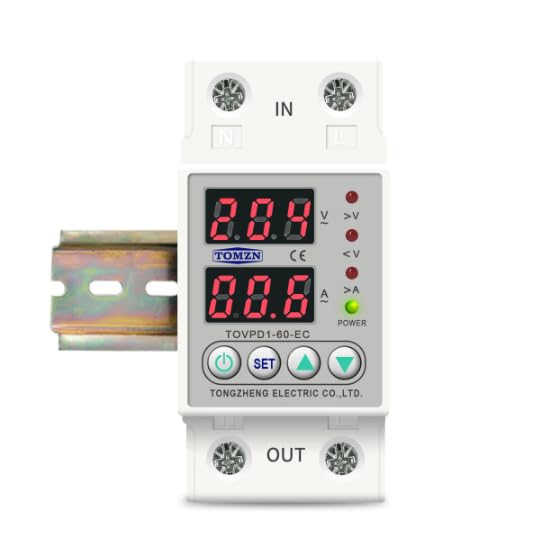
Rysunek 1: Przód view of the Tomzn TOVPD1-80-EC protection device. Note: The image displays model TOVPD1-60-EC, but the instructions apply to the TOVPD1-80-EC model with an 80 Ampprzed oceną.
The device includes input terminals (IN) and output terminals (OUT) for electrical connections, along with a power indicator and status LEDs for over-voltage (>V), under-voltage (<V), and over-current (>A).
4. Instalacja
The TOVPD1-80-EC device is designed for DIN rail mounting (35mm). Follow these steps for proper installation:
- Odłączenie zasilania: Before starting, ensure the main power supply to the circuit is completely disconnected to prevent electrical shock.
- Montowanie: Snap the device onto a standard 35mm DIN rail in your electrical panel.
- Okablowanie:
- Connect the incoming live (L) and neutral (N) wires from the power source to the "IN" terminals of the device.
- Connect the outgoing live (L) and neutral (N) wires to the load (appliances/circuit) from the "OUT" terminals of the device.
- Sprawdź, czy wszystkie połączenia są dobrze dokręcone i bezpieczne.
- Weryfikacja: Sprawdź dokładnie wszystkie połączenia okablowania pod kątem poprawności i bezpieczeństwa.
- Przywrócenie zasilania: Restore power to the circuit. The device will power on and display the current voltage i aktualne odczyty.
5. Instrukcja obsługi i ustawienia
Urządzenie wyświetla w czasie rzeczywistym objętośćtage and current. Use the control buttons to adjust protection parameters.
5.1. Funkcje przycisków
- Przycisk zasilania: Turns the device ON/OFF (if applicable, or for display cycling).
- Przycisk SET: Enters/exits setting mode and cycles through parameters.
- Przycisk strzałki w górę (▲): Zwiększa wartości parametrów.
- Przycisk strzałki w dół (▼): Zmniejsza wartości parametrów.
5.2. Regulacja parametrów
To adjust a parameter:
- Naciśnij USTAWIĆ button to enter the setting mode. The first parameter will flash.
- Naciskać USTAWIĆ repeatedly to cycle through the available parameters (e.g., Over-voltage protection threshold, Under-voltage protection threshold, Over-current protection threshold, recovery delays, etc.).
- When the desired parameter is flashing, use the ▲ (W górę i ▼ (Down) buttons to adjust its value.
- After setting the value, wait a few seconds for the device to automatically save the setting and exit the setting mode, or press USTAWIĆ again to move to the next parameter.
5.3. Parameter Ranges and Default Values (for 220V/80A model)
| Parametr | Zakres regulacji | Wartość domyślna |
|---|---|---|
| Nadmierna ilośćtage Ochrona (UVP) | 230V ~ 300V (OFF) | 270 V |
| Nadmierna ilośćtage Recovery (UVR) | 225V ~ 295V | 250 V |
| UVP Action Time | 0.1 sek. ~ 30 sek. | 0.5s |
| UVP Recovery Delay | 1 sek. ~ 500 sek. | 30s |
| Poniżej objętościtage Ochrona (LVP) | 140V ~ 210V (OFF) | 170 V |
| Poniżej objętościtage Recovery (LVR) | 145V ~ 215V | 190 V |
| LVP Action Time | 0.1 sek. ~ 30 sek. | 0.5s |
| LVP Recovery Delay | 1 sek. ~ 500 sek. | 30s |
| Over-current Protection (OCP) | 1A ~ 80A (adjustable) | 40A (Note: Default may vary based on specific model variant.) |
| OCP Action Time | 0.1 sek. ~ 30 sek. | 0.5s |
| OCP Recovery Delay | 1 sek. ~ 500 sek. | 30s |
| Czas opóźnienia włączenia zasilania | 1 sek. ~ 500 sek. | 10s |
Note: The over-current adjustment range is inferred to be up to 80A for the TOVPD1-80-EC model, although the provided description mentions 40A and 63A variants. Always refer to the specific markings on your device.
5.4. Przywracanie ustawień fabrycznych
To restore the device to its factory default settings, press and hold the ▼ (Down) button for more than 12 seconds. The display will indicate a reset.
5.5. Error Inquiry
To inquire about past error events, press and hold the ▲ (Up) button for more than 12 seconds. The device will display error codes or logs if available.
6. Konserwacja
- Regularnie sprawdzaj urządzenie pod kątem ewentualnych uszkodzeń fizycznych lub luźnych połączeń.
- Utrzymuj urządzenie w czystości i zapobiegaj jego zakurzaniu. Do czyszczenia używaj suchej, miękkiej ściereczki.
- Nie należy używać środków czyszczących o właściwościach ściernych ani rozpuszczalników.
- Zapewnij odpowiednią wentylację wokół urządzenia, aby zapobiec przegrzaniu.
7. Rozwiązywanie Problemów
| Problem | Możliwa przyczyna | Rozwiązanie |
|---|---|---|
| Urządzenie nie włącza się | No power supply; incorrect wiring; internal fault. | Sprawdź główne zasilanie. Sprawdź połączenia okablowania. Jeśli problem będzie się powtarzał, skontaktuj się z pomocą techniczną. |
| Urządzenie często się wyłącza | Protection thresholds set too low; actual voltage/current exceeds limits. | Adjust protection parameters (UVP, LVP, OCP) to appropriate levels. Check load for faults. |
| Wyświetlacz pokazuje kod błędu | Internal error or specific fault detected. | Refer to the error inquiry function (Section 5.5) for details. If unknown, contact support. |
| Device does not recover automatically | Automatic recovery feature disabled or recovery delay too long. | Ensure automatic recovery is enabled in settings. Check recovery delay times. |
8. Specyfikacje
| Funkcja | Wartość |
|---|---|
| Numer modelu | TOVPD1-80-EC |
| Prąd znamionowy | 80 Amptutaj |
| Źródło zasilania | 220V AC 50/60Hz (Nominal) |
| Nadmierna ilośćtagZakres ochrony | 230V ~ 300V (OFF) |
| Poniżej objętościtagZakres ochrony | 140V ~ 210V (OFF) |
| Zakres regulacji nadprądu | 1A ~ 80A |
| Pobór mocy | <2 W |
| Życie elektryczne | 100,000 XNUMX XNUMX razy |
| Typ instalacji | DIN Rail Mount (35mm) |
| Wymiary (dł. x szer. x wys.) | Wymiary 9.3 x 7.8 x 4.5 cm |
| Waga | 200 gramów |