1. Wprowadzenie
Welcome to the user manual for your VGN N75 Gaming Keyboard. This manual provides essential information on setting up, operating, maintaining, and troubleshooting your new keyboard. The VGN N75 is a compact, numeric keyless mechanical keyboard designed for an optimal gaming and typing experience.

Figure 1.1: VGN N75 Gaming Keyboard with RGB lighting enabled.

Rysunek 1.2: Kątowy view of the VGN N75 keyboard, highlighting its compact form factor.
2. Informacje dotyczące bezpieczeństwa
Please read the following safety guidelines carefully before using your VGN N75 keyboard:
- Aby zapobiec uszkodzeniom klawiatury, należy chronić ją przed płynami i nadmierną wilgocią.
- Avoid exposing the keyboard to extreme temperatures (hot or cold).
- Do not attempt to disassemble or modify the keyboard. This may void your warranty and cause damage.
- Use only the provided USB-C cable for connection.
- Należy obchodzić się ostrożnie, aby zapobiec uszkodzeniom fizycznym na skutek upadków lub uderzeń.
3. Funkcje produktu
The VGN N75 keyboard is engineered with several features to enhance your typing and gaming experience:
- Kompaktowy układ 75%: The US82 key numeric keyless design offers a space-saving solution compared to full-size keyboards, providing more desk space for mouse movement.
- Advanced Internal Construction: Features multiple buffer layers and specially tuned stabilizers for a smooth, quiet, and consistent typing experience.
- VGN "Dynamic Silver" Mechanical Switches: Equipped with VGN's original linear mechanical switches, offering a responsive feel and vibrant RGB illumination.
- Charakterystyczny projekt: The "Caribbean Blue" model features striking keycap colors, adding a unique aesthetic to your setup.
- Integrated Metal Volume Knob: A conveniently located metal rotary knob allows for quick and precise volume adjustments, useful for both work and gaming.
- Konfigurowalne oświetlenie RGB: Enjoy dynamic and customizable RGB backlight options to personalize your keyboard's appearance.

Figure 3.1: The compact 75% layout of the VGN N75, demonstrating its space-saving advantage over a traditional full-size keyboard.

Figure 3.2: Detail of the VGN N75's unique "Dynamic Silver" mechanical switches, known for their linear feel and RGB compatibility.

Figure 3.3: An exploded diagram illustrating the multiple buffer layers and components within the VGN N75 keyboard, contributing to its smooth and quiet operation.

Figure 3.4: Close-up of the metal volume knob, providing convenient audio control.
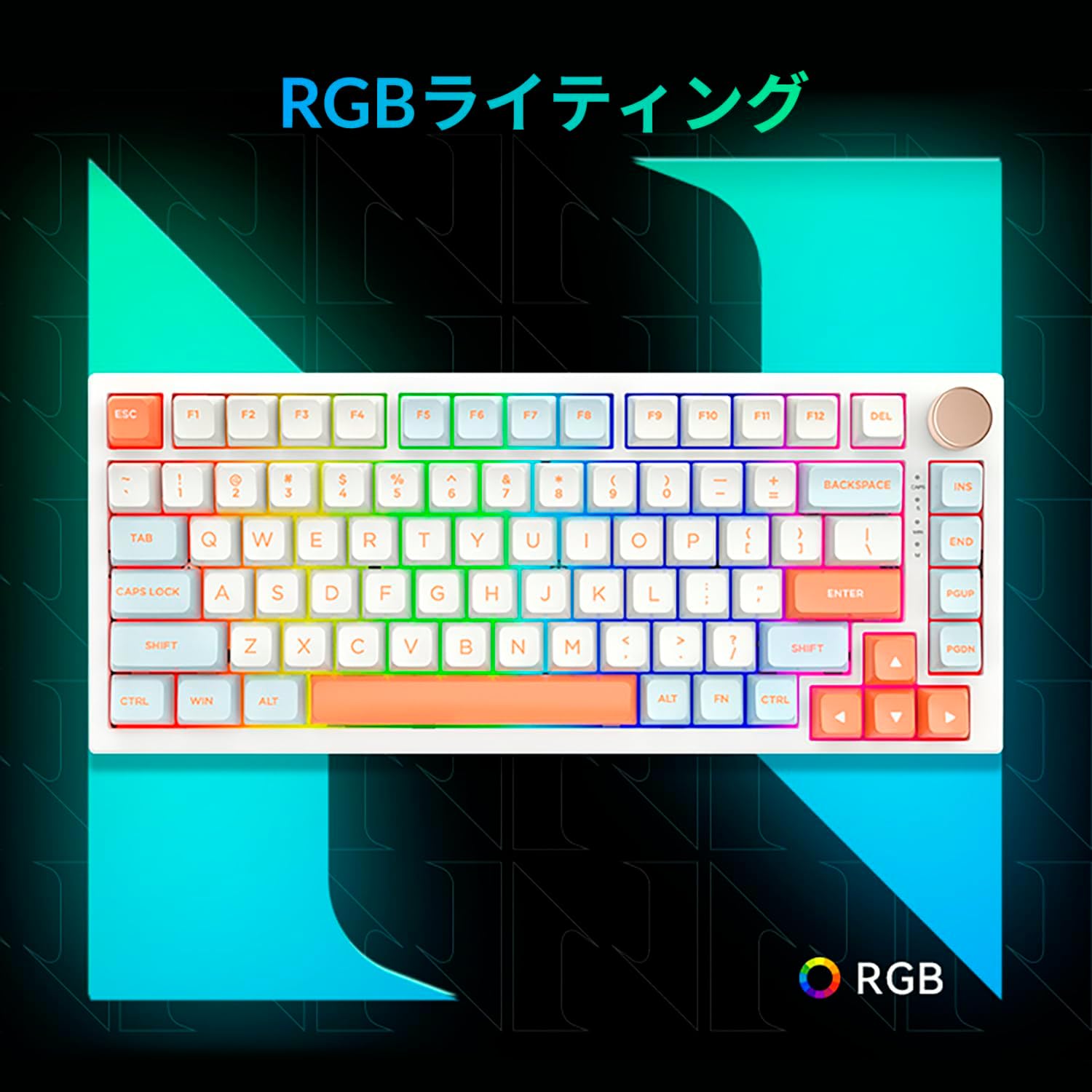
Figure 3.5: The VGN N75 keyboard displaying its customizable RGB lighting, enhancing the visual appeal.
4. Przewodnik konfiguracji
Follow these steps to set up your VGN N75 keyboard:
- Rozpakuj klawiaturę: Carefully remove the keyboard and all included accessories (USB cable, keycap puller, replacement key) from the packaging.
- Podłącz kabel USB-C: Insert one end of the provided USB-C cable into the USB-C port on the keyboard.
- Połącz się ze swoim urządzeniem: Plug the other end of the USB-C cable into an available USB port on your computer or laptop.
- Instalacja sterownika (automatyczna): Klawiatura działa w trybie plug-and-play. System operacyjny powinien automatycznie wykryć i zainstalować niezbędne sterowniki. Zazwyczaj ręczna instalacja sterowników nie jest wymagana.
- Test wstępny: Open a text editor or any application to test the keys and ensure all functions are working correctly.
5. Instrukcja obsługi
This section details the basic operation of your VGN N75 keyboard:
5.1. Podstawowe funkcje klawiszy
The VGN N75 features a standard US82 key layout. All keys function as labeled. For specific key combinations or software-defined macros, refer to any accompanying software documentation (if applicable, not included in this manual).
5.2. Using the Rotary Knob
- Regulacja głośności: Rotate the knob clockwise to increase volume and counter-clockwise to decrease volume.
- Wycisz/Włącz wyciszenie: Naciśnij pokrętło, aby wyciszyć lub włączyć dźwięk.
5.3. Sterowanie oświetleniem RGB
The VGN N75 supports RGB lighting. While specific key combinations for lighting modes are not provided in the product description, most RGB keyboards allow cycling through effects using function key combinations (e.g., Fn + F-keys or dedicated lighting keys). Experiment with the 'Fn' key in combination with other keys (like arrow keys or Ins/Del/Home/End/PgUp/PgDn) to discover lighting controls.
6. Konserwacja
Właściwa konserwacja wydłuży żywotność klawiatury:
- Czyszczenie:
- Przed czyszczeniem odłącz klawiaturę od komputera.
- Użyj miękkiej, niestrzępiącej się ściereczki, lekko wyczyśćampPrzetrzyj klawisze i ramkę wodą lub łagodnym środkiem czyszczącym.
- Do usuwania kurzu i zanieczyszczeń spomiędzy klawiszy należy użyć sprężonego powietrza.
- Nie rozpylaj płynu bezpośrednio na klawiaturę.
- Wymiana nakładek klawiszy i przełączników:
- The keyboard comes with a keycap puller and a replacement key.
- To remove a keycap, gently use the keycap puller to grip the keycap and pull upwards.
- Aby wymienić nakładkę na klawisz, należy ją wyrównać z trzpieniem przełącznika i mocno docisnąć, aż zatrzaśnie się na swoim miejscu.
- Notatka: The VGN N75 features hot-swappable switches, allowing for easy replacement without soldering. To remove a switch, use a switch puller (not explicitly listed as included, but implied by "hot-swappable") to gently pry it out. Align the new switch's pins with the sockets and press firmly until it seats correctly.
7. Rozwiązywanie Problemów
If you encounter issues with your VGN N75 keyboard, try the following solutions:
- Klawiatura nie odpowiada:
- Sprawdź, czy kabel USB-C jest prawidłowo podłączony do klawiatury i komputera.
- Spróbuj podłączyć klawiaturę do innego portu USB w komputerze.
- Uruchom ponownie komputer.
- Przetestuj klawiaturę na innym komputerze, aby wykluczyć problem związany z systemem.
- Klucze nie są rejestrowane:
- Sprawdź, czy pod klawiszem nie znajdują się żadne przeszkody fizyczne.
- If a specific key is not working, consider replacing its switch if you have a switch puller and replacement switches.
- Problemy z oświetleniem RGB:
- Sprawdź, czy klawiatura jest prawidłowo zasilana.
- Try cycling through lighting modes using the keyboard's function key combinations.
- Rotary Knob Not Working:
- Check for any physical obstructions around the knob.
- Sprawdź, czy klawiatura jest prawidłowo podłączona.
8. Specyfikacje
| Atrybut | Szczegół |
|---|---|
| Marka | VGN |
| Numer modelu | N75BLUE |
| Szereg | N75 |
| Kolor | Niebieski |
| Opis klawiatury | Mechaniczny |
| Liczba kluczy | 82 |
| Technologia łączności | USB-C |
| Typ źródła zasilania | Zasilanie przez USB |
| Kompatybilne urządzenia | Laptop |
| Zalecane zastosowania produktu | Hazard |
| Keyboard Backlight Colour Support | RGB |
| Tworzywo | Plastikowy |
| Zawarte komponenty | Keycap Puller, Replacement Key, USB Cable |
| Wymiary opakowania | 42.1 x 18.8 x 6.5 cm; waga 1.1 kg |
| Data pierwszej dostępności | 22 Marzec 2024 |
9. Gwarancja i wsparcie
The VGN N75 Gaming Keyboard comes with a 1-year warranty from the date of purchase, as indicated in the product listing. This warranty covers manufacturing defects under normal use.
For warranty claims, technical support, or further inquiries, please contact your point of purchase or the official VGN support channels. Keep your proof of purchase for warranty validation.
Notatka: Nieautoryzowany demontaż lub modyfikacja produktu może spowodować unieważnienie gwarancji.