
1. Wprowadzenie
This user manual provides detailed instructions for the installation, operation, and maintenance of your NAPCAT N2804 Camera Kit Bundle. Please read this manual thoroughly before using the product to ensure proper setup and optimal performance. This system is designed to enhance your home or business security with advanced surveillance capabilities.

Figure 1.1: NAPCAT N2804 Camera Kit Bundle showing the NVR unit and four bullet cameras.
2. Funkcje produktu
The NAPCAT N2804 Camera Kit Bundle offers a range of features designed for comprehensive security monitoring:
- 4MP Super HD Camera System: Provides clear surveillance with F1.0 super aperture for vibrant color night vision.
- Accurate Alerts: Utilizes human and vehicle detection to minimize false alarms, with customizable behavior detection like intrusion and line crossing.
- Instalacja PoE: Simplifies setup with a single network cable for both data and power.
- Remote & Local Access: Dostęp do footage via smartphone app, PC software, or locally on a connected monitor.
- Smart Deterrence: Features dynamic strobe light and siren for proactive crime prevention.
- Odporność na warunki atmosferyczne IP67: Robust design suitable for both indoor and outdoor use, withstanding various weather conditions.
- Dwukierunkowy dźwięk: Built-in microphone and speaker for enhanced interaction and communication.
- Dysk twardy 2TB: Included for up to 32 days of continuous recording, with expandable storage options.
3. Konfiguracja i instalacja
The NAPCAT N2804 system utilizes Power over Ethernet (PoE) for simplified installation.
3.1. Rozpakowywanie i sprawdzanie podzespołów
Przed rozpoczęciem instalacji należy upewnić się, że wszystkie komponenty są obecne:
- Jednostka NVR
- 4K Bullet Cameras (quantity as per bundle)
- Kable Ethernet
- Zasilacz do rejestratora NVR
- Śruby montażowe i kołki
- Instrukcja obsługi (ten dokument)
3.2. NVR Placement
Place the NVR unit in a secure, dry location, preferably near your internet router for network connectivity. Ensure adequate ventilation around the unit.
3.3. Montaż kamery
Select appropriate locations for your cameras, considering coverage area and power access (via PoE). Use the provided mounting hardware to securely attach cameras to walls or ceilings.

Figure 3.1: True Plug-and-Play: Power and Data in One Cable. This image demonstrates the simplicity of PoE installation, where a single Ethernet cable provides both power and data to the camera from the NVR.
3.4. Connecting Cameras to NVR
Connect each camera to an available PoE port on the NVR using an Ethernet cable. The NVR will automatically power the cameras and establish a data connection.
3.5. Konfiguracja początkowa
Connect the NVR to a monitor via HDMI/VGA and a mouse for initial configuration. Follow the on-screen prompts to set up network settings, date/time, and hard drive initialization.
4. Instrukcja obsługi
4.1. Remote Access (Smartphone App / PC Software)
Download the official NAPCAT security app from your device's app store or the PC software from the NAPCAT website. Register an account and add your NVR by scanning the QR code or entering its serial number. This allows you to view transmisje na żywo, odtwarzanie nagrań i zdalne otrzymywanie alertów.
4.2. Detekcja ruchu i alerty
The system features intelligent human/vehicle detection. Configure detection zones and sensitivity settings through the NVR interface or the remote access application. When motion is detected, the system can send push notifications to your smartphone or trigger the smart deterrence features.

Figure 4.1: Human/Vehicle Detection to Minimize False Alarms. This image illustrates how the system identifies humans and vehicles, reducing unnecessary alerts.
4.3. Smart Deterrence
The cameras are equipped with dynamic strobe lights and a siren. These can be configured to activate automatically upon detection of suspicious activity or manually triggered via the app to deter intruders.
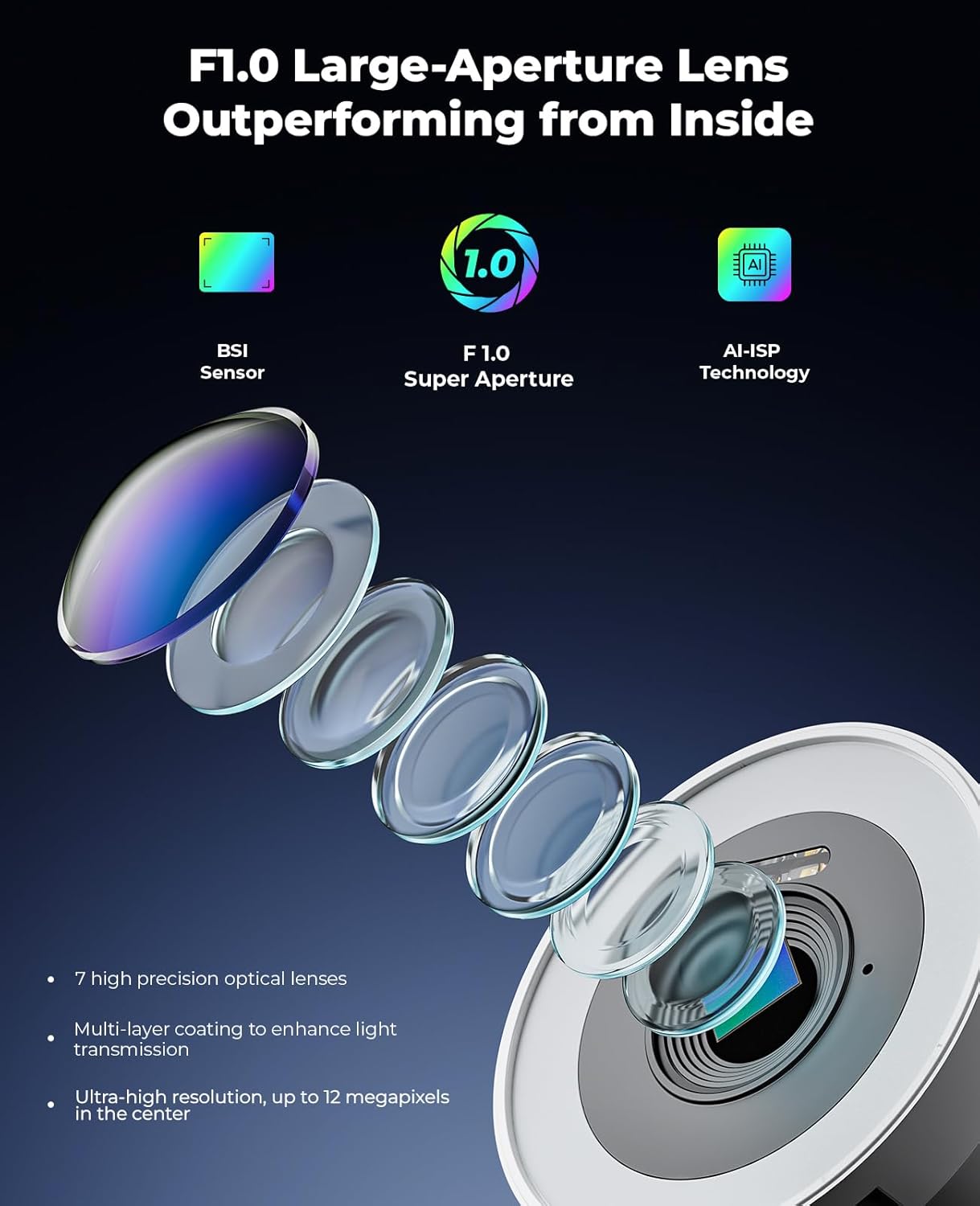
Figure 4.2: Dual Alerts Optional: Proactive Deterrent, Crime Prevention. This image shows the system's ability to use both strobe lights and a siren alarm to deter potential threats.
4.4. Dźwięk dwukierunkowy
Utilize the built-in microphone and speaker on the cameras for two-way communication. This feature is useful for speaking with visitors, delivery personnel, or deterring unwanted individuals.

Figure 4.3: Two-Way Audio, Instant Talk. This image demonstrates the two-way audio capability, allowing communication through the camera.
4.5. Wizja nocna
The F1.0 super aperture technology provides vibrant color night vision, ensuring clear and detailed images even in low-light conditions.

Figure 4.4: F1.0 Super Aperture: Turn the Night into Day. This image highlights the superior night vision capabilities of the NAPCAT camera compared to a standard mobile phone camera.

Figure 4.5: F1.0 Large-Aperture Lens Outperforming from Inside. This image provides an internal view of the lens technology, detailing its components like the BSI Sensor, F1.0 Super Aperture, and AI-ISP Technology, which contribute to its high performance.
5. Konserwacja
Regular maintenance ensures the longevity and optimal performance of your NAPCAT security system.
5.1. Camera Lens Cleaning
Periodically clean the camera lenses with a soft, lint-free cloth to remove dust, dirt, or water spots that may obstruct the view. Nie używaj silnych środków chemicznych.
5.2. NVR Ventilation
Ensure the NVR unit's ventilation openings are clear of obstructions to prevent overheating. Avoid placing the NVR in enclosed spaces without airflow.
5.3. Aktualizacje oprogramowania sprzętowego
Check for and install firmware updates for your NVR and cameras regularly. Updates often include performance improvements, bug fixes, and new features. Refer to the NAPCAT webInstrukcje dotyczące aktualizacji znajdziesz na stronie lub w aplikacji.
5.4. Ochrona przed warunkami atmosferycznymi
The cameras are IP67 weatherproof, designed to withstand various environmental conditions. However, extreme conditions or prolonged exposure to direct harsh elements might still require occasional inspection.
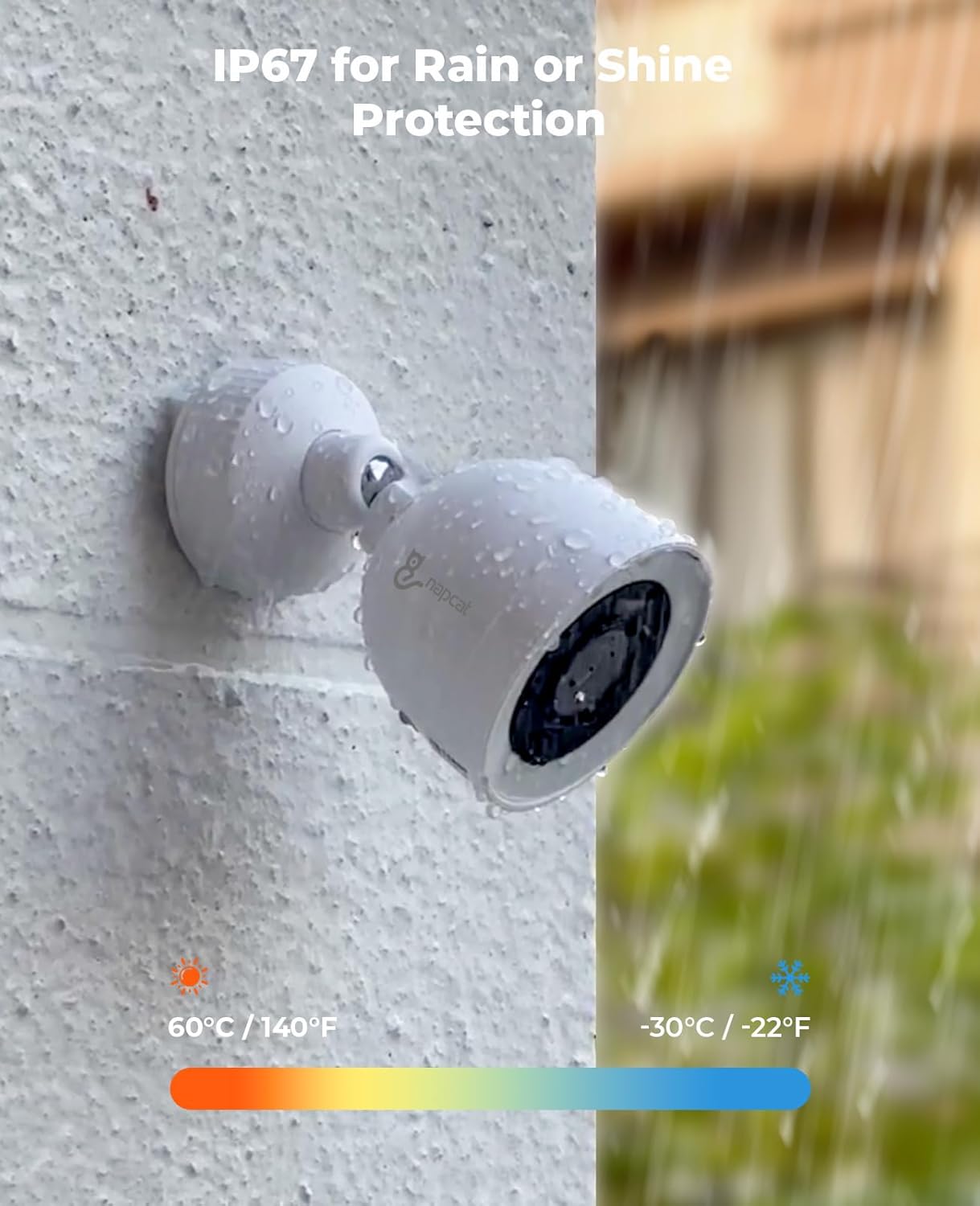
Figure 5.1: IP67 for Rain or Shine Protection. This image demonstrates the camera's IP67 weather resistance, showing it enduring water exposure and indicating its operational temperature range.
6. Rozwiązywanie Problemów
This section addresses common issues you might encounter with your NAPCAT security system.
6.1. No Video Feed from Camera
- Check the Ethernet cable connection at both the camera and NVR ends.
- Upewnij się, że rejestrator NVR jest włączony i działa prawidłowo.
- Verify the camera's status indicator light (if available).
- Spróbuj podłączyć kamerę do innego portu PoE w rejestratorze NVR.
6.2. Brak dostępu zdalnego
- Ensure the NVR is connected to the internet. Check network cables and router status.
- Verify that the NVR's network settings (IP address, DNS) are correct.
- Uruchom ponownie NVR i router.
- Upewnij się, że Twój smartfon lub komputer ma stabilne połączenie z Internetem.
- Check if the app or software is updated to the latest version.
6.3. Fałszywe alerty ruchu
- Dostosuj ustawienia czułości wykrywania ruchu w rejestratorze NVR lub aplikacji.
- Refine the detection zones to exclude areas with frequent irrelevant movement (e.g., trees swaying, busy roads).
- Ensure the human/vehicle detection feature is enabled and configured correctly.
6.4. Poor Image Quality at Night
- Sprawdź, czy obiektyw aparatu jest czysty i nie ma na nim smug ani brudu.
- Check for any obstructions near the camera that might reflect IR light back into the lens.
- Verify that the camera's night vision mode is active.
If you continue to experience issues, please refer to the support section.
7. Specyfikacje
| Funkcja | Szczegół |
|---|---|
| Marka | NAPCAT |
| Technologia łączności | Przewodowy (PoE) |
| Cechy specjalne | Motion Sensor, Night Vision, Two-Way Audio, Smart Deterrence (Strobe Light, Siren) |
| Pojemność pamięci masowej | 2 TB (rozszerzalna) |
| Źródło zasilania | Przewodowe zasilanie elektryczne (PoE) |
| Kompatybilne urządzenia | Kamery |
| Technologia słabego oświetlenia | Night Vision (F1.0 Super Aperture) |
| Odporność na warunki atmosferyczne | Oznaczenie IP67 |
8. Gwarancja i wsparcie
Your NAPCAT N2804 Camera Kit Bundle comes with comprehensive support to ensure your peace of mind.
- 2-Year Manufacturer Service Coverage: This product is covered by a 2-year manufacturer service warranty from the date of purchase.
- Dożywotnia obsługa klienta: NAPCAT provides lifetime customer support for this product. For technical assistance, troubleshooting, or any inquiries, please contact our support team.
For support, please visit the official NAPCAT webodwiedź witrynę lub zapoznaj się z danymi kontaktowymi dołączonymi do opakowania produktu.