
Wstęp
This manual provides detailed instructions for the installation, operation, and maintenance of your DELLA 6000 BTU Window Air Conditioner. Please read this manual thoroughly before using the appliance and retain it for future reference.
Informacje dotyczące bezpieczeństwa
Aby zminimalizować ryzyko pożaru, porażenia prądem i obrażeń ciała, należy zawsze przestrzegać podstawowych zasad bezpieczeństwa podczas korzystania z urządzeń elektrycznych.
- Upewnij się, że urządzenie jest prawidłowo uziemione.
- Nie używaj urządzenia z uszkodzonym przewodem lub wtyczką.
- Nie wkładaj palców ani ciał obcych do wlotu/wylotu powietrza.
- Przed czyszczeniem lub jakąkolwiek konserwacją należy odłączyć urządzenie od zasilania.
- Trzymaj materiały łatwopalne z dala od urządzenia.
Produkt ponadview
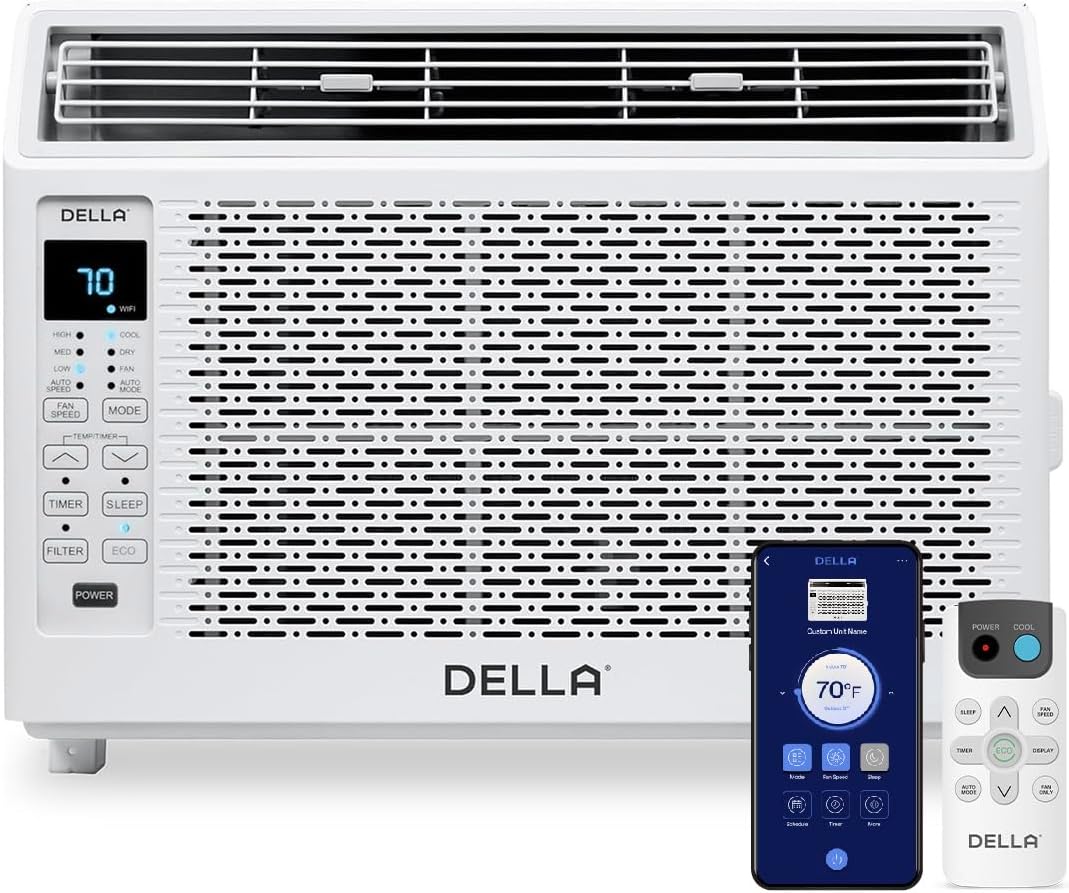
Figure 1: DELLA 6000 BTU Window Air Conditioner Unit, Remote Control, and Smartphone App Interface.
Panel sterowania
The unit features an intuitive control panel with various buttons and indicator lights for easy operation.
- Przycisk zasilania: Włącza lub wyłącza urządzenie.
- Przycisk trybu: Cycles through Cool, Dry (Dehumidifier), Fan, Auto Mode, and ECO Mode.
- Przycisk prędkości wentylatora: Adjusts fan speed (High, Med, Low, Auto Speed).
- Temp/Timer Buttons: Adjusts temperature settings or sets timer.
- Przycisk uśpienia: Activates sleep mode for quiet, energy-efficient operation overnight.
- Przycisk Filtra: Sygnalizuje konieczność czyszczenia filtra.
- Wskaźnik Wi-Fi: Pokazuje stan łączności Wi-Fi.
Zdalne sterowanie

Figure 2: Remote Control for the DELLA Air Conditioner.
The remote control allows for convenient operation of all unit functions from a distance. Ensure batteries are correctly installed.
Instalacja
The DELLA 6000 BTU Window Air Conditioner features a T-design for simplified installation.
Kroki instalacji

Figure 3: T-design installation allows for flexible window opening.

Figure 4: Simplified 3-step installation process.
- Step 1: Secure into window frame. Place the unit into the window opening, ensuring it is securely seated.
- Step 2: Mount with four screws. Fasten the unit to the window frame using the provided screws for stability.
- Step 3: Extend side panels into wall. Extend the accordion side panels to fill the gap between the unit and the window frame, providing insulation and reducing air leaks.
Elementy zestawu instalacyjnego

Figure 5: Included installation kit components.
The installation kit includes filler panels, insulation strips, lock frame & sash lock, screws, window sash seal, and a top mounting rail to ensure a secure and efficient installation.
Wymiary produktu

Figure 6: Unit dimensions and recommended window opening.
The unit dimensions are approximately 15.94"D x 16.02"W x 12.05"H. It is designed for window widths between 23"-34" and requires at least 14.5" vertical clearance.
Instrukcja obsługi
Modes and Fan Speeds

Figure 7: Available operating modes and fan speeds.
The unit offers 5 operating modes (Cool, Auto, Dehumidify, Fan Only, ECO Mode) and 4 fan speeds (Auto, Low, Mid, High) to suit various comfort needs. Use the 'Mode' and 'Fan Speed' buttons on the control panel or remote to select your desired settings.
Kontrola temperatury
Use the up and down arrow buttons on the control panel or remote to set your desired temperature. The digital display will show the current setting.
Smart Features (Wi-Fi Control)

Figure 8: Control your unit wirelessly with the Della+ APP.

Figure 9: Della+ app supports Google Assistant and Alexa for voice control.
Download the free Della+ app to control your unit from anywhere. The app allows for remote control, scheduling, and integration with smart home systems like Google Assistant and Alexa.
Geo Location Function

Figure 10: Smart Geo Location feature for automatic operation.
The Geo Location feature allows the unit to automatically turn on or off based on your proximity to your home. This feature can be configured via the Della+ app.
Video 1: Demonstration of the Geo Location Function setup and customization within the Della+ app.
Tryb uśpienia

Figure 11: Intelligent sleep mode adjusts temperature for optimal comfort.
Intelligent sleep mode automatically adjusts the temperature overnight to maintain comfort and save energy. Activate it using the 'Sleep' button.
Funkcja timera
The 24-hour auto on/off timer allows you to program the unit to turn on or off at specific times, enhancing convenience and energy efficiency.
Konserwacja
Czyszczenie filtrów wielokrotnego użytku

Figure 12: The unit features a washable and reusable filter.
The unit is equipped with a washable and reusable filter. A clean filter helps maintain optimal cooling performance and air quality. When the 'Filter' indicator light illuminates, it's time to clean the filter.
- Wyłącz i odłącz klimatyzator.
- Zdejmij panel przedni i wysuń filtr powietrza.
- Umyj filtr ciepłą wodą z mydłem. Dokładnie wypłucz.
- Przed ponownym założeniem poczekaj, aż filtr całkowicie wyschnie.
- Wymień panel przedni.
Opieka ogólna
- Wyczyść zewnętrzną część urządzenia miękką ściereczką, damp płótno.
- Nie używaj żrących chemikaliów ani ściernych środków czyszczących.
- Ensure the drainage area is clear of obstructions.
Rozwiązywanie problemów
If you experience issues with your air conditioner, refer to the following common problems and solutions:
| Problem | Możliwa przyczyna | Rozwiązanie |
|---|---|---|
| Jednostka się nie włącza | Brak zasilania; zadziałał wyłącznik obwodu; urządzenie odłączone od zasilania. | Sprawdź zasilanie, zresetuj wyłącznik automatyczny, upewnij się, że wtyczka jest całkowicie włożona. |
| Jednostka nie chłodzi skutecznie | Brudny filtr powietrza; zablokowany wlot/wylot powietrza; pomieszczenie jest za duże; okna/drzwi są otwarte. | Clean air filter; clear obstructions; ensure unit is sized correctly for room; close windows/doors. |
| Hałaśliwa praca | Luźne części; urządzenie nie jest wypoziomowane; zablokowany wentylator. | Check for loose components; ensure unit is level; remove any fan obstructions. |
| Woda kapie na zewnątrz | Normalna praca (kondensacja). | This is normal during cooling. Ensure proper drainage. |
Specyfikacje
| Funkcja | Szczegół |
|---|---|
| Nazwa marki | Della |
| Informacje o modelu | 048-TL-W6KWD |
| Wymiary produktu | 15.94 x 16.02 x 12.05 cala |
| Numer modelu przedmiotu | 048-TL-W6KWD |
| Efektywność | Energooszczędny |
| Pojemność | 0.5 tony |
| Hałas | 51dB |
| Typ instalacji | Okno |
| Numer części | 048-TL-W6KW_2 |
| Współczynnik kształtu | Klimatyzator okienny |
| Cechy specjalne | Zdalne sterowanie |
| Tomtage | 115 V (AC) |
| Cotage | 517.5 watów |
| Czy baterie są w zestawie? | NIE |
| Powierzchnia podłogi | 250 stóp kwadratowych |
| Moc chłodzenia | 6000 brytyjskich jednostek termicznych |
| Ocena gwiazdkowa BEE | Tak |
| Sezonowy współczynnik efektywności energetycznej (SEER) | 11 |
| Źródło zasilania | Elektryczny przewodowy |
Gwarancja i wsparcie
Your DELLA 6000 BTU Window Air Conditioner comes with a 1 rok gwarancji. For any inquiries or technical assistance, Della provides Obsługa klienta 24/7.
Proszę odwiedzić Della Store on Amazon Aby uzyskać więcej informacji lub skontaktować się z pomocą techniczną.