
1. Wprowadzenie
This manual provides comprehensive instructions for the installation, operation, and maintenance of your LongPlus Smart 4K 8CH Home Security Camera System. This system is designed to provide robust surveillance with advanced features such as 4K UHD resolution, intelligent AI detection, and flexible storage options, ensuring comprehensive protection for your property.
Please read this manual thoroughly before operating the system and retain it for future reference.
2. Zawartość opakowania
Verify that all items listed below are included in your package. If any items are missing or damaged, please contact LongPlus customer support.
- 1 x 8CH NVR with 48/1.875V Adaptor
- 4 x 4K PoE Bullet Cameras
- Mysz 1 x USB
- 1x1 M kabel Cat5
- 1x1 M kabel HDMI
- Kable 4 x 18M Cat5
- 2 x Extra Connectors
- 4 x paczki śrub i innych akcesoriów
- 1 x Skrócona instrukcja obsługi

Image: The LongPlus 4K 8CH NVR system, including the main NVR unit, four white PoE bullet cameras, and a 2TB hard drive. This image illustrates the primary components of the security system.
3. Konfiguracja
3.1 Fizyczna instalacja
Before mounting, test all cameras and connections to ensure proper functionality.
- Umiejscowienie NVR: Umieść rejestrator NVR w bezpiecznym, suchym i dobrze wentylowanym miejscu, z dala od bezpośredniego światła słonecznego i źródeł ciepła. Upewnij się, że jest on łatwo dostępny i umożliwia podłączanie urządzeń.
- Umiejscowienie kamery:
- Choose strategic locations that provide optimal coverage of desired areas (e.g., entry points, driveways, yards).
- Consider the camera's 132° wide-angle view dla zapewnienia kompleksowego pokrycia.
- Ensure the cameras are within the 100ft night vision range for effective low-light monitoring.
- The cameras are designed for outdoor use with a durable metal body, capable of withstanding extreme weather conditions (-22°F to 140°F).
- Okablowanie:
- Connect each PoE camera to the NVR's PoE ports using the provided Cat5 cables. The system supports cable runs up to 660ft.
- Podłącz rejestrator NVR do monitora za pomocą kabla HDMI lub VGA.
- Podłącz mysz USB do portu USB rejestratora NVR, aby móc nawigować.
- Connect the NVR to your router's LAN port using the 1M Cat5 cable for network access.

Image: A detailed diagram illustrating the connection setup for the LongPlus 8-channel PoE Home Security Camera System. It shows PoE cameras connecting to the NVR, the NVR connecting to a router for internet access, and connections to a monitor, mouse, and power. Remote access via PC and mobile devices is also depicted.

Obraz: Zbliżenie view of the rear panel of the LongPlus NVR, highlighting its various ports including HDMI, VGA, USB, and Ethernet ports for camera and network connections.

Image: A visual comparison showing the LongPlus camera's 132-degree wide viewing angle providing broader coverage compared to a typical 121-degree view from other cameras.
3.2 Pierwsze uruchomienie i konfiguracja
- Connect the NVR power adapter to a power outlet. The system will power on automatically.
- Follow the on-screen prompts on the connected monitor to complete the initial setup wizard, including setting up a password and network settings.
- The NVR comes with a 2TB HDD pre-installed. Ensure it is properly connected inside the NVR for local storage.
4. Działanie
4.1 Remote Access and App Installation
To access your security system remotely, download the Longvision APP on your smartphone or tablet (iOS/Android) or use the client software for Mac/Windows.
- Szukaj "Longvision" in the Apple App Store or Google Play Store.
- Install the app and follow the in-app instructions to add your NVR system.
- The system supports up to 32 users for shared access.

Image: Screenshots of the Longvision mobile application, demonstrating its live view, smart motion alert notifications, and video playback features. The app is compatible with Mac, Windows, Apple iOS, and Google Android operating systems.
4.2 Tryby nagrywania i przechowywania
The NVR supports various recording modes and flexible storage options.
- Nagrywanie ciągłe 24/7: The system records continuously to the pre-installed 2TB HDD. The storage is expandable up to 10TB.
- Nagrywanie wyzwalane ruchem: Records only when motion is detected, saving storage space. This is the default mode.
- Zaplanowane nagrywanie: Ustaw konkretne godziny nagrywania.
- Kompresja H.265+: Utilizes advanced H.265+ video compression technology, which saves over 75% of storage space compared to H.264, allowing for longer recording times.
- Przechowywanie w chmurze: Bank-level encrypted cloud storage is available as an optional service for off-site backup.
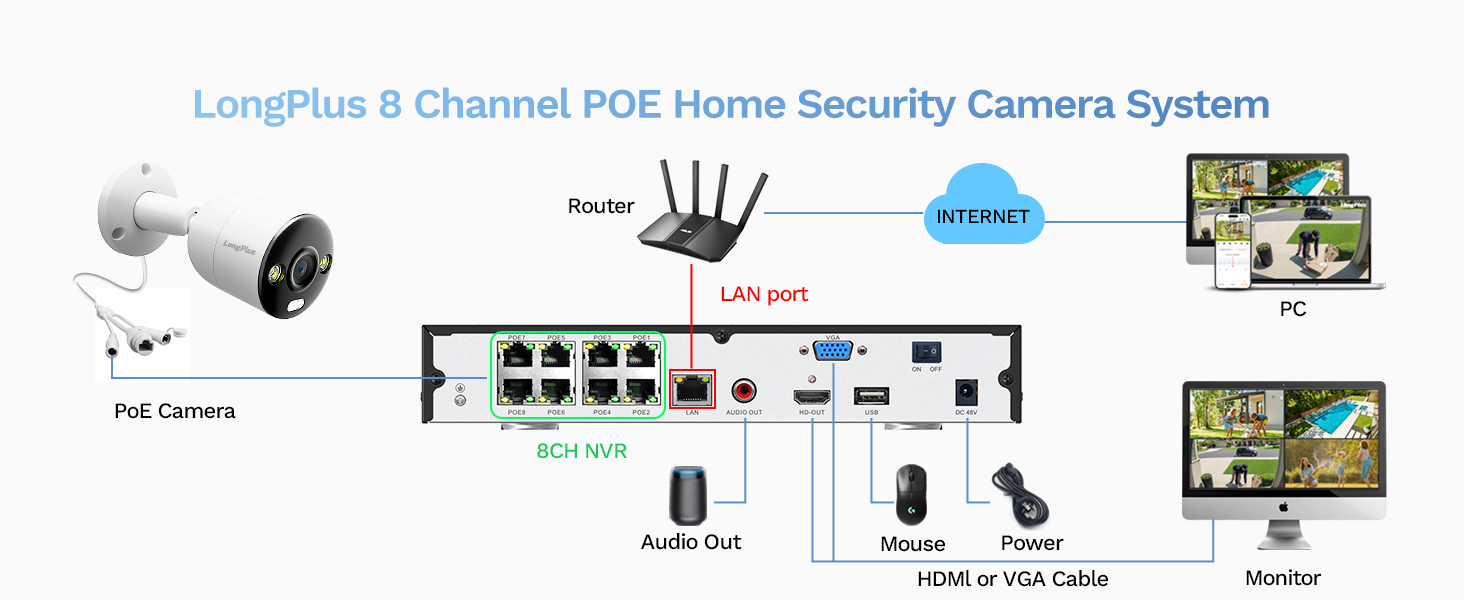
Image: A visual comparison demonstrating the efficiency of H.265+ compression over H.264, highlighting how H.265+ saves over 75% of storage space, enabling longer recording durations.
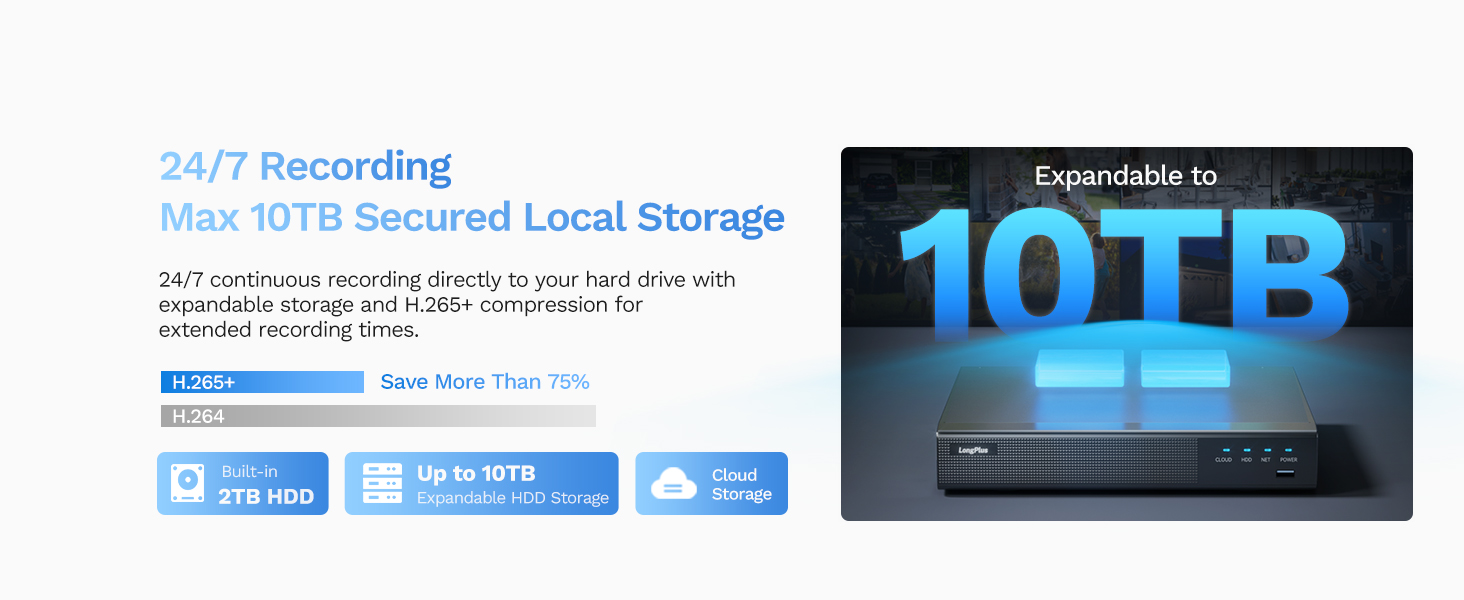
Image: An illustration of the LongPlus NVR's 24/7 recording capability and its support for expandable local storage up to 10TB, with a built-in 2TB HDD.
4.3 Tryby widzenia nocnego
The LongPlus system offers three distinct night vision modes to suit various lighting conditions:
- IR Night Vision (Infrared Mode): Zapewnia wyraźne czarno-białe światłotage in complete darkness up to 100ft.
- Kolorowa wizja nocna (tryb pełnego koloru): Delivers vibrant, full-color footage even in low-light conditions, allowing for better identification of details.
- Smart Night Vision (AI Mode): Automatically switches to color night vision and activates the built-in spotlights when motion is detected, providing clear, illuminated footage.

Image: A visual comparison demonstrating the three night vision modes: Full Color Mode, Infrared Mode, and Smart Night Vision (AI Mode), showing how each mode renders the scene differently in low light.
4.4 AI Motion Detection and Activity Zones
The system features advanced AI object detection for precise alerts.
- Wykrywanie obiektów: Accurately detects humans, vehicles, and pets, reducing false alarms.
- Alerty w czasie rzeczywistym: Receive instant push notifications, emails, or siren alerts when motion is detected.
- Strefy aktywności: Zdefiniuj określone obszary w polu widzenia kamery view where motion detection should be active. This helps to ignore irrelevant motion (e.g., public roads).
- Maska prywatności: Configure privacy masks to block out specific areas from being recorded or viewed, ensuring privacy.

Image: An illustration of the smart AI detection capabilities, showing the system identifying a person and a vehicle, and the corresponding alert options: push notification, email, and siren.

Image: A visual representation of how to set up motion detection zones and privacy masks within the camera's view, allowing users to customize surveillance areas and protect privacy.
4.5 Two-way Audio and Strobe Light Alarm
Enhance your security with interactive features:
- Dwukierunkowy dźwięk: Communicate directly with visitors or deter intruders using the built-in microphone and speaker on the cameras.
- Strobe Light Alarm: When a humanoid, vehicle, or pet motion is detected, the camera can automatically trigger a red and blue strobe light to warn off intruders.
- Alarm syreny: An audible siren can be activated manually or automatically upon detection to further deter unwanted presence.

Image: An illustration depicting the two-way audio feature, where a person can speak through the camera, and the camera's red and blue strobe light alarm activating upon detection of an intruder.
5. Konserwacja
- Regularne czyszczenie: Okresowo czyść obiektywy aparatu miękką,amp szmatką, aby zapewnić wyraźną jakość obrazu.
- Aktualizacje oprogramowania układowego: The NVR firmware automatically updates when connected to the internet. Ensure your system is connected to receive the latest features and security enhancements.
- Kontrola stanu dysku twardego: Regularly check the health of your HDD through the NVR's system settings to prevent data loss.
- Kontrola kabla: Inspect all cables for wear and tear, especially outdoor cables, to ensure reliable connection and power.
6. Rozwiązywanie Problemów
| Problem | Możliwa przyczyna | Rozwiązanie |
|---|---|---|
| No image on monitor/TV | Luźny kabel HDMI/VGA, rejestrator NVR nie jest włączony, nieprawidłowe źródło sygnału wejściowego na monitorze. | Check all cable connections. Ensure NVR is powered. Select correct input source on monitor (HDMI/VGA). |
| Brak obrazu z kamery | Loose PoE cable, camera not powered, faulty camera/cable. | Check PoE cable connections to NVR and camera. Ensure NVR PoE ports are active. Try a different port or cable. |
| Brak dostępu zdalnego przez aplikację | Rejestrator NVR nie jest połączony z internetem, ustawienia sieciowe są nieprawidłowe, aplikacja nie została poprawnie skonfigurowana. | Ensure NVR is connected to router and has internet access. Verify network settings on NVR. Re-add device in Longvision app. |
| Nie otrzymano alertów ruchu | Motion detection not enabled, activity zones not set correctly, notification settings off in app. | Enable motion detection in NVR settings. Adjust activity zones. Check app notification settings. |
| Słaba jakość widzenia w nocy | Dirty lens, IR/Starlight mode not optimal, external light interference. | Clean camera lens. Try different night vision modes (IR, Color, Smart). Reduce external light sources that might cause glare. |
7. Specyfikacje
| Funkcja | Szczegół |
|---|---|
| Marka | DługiPlus |
| Numer modelu | LP8ME84B1 |
| Technologia łączności | Przewodowy (PoE) |
| Rozdzielczość przechwytywania wideo | 4K (8 MP) |
| Liczba kanałów | 8 |
| Pojemność pamięci masowej | 10 TB (2TB HDD included) |
| Pozycja Wymiary (dł. x szer. x wys.) | 11.76 x 11.41 x 7.67 cala |
| Zgodność z systemem operacyjnym | Android, Mac OS, Windows, iOS |
| Zalecane zastosowania | Wewnątrz, Na zewnątrz |
| Zakres noktowizora | 100 stóp |
| Szybkość klatek | 30 klatek na sekundę |
| Tryb nagrywania | Motion-triggered (default), Scheduled, 24/7 |
| Łączna liczba portów USB | 2 |
| Interfejs sprzętowy | Ethernet, HDMI, USB, VGA |
| Viewing kąt | 132 stopni |
| Cechy specjalne | High Efficiency Video Coding (H.265+), Red & Blue Flashing Lights, Easy to Install, Waterproof, Vehicle Detection, Adjustable, Motion Sensor, Siren Alarm, Flexible Storage (Local/Cloud), Smart Playback, Person/Vehicle/Animal Detection, Two-way Audio |
8. Gwarancja i wsparcie
LongPlus provides a 2-letnia gwarancja for this product, ensuring peace of mind regarding manufacturing defects and performance issues.
Dodatkowo, dożywotnie wsparcie techniczne is available for all LongPlus customers. If you encounter any issues or have questions regarding your security system, please do not hesitate to contact our professional technical team. We aim to respond to all queries within 24 hours.
For support, please refer to the contact information provided in your Quick Start Guide or visit the official LongPlus webstrona.