
1. Wprowadzenie
This manual provides detailed instructions for the safe and effective operation of your Andoer Mini WiFi Action Camera L11. This compact digital video camera is designed for capturing high-quality 1080P video at 30 frames per second, featuring a 0.96-inch LCD screen, built-in rechargeable battery, motion detection, and versatile mounting options. Please read this manual thoroughly before using the device.
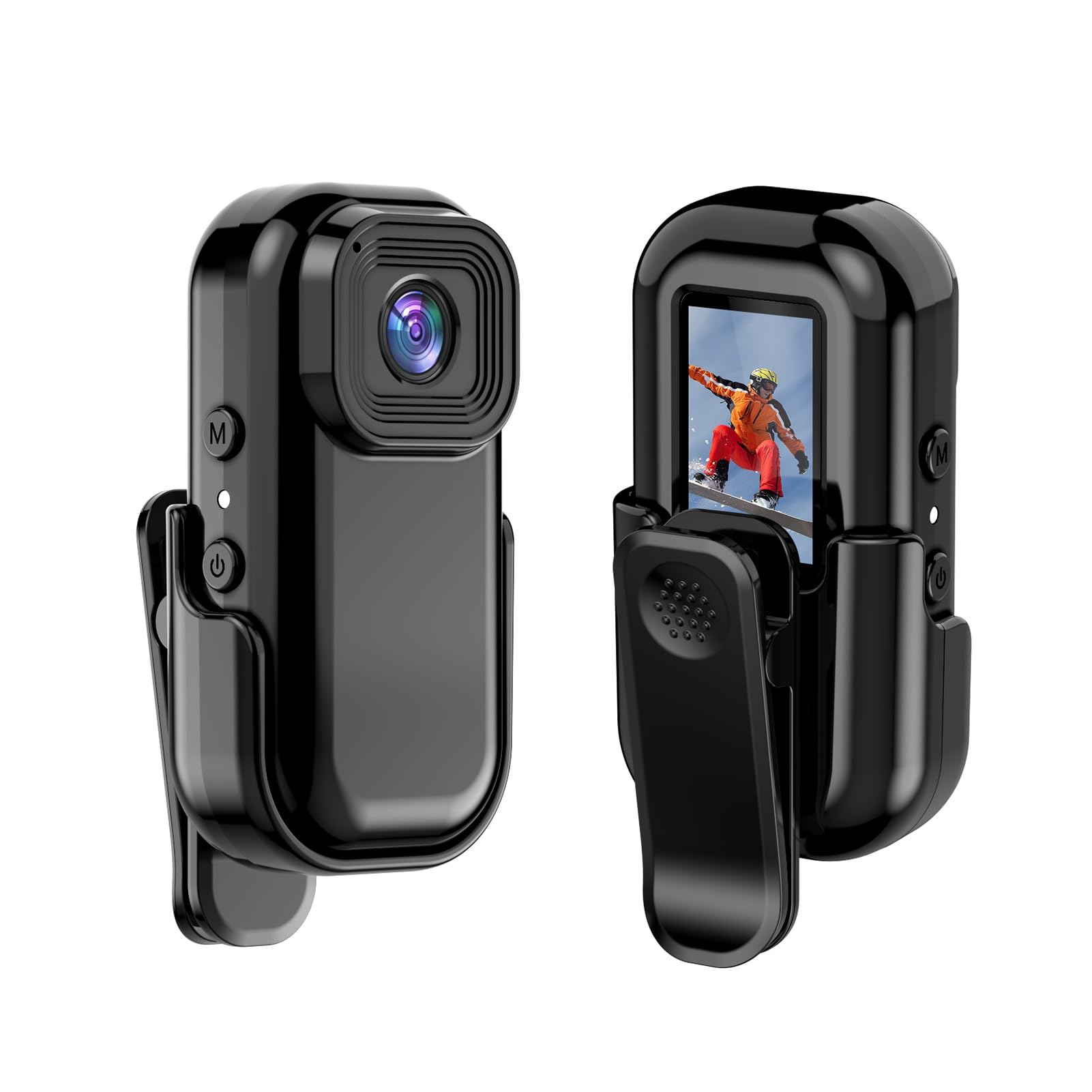
Obraz: przód i tył view of the Andoer Mini WiFi Action Camera L11, showing the lens and the 0.96-inch LCD screen.
2. Zawartość opakowania
Sprawdź, czy wszystkie wymienione poniżej elementy znajdują się w Twojej paczce. Jeśli brakuje któregokolwiek z nich lub jest on uszkodzony, skontaktuj się z obsługą klienta.
- 1 x Andoer Mini WiFi Action Camera L11
- 1 x Pokrowiec ochronny
- 1 x 1/4in Adapter Mount
- 1 x Back Clip Mount
- 1 x czytnik kart
- 1 x kabel typu C
- 1 x Instrukcja obsługi (ten dokument)
3. Funkcje produktu
- Wideo wysokiej jakości: Records in 1080P at 30 frames per second, suitable for various applications including live broadcasting and video conferencing.
- Kompaktowy i przenośny: Super mini size allows for easy portability and discreet placement.
- Ciało magnetyczne: Features a magnetic base for secure attachment to smooth metal surfaces.
- Bezproblemowa łączność Wi-Fi: Connects wirelessly to a dedicated app for live view i kontrola.
- Wszechstronny montaż: Includes a 1/4-inch adapter mount and a back clip mount for diverse installation options.

Obraz: Byłyamples of application scenarios for the camera, including parachute jumping, cycling, parent-child activities, and skiing.

Image: The camera being used as a portable video recorder in various outdoor activities like camping, cycling, climbing, and sports.
4. Konfiguracja
4.1 Ładowanie akumulatora
Before first use, fully charge the camera's built-in 400mAh battery. Connect the provided Type-C cable to the camera's USB port and the other end to a standard USB power adapter (5V, ≥1A). The charging indicator light will typically show the charging status and turn off or change color when fully charged.
4.2 Wkładanie karty pamięci
The camera supports TF (Micro SD) cards up to 128GB. Ensure the card is formatted to FAT32 for optimal performance. Gently insert the TF card into the designated slot until it clicks into place. To remove, press the card in slightly until it springs out.
Note: A memory card is required for recording video and taking photos.
4.3 Włączanie/wyłączanie
- Włączanie: Naciśnij i przytrzymaj przycisk zasilania (zazwyczaj oznaczony symbolem zasilania) przez kilka sekund, aż ekran się podświetli.
- Aby wyłączyć: Press and hold the Power button again for a few seconds until the screen turns off.
5. Instrukcja obsługi
5.1 Podstawowa obsługa
The 0.96-inch color display provides visual feedback for modes and settings. Use the navigation buttons (if present, typically 'M' for Mode and another for selection/shutter) to cycle through options and confirm selections.
5.2 Nagrywanie wideo
In video mode, press the Shutter/Record button to start recording. Press it again to stop. Videos are saved in AVI format at 1920x1080P resolution. The camera supports loop recording with 3-minute segments.

Image: The camera's screen displaying a family scene, indicating video recording at 1920x1080P resolution.
5.3 Robienie zdjęć
Switch to photo mode using the Mode button. Press the Shutter button to capture a still image. Photos are saved in JPG format.

Image: Icons representing photo, video, and audio recording modes, illustrating the camera's ability to capture various moments.
5.4 Wykrywanie ruchu
The camera features motion detection capabilities. Refer to the on-screen menu or the dedicated app for instructions on how to activate and configure this feature. When enabled, the camera will automatically begin recording when motion is detected within its field of view.
6. Łączność Wi-Fi
The Andoer L11 camera supports wireless WiFi connectivity for remote control and live viewing via a smartphone application. Follow these general steps:
- Download the official Andoer camera app from your device's app store (iOS or Android).
- Power on the camera and activate its WiFi mode (refer to the camera's on-screen menu).
- On your smartphone, go to WiFi settings and connect to the camera's WiFi network (SSID and password will be displayed on the camera screen or in the app).
- Open the Andoer app. You should now see a live view from the camera and be able to control recording and settings remotely.

Image: A smartphone displaying a live view from the camera, demonstrating the WiFi connectivity feature.
7. Opcje montażu
The Andoer L11 offers flexible mounting solutions:
- Mocowanie magnetyczne: The camera body has a magnetic feature, allowing it to be securely attached to smooth metal surfaces like refrigerator doors or metal poles.
- 1/4-inch Adapter Mount: Use the included 1/4-inch adapter mount to attach the camera to standard tripods, monopods, or other accessories with a 1/4-inch screw.
- Back Clip Mount: The back clip mount allows you to attach the camera to clothing, backpacks, or other thin objects for hands-free recording.
8. Konserwacja
- Czyszczenie: Do czyszczenia korpusu aparatu używaj miękkiej, suchej ściereczki. Do czyszczenia obiektywu użyj specjalnej ściereczki i płynu do czyszczenia obiektywów. Unikaj stosowania silnych środków chemicznych.
- Składowanie: Przechowuj kamerę w chłodnym, suchym miejscu, z dala od bezpośredniego światła słonecznego i ekstremalnych temperatur.
- Pielęgnacja baterii: For long-term storage, charge the battery to about 50% every few months to maintain its health.
- Aktualizacje oprogramowania układowego: Sprawdź oficjalne Andoer webokresowo odwiedzaj tę witrynę w celu sprawdzenia dostępności aktualizacji oprogramowania sprzętowego, aby zapewnić optymalną wydajność i nowe funkcje.
9. Rozwiązywanie Problemów
| Problem | Możliwe rozwiązanie |
|---|---|
| Kamera się nie włącza. | Upewnij się, że bateria jest w pełni naładowana. Podłącz ją do źródła zasilania i spróbuj ponownie. |
| Nie można nagrywać filmów/robić zdjęć. | Check if a TF card is inserted and properly formatted. Ensure there is sufficient storage space. |
| Problemy z połączeniem WiFi. | Ensure WiFi is enabled on the camera and your smartphone. Restart both devices. Verify the correct app is installed. |
| Słaba jakość obrazu/wideo. | Ensure the lens is clean. Check lighting conditions. Verify camera settings are correct (e.g., resolution). |
| Kamera zawiesza się lub przestaje reagować. | Perform a soft reset by holding the power button until it turns off, then restart. If persistent, remove and reinsert the memory card. |
10. Specyfikacje
| Funkcja | Szczegół |
|---|---|
| Typ maszyny | L11 |
| Kąt obiektywu | 140 stopnia |
| Wyświetlacz TFT | Kolorowy wyświetlacz o przekątnej 0.96 cala |
| Rozdzielczość wideo | 1920 * 1080P |
| Bateria | 400mAh |
| Wideo File Format | Plik AVI |
| Format zdjęcia | Plik JPG |
| Pętla wideo | 3 minut |
| Nagranie File Format | WAV (Audio) |
| Wilgotność robocza | 30% |
| Temperatura pracy | -25 do + 75 ° C (-13 do + 167 ° F) |
| Zasilacz | Pojemność USBtage 5V, prąd ≥1A |
| Karta pamięci | Karta TF, obsługuje do 128G |
| Technologia łączności | Wi-Fi |
| Współczynnik kształtu | Kompaktowy |
| Waga przedmiotu | 4.2 uncji (około 119 g) |
| Wymiary opakowania | 3.94 x 2.36 x 1.97 cala |
11. Informacje dotyczące bezpieczeństwa
- Do not expose the camera to extreme temperatures outside the specified operating range (-25°C to +75°C).
- Avoid operating the camera in humidity levels exceeding 30%.
- Keep the device away from water and other liquids unless explicitly stated as waterproof.
- Nie należy podejmować prób rozmontowania lub modyfikacji kamery, gdyż spowoduje to utratę gwarancji i może spowodować uszkodzenia.
- Use only the specified power supply (USB 5V, ≥1A) for charging.
- Przechowywać w miejscu niedostępnym dla dzieci.