1. Wprowadzenie
This manual provides detailed instructions for the SUUNY H10 Pro Smartwatch. Please read this guide thoroughly to ensure proper use and optimal performance of your device. The H10 Pro features a 1.9-inch HD screen, Bluetooth calling, NFC access control, and comprehensive health monitoring.
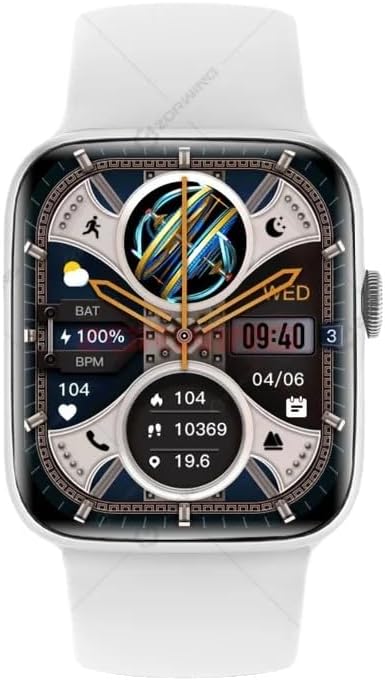
Figure 1: SUUNY H10 Pro Smartwatch (Silver model with white strap)
2. Zawartość opakowania
Sprawdź, czy w opakowaniu produktu znajdują się wszystkie elementy:
- 1 x SUUNY H10 Pro Smartwatch
- 1 x Magnetyczny przewód ładujący
- 1 x Instrukcja obsługi
- 1 x Oryginalne pudełko
3. Konfiguracja
3.1. Ładowanie smartwatcha
Before initial use, fully charge your SUUNY H10 Pro Smartwatch. The device uses magnetic wireless charging.
- Podłącz magnetyczny kabel ładujący do zasilacza USB (nie ma go w zestawie).
- Place the smartwatch on the magnetic charging base. Ensure the charging pins align correctly with the watch's charging points.
- The watch screen will indicate charging status. A full charge typically takes approximately 2 hours.
3.2. Instalacja aplikacji i parowanie urządzeń
Aby w pełni korzystać z funkcjonalności smartwatcha, należy zainstalować aplikację towarzyszącą na smartfonie i sparować urządzenia.
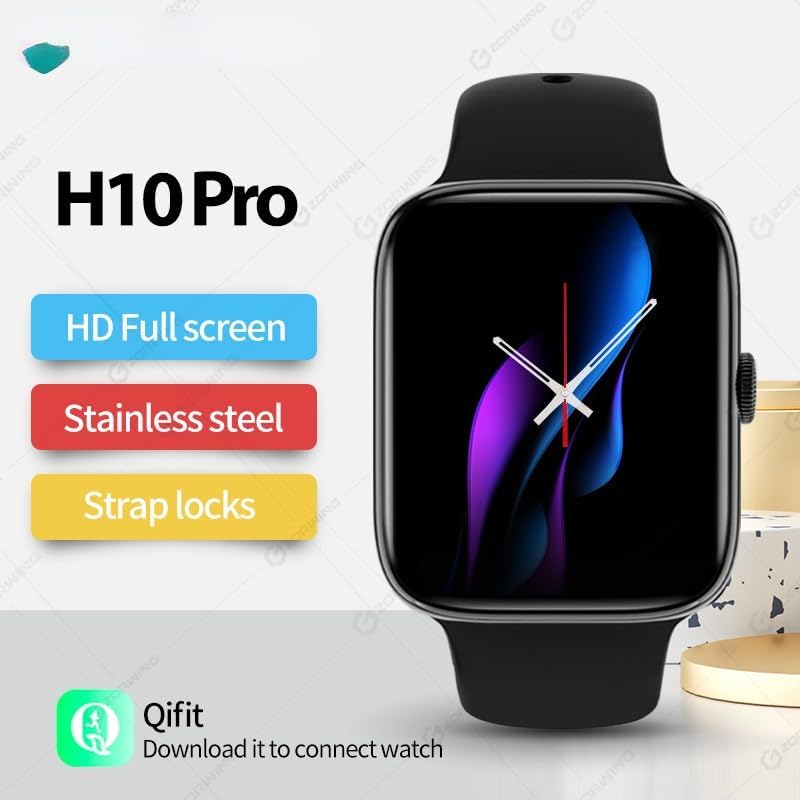
Figure 2: H10 Pro features and Qifit app information
- Download the Qifit App: Szukaj "Qifit" in your smartphone's app store (Google Play Store for Android or Apple App Store for iOS) and install it.
- Włącz Bluetooth: Upewnij się, że Bluetooth jest włączony w Twoim smartfonie.
- Open Qifit App: Launch the Qifit application and follow the on-screen instructions to create an account or log in.
- Paruj urządzenie: Within the Qifit app, navigate to the device pairing section. The app will search for available devices. Select "H10 Pro" or a similar device name from the list.
- Potwierdź parowanie: A pairing request may appear on both your phone and smartwatch. Confirm the pairing on both devices.
Notatka: For GPS positioning, the smartwatch relies on the Qifit mobile phone software to push location information to the watch. The watch does not have a built-in GPS chip.
4. Instrukcja obsługi
4.1. Podstawowa nawigacja
The H10 Pro Smartwatch features a 1.9-inch HD full touch screen and a smart rotary knob for navigation.
- Ekran dotykowy: Swipe left, right, up, or down to access different functions and menus. Tap to select items.
- Smart Rotary Knob: Rotate the knob to scroll through menus or adjust settings. Press the knob to return to the home screen or confirm selections.
- Cover Screen to Turn Off: Covering the screen with your palm can turn off the display.
4.2. Połączenia Bluetooth
Once paired with your smartphone, the H10 Pro allows you to make and receive calls directly from your wrist.
- Dzwonić: Access the dialer function on the watch to input numbers or select contacts from your synced phonebook.
- Odbieranie połączeń: Gdy ktoś dzwoni, zegarek wyświetla identyfikator dzwoniącego. Możesz odebrać lub odrzucić połączenie bezpośrednio z zegarka.
4.3. Kontrola dostępu NFC
The smartwatch includes a built-in NFC chip for access control functionality. There is no dedicated NFC software icon on the watch.
- Obsługiwane karty: The NFC function supports IC door cards with a frequency of 13.56 MNZ. It does not support other NFC functions like mobile payments.
- Proces rejestracji: To use the watch as an access card, you must register its NFC ID with your access control system. This typically involves adding the watch's NFC identifier through the access control system's administration interface (e.g., at a community property management office for encrypted access control).
- Zamki na odcisk palca: For fingerprint locks, enter the administrator mode, then select "add card" and "write" to register the watch.
4.4. Monitorowanie stanu zdrowia
The H10 Pro provides various health monitoring features:
- Monitorowanie częstości akcji serca: Real-time heart rate tracking. Access this feature from the main menu or a dedicated widget.
- Monitorowanie snu: Tracks sleep patterns and quality. Wear the watch during sleep for accurate data.
- Krokomierz: Liczy Twoje kroki w ciągu dnia.
- Przypomnienie o siedzącym trybie życia: Otrzymujesz powiadomienie, gdy jesteś zbyt długo nieaktywny.
4.5. Tryby multisportowe
The smartwatch supports various multi-sport modes to track your exercise activities. Select the appropriate mode before starting your workout for accurate data recording.
4.6. Asystent głosowy AI
Skorzystaj ze zintegrowanego asystenta głosowego AI do szybkich poleceń i wyszukiwania informacji. Aktywuj asystenta za pomocą interfejsu zegarka i wydawaj polecenia głosowe.
4.7. Sterowanie muzyką
Control music playback on your paired smartphone directly from the watch. This includes playing, pausing, skipping tracks, and adjusting volume.
4.8. Always-On Display & Custom Watch Faces
The H10 Pro supports an always-on display mode. You can also customize the watch face from a selection of pre-installed options or personalize it further through the Qifit app.
4.9. Ustawienia językowe
The smartwatch supports the following languages:

Figure 3: Supported languages for the H10 Pro Smartwatch
- angielski
- hiszpański
- portugalski
- turecki
- arabski
- tajski
- wietnamski
To change the language, navigate to the settings menu on your watch.
5. Konserwacja
5.1. Wskazówki dotyczące wodoodporności
The SUUNY H10 Pro Smartwatch is designed with "life waterproof" capabilities, meaning it can withstand daily activities such as hand washing and exposure to rain. However, it is important to adhere to the following guidelines to prevent damage:
- Nie zanurzaj się: The watch is not suitable for swimming, bathing, or prolonged submersion in water.
- Unikaj cieczy żrących: Prevent contact with corrosive liquids such as hand sanitizer, soap, or detergents, as these can penetrate the watch and cause damage to internal components.
- Unikaj gorącej wody: Do not expose the watch to hot water or steam (e.g., in saunas or hot showers).
5.2. Czyszczenie
Aby zachować wygląd i funkcjonalność swojego smartwatcha:
- Przetrzyj ekran i obudowę miękką, niepozostawiającą włókien ściereczką.
- Jeśli to konieczne, lekko dampSpłukać szmatkę wodą, ale unikać nadmiernego nawilżenia.
- Aby zapewnić efektywne ładowanie, należy okresowo czyścić styki ładowania.
6. Rozwiązywanie Problemów
- Zegarek się nie włącza: Upewnij się, że zegarek jest w pełni naładowany. Podłącz go do ładowarki i odczekaj kilka minut przed próbą włączenia.
- Nie można sparować z telefonem:
- Sprawdź, czy Bluetooth jest włączony w telefonie i zegarku.
- Make sure the Qifit app is installed and running.
- Uruchom ponownie zegarek i telefon, a następnie spróbuj sparować je jeszcze raz.
- Sprawdź, czy zegarek nie jest już sparowany z innym urządzeniem.
- Niedokładne dane dotyczące zdrowia: Upewnij się, że zegarek ściśle przylega do nadgarstka, ale nie jest za ciasny. Wyczyść czujnik z tyłu zegarka.
- NFC access not working:
- Verify that the access card system uses 13.56 MNZ IC cards.
- Confirm that the watch's NFC ID has been correctly registered with the access control system.
- Ensure the watch is held close enough to the reader.
- GPS nie działa: The watch uses your phone's GPS via the Qifit app. Ensure your phone's GPS is active and the Qifit app has location permissions.
7. Specyfikacje
Detailed technical specifications for the SUUNY H10 Pro Smartwatch:
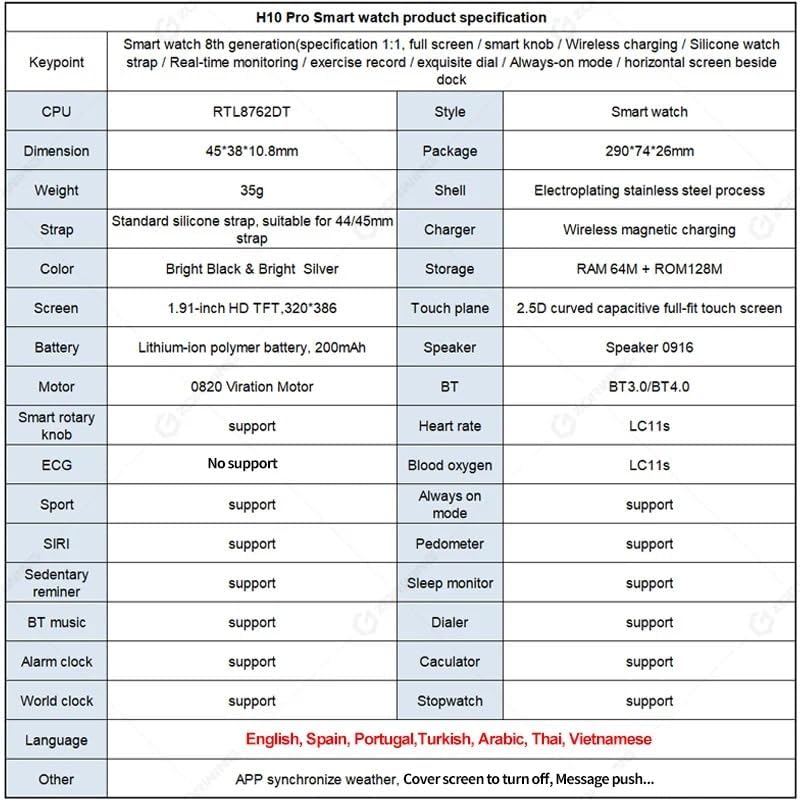
Figure 4: H10 Pro Smartwatch detailed specifications
| Funkcja | Specyfikacja |
|---|---|
| Marka | SUUNNY |
| Numer modelu | H10 Pro (2023) |
| Edytor | RTL8762DT |
| Wymiary | Wymiary: 45 x 38 x 10.8 mm |
| Materiał obudowy | Electroplated Stainless Steel |
| Pasek | Standard Silicone, suitable for 44/45mm straps |
| Rumak | Bezprzewodowe ładowanie magnetyczne |
| Składowanie | RAM 64M + ROM 128M |
| Ekran | 1.9-inch HD TFT, 320 x 386 resolution |
| Panel dotykowy | 2.5D Curved Capacitive Full-fit Touch Screen |
| Bateria | 200 mAh Polymer Lithium-ion Battery |
| Głośnik | 0916 Głośnik |
| Silnik | 0820 Vibration Motor |
| Bluetooth | Dual Bluetooth (BT3.0/BT4.0) |
| System operacyjny | Android (kompatybilny z iOS) |
| Obsługiwane funkcje | Heart Rate Monitoring, Sleep Monitoring, Multi-Sport Modes, Always-on Display, AI Voice Assistant, Pedometer, Sedentary Reminder, BT Music, Dialer, Alarm, Calculator, World Clock, Stopwatch, NFC Access Control (13.56 MNZ IC cards) |
| GPS | Via smartphone (Qifit app) |
| Obsługiwane języki | English, Spanish, Portuguese, Turkish, Arabic, Thai, Vietnamese |
8. Gwarancja i wsparcie
Information regarding product warranty and specific support contacts is not available in the provided product details. Please refer to the seller or manufacturer's official webstrona z warunkami gwarancji i opcjami obsługi klienta.