
Wstęp
This manual provides detailed instructions for setting up and operating your Majority Frameo Snap10 WiFi Digital Picture Frame. This 10.1-inch digital frame allows you to display photos and videos shared via the Frameo app, offering a convenient way to share memories with family and friends. It features a touchscreen, 32GB of internal storage, auto-rotate functionality, and a motion sensor for efficient use.

The Majority Frameo Snap10 Digital Picture Frame, showcasing a family photo on its 10.1-inch screen.
Co jest w pudełku
Sprawdź zawartość paczki, aby upewnić się, że znajdują się w niej wszystkie elementy:
- Majority Frameo Snap10 Digital Picture Frame
- Podpórka
- Zasilacz
- Zdalne sterowanie
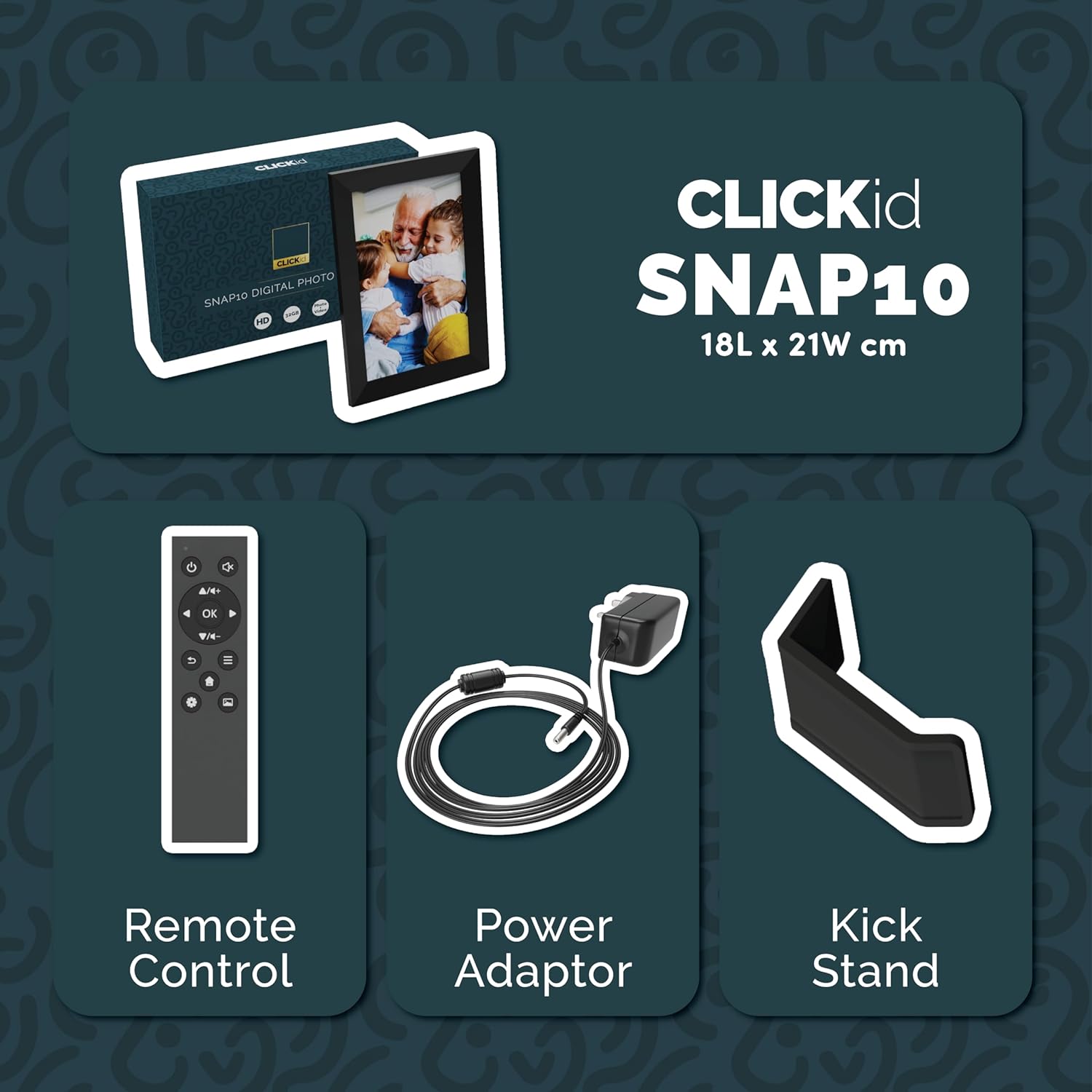
Included accessories: Remote Control, Power Adapter, and Kickstand.
Przewodnik po konfiguracji
- Rozpakuj ramkę: Ostrożnie wyjmij cyfrową ramkę do zdjęć i wszystkie akcesoria z opakowania.
- Attach the Kickstand: Insert the kickstand into the designated slot on the back of the frame. The frame supports both horizontal and vertical orientations.
- Podłącz zasilanie: Plug the power adapter into the DC port on the back of the frame, then connect it to a power outlet. The frame will automatically power on.
- Początkowe ustawienia: Follow the on-screen instructions to select your language, time zone, and connect to a Wi-Fi network.
- Zainstaluj aplikację Frameo: Pobierz aplikację „Frameo” ze sklepu z aplikacjami na swoim smartfonie (dostępna dla systemów iOS i Android).
- Połącz ramkę z aplikacją: Open the Frameo app and create an account. On your digital frame, tap "Add Friend" to get a unique code. Enter this code into the Frameo app on your smartphone to link the devices.

The back of the frame features essential ports for power, USB, and Micro SD card.
Instrukcja obsługi
Wysyłanie zdjęć i filmów
Once your frame is connected to the Frameo app, you can easily send photos and short videos from your smartphone.
- Otwórz aplikację Frameo na swoim smartfonie.
- Wybierz zdjęcia lub filmy, które chcesz wysłać.
- Choose the connected digital frame as the recipient.
- Add a caption if desired, then tap "Send."

The Frameo app simplifies photo and video uploads from your smartphone.
Korzystanie z ekranu dotykowego
The 10.1-inch LCD touchscreen allows for intuitive navigation. Swipe left or right to browse photos, tap to view options, and pinch to zoom.
Funkcje pilota zdalnego sterowania
The included remote control provides convenient access to various frame functions from a distance.
- Nawigacja: Use arrow keys to move through menus and photos.
- OK/Wprowadź: Potwierdź wybór.
- Z powrotem: Powrót do poprzedniego ekranu.
- Odtwórz/Pauza: Control slideshows or video playback.
- Tom: Adjust audio for videos.

Dołączony pilot zdalnego sterowania zapewnia wygodną obsługę.
Czujnik ruchu
The integrated motion sensor can be enabled to automatically turn the display on when movement is detected and off when the area is vacant, conserving energy. This setting can be adjusted in the frame's system settings.
Funkcja automatycznego obracania
The frame automatically adjusts the photo orientation (portrait or landscape) based on how the frame is positioned. Ensure the auto-rotate feature is enabled in the settings for optimal display.

The auto-rotate feature adjusts display based on frame orientation.
Funkcje Ponadview
- 10.1-calowy ekran dotykowy LCD: Provides a clear display and interactive control.
- 32 GB pamięci wewnętrznej: Ample space to store thousands of photos and videos.
- Łączność Wi-Fi: Enables seamless photo and video sharing from anywhere via the Frameo app.
- Integracja aplikacji Frameo: Manage your frame, send media, and invite friends/family to share their moments.
- Czujnik ruchu: Automatically turns the screen on/off to save energy.
- Automatyczne obracanie: Adjusts photo orientation automatically.
- Weather and Calendar Display: Integrated widgets provide current weather and calendar information.
- Gniazdo karty pamięci: Supports Micro SD cards for additional storage or direct media import.
Konserwacja
- Czyszczenie: Use a soft, dry cloth to clean the screen and frame. Avoid abrasive cleaners or sprays directly on the screen.
- Aktualizacje oprogramowania: The frame may receive automatic software updates via Wi-Fi. Ensure your frame is connected to the internet to receive the latest features and improvements.
- Zarządzanie pamięcią masową: Okresowo ponownieview your stored photos and videos. You can delete unwanted media directly from the frame or through the Frameo app to free up space.
Rozwiązywanie problemów
- Rama nie włącza się:
- Upewnij się, że zasilacz jest solidnie podłączony do ramy i do sprawnego gniazdka elektrycznego.
- Nie można połączyć się z Wi-Fi:
- Verify your Wi-Fi password. Ensure the frame is within range of your Wi-Fi router. Try restarting your router and the frame.
- Photos not appearing on the frame:
- Confirm that the frame is connected to Wi-Fi and linked to your Frameo app account. Check the Frameo app to ensure photos were successfully sent. Allow some time for photos to download, especially large batches.
- Frame is stuck on a white screen with a loading bar:
- This may indicate a software issue. Try performing a soft reset by disconnecting the power for 30 seconds and then reconnecting. If the issue persists, a factory reset might be necessary (refer to the frame's settings for this option, noting it will erase all data).
- Pilot nie działa:
- Check if the batteries in the remote control need replacement. Ensure there are no obstructions between the remote and the frame's IR receiver.
Specyfikacje
| Marka | Większość |
| Numer modelu | Snap10 |
| Kolor | Czarny |
| Rozmiar ekranu | 10.1 cali |
| Rezolucja | 800*1280 |
| Proporcje obrazu | 2.10:1 |
| Pojemność pamięci masowej | 32 GB |
| Technologia łączności | Wi-Fi |
| Metoda kontroli | App, Touchscreen, Remote |
| Źródło zasilania | Elektryczny przewodowy |
| Waga przedmiotu | 491 gram |
| Wymiary przedmiotu (dł. x szer.) | 7.08" dł. x 8.26" szer. |
Gwarancja i wsparcie
The Majority Frameo Snap10 Digital Picture Frame comes with a 2-letnia rozszerzona gwarancja. Registration is required to activate the extended warranty. Please refer to the product packaging or the manufacturer's website for details on how to register your product.
For technical support, troubleshooting assistance, or warranty claims, please contact Majority customer service through their official webwitrynę lub dane kontaktowe podane w dokumentacji produktu.
Wideo produktu
This video demonstrates the ease of sharing photos and videos with the Frameo app and viewing them on the digital picture frame, highlighting its use for connecting family members.