
YESYAMO CB-FR-GX8S
YESYAMO 2K Solar Wireless Outdoor Security Camera
Model: CB-FR-GX8S
1. Wprowadzenie
Thank you for choosing the YESYAMO 2K Solar Wireless Outdoor Security Camera. This manual provides detailed instructions for the installation, operation, and maintenance of your new security camera system. Please read this manual thoroughly before use and keep it for future reference.
This camera features advanced AI motion detection, 355° pan and 120° tilt capabilities, 2K HD resolution with color night vision, and two-way audio, providing comprehensive surveillance for your property.
2. Zawartość opakowania
Proszę sprawdzić zawartość opakowania po otwarciu. Jeśli brakuje któregokolwiek elementu lub jest on uszkodzony, prosimy o kontakt z obsługą klienta.
- 1 x Outdoor Surveillance Camera
- 1 x zdejmowana podstawa
- 1 x kabel USB
- 1 x panel słoneczny z kablem
- 1 x wspornik montażowy
- 1 x Instrukcja obsługi
- 1 x zestaw śrub montażowych

Image: The YESYAMO 2K Solar Wireless Outdoor Security Camera shown alongside its accompanying solar panel.
3. Przewodnik konfiguracji
3.1 Ładowanie kamery
Przed pierwszym użyciem należy w pełni naładować wbudowany akumulator aparatu za pomocą dołączonego kabla USB. Podłącz kabel USB do portu ładowania aparatu i zasilacza 5 V/2 A (brak w zestawie). Kontrolka ładowania pokaże stan ładowania.
3.2 Instalacja aplikacji i rejestracja konta
Download the 'YESYAMO Cam' app from your smartphone's app store (compatible with Apple iOS and Android devices). Register for a new account and log in.

Image: A smartphone displaying the YESYAMO Cam app interface, indicating compatibility with both Android and Apple devices.
3.3 Dodawanie kamery do aplikacji
- Open the YESYAMO Cam app and tap the '+' icon to add a new device.
- Wybierz model aparatu z listy.
- Follow the on-screen instructions to connect the camera to your 2.4GHz Wi-Fi network. Ensure your phone is connected to the same Wi-Fi network.
- Scan the QR code displayed on your phone screen with the camera lens. You will hear a prompt when the connection is successful.
- Nazwij kamerę i zakończ proces konfiguracji.
3.4 Montaż kamery i panelu słonecznego
Choose a suitable location for installation. The camera should be mounted at a height that provides optimal viewing coverage, and the solar panel should receive direct sunlight for most of the day.
- Using the mounting bracket and screws, securely attach the camera to a wall or tree.
- Mount the solar panel in a location that maximizes sun exposure.
- Connect the solar panel cable to the camera's charging port. This will provide continuous power to the camera.
4. Instrukcja obsługi
4.1 Na żywo View i odtwarzanie
Open the YESYAMO Cam app to access the live view of your camera. You can pan (355°) and tilt (120°) the camera remotely to adjust the viewing angle. Recorded events can be accessed via the playback function.

Image: A smartphone displaying a timeline of recorded events from the security camera, allowing for easy playback.
4.2 2K HD Quality and Night Vision
The camera captures video in 2K (2560*1440) resolution, providing sharp and clear images. It offers three display modes: ultra-clear, high-definition, and smooth, adapting to your network conditions.
Equipped with two white lights and two infrared lights, the camera provides full-color night vision, allowing you to see clear, colorful images even in low-light or dark conditions.
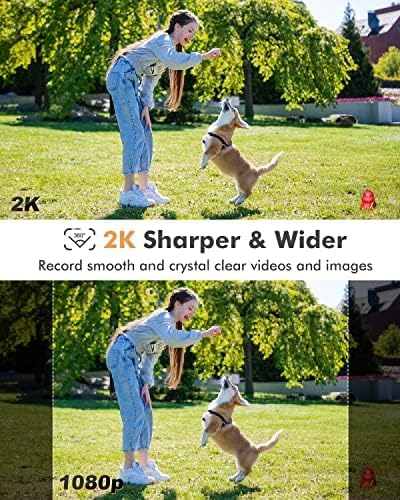
Image: A visual comparison demonstrating the superior sharpness and wider view of 2K resolution compared to 1080p, showing a person playing with a dog.
4.3 AI Motion Detection and Alarms
The camera utilizes advanced AI technology to accurately detect human motion, minimizing false alarms from small animals, wind, or tree movements. When motion is detected, you will receive instant notifications on your smartphone.
Upon detecting an intruder, the camera can automatically trigger a dual sound and light alarm to deter them, enhancing your property's security.
4.4 Dźwięk dwukierunkowy
The built-in microphone and speaker allow for real-time two-way communication. You can speak to visitors or deter intruders directly through the app, with clear audio pickup up to 10 meters away.

Image: A hand holding a smartphone displaying the two-way audio interface of the camera app, allowing fluent communication from anywhere.
4.5 Integracja inteligentnego domu (Alexa)
The camera is compatible with Amazon Alexa. You can integrate it with your Alexa-enabled devices to view transmisje na żywo za pomocą komend głosowych, np.ample, by saying "Alexa, show me the patio."

Image: An Amazon Echo Show device displaying a live feed from the security camera, demonstrating Alexa integration.
5. Konserwacja
- Czyszczenie obiektywu: Gently wipe the camera lens with a soft, dry cloth to remove dust or smudges. Avoid using harsh chemicals.
- Pielęgnacja paneli słonecznych: Periodically clean the surface of the solar panel to ensure maximum sunlight absorption. Remove any dirt, leaves, or debris that may obstruct sunlight.
- Aktualizacje oprogramowania układowego: Check the YESYAMO Cam app regularly for firmware updates. Keeping your camera's firmware up-to-date ensures optimal performance and security.
- Stan baterii: While the solar panel provides continuous charging, ensure the camera receives adequate sunlight to maintain battery health, especially during prolonged cloudy periods.
6. Rozwiązywanie Problemów
| Problem | Możliwa przyczyna | Rozwiązanie |
|---|---|---|
| Kamera nie łączy się z siecią Wi-Fi | Nieprawidłowe hasło Wi-Fi; Kamera znajduje się zbyt daleko od routera; Dostępne jest tylko Wi-Fi 5 GHz. | Ensure correct 2.4GHz Wi-Fi password; Move camera closer to router; Check router settings for 2.4GHz band. |
| Brak obrazu/wideo | Camera offline; Low battery; Network issue. | Check camera power and Wi-Fi connection; Ensure solar panel is charging; Restart camera and router. |
| Częste fałszywe alarmy | Sensitivity too high; Environmental factors (trees, animals). | Adjust motion detection sensitivity in the app; Optimize detection zone to exclude irrelevant areas. |
| Słaba widoczność w nocy | Przesłonięcie soczewki; Niewystarczające oświetlenie otoczenia do widzenia kolorów w nocy. | Clean the camera lens; Ensure no obstructions; Verify night vision settings in app. |
7. Specyfikacje
| Funkcja | Specyfikacja |
|---|---|
| Numer modelu | CB-FR-GX8S |
| Marka | TAK, TAK |
| Rezolucja | 2K (2560*1440) |
| Pan / Tilt Angle | Pan 355 °, pochylenie 120 ° |
| Łączność | 2.4GHz Wi-Fi, Wireless |
| Źródło zasilania | Solar Powered, Lithium-ion Battery |
| Audio | Two-Way Audio (10m pickup) |
| Wizja nocna | Color Night Vision (2 white lights + 2 infrared lights) |
| Cechy specjalne | AI Motion Detection, Sound and Light Alarm, HD Resolution, Alexa Compatible |
| Środowisko użytkowania | Plenerowy |
| Wymiary (dł. x szer. x wys.) | 1.36 x 0.96 x 1.13 cm; 820 grams (Product) / 14 x 10 x 11 mm (Item) |
8. Gwarancja i wsparcie
YESYAMO is committed to providing high-quality products and excellent customer service.
- Gwarancja: Produkt objęty jest roczną gwarancją od daty zakupu. Prosimy zachować dowód zakupu na wypadek roszczeń gwarancyjnych.
- Wsparcie techniczne: Oferujemy dożywotnią pomoc techniczną.
- Usługa online: Our customer service team is available 7x24 hours for online support.
For any inquiries, technical assistance, or warranty claims, please contact YESYAMO customer support through the contact information provided on our official website or within the YESYAMO Cam app.

Image: Icons representing 2-year warranty, lifetime technical assistance, and 7x24 hours online service, highlighting YESYAMO's commitment to customer support.
Ochrona danych
YESYAMO surveillance cameras utilize advanced 256-bit AES encryption technology. Software is periodically updated, and encrypted cloud storage is supported to fully protect the security and privacy of customer homes.

Image: A graphic depicting a shield and lock, symbolizing robust data protection and privacy measures for the security camera system.
Ask a question about this manual
Ask about setup, troubleshooting, compatibility, parts, safety, or missing instructions. Manuals+ will review the question and use this page’s manual context to help answer it.