
DREAME RLL42SD
DREAME L10s Plus Robot Vacuum and Mop Combo User Manual
Model: RLL42SD
1. Wprowadzenie
The DREAME L10s Plus is an advanced self-empty robot vacuum and mop combo designed to provide a comprehensive and hands-free cleaning experience for your home. Equipped with powerful suction, intelligent mopping capabilities, and smart navigation, it efficiently handles various floor types, including hard floors and carpets, and is particularly effective at managing pet hair.
This manual provides detailed instructions on how to set up, operate, maintain, and troubleshoot your DREAME L10s Plus to ensure optimal performance and longevity.
2. Zawartość opakowania
Sprawdź, czy w przesyłce znajdują się wszystkie elementy wymienione poniżej:
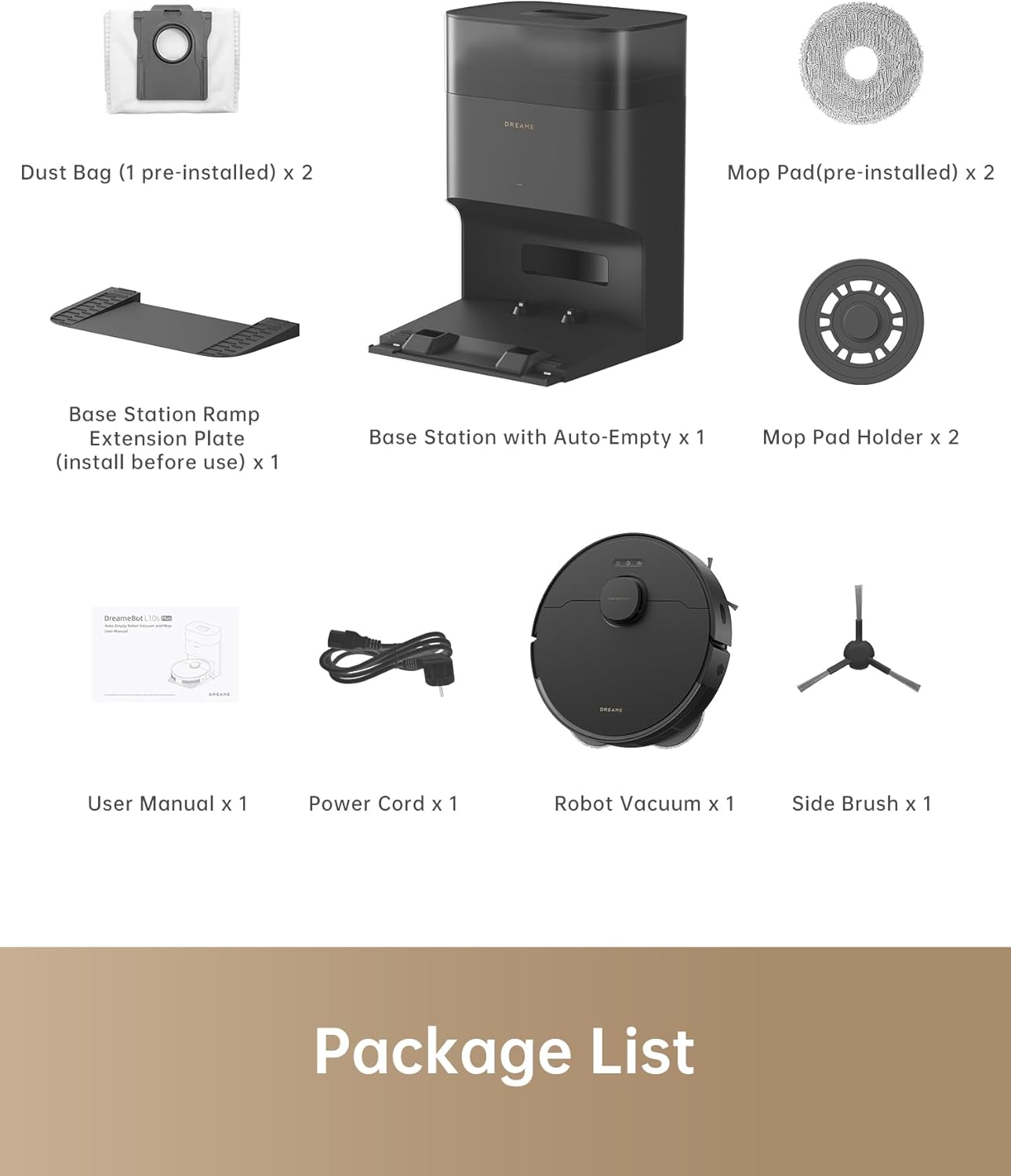
Image: All components included in the DREAME L10s Plus package.
- Robot odkurzający x 1
- Base Station with Auto-Empty x 1
- Dust Bag (1 pre-installed) x 2
- Mop Pad (pre-installed) x 2
- Uchwyt na mopa x 2
- Stacja bazowa ramp Extension Plate (install before use) x 1
- Przewód zasilający x 1
- Szczotka boczna x 1
- Instrukcja obsługi x 1
3. Konfiguracja
3.1 Unpacking and Base Station Placement
Carefully remove all packaging materials. Place the Base Station on a hard, level surface against a wall, ensuring there are no obstacles within 1.5 meters (4.9 feet) in front and 0.5 meters (1.6 feet) to either side. Connect the power cord to the Base Station and plug it into a power outlet.

Image: The DREAME L10s Plus robot vacuum and its base station.
3.2 Instalowanie komponentów
- Szczotka boczna: Press the side brush onto its post on the bottom of the robot until it clicks into place.
- Nakładki na mopy: Attach the mop pads to the mop pad holders, then align the holders with the slots on the bottom of the robot and push them in until they are securely fastened.
3.3 Pierwsze ładowanie
Place the robot vacuum onto the Base Station. Ensure the charging contacts on the robot align with those on the Base Station. The robot will automatically begin charging. For first-time use, it is recommended to fully charge the robot before its initial cleaning cycle.
3.4 Connecting to the Dreamehome App
- Pobierz Aplikacja Dreamehome from your mobile app store.
- Otwórz aplikację i załóż konto lub zaloguj się.
- Follow the in-app instructions to add your DREAME L10s Plus device. This typically involves turning on the robot, resetting its Wi-Fi, and connecting your phone to the robot's temporary Wi-Fi hotspot before connecting it to your home Wi-Fi network.
- Once connected, the app will guide you through the initial mapping process, allowing the robot to create a layout of your home for efficient cleaning.
4. Instrukcja obsługi
4.1 Rozpoczęcie cyklu czyszczenia
Cykl czyszczenia można rozpocząć na kilka sposobów:
- O robocie: Press the Power/Clean button on the robot once to start a full cleaning cycle.
- Via Dreamehome App: Open the app, select your device, and tap 'Clean' to start. The app offers more advanced options like selecting specific rooms, zones, or setting virtual walls.
- Sterowanie głosowe: If integrated with a compatible smart home assistant (e.g., Amazon Echo), you can use voice commands like "Hey Siri, start vacuuming."
4.2 tryby czyszczenia
The DREAME L10s Plus supports various cleaning modes, configurable via the Dreamehome App:
- Tylko odkurzacz: Do usuwania suchych zanieczyszczeń ze wszystkich typów podłóg.
- Tylko mop: Do czyszczenia na mokro twardych podłóg.
- Odkurzanie i mycie: Jednoczesne odkurzanie i mycie podłóg.
4.3 Funkcje zaawansowane
- Hands-Free Dust Emptying: The DualBoost 2.0 system automatically transfers collected dust into a 4L E12 dust bag in the base station, providing up to 90 days of hands-free dust disposal.

Image: The robot vacuum automatically emptying dust into its base station.
- DuoScrub Mopping System: Two high-speed rotary mops scrub under pressure to remove stubborn dirt and spills, with fiber mop pads reducing water stains.

Image: The robot vacuum actively mopping a hard floor with its dual rotary mops.
- 7000 Pa Silne ssanie: Provides powerful suction to effectively pick up food crumbs, litter, and pet hair from various surfaces.

Image: Visual representation of the robot's powerful 7000Pa suction capability.
- 7mm Auto Lifting Mop: Ultrasonic Carpet Detection allows the robot to identify carpets and automatically lift its mops by 7mm to prevent wetting while vacuuming carpets.

Image: The robot vacuum demonstrating its 7mm mop lifting feature when encountering a carpet.
- 3DAdapt Obstacle Avoidance: The robot uses advanced sensors to detect and navigate around obstacles like shoes and toys, ensuring thorough cleaning without getting stuck.

Image: The robot vacuum utilizing 3DAdapt obstacle avoidance to navigate a room.
- Mapowanie wielopiętrowe: Create and save up to four separate floor maps within the Dreamehome App, allowing for customized cleaning routines across different levels of your home.
- Virtual Walls & No-Mop Zones: Use the app to set virtual boundaries or no-mop zones to restrict the robot from entering certain areas or mopping carpets.
4.4 Oficjalny film o produkcie
Wideo: Oficjalnyview of the DREAME L10s Plus, showcasinjego funkcji i działania.
5. Konserwacja
Regular maintenance is crucial for the optimal performance and longevity of your DREAME L10s Plus. Always turn off the robot and disconnect the Base Station from power before performing any maintenance.
5.1 Dust Bag / Dustbin Maintenance
- Worek przeciwkurzowy: The 4L E12 dust bag in the Base Station should be replaced approximately every 90 days, or when the app indicates it is full. Simply remove the old bag and insert a new one.
- Śmietnik robota: Although the robot self-empties, it's good practice to periodically check and manually clean the robot's internal dustbin and filter.
5.2 szczotka główna i szczotka boczna
- Pędzel główny: Remove the main brush cover and lift out the brush. Use the cleaning tool to remove tangled hair and debris. Clean the brush bearings.
- Szczotka boczna: Unscrew and remove the side brush. Clean any hair or debris wrapped around it.
5.3 Nakładki mopa i zbiornik na wodę
- Nakładki na mopy: After each mopping session, remove the mop pads from their holders and wash them thoroughly. They can be hand-washed or machine-washed.
- Zbiornik na wodę: Empty any remaining water from the robot's water tank after each use. Periodically clean the tank to prevent mold or odor buildup.
5.4 Czujniki i styki ładowania
Wipe all sensors (cliff sensors, wall sensor, obstacle avoidance sensors) and charging contacts on both the robot and the Base Station with a soft, dry cloth. This ensures proper navigation and charging.
6. Rozwiązywanie Problemów
If you encounter issues with your DREAME L10s Plus, please refer to the following common problems and solutions:
| Problem | Możliwa przyczyna | Rozwiązanie |
|---|---|---|
| Robot się nie ładuje | Charging contacts are dirty; Power cord not connected; Robot not properly docked. | Clean charging contacts; Ensure power cord is securely plugged in; Re-dock the robot, ensuring proper alignment. |
| Słaba wydajność czyszczenia | Dust bag full; Brushes tangled; Filter clogged; Suction power set too low. | Replace dust bag; Clean main and side brushes; Clean or replace filter; Increase suction power in the app. |
| Robot często się zacina | Obstacles in path; Sensors dirty; Robot operating in a cluttered area. | Clear obstacles; Clean all sensors; Use virtual walls/no-go zones in the app for problem areas. |
| Problemy z łącznością aplikacji | Incorrect Wi-Fi password; Robot too far from router; Router settings (e.g., 5GHz network). | Ensure correct Wi-Fi password; Move robot closer to router; Ensure you are connecting to a 2.4GHz Wi-Fi network. |
| Mop not dispensing water or mopping poorly | Water tank empty; Mop pads dirty or not installed correctly; Water outlet clogged. | Fill water tank; Clean and properly attach mop pads; Clean water outlet (refer to app for specific instructions). |
If the problem persists after trying these solutions, please contact DREAME customer support for further assistance.
7. Specyfikacje
| Funkcja | Specyfikacja |
|---|---|
| Marka | MARZYĆ |
| Model | RLL42SD |
| Cechy specjalne | Logical navigation, automatic height adjustment, smart mapping, automatic dust collection |
| Kolor | Czarny |
| Typ filtra | HEPA-like |
| Żywotność baterii | Do 180 minut |
| Źródło zasilania | Zasilany bateryjnie |
| Kompatybilne urządzenia | Echo Amazona |
| Współczynnik kształtu | Robotyczny |
| Wymiary produktu | 14 x 19 x 13 cala |
| Waga przedmiotu | 23.3 funta |
8. Gwarancja i wsparcie
Your DREAME L10s Plus comes with a manufacturer's warranty. Please refer to the warranty card included in your package for specific terms and conditions, including the warranty period and coverage details.
For technical support, troubleshooting assistance, or warranty claims, please contact DREAME customer service through the following channels:
- Urzędnik Webstrona: Odwiedź oficjalną stronę DREAME webwitryna z odpowiedziami na często zadawane pytania, zasobami pomocy i informacjami kontaktowymi.
- Aplikacja Dreamehome: The app often includes a support section where you can find help or submit inquiries.
Please have your product model number (RLL42SD) and purchase information ready when contacting support.
Ask a question about this manual
Ask about setup, troubleshooting, compatibility, parts, safety, or missing instructions. Manuals+ will review the question and use this page’s manual context to help answer it.