
1. Wprowadzenie
This manual provides detailed instructions for the LKTOP Mini 4 Pro/Mini 3 Series Battery Charging Hub and the included Controller Sticks. The charging hub is designed to efficiently manage and charge intelligent flight batteries for DJI Mini 4 Pro, DJI Mini 3 Pro, and DJI Mini 3 drones. It also features LED lighting, an alarm mode, and a storage mode. The controller sticks are compatible with various DJI remote controllers.
2. Zawartość opakowania
- LKTOP Mini 4 Pro/Mini 3 Series Battery Charging Hub × 1
- RC-N1/N2 Controller Stick × 3 Pairs (Gray, Black, Gold)
- USB-C to USB-C Cable (not explicitly listed in product description but implied by charging hub, assuming for completeness)
- USB-A to USB-C Cable (not explicitly listed in product description but implied by charging hub, assuming for completeness)
3. Koniec produktuview
3.1. Battery Charging Hub
The LKTOP Battery Charging Hub is a multi-functional device for DJI Mini 4 Pro, DJI Mini 3 Pro, and DJI Mini 3 intelligent flight batteries. It supports sequential charging for up to three batteries and can also function as a power bank to charge other USB-C devices like remote controllers, phones, or tablets. The hub integrates LED lighting and an alarm mode for enhanced utility.

Image 1: LKTOP Mini 4 Pro/Mini 3 Series Battery Charging Hub with three batteries inserted, alongside three pairs of controller sticks and two USB-C cables.

Image 2: The charging hub connected to a 37W power adapter, simultaneously charging a drone remote controller. The image highlights Charging Mode, LED Mode, Alarm Mode, and Storage Mode.
3.2. Controller Sticks
The included controller sticks are designed for compatibility with DJI RC-N1 and RC-N2 remote controllers, as well as other models such as DJI Mini 3, Mini 3 Pro, Mini 2, Mini 2 SE, Air 2, Air 2S, Mavic 3, and Mavic 3 Pro. They are made from aluminum alloy for durability and feature a knurled non-slip design.

Image 3: Three pairs of controller sticks in gray, black, and gold, shown next to a DJI remote controller, illustrating color options and compatibility.
4. Konfiguracja
To begin using the charging hub, ensure you have a compatible USB-C power adapter (not included). Connect the charging hub to the power adapter using a USB-C cable. Insert your DJI intelligent flight batteries into the designated slots on the charging hub. The hub will automatically detect the batteries and begin the charging process.
5. Instrukcja obsługi
5.1. Tryb ładowania
The charging hub supports charging up to three batteries. Depending on the input power of your adapter, the charger will automatically match the charging method. If the input power is 45W or higher, batteries may charge simultaneously. If less than 45W, batteries will charge one by one in sequence.
- Czas ładowania: Approximately 50 minutes for one Intelligent Flight Battery; approximately 90 minutes for one Intelligent Flight Battery Plus.
Video 1: Demonstration of the LKTOP charging hub's charging mode, showing how batteries are inserted and charged, including simultaneous and sequential charging based on power input.
Video 2: Illustrates the sequential charging process for Mini 3 Pro batteries when using a lower wattage zasilacz.
5.2. Tryb LED
The charging hub includes an integrated LED lighting function for convenience in low-light conditions.
- Aktywacja: Short press and long press the function button to activate the lighting function.
- Regulacja jasności: With each subsequent short press, the brightness will adjust through five levels (10%-100%).
- Tryb stroboskopowy: The last brightness level is a strobe mode.

Image 4: The charging hub's LED lights illuminating a dark outdoor area, demonstrating its use for visibility.
Video 3: Highlights the LED lighting function of the LKTOP 100W Mini 4/3 Series Parallel Charging Hub, showing its use in dark environments.
5.3. Tryb alarmowy
The alarm mode provides an audible alert and visual strobe for emergency situations.
- Aktywacja: Short press and long press the function button to activate the SOS sound mode.
- Cykle trybów: Subsequent short presses will cycle through strobe mode and SOS sound and light combination mode.
- Dezaktywacja: Long press the function button to deactivate the alarm function.
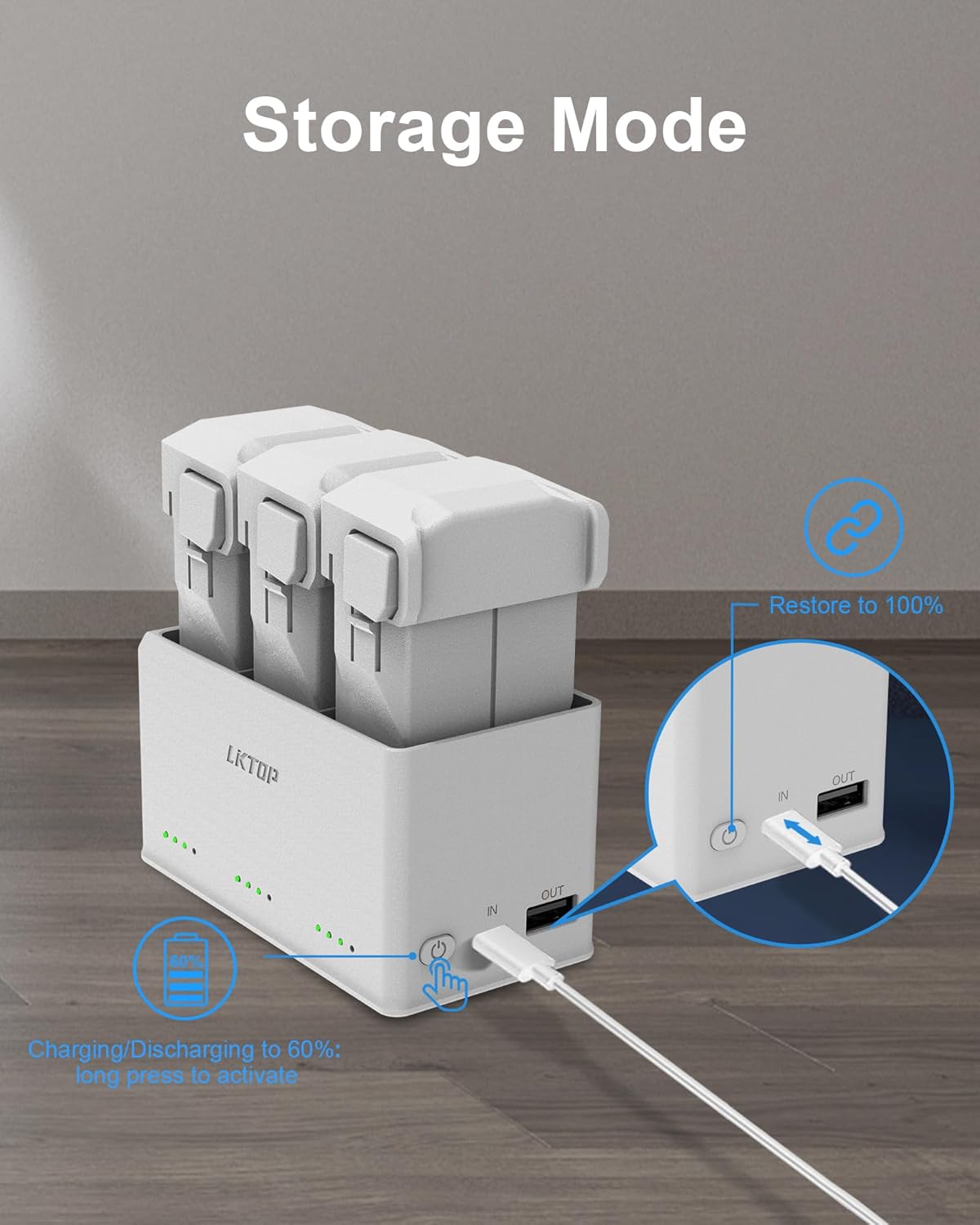
Image 5: The charging hub with its alarm mode activated, showing the sequence of alarm, strobe, and SOS sound/light combination.
5.4. Tryb przechowywania
The storage mode helps maintain battery health by charging or discharging batteries to an optimal storage level (around 60%).
- Aktywacja: Long press the function button to activate the charging/discharging to 60% function.
- Full Charge Override: Unplug and reconnect the Type-C connector to restore to 100% charging.

Image 6: The charging hub in storage mode, indicating the process of charging/discharging batteries to 60% for optimal storage.
5.5. Output Mode (Power Bank Function)
The charging hub can utilize the drone batteries as a power bank to charge other devices.
- Connect your DJI remote controller, smartphone, iPad, or other USB-C compatible device to the 'OUT' port of the charging hub using an appropriate USB-C cable.
- The batteries inserted in the hub will then discharge to power your connected device.
Video 4: Demonstrates the power bank function of the charging hub, showing it charging a DJI remote controller.
6. Zgodność
6.1. Charging Hub Compatibility
The LKTOP Battery Charging Hub is compatible with:
- Inteligentny akumulator DJI Mini 4 Pro
- Inteligentny akumulator DJI Mini 3 Pro
- DJI Mini 3 Intelligent Flight Battery
6.2. Controller Stick Compatibility
The included controller sticks are compatible with the following DJI remote controllers:
- DJI RC-N1
- DJI RC-N2
- DJI Mini 3
- DJI Mini 3 Pro
- DJI Mini 2
- DJI Mini 2 SE
- DJI Air 2
- DJI Air 2S
- DJI Mavic 3
- DJI Mavic 3 Pro

Image 7: Visual representation of the gray, black, and gold controller sticks and their compatibility with DJI RC-N1/N2 remote controllers.
7. Specyfikacje
| Nazwa produktu | LKTOP Mini 4 Pro/Mini 3 Series Battery Charging Hub |
| Kompatybilne baterie | DJI Mini 4 Pro, DJI Mini 3 Pro, DJI Mini 3 Intelligent Flight Batteries |
| Charging Time (Intelligent Flight Battery) | Approx. 50 minutes (for 1 battery) |
| Charging Time (Intelligent Flight Battery Plus) | Approx. 90 minutes (for 1 battery) |
| Tryb wejścia/wyjścia | Charge 3 batteries in sequence or simultaneously charge battery and USB-C devices. |
| Tryby oświetlenia LED | 5 brightness levels (10%-100%), Strobe mode |
| Tryby alarmowe | SOS sound mode, Strobe mode, SOS sound and light combination mode |
| Tryb przechowywania | Charges/discharges batteries to 60% for optimal storage. |
| Controller Stick Material | Aluminum alloy, knurled non-slip |
| Controller Stick Weight | 3.5g (per stick) |
8. Konserwacja
- Keep the charging hub and controller sticks clean and dry.
- Avoid exposing the devices to extreme temperatures, moisture, or direct sunlight.
- Regularly inspect cables for any signs of wear or damage.
- Store the charging hub and batteries in a cool, dry place when not in use. Utilize the storage mode for long-term battery preservation.
9. Rozwiązywanie Problemów
- Urządzenie się nie ładuje: Ensure the power adapter is properly connected and functioning. Verify that the USB-C cable is securely plugged into both the adapter and the charging hub. Check if batteries are correctly inserted.
- LED lights not activating: Ensure a battery is inserted into the hub. Press and hold the function button as described in the LED Mode section.
- Powolne ładowanie: Upewnij się, że Twój zasilacz zapewnia wystarczającą moc.tage (e.g., 45W or higher for simultaneous charging). Lower wattage adapters will charge batteries sequentially.
- Controller sticks not fitting: Confirm that your remote controller model is listed under the compatible devices in Section 6.2.
10. Informacje dotyczące bezpieczeństwa
- Do not disassemble or modify the charging hub or controller sticks.
- Przechowywać w miejscu niedostępnym dla dzieci.
- Use only compatible batteries and power adapters.
- Unikaj upuszczania urządzeń i narażania ich na silne uderzenia.
- If any unusual behavior or damage is observed, discontinue use immediately and contact customer support.
11. Gwarancja i wsparcie
For warranty information, technical support, or any inquiries regarding your LKTOP product, please refer to the official LKTOP webOdwiedź stronę internetową lub skontaktuj się bezpośrednio z działem obsługi klienta. Szczegółowe informacje można zazwyczaj znaleźć na opakowaniu produktu lub w oficjalnych kanałach internetowych producenta.