
1. Wprowadzenie
This manual provides detailed instructions for the installation, operation, and maintenance of your Active Pixel A9 Triple Lens WiFi Outdoor Security Camera. Please read this manual thoroughly before using the product to ensure proper function and safety. This camera is designed for outdoor surveillance, offering a wide field of view, advanced detection features, and robust weather resistance.
2. Zawartość opakowania
Sprawdź, czy w przesyłce znajdują się wszystkie elementy:
- 1x Active Pixel A9 Camera
- 1x stojak montażowy
- 1x Zasilacz
- 1x Instrukcja obsługi (ten dokument)
- 1x Screw Kit for installation
3. Funkcje produktu powyżejview
The Active Pixel A9 camera offers a range of features for comprehensive outdoor security:
- Triple Lens Ultra-Wide 4MP Clarity: Three lenses provide a dramatically wider area coverage with sharper details and expanded angle monitoring.
- Pełnokolorowa wizja nocna: Equipped with 8 high-power LEDs for clear, full-color video even in complete darkness.
- 360° PTZ Surveillance: Remotely pan, tilt, and zoom the camera to monitor every corner without blind spots.
- Smart Motion Tracking & Human Detection: AI-powered detection identifies human movement accurately and automatically tracks moving subjects.
- WiFi Enabled with Two-Way Audio: Stable 2.4GHz WiFi connectivity with a built-in microphone and speaker for remote communication.
- Waterproof Outdoor Build (IP66): Designed to withstand rain, dust, heat, and harsh outdoor conditions.
- Opcje podwójnego przechowywania: Supports local SD card storage (up to 128GB) and secure cloud backup.
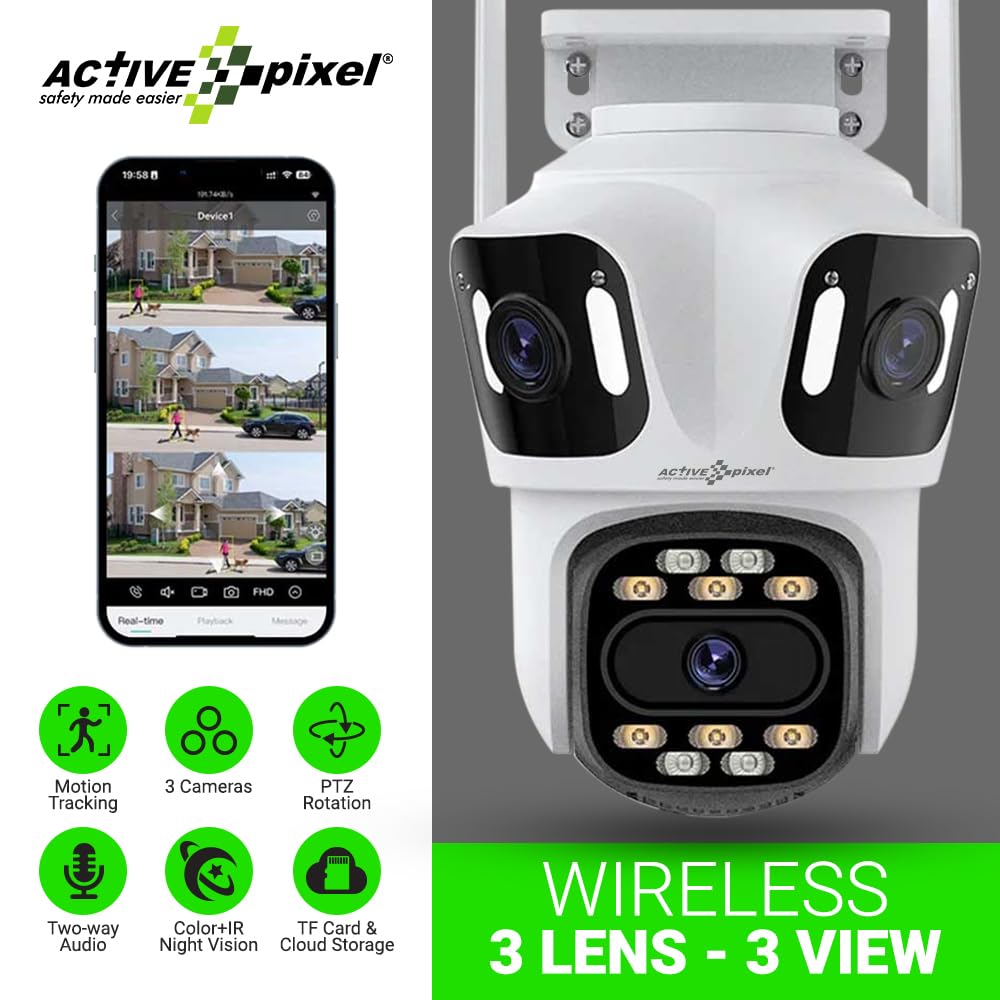
Figure 3.1: Active Pixel A9 Camera highlighting key features and mobile app view.

Figure 3.2: Illustration of the 3-Lens, 3-Screen panoramic viewmożliwości.

Figure 3.3: The camera's weatherproof design ensures durability in various conditions.
4. Instrukcje konfiguracji
4.1 Fizyczna instalacja
- Wybierz lokalizację: Wybierz lokalizację na zewnątrz, która zapewnia pożądane viewing angle and is within range of your WiFi network. Ensure the camera is mounted securely and has access to a power outlet.
- Zamontuj kamerę: Use the provided screw kit to securely attach the mounting stand to a wall or ceiling. Attach the camera to the stand. Refer to the camera dimensions for proper placement.
- Podłącz zasilanie: Plug the power adapter into the camera and then into a suitable power outlet. The camera will power on and initiate its startup sequence.

Figure 4.1: Camera dimensions for installation planning.
4.2 Pobieranie aplikacji i tworzenie konta
- Pobierz aplikację: Szukaj the recommended mobile application (e.g., "ICSEE" or as specified in the camera packaging) on your smartphone's app store (Google Play Store or Apple App Store).
- Utwórz konto: Otwórz aplikację i postępuj zgodnie z instrukcjami wyświetlanymi na ekranie, aby zarejestrować nowe konto.
4.3 Parowanie kamery
The camera supports both wireless (WiFi) and wired connections:
- Połączenie bezprzewodowe:
- Upewnij się, że Twój telefon jest podłączony do sieci Wi-Fi 2.4 GHz.
- In the app, select "Add Device" and choose the wireless connection option.
- Follow the app's prompts to connect the camera to your WiFi network. This usually involves scanning a QR code displayed on your phone with the camera or entering WiFi credentials.
- Połączenie przewodowe (opcjonalnie):
- Podłącz kabel Ethernet do routera i portu LAN kamery.
- In the app, select "Add Device" and choose the wired connection option. The camera should be automatically detected.

Figure 4.2: Connection methods for the Active Pixel A9 camera.
5. Instrukcja obsługi
5.1 Na żywo View and Multi-Screen Monitoring
Po połączeniu otwórz aplikację, aby view żyćtage from your camera. The triple-lens design allows for multi-screen viewing within the app, providing a comprehensive panoramic perspective.
Figure 5.1: Multi-screen live view from the triple-lens camera.
5.2 Sterowanie PTZ
Use the directional controls within the app to remotely pan (horizontal rotation), tilt (vertical rotation), and zoom the camera to adjust your viewing area. This allows for dynamic monitoring of your surroundings.
5.3 Dźwięk dwukierunkowy
Tap the microphone icon in the app to speak through the camera's speaker, and listen to audio from the camera's microphone. This feature enables real-time communication with visitors or deterrence of intruders.
5.4 Tryby widzenia nocnego
The camera automatically switches to night vision in low-light conditions. The 8 high-power LEDs provide full-color night vision, ensuring clear visibility after dark.
5.5 Detekcja ruchu i śledzenie
Enable motion detection in the app settings. The camera will send alerts to your phone when motion is detected. With human detection enabled, the camera can distinguish human shapes from other movements, reducing false alarms. The smart tracking feature will automatically follow detected human subjects.

Figure 5.2: Human detection and automatic tracking in action.
5.6 Nagrywanie i odtwarzanie
Kamera obsługuje dwie metody nagrywania:
- Pamięć karty SD: Insert a Micro SD card (up to 128GB, not included) into the designated slot on the camera. Recordings will be saved locally.
- Przechowywanie w chmurze: Subscribe to the cloud storage service through the app for secure off-site backup of your recordings.
Uzyskaj dostęp do nagranego pliku footage via the playback function in the mobile app.

Figure 5.3: Dual storage options: TF card and cloud.
6. Konserwacja
6.1 Czyszczenie aparatu
Okresowo czyść obiektyw i obudowę aparatu miękką,amp cloth. Do not use harsh chemicals or abrasive cleaners, as these can damage the lens or finish. Ensure the camera is powered off before cleaning.
6.2 aktualizacji oprogramowania sprzętowego
Check the mobile app regularly for available firmware updates. Keeping your camera's firmware up-to-date ensures optimal performance, security, and access to new features. Follow the in-app instructions for firmware updates.
6.3 Zarządzanie kartami SD
If using an SD card, it is recommended to format it periodically through the camera's settings in the app to maintain optimal recording performance. Replace the SD card if it shows signs of corruption or failure.
7. Rozwiązywanie Problemów
- Kamera nie łączy się z siecią Wi-Fi:
- Upewnij się, że Twoja sieć Wi-Fi obsługuje częstotliwość 2.4 GHz. Kamera nie obsługuje sieci 5 GHz.
- Sprawdź siłę sygnału WiFi w miejscu, w którym znajduje się kamera.
- Sprawdź, czy hasło Wi-Fi wprowadzone w aplikacji jest prawidłowe.
- Uruchom ponownie router i kamerę.
- Słaba jakość obrazu:
- Wyczyść obiektyw aparatu.
- Należy zadbać o odpowiednie oświetlenie, zwłaszcza w celu umożliwienia widzenia w nocy.
- Sprawdź prędkość swojego połączenia internetowego.
- Detekcja ruchu nie działa lub zbyt wiele fałszywych alarmów:
- Dostosuj czułość wykrywania ruchu w aplikacji.
- Ensure human detection is enabled if you wish to filter out non-human movements.
- Define specific detection zones to exclude areas with constant, irrelevant movement (e.g., busy roads).
- Problemy z dwukierunkową transmisją dźwięku:
- Sprawdź uprawnienia aplikacji na swoim telefonie dotyczące mikrofonu i głośnika.
- Ensure volume levels are adjusted correctly on both the app and your phone.
- Sprawdź stabilność sieci.
8. Specyfikacje
| Funkcja | Szczegół |
|---|---|
| Marka | Aktywny piksel |
| Nazwa modelu | WIFI Triple LENS |
| Numer modelu | A9 |
| Zalecane zastosowania | Bezpieczeństwo na zewnątrz |
| Środowisko użytkowania | Plenerowy |
| Technologia łączności | Bezprzewodowa (Wi-Fi 2.4 GHz) |
| Cechy specjalne | Triple Lens, Full-Color Night Vision, 360° PTZ, Motion Tracking, Human Detection, Two-Way Audio |
| Typ montażu | Wystający |
| Rozdzielczość przechwytywania wideo | 1536P |
| Format przechwytywania wideo | 4MP |
| Źródło zasilania | Adapter (No Batteries Required) |
| Pozycja Wymiary (dł. x szer. x wys.) | 15 x 10 x 8 centymetrów |
| Waga przedmiotu | 400 gram |
| Zawartość opakowania | 1x Camera, 1x Stand, 1x Adapter, 1x Manual, 1x Screw Kit |
9. Gwarancja i wsparcie
9.1 Informacje o gwarancji
This product may be eligible for an extended warranty. For details on warranty coverage and terms, please refer to any warranty cards included in your package or contact customer support. An optional 1-Year Extended Warranty by Onsitego may be available for purchase.
9.2 Obsługa klienta
For technical assistance, troubleshooting, or any product-related inquiries, please contact Active Pixel customer care:
- Telefon: 9321367328
- Producent / Importer: Glorious Digital Solution Pvt Ltd, Mumbai, India.