
Wstęp
Dziękujemy za zakupasing the XDOBO KING MAX 140W Portable Wireless Speaker. This manual provides essential information for setting up, operating, maintaining, and troubleshooting your speaker. Please read this manual thoroughly before use to ensure optimal performance and longevity of your device.
Informacje dotyczące bezpieczeństwa
- Nie wystawiaj głośnika na działanie ekstremalnych temperatur, bezpośredniego światła słonecznego i wysokiej wilgotności.
- Aby zapobiec uszkodzeniom, trzymaj głośnik z dala od wody i innych płynów, mimo że ma klasę ochrony IPX5.
- Nie rozmontowuj, nie naprawiaj ani nie modyfikuj urządzenia samodzielnie. Wszelkie prace serwisowe zleć wykwalifikowanemu personelowi.
- Use only the specified charging cable and power supply (Type C 5V3A) to avoid damage or fire.
- Unikaj słuchania przy wysokim poziomie głośności przez dłuższy czas, aby zapobiec uszkodzeniu słuchu.
- Przechowywać w miejscu niedostępnym dla dzieci.
Zawartość opakowania
Proszę sprawdzić, czy w paczce znajdują się następujące elementy:
- 1 x XDOBO KING MAX Speaker
- 1 x kabel ładujący (typ C)
- 1 x kabel audio
- 1 x Instrukcja obsługi
- 1 pasek
- 2 x mikrofony

Image: The XDOBO KING MAX speaker shown with its two accompanying wireless microphones, illustrating the complete product package.
Produkt ponadview
Elementy sterujące i porty
Familiarize yourself with the various input and control options available on your speaker:
- BT (Bluetooth): Do bezprzewodowego strumieniowania dźwięku.
- Gniazdo karty TF: For playing audio directly from a MicroSD card.
- USB Flash Disk Port: Do odtwarzania dźwięku bezpośrednio z dysku USB.
- 3.5mm AUX Line Input: For wired audio connection from external devices.
- 6.5mm Audio Cable Input: For connecting additional audio sources or instruments.
- Wejścia mikrofonowe: Dedicated ports for the wireless microphones.
- Przycisk zasilania: To turn the speaker on/off.
- Regulacja głośności: Aby dostosować głośność wyjściową głośnika.
- Przycisk trybu: To switch between different playback modes.
- TWS Button (Key III): For connecting two speakers in True Wireless Stereo mode.
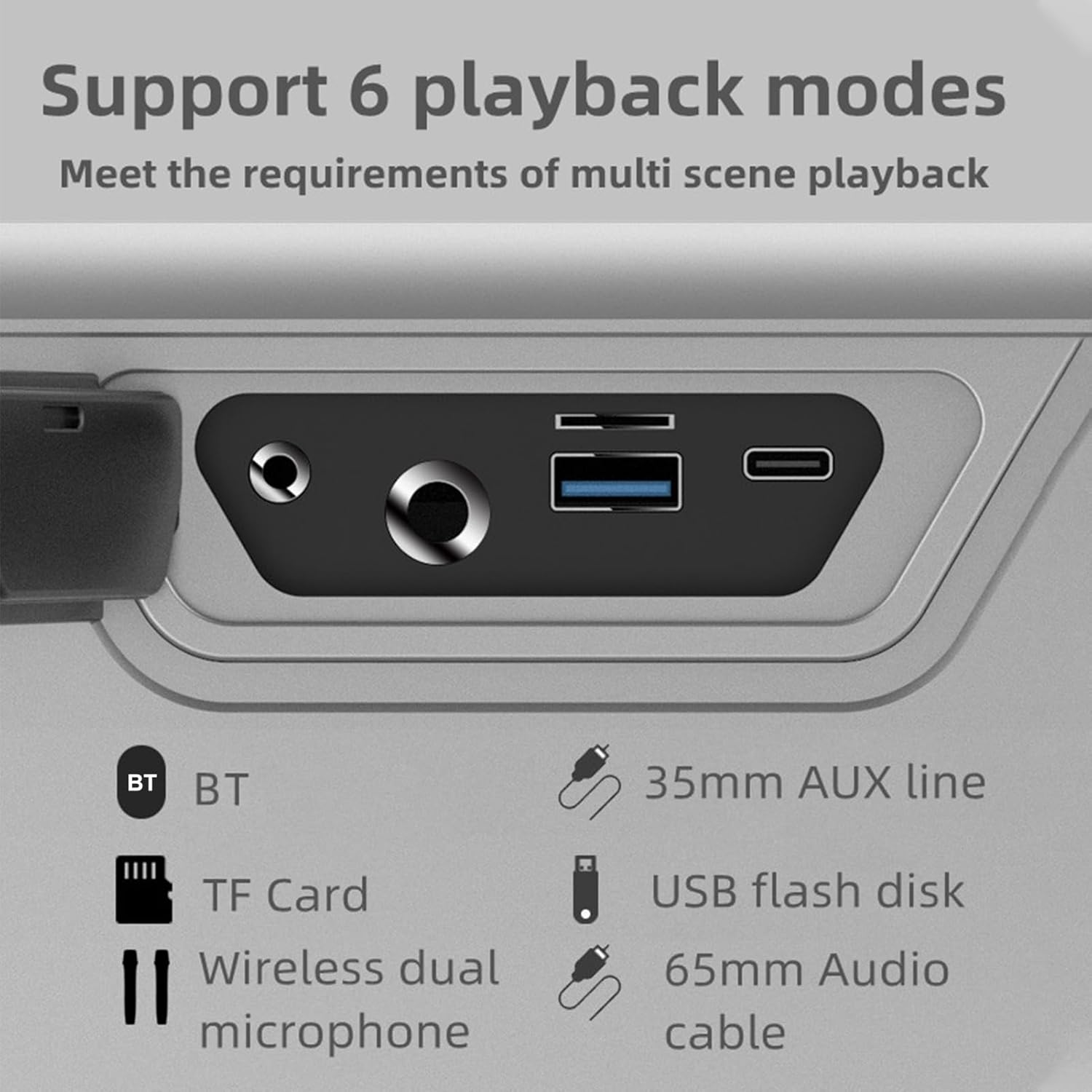
Obraz: Zbliżenie view of the speaker's rear panel, highlighting the BT, TF Card, Wireless Dual Microphone, 3.5mm AUX line, USB flash disk, and 6.5mm Audio cable input ports.
Organizować coś
1. Ładowanie głośnika
Before first use, fully charge the speaker. Connect the provided Type-C charging cable to the speaker's charging port and the other end to a 5V/3A power adapter (not included). The charging time is approximately 9 hours for a full charge. The battery capacity is 36000mAh (7.4V).
2. Konfiguracja mikrofonu
The speaker comes with two UHF wireless karaoke microphones. To use them, ensure they are charged (if applicable) and powered on. They should automatically connect to the speaker when both devices are on and within range. Refer to the microphone's individual instructions for specific pairing details if needed.

Image: The XDOBO KING MAX speaker and its two wireless microphones are displayed on a wooden table, ready for use in a home setting.
Instrukcja obsługi
1. Włączanie/wyłączanie zasilania
Naciśnij i przytrzymaj przycisk zasilania, aby włączyć lub wyłączyć głośnik.
2. Bluetooth Pairing (BT Mode)
- Włącz głośnik. Automatycznie przejdzie on w tryb parowania Bluetooth.
- Włącz Bluetooth w swoim urządzeniu (smartfonie, tablecie itp.).
- Szukaj "XDOBO KING MAX" (or similar name) in your device's Bluetooth list and select it to connect.
- Once connected, the speaker will indicate successful pairing. The effective Bluetooth distance is up to 18 meters in open areas.
3. TWS (True Wireless Stereo) Mode
If you have two XDOBO KING MAX speakers, you can connect them for a stereo sound experience. TWS mode is supported only in Bluetooth mode.
- Upewnij się, że oba głośniki są włączone i nie są połączone z żadnym innym urządzeniem Bluetooth.
- On either speaker, click the TWS button (often labeled as 'III' or a dedicated TWS icon).
- Głośniki automatycznie wyszukają się i sparują ze sobą. Po połączeniu będą działać jako para stereo.
- Now, connect your device to one of the speakers via Bluetooth as described above. Audio will play through both speakers in stereo.

Image: A visual representation of two XDOBO KING MAX speakers wirelessly connected to create a stereo sound system, emphasizing the TWS (True Wireless Stereo) functionality.
4. Przełączanie trybów odtwarzania
Press the Mode button to cycle through the available playback modes:
- Bluetooth (BT)
- Karta TF
- Dysk flash USB
- AUX Input (3.5mm or 6.5mm)
- Karaoke Mode (with microphones)
Supported audio formats include APE, FLAC, WAV, and MP3.
5. Korzystanie z mikrofonu (karaoke)
Turn on the wireless microphones. They will automatically connect to the speaker. Adjust the microphone volume and echo effects (if available on the speaker or microphone) for your karaoke experience. The speaker supports full frequency, voice, and subwoofer sound effect modes, enhancing your audio and vocal performance.
6. Output Phone Charging
The speaker supports output phone charging. You can use the USB port to charge your mobile device while the speaker is on, utilizing its large battery capacity.
Konserwacja
- Czyszczenie: Do czyszczenia powierzchni głośnika należy używać miękkiej, suchej ściereczki. Nie należy używać środków czyszczących ani rozpuszczalników o działaniu ściernym.
- Składowanie: Przechowuj głośnik w chłodnym i suchym miejscu, gdy nie jest używany. Unikaj ekstremalnych temperatur.
- Pielęgnacja baterii: To prolong battery life, charge the speaker fully at least once every three months if not used regularly. Avoid completely draining the battery frequently.
- Wodoodporność: The IPX5 rating means it can resist a sustained, low-pressure water jet spray. Do not submerge the speaker in water. Ensure all port covers are securely closed before exposure to water.
Rozwiązywanie problemów
| Problem | Możliwa przyczyna | Rozwiązanie |
|---|---|---|
| Głośnik się nie włącza | Niski poziom naładowania baterii; przycisk zasilania nie został prawidłowo naciśnięty | Naładuj głośnik; naciśnij i przytrzymaj przycisk zasilania przez kilka sekund |
| Brak dźwięku | Zbyt niski poziom głośności; Nieprawidłowy tryb; Urządzenie nie jest podłączone | Increase volume; Switch to correct playback mode (BT, AUX, TF, USB); Reconnect device |
| Połączenie Bluetooth niestabilne | Too far from device; Obstacles; Interference | Move speaker closer to device (within 18M); Remove obstacles; Avoid strong electromagnetic interference |
| Mikrofon nie działa | Microphone off; Low microphone battery; Not paired | Turn on microphone; Charge microphone; Re-pair microphone with speaker |
| Parowanie TWS nie powiodło się | Speakers already connected to other devices; Not in BT mode | Disconnect speakers from other devices; Ensure both are in BT mode before TWS pairing |
Specyfikacje

Image: A graphic detailing the technical specifications and parameters of the XDOBO KING MAX speaker, including BT version, power, waterproof rating, and battery life.
| Funkcja | Specyfikacja |
|---|---|
| Wersja BT | V5.2 |
| Moc znamionowa | 140 W |
| Stopień wodoodporności | IPX5 |
| Stosunek sygnału do szumu | 75dB |
| Zakres odpowiedzi częstotliwościowej | 20Hz - 20kHz |
| Zniekształcenie | ≤1% |
| Effective Distance (BT) | 18M (otwarta przestrzeń) |
| Zasilanie wejściowe | Type C 5V3A |
| Czas gry | 4-12 godzin (w zależności od objętości i treści) |
| Czas ładowania | Około 9 godzin |
| Pojemność baterii | 36000mAh 7.4V (Built-in lithium battery) |
| Połączenie TWS | BT |
| Tryby efektów dźwiękowych | Full frequency, Voice, Subwoofer |
| Output Phone Charging | Utrzymany |
| Obsługiwane formaty | APE, FLAC, WAV, MP3 |
| Tryby pracy | BT, TF card, USB flash disk, AUX cable, Karaoke |
| Rozmiar produktu | 255x125x255mm |
| Waga produktu | 4476g |
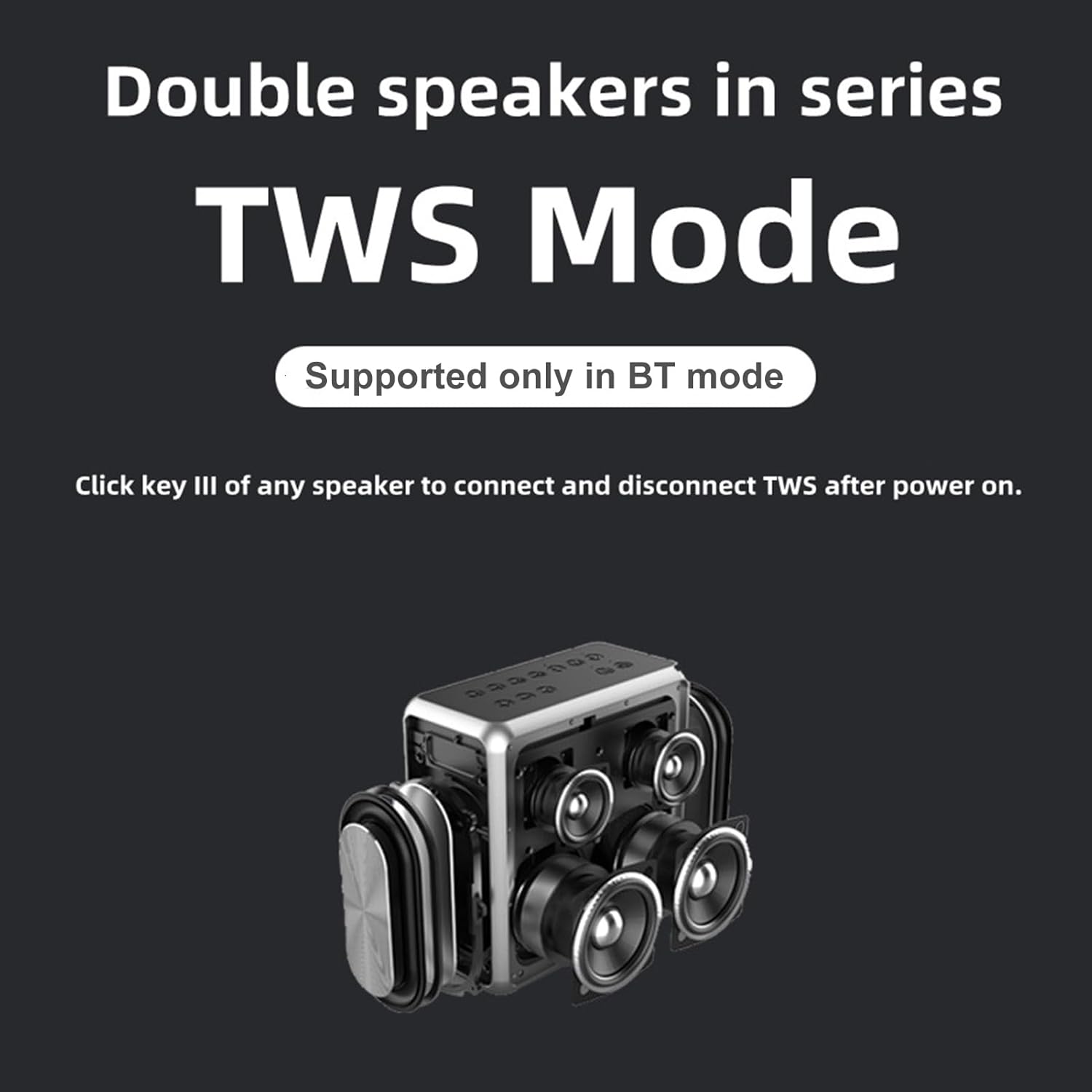
Image: A technical drawing illustrating the length, width, and height measurements of the XDOBO KING MAX speaker.
Gwarancja i wsparcie
Ten produkt jest objęty standardową gwarancją producenta. Szczegółowe warunki gwarancji znajdują się w karcie gwarancyjnej dołączonej do opakowania. W celu uzyskania pomocy technicznej, pomocy w rozwiązywaniu problemów lub zgłoszenia reklamacji prosimy o kontakt ze sprzedawcą lub działem obsługi klienta producenta. Zachowaj paragon jako dowód zakupu.