
1. Wprowadzenie
Thank you for choosing the MONODEAL DV68 Bone Conduction Headphones. These headphones are designed to provide a comfortable and safe listening experience, especially during sports and outdoor activities. Utilizing advanced bone conduction technology and Bluetooth 5.3, they deliver clear audio while keeping your ears open to ambient sounds. The integrated smart light enhances visibility and safety during nighttime use.
2. Zawartość opakowania
Proszę sprawdzić, czy w paczce znajdują się następujące elementy:
- MONODEAL DV68 Bone Conduction Headphones
- Magnetyczny kabel ładujący
- Instrukcja obsługi
- Earplugs (optional, for enhanced sound isolation)
3. Koniec produktuview
Familiarize yourself with the components of your MONODEAL DV68 headphones.
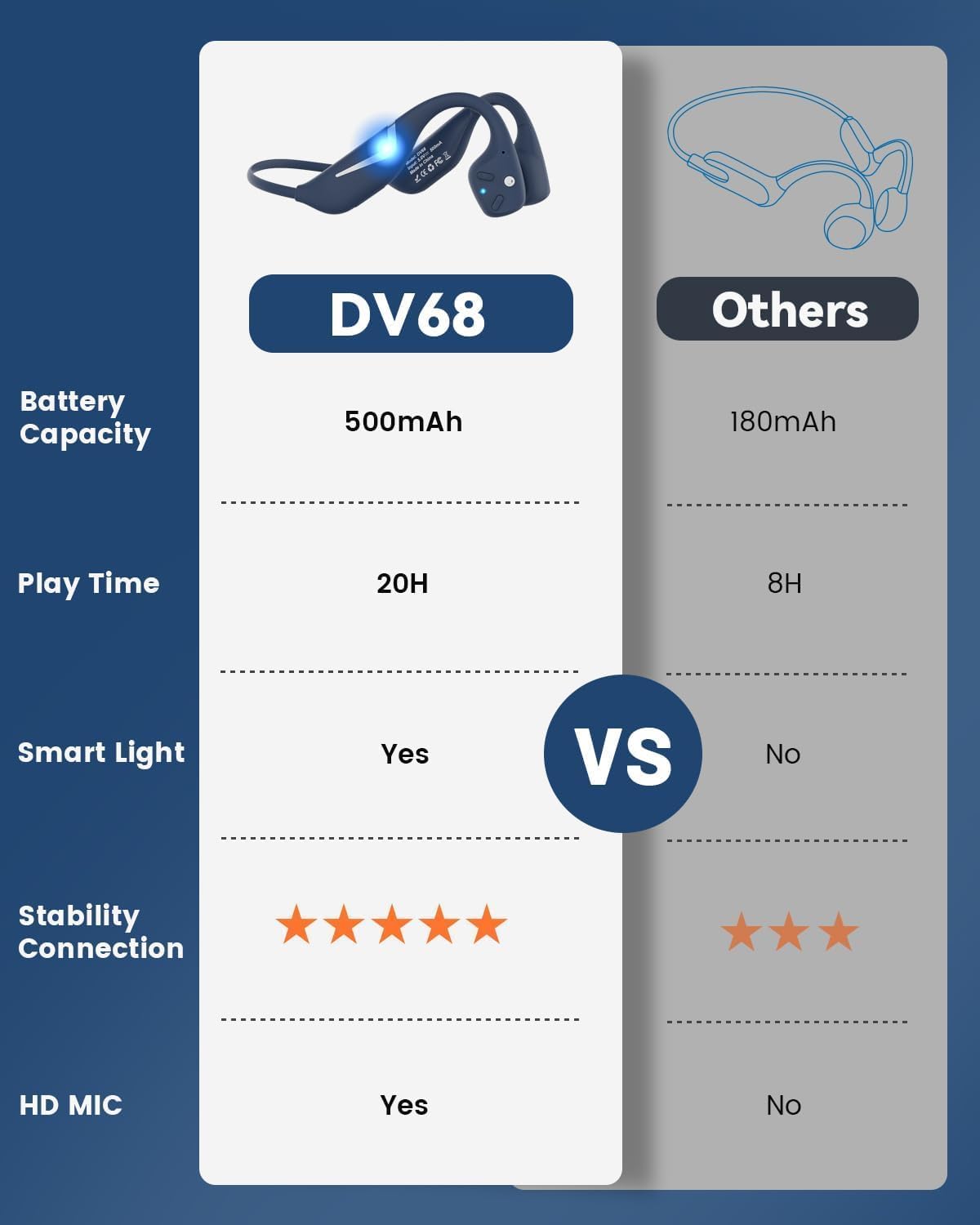
Figure 3.1: MONODEAL DV68 Bone Conduction Headphones, showing the overall design.

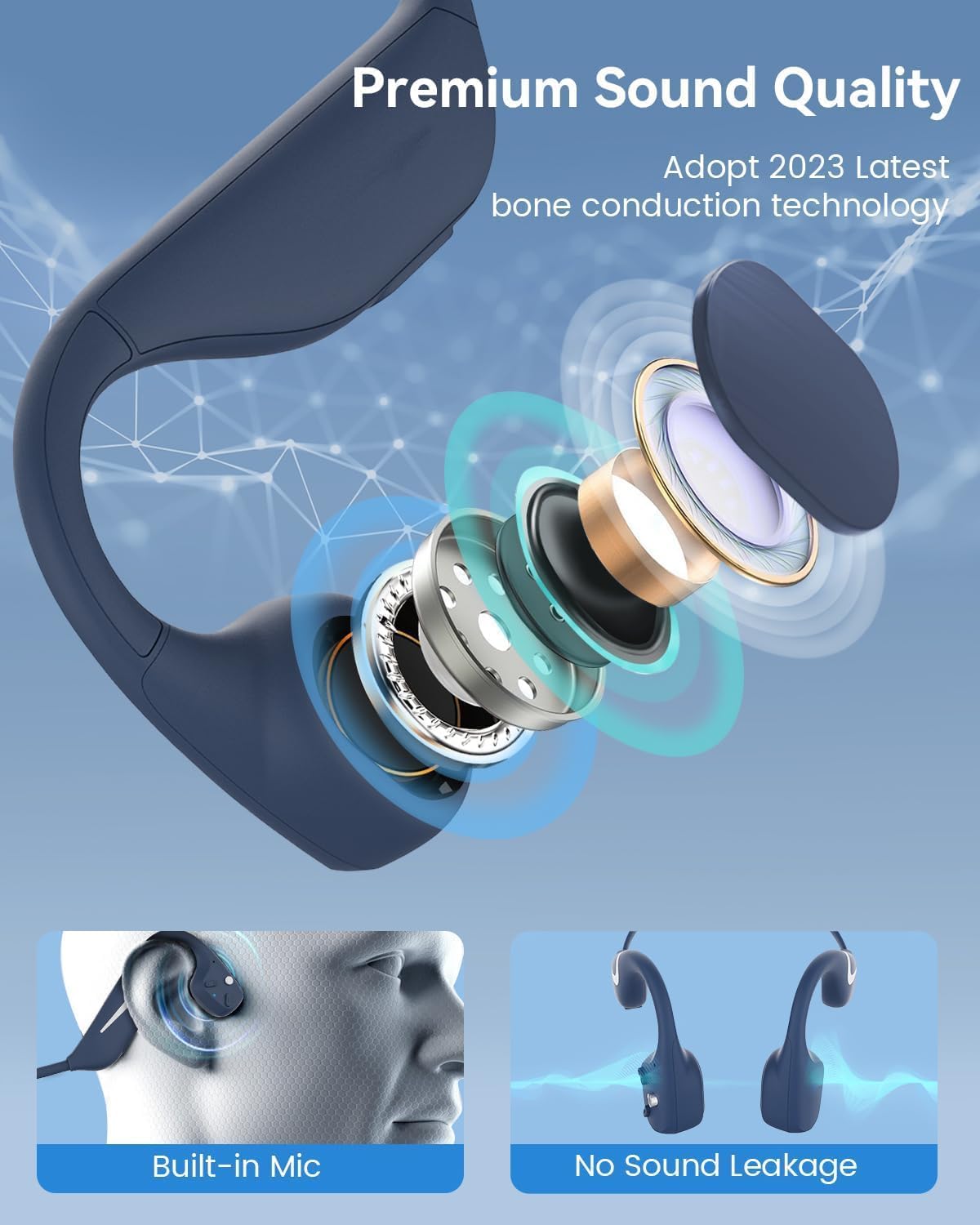
Rysunek 3.2: Eksplodowany view illustrating the bone conduction transducer and built-in microphone.
3.1 Elementy sterujące i porty
Rysunek 3.3: Strona view of the headphones highlighting the control buttons.

Rysunek 3.4: Zbliżenie view of the magnetic charging port.
The headphones feature physical buttons for power, volume, and playback control. The magnetic charging port is located on one of the ear pieces for convenient charging.
4. Specyfikacje
| Funkcja | Specyfikacja |
|---|---|
| Numer modelu | DV68 |
| Wersja Bluetooth | 5.3 |
| Pojemność baterii | 500 mAh |
| Pauza w szkole | Do 20 godzin |
| Ocena odporności na wodę | IP67 (Sweat, rain, and splash resistant) |
| Waga | 34 gramów |
| Zakres częstotliwości | 20 Hz - 20 000 Hz |
| Technologia łączności | Bezprzewodowy (Bluetooth) |
| Typ sterownika audio | Przewodnictwo kostne |
| Cechy specjalne | Smart LED Light, Built-in Microphone, Multipoint Pairing |

Rysunek 4.1: Koniecview of key features including Open-Ear design, IP67 Waterproofing, 500mAh Battery, Bluetooth V5.3, Lightweight, HD Microphone, Multipoint Pairing, and RGB Light.
5. Konfiguracja
5.1 Ładowanie słuchawek
Przed pierwszym użyciem należy całkowicie naładować słuchawki.
- Podłącz magnetyczny kabel ładujący do portu ładowania w słuchawkach.
- Podłącz drugi koniec kabla do zasilacza USB (nie ma go w zestawie) lub do portu USB komputera.
- Wskaźnik LED pokaże stan ładowania. Pełne naładowanie trwa zazwyczaj około 2 godziny.

Figure 5.1: Illustration of 20-hour battery life and quick charge feature (10 minutes charging for 2 hours playtime).
5.2 parowanie Bluetooth
Aby podłączyć słuchawki do urządzenia:
- Upewnij się, że słuchawki są wyłączone.
- Naciśnij i przytrzymaj przycisk zasilania, aż dioda LED zacznie migać na czerwono i niebiesko, wskazując tryb parowania.
- Na swoim urządzeniu (smartfonie, tablecie, komputerze) włącz Bluetooth i wyszukaj dostępne urządzenia.
- Select "MONODEAL DV68" from the list of found devices.
- Po nawiązaniu połączenia dioda LED zacznie świecić ciągłym niebieskim światłem lub będzie powoli migać na niebiesko.
The headphones support multipoint pairing, allowing connection to two devices simultaneously. Refer to your device's Bluetooth settings for managing multiple connections.
6. Instrukcja obsługi
6.1 Włączanie/wyłączanie zasilania
- Włączanie: Naciśnij i przytrzymaj przycisk zasilania przez 3 sekundy.
- Wyłączone: Naciśnij i przytrzymaj przycisk zasilania przez 5 sekundy.
6.2 Odtwarzanie muzyki
- Odtwórz/Pauza: Naciśnij raz przycisk wielofunkcyjny.
- Następny utwór: Naciśnij i przytrzymaj przycisk zwiększania głośności przez 2 sekundy.
- Poprzedni utwór: Naciśnij i przytrzymaj przycisk głośności - przez 2 sekundy.
- Zwiększenie głośności: Naciśnij przycisk Głośność +.
- Ściszanie: Naciśnij przycisk głośności -.
6.3 Zarządzanie połączeniami
- Odbieranie/kończenie połączeń: Naciśnij raz przycisk wielofunkcyjny.
- Odrzuć połączenie: Naciśnij i przytrzymaj przycisk wielofunkcyjny przez 2 sekundy.
- Asystent głosowy: Dwukrotnie naciśnij przycisk wielofunkcyjny.
6.4 Smart LED Light
The headphones feature a smart LED light for enhanced visibility during nighttime activities.
- Włącz/wyłącz światło: Refer to the specific button combination in your quick start guide (usually a dedicated light button or a long press of a volume button).
- The light can cycle through different colors (e.g., blue, green, red) to increase your safety and visibility.

Figure 6.1: A runner demonstrating the smart LED light feature for night safety.
7. Konserwacja
7.1 Czyszczenie
To maintain hygiene and product longevity:
- After sweating or intense workouts, gently wipe the headphones with a damp szmatką lub mokrą ściereczką.
- Unikaj stosowania silnych środków chemicznych i ściernych środków czyszczących.
7.2 Przechowywanie
- Przechowuj słuchawki w chłodnym i suchym miejscu, z dala od bezpośredniego światła słonecznego i ekstremalnych temperatur.
- When not in use, it is recommended to store them in their original packaging or a protective case.
7.3 Wodoodporność
The MONODEAL DV68 headphones are IP67 rated, meaning they are resistant to sweat, rain, and splashes. However, they are not suitable for swimming or submersion in water.

Figure 7.1: A person exercising with the headphones, demonstrating their IP67 water resistance against sweat and rain. Note: Not for swimming.
8. Rozwiązywanie Problemów
Jeśli masz problemy ze słuchawkami, zapoznaj się z poniższymi, często stosowanymi rozwiązaniami:
- Brak zasilania:
Ensure the headphones are fully charged. Connect them to the charging cable and a power source. - Nie można sparować:
Make sure the headphones are in pairing mode (LED flashing red and blue). Turn off Bluetooth on other nearby devices that may have previously connected. Try restarting both the headphones and your device. - Brak dźwięku/niska głośność:
Check the volume levels on both the headphones and your connected device. Ensure the headphones are properly positioned on your cheekbones. If using earplugs, ensure they are correctly inserted. - Połączenie przerywane:
Ensure your device is within the Bluetooth range (up to 15 meters) and there are no significant obstacles between the headphones and your device. Avoid strong electromagnetic interference. - Słaba jakość połączeń:
Ensure the microphone is not obstructed. Move to an area with better network reception for your phone.
9. Gwarancja i wsparcie
9.1 Informacje o gwarancji
MONODEAL provides a 2-letnia gwarancja for the DV68 Bone Conduction Headphones from the date of purchase. This warranty covers manufacturing defects and ensures the product meets its specified performance. Please retain your proof of purchase for warranty claims.
9.2 Obsługa klienta
For further assistance, technical support, or warranty inquiries, please contact MONODEAL customer service through the retailer where you purchased the product or visit the official MONODEAL webwitryna do informacji kontaktowych.