
Wstęp
Dziękujemy za zakupasing the PUREMIC S3 Portable Bluetooth Karaoke Machine. This manual provides detailed instructions for setting up, operating, and maintaining your device. Please read this manual thoroughly before use to ensure proper function and to maximize your enjoyment of the product.
Co jest w pudełku
Sprawdź, czy w opakowaniu znajdują się wszystkie elementy:
- Głośnik Bluetooth x 1
- UHF Wireless Microphone x 2
- Leather Bag x 1
- Speaker Charger x 1
- Microphone Charger x 1
- Instrukcja obsługi x 1

Image: All components included in the PUREMIC S3 package.
Produkt ponadview i funkcje
The PUREMIC S3 is a portable karaoke system designed for high-quality audio and versatile use. Key features include:
- Wciągający dźwięk: Equipped with a 5.25-inch woofer and two 1-inch tweeters for clear, powerful sound.
- Mikrofony bezprzewodowe: Two UHF wireless microphones for singing.
- Voice Elimination: One-touch vocal elimination feature on microphones.
- Efekty dźwiękowe: Eight entertainment sound effects (Children, Monster, K.T.V., etc.).
- Długotrwała bateria: Built-in 10,000 mAh rechargeable battery providing up to 8 hours of playtime for the speaker and 10 hours for microphones.
- Oszczędność energii: Automatic power-down after 15 minutes of inactivity.
- Wszechstronna łączność: Bluetooth 5.0, AUX input, USB port for playback and recording.
- Dynamiczne oświetlenie: Six adjustable lighting modes with 128 LED colors that synchronize with music.
- Ruchliwość: Lightweight, compact design with a swivel handle and included leather carrying bag.
- Wodoodporność: IPX4 rated for splash resistance.
- Łączność NFC: Quick pairing with Android devices via NFC.
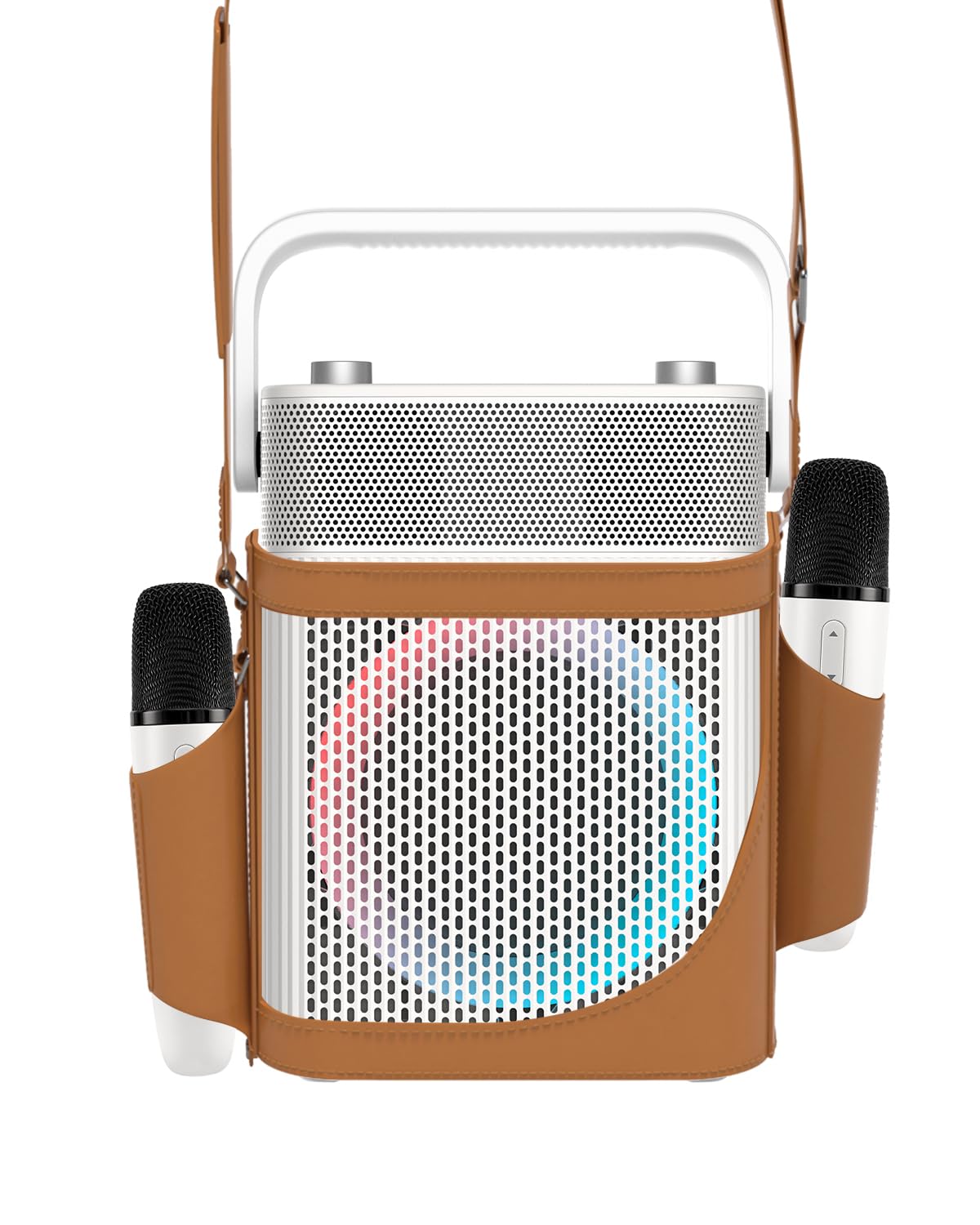
Obraz: Przód view of the PUREMIC S3 Karaoke Machine, highlighting its design and LED lights.
Przewodnik po konfiguracji
1. Ładowanie urządzenia
Before first use, fully charge the speaker and microphones.
- Głośnik: Connect the speaker charger to the "Charge Port" on the back of the speaker. The charging indicator will show progress.
- Mikrofony: Place the UHF wireless microphones into their dedicated charging holders on top of the speaker. The microphones will begin charging automatically.

Image: Close-up of the speaker's rear panel, indicating the Charge Port, Aux-in Port, and USB Port.
2. Włączanie/wyłączanie zasilania
- Głośnik: Press and hold the Power On/Off button on the control panel until the device powers on or off.
- Mikrofony: Press and hold the power button on each microphone to turn them on or off. They will automatically pair with the speaker when both are powered on.
Instrukcja obsługi
1. Połączenie Bluetooth
- Turn on the PUREMIC S3 speaker.
- Naciśnij BT button on the speaker's control panel to enter Bluetooth pairing mode. The Bluetooth indicator will flash.
- On your device (smartphone, tablet, TV, computer), enable Bluetooth and search for "PUREMIC S3".
- Select "PUREMIC S3" from the list of available devices to pair. A confirmation sound will indicate a successful connection.
NFC Pairing (Android devices only): For quick pairing, ensure NFC is enabled on your Android smartphone. Tap your phone gently against the NFC area on the speaker's control panel. Your phone will prompt you to connect to the PUREMIC S3.

Image: Demonstrates NFC pairing with an Android phone on the PUREMIC S3 speaker.
2. Wejście AUX
To connect devices via AUX cable:
- Connect one end of a 3.5mm AUX cable (not included) to the AUX-in port on the back of the PUREMIC S3.
- Connect the other end to the audio output jack of your device (e.g., TV, MP3 player).
- Głośnik automatycznie przełączy się na tryb AUX.

Image: PUREMIC S3 connected to a TV via AUX, showing karaoke lyrics on screen.
3. Odtwarzanie i nagrywanie przez USB
Insert a USB drive into the USB port on the back of the speaker for music playback or to record your performance.
- Odtwarzanie nagranego dźwięku: Głośnik automatycznie wykryje i odtworzy dźwięk filez dysku USB.
- Nagranie: Naciśnij REK button on the control panel to start recording. Press it again to stop recording. Recordings will be saved to the USB drive.
4. Microphone Functions
The wireless microphones offer several features:
- Volume/Echo: Use the dedicated knob on the speaker to adjust microphone volume and echo effect.
- Vocal Elimination: Press the designated button on the microphone for one-touch vocal elimination from music tracks.
- Efekty dźwiękowe: The microphones feature 8 different sound effects (Children, Monster, Male, Female, Original, Concert, Live, K.T.V.). Cycle through these effects using the microphone's controls.

Image: Visual representation of the 8 sound effects available on the PUREMIC S3 microphones.
5. Sterowanie głośnikami
The speaker's control panel includes:
- Włączanie/wyłączanie: Naciśnij i przytrzymaj, aby włączyć/wyłączyć.
- Volume/Echo Knob: Rotate to adjust overall volume and microphone echo.
- Przycisk BT: Aktywuje tryb parowania Bluetooth.
- Przycisk BASS: Toggles bass sound enhancement.
- Przycisk pauzy: Wstrzymuje/wznawia odtwarzanie.
- Przycisk REC: Initiates/stops recording to USB.
- Przycisk efektu świetlnego: Cycles through 6 different lighting modes.
- Pre/Next Song Knob: Rotate to skip tracks.

Obraz: Szczegółowy view of the speaker's control panel, showing all buttons and their functions.
6. TWS Pairing (True Wireless Stereo)
If you have two PUREMIC S3 speakers, you can pair them for a true wireless stereo experience:
- Sprawdź, czy oba głośniki są włączone i nie są podłączone do żadnego urządzenia Bluetooth.
- On one speaker, press and hold the Bluetooth button until you hear a pairing tone.
- Powtórz ten krok dla drugiego głośnika.
- Głośniki połączą się ze sobą automatycznie. Po sparowaniu połącz urządzenie z jednym z głośników przez Bluetooth.

Image: Two PUREMIC S3 speakers set up for TWS, providing double stereo sound in a room.
Konserwacja
- Czyszczenie: Wipe the speaker and microphones with a soft, dry cloth. Do not use abrasive cleaners or solvents.
- Składowanie: Przechowywać urządzenie w chłodnym i suchym miejscu, z dala od bezpośredniego światła słonecznego i ekstremalnych temperatur.
- Pielęgnacja baterii: To prolong battery life, fully charge the device before long periods of storage and recharge it every 3 months.
- Wodoodporność: The speaker is IPX4 rated, meaning it is resistant to splashes. Do not submerge the device in water. Ensure all ports are securely covered when exposed to moisture.
Rozwiązywanie problemów
| Problem | Możliwa przyczyna | Rozwiązanie |
|---|---|---|
| Brak zasilania | Bateria jest rozładowana. | Charge the speaker and microphones using the provided chargers. |
| Nie można połączyć się przez Bluetooth | Bluetooth is not enabled on your device or speaker is not in pairing mode. Device is too far. | Ensure Bluetooth is active on your device. Press the BT button on the speaker. Move device closer to the speaker. |
| Brak dźwięku z mikrofonów | Microphones are off or not paired. Microphone volume is too low. | Turn on microphones. Ensure they are charged. Adjust microphone volume knob on the speaker. |
| Zniekształcenie dźwięku | Volume is too high. Microphone is too close to the speaker. | Reduce the volume. Increase distance between microphone and speaker. |
| Odtwarzanie USB nie działa | USB drive not formatted correctly or unsupported file Typy. | Ensure USB drive is formatted to FAT32. Use supported audio formats (e.g., MP3). |
Specyfikacje
| Funkcja | Szczegół |
|---|---|
| Numer modelu | S3 |
| Waga przedmiotu | 8.82 funta |
| Wymiary produktu | 5.91 x 7.72 x 10.2 cala |
| Typ baterii | 1 bateria litowo-jonowa (wymagana) |
| Pojemność baterii | 10,000 mAh (Głośnik) |
| Pauza w szkole | Up to 8 hours (Speaker), Up to 10 hours (Microphones) |
| Kompatybilne urządzenia | Smartphones, Televisions, iPads, Tablets, Computers |
| Typ złącza | 3.5 mm Jack (AUX), USB |
| Liczba mówców | 3 (1x 5.25-inch woofer, 2x 1-inch tweeters) |
| Moc wyjściowatage | 300 watów |
| Źródło zasilania | Zasilany bateryjnie |
| Tomtage | 5 V (prąd stały) |
| Odporność na wodę | IPX4 |
| Funkcja specjalna | Light Up Speaker, NFC |
Gwarancja i wsparcie
For warranty information and technical support, please refer to the warranty card included in your package or contact PUREMIC customer service through their official webwitrynę lub sprzedawcę, u którego zakupiono produkt.
Wsparcie online: Visit the PUREMIC Store on Amazon for additional product information and support resources: PUREMIC Store


